
DEVIA 311031
DEVIA Dual Point Smart Bluetooth 4.2 Handsfree Headset User Manual
Model: 311031
Introduction
Thank you for purchasing the DEVIA Dual Point Smart Bluetooth 4.2 Handsfree Headset. This manual provides essential information for setting up, operating, and maintaining your new headset. Please read it carefully before use and retain it for future reference.
Important Safety Information
- Do not expose the headset to extreme temperatures, humidity, or corrosive substances.
- Avoid dropping or subjecting the headset to strong impacts.
- Do not attempt to disassemble or modify the headset. This will void the warranty.
- Keep the headset away from children and pets.
- Use only the provided charging cable or a certified equivalent.
- Prolonged exposure to loud sounds may cause hearing damage. Adjust volume to a safe level.
Package Contents
Please check the box for the following items:
- DEVIA Dual Point Smart Bluetooth 4.2 Handsfree Headset
- Protective Case
- User Manual (this document)
- USB Charging Cable

Image: The retail packaging for the DEVIA Smart Bluetooth 4.2 Earphone, displaying the headset and product information on both the front and back of the box.
Product Overview
The DEVIA Dual Point Smart Bluetooth 4.2 Handsfree Headset is designed for clear audio communication and music playback. It features Bluetooth 4.2 connectivity for stable wireless performance and Active Noise Cancellation for an improved listening experience.

Image: A side profile of the DEVIA Dual Point Smart Bluetooth 4.2 Handsfree Headset, showcasing its sleek black design and in-ear component.
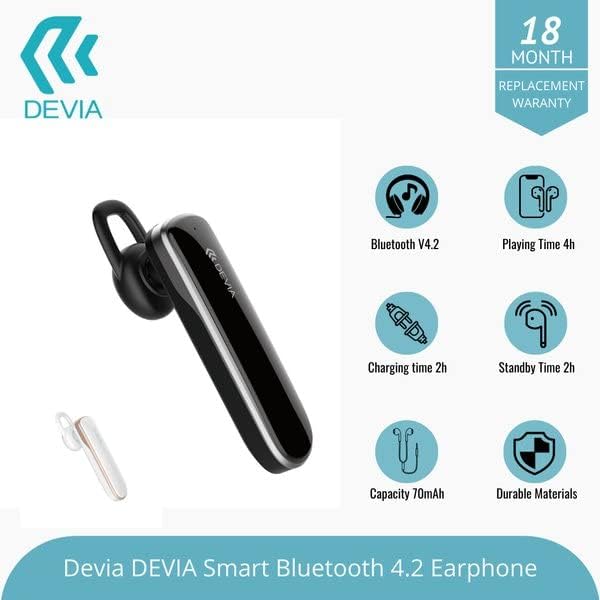
Image: The DEVIA Smart Bluetooth 4.2 Earphone displayed alongside graphical icons detailing its key features: Bluetooth V4.2, 4 hours playing time, 2 hours charging time, 70mAh battery capacity, and durable construction materials.
Setup
1. Charging the Headset
- Connect the USB charging cable to the charging port on the headset.
- Plug the other end of the USB cable into a compatible USB power source (e.g., computer USB port, USB wall adapter).
- The indicator light will typically show red during charging and turn blue or off when fully charged.
- A full charge takes approximately 2 hours. The headset provides up to 6 hours of battery life for calls/music.
2. Pairing with a Bluetooth Device
- Ensure the headset is fully charged.
- Power On: Press and hold the Multi-function button (usually the main button) on the headset until the indicator light flashes red and blue alternately. This indicates pairing mode.
- Activate Bluetooth: On your smartphone or other Bluetooth device, go to the Bluetooth settings and enable Bluetooth.
- Search for Devices: Your device will scan for available Bluetooth devices. Look for "DEVIA" or a similar name in the list.
- Connect: Select "DEVIA" from the list to pair. Once successfully paired, the indicator light on the headset will usually flash blue slowly or turn off, and you may hear a confirmation tone.
- If prompted for a password, enter "0000" (four zeros).
Note: The headset supports dual-point connection, allowing it to be connected to two Bluetooth devices simultaneously. To use this feature, pair with the first device, then disable Bluetooth on the first device. Put the headset back into pairing mode and pair with the second device. Finally, re-enable Bluetooth on the first device, and the headset should connect to both.
Operating Instructions
Power On/Off
- Power On: Press and hold the Multi-function button for approximately 3 seconds until the blue indicator light flashes.
- Power Off: Press and hold the Multi-function button for approximately 5 seconds until the red indicator light flashes and then turns off.
Call Management
- Answer Call: Press the Multi-function button once.
- End Call: Press the Multi-function button once during a call.
- Reject Call: Press and hold the Multi-function button for about 2 seconds.
- Redial Last Number: Double-press the Multi-function button.
Music Playback
- Play/Pause: Press the Multi-function button once.
- Next Track: Press and hold the Volume Up button.
- Previous Track: Press and hold the Volume Down button.
Volume Control
- Increase Volume: Press the Volume Up button.
- Decrease Volume: Press the Volume Down button.
Note: The headset features Active Noise Cancellation. This function is typically activated automatically or via a dedicated button (if present, not specified in product details). Refer to the device's specific button layout for ANC control.
Maintenance
- Cleaning: Use a soft, dry, lint-free cloth to clean the headset. Do not use abrasive cleaners, alcohol, or chemical solvents.
- Storage: When not in use, store the headset in its protective case in a cool, dry place, away from direct sunlight and extreme temperatures.
- Battery Care: To prolong battery life, avoid fully discharging the headset frequently. Charge it regularly, even if not used for extended periods.
Troubleshooting
| Problem | Possible Cause | Solution |
|---|---|---|
| Headset does not power on. | Low battery. | Charge the headset for at least 30 minutes. |
| Cannot pair with device. | Headset not in pairing mode; Bluetooth off on device; device too far. | Ensure headset is in pairing mode (flashing red/blue). Turn on Bluetooth on your device. Move headset closer to device (within 10 meters). |
| No sound or low volume. | Volume too low; headset not connected; incorrect audio output selected. | Increase volume on both headset and connected device. Re-pair the headset. Check audio output settings on your device. |
| Call quality is poor. | Weak Bluetooth signal; interference. | Move closer to the connected device. Avoid environments with strong Wi-Fi or other wireless interference. |
| Headset not charging. | Faulty cable or power source; charging port issue. | Try a different USB cable and power source. Ensure the charging port is clean and free of debris. |
Specifications
| Brand | DEVIA |
| Model Number | 311031 |
| Connectivity Technology | Wireless (Bluetooth 4.2) |
| Ear Placement | On Ear (Form factor: In Ear) |
| Noise Control | Active Noise Cancellation |
| Headphone Jack | USB (for charging) |
| Battery Average Life | 6 Hours |
| Playing Time | 4 Hours |
| Charging Time | 2 Hours |
| Battery Capacity | 70mAh |
| Control Type | Volume Control, Touch |
| Compatible Devices | Smartphones |
| Primary Color | Black |
| Enclosure Material | Plastic |
| Item Weight | 1 Kilograms (Note: This weight may include packaging and is unusually high for a headset. Refer to actual product for accurate weight.) |
Warranty and Support
This product comes with a standard manufacturer's warranty. Please refer to the warranty card included in your package for specific terms and conditions, including the warranty period and coverage details.
For technical support or customer service, please contact your retailer or visit the official DEVIA website for contact information.
Related Documents - 311031
 |
DEVIA DHP511 Photo Printer User Manual - Setup, Operation, and Warranty Comprehensive user manual for the DEVIA DHP511 Thermal Sublimation Photo Printer. Includes setup instructions, operation guides, ribbon and paper installation, troubleshooting, and warranty information. |
 |
DEVIA TWS Bluetooth Earphone (V3) User Manual and Guide Comprehensive user manual for DEVIA TWS Bluetooth Earphone (V3), covering charging indicators, earphone status, Bluetooth pairing, call functions, music playback, and voice assistant activation. |
 |
Bernhardt Albion Nesting Table - Pewter Oak Detailed specifications for the Bernhardt Albion Nesting Table in Pewter Oak finish, including dimensions, features, and options. |
 |
Newco 2024 Product Catalog - Commercial Coffee Brewers and Beverage Equipment Discover the comprehensive 2024 product catalog from Newco, featuring a wide array of commercial coffee brewers, espresso machines, tea dispensers, cold brew systems, and related beverage equipment. This catalog provides detailed specifications, model numbers, and features for Newco's extensive product line. |
Ask a question about this manual
Ask about setup, troubleshooting, compatibility, parts, safety, or missing instructions. Manuals+ will review the question and use this page’s manual context to help answer it.