
1. Product Overview
This manual provides instructions for the safe and efficient use of your weiwin 90W AC Adapter Charger. This adapter is designed to provide power to compatible Lenovo laptops, specifically models G530, G550, and G555.
The package includes one AC adapter and one US power cord.

Image 1.1: The weiwin 90W AC Adapter and its accompanying power cord.
2. Setup Instructions
Follow these steps to properly set up your AC adapter:
- Unpack the Components: Carefully remove the AC adapter and power cord from their packaging.
- Connect the Power Cord to the Adapter: Insert the 3-prong end of the power cord into the AC input port on the adapter. Ensure it is firmly seated.
- Connect the Power Cord to a Wall Outlet: Plug the 2-prong end of the power cord into a standard AC wall outlet (100-240V).
- Connect the Adapter to Your Laptop: Insert the barrel connector (DC pin) of the adapter into the power input port on your Lenovo G530, G550, or G555 laptop.

Image 2.1: Rear view of the AC adapter showing the power input port where the power cord connects.
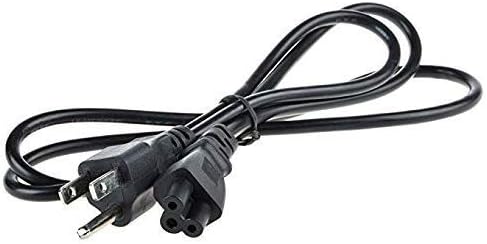
Image 2.2: The US power cord, showing the 2-prong plug for the wall outlet and the 3-prong connector for the adapter.

Image 2.3: The AC adapter showing the barrel connector (DC pin) that connects to the laptop.
Ensure all connections are secure before operating your laptop.
3. Operating Instructions
Once properly connected, the adapter will supply power to your laptop and charge its battery. The adapter is designed for continuous use within its specified voltage and current ratings.
- Power On: After connecting the adapter, you can power on your laptop as usual.
- Charging Indication: Your laptop should indicate that it is receiving power and charging the battery. Refer to your laptop's user manual for specific charging indicators.
- Safety Features: This adapter includes built-in safety features such as over current protection, total power protection, over voltage protection, and short circuit protection to ensure safe operation.
4. Maintenance
Proper care and maintenance will extend the life of your AC adapter:
- Keep Clean: Regularly wipe the adapter and cables with a soft, dry cloth. Avoid using liquid cleaners.
- Avoid Physical Damage: Do not bend, twist, or crimp the cables excessively. Avoid placing heavy objects on the adapter or cables.
- Storage: When not in use, store the adapter in a cool, dry place. Avoid extreme temperatures.
- Disconnect Safely: Always pull the plug directly from the outlet and the laptop, rather than pulling on the cable.
5. Troubleshooting
If you encounter issues with your AC adapter, consider the following:
- No Power to Laptop:
- Ensure all connections (wall outlet, adapter to power cord, adapter to laptop) are secure.
- Try plugging the adapter into a different wall outlet to rule out a faulty outlet.
- Verify that the adapter's specifications (voltage, amperage) match your laptop's requirements.
- Adapter Overheating:
- Ensure the adapter is placed in a well-ventilated area and not covered by objects that could trap heat.
- If overheating persists, discontinue use and contact support.
- Loose Connection:
- If the connection to the laptop feels loose, gently check the barrel connector for damage. Do not force it.
If troubleshooting steps do not resolve the issue, contact customer support.
6. Specifications
Detailed technical specifications for the weiwin 90W AC Adapter Charger:
| Input Voltage | 100-240V AC |
| Input Amperage | 1.5A |
| Input Frequency | 50-60Hz |
| Output Voltage | 20V DC |
| Output Amperage | 4.5A |
| Total Output Power | 90W |
| Connector Size | 5.5mm x 2.5mm (Barrel Connector) |
| Compatible Laptop Models | Lenovo G530, G550, G555 |
| Safety Features | Over current protection, Total power protection, Over voltage protection, Short Circuit Protection |
| Model Number | SL190342 |
| Weight | Approximately 12.35 Ounces |
| Certifications | CE, FCC, RoHS, UL |
7. Warranty and Support
Specific warranty details for this product are not provided in the available product information. For warranty inquiries or technical support, please refer to the seller's information or contact the manufacturer directly.
Manufacturer: Shenzhen Speed Ronda Electronic Technology Co., Ltd