Introduction
This manual provides essential information for the proper installation, operation, and maintenance of your Taramps MD 3000.1 2-Ohms Car Amplifier. Please read this manual thoroughly before installation and use to ensure optimal performance and safety.

Figure 1: Front view of the Taramps MD 3000.1 2-Ohms Car Amplifier.
Setup and Installation
Proper installation is crucial for the amplifier's performance and longevity. Ensure all connections are secure and follow recommended cable gauges.
Power Connections
Connect the amplifier to your vehicle's battery using appropriate gauge wiring. A minimum of 4 AWG (21mm²) cable is recommended for the power input. Ensure a 150A circuit breaker or fuse is installed close to the battery for safety.

Figure 2: Side view showing the power input terminals and smart cooler fan. The power input requires a minimum of 4 AWG cable.
The remote turn-on terminal (REM) requires an 18 AWG wire connected to the head unit's remote output.
Speaker Connections
Connect your speakers to the amplifier's speaker output terminals. The MD 3000.1 is designed for 2-Ohms impedance. Ensure your speaker configuration matches this impedance for optimal performance and to prevent damage.
Audio Input (RCA)
Connect your head unit's RCA outputs to the amplifier's RCA input terminals. This amplifier features a full-range input for versatile audio signal processing.

Figure 3: Side view displaying the RCA input, gain, crossover, bass boost controls, and remote monitor port.

Figure 4: Detailed diagram illustrating the power input, speaker output, RCA inputs, and various control knobs.
Operating the Amplifier
The MD 3000.1 offers several controls to fine-tune your audio experience.
Controls
- GAIN: Adjusts the input sensitivity of the amplifier. Set this to match the output level of your head unit to prevent distortion.
- CROSSOVER (High Pass Filter - HPF): Allows you to set a cutoff frequency for high-pass filtering. This is useful for protecting speakers from low frequencies they cannot reproduce.
- CROSSOVER (Low Pass Filter - LPF): Allows you to set a cutoff frequency for low-pass filtering. This is typically used for subwoofers to ensure they only reproduce bass frequencies.
- BASS BOOST: Provides an adjustable boost to bass frequencies, allowing for enhanced low-end response.
LED Indicators
The amplifier features integrated LED indicators for real-time monitoring:
- ON (Blue): Indicates the amplifier is powered on and operating normally.
- CLIP (Orange): Illuminates when the audio signal is clipping (distorting). Reduce the gain or head unit volume to prevent damage.
- PROT (Red): Indicates the amplifier is in protection mode due to an issue (e.g., overheating, short circuit, low/high voltage). Turn off the amplifier and troubleshoot the cause.
- TEMP (Red): Indicates the amplifier is overheating. Allow the amplifier to cool down. Ensure adequate ventilation.
Remote Monitor (Optional Accessory)
The amplifier is compatible with an optional remote monitor (sold separately) that provides practical and real-time control of the amplifier's volume and indicates operating conditions through integrated LEDs (ON, CLIP, PROT).
Video 1: Official product video demonstrating the features and connections of the Taramps MD 3000.1 amplifier, including its various controls and indicators.
Maintenance
To ensure the longevity and optimal performance of your Taramps MD 3000.1 amplifier, follow these maintenance guidelines:
- Cleaning: Regularly clean the amplifier's exterior with a soft, dry cloth. Avoid using harsh chemicals or abrasive materials.
- Ventilation: Ensure the amplifier has adequate airflow around it. Do not block the cooling fins or the smart cooler fan. Proper ventilation is essential for heat dissipation.
- Connection Checks: Periodically inspect all wiring connections (power, ground, remote, speaker, RCA) to ensure they are secure and free from corrosion. Loose connections can lead to poor performance or damage.
- Environmental Factors: Avoid exposing the amplifier to extreme temperatures, moisture, or direct sunlight.
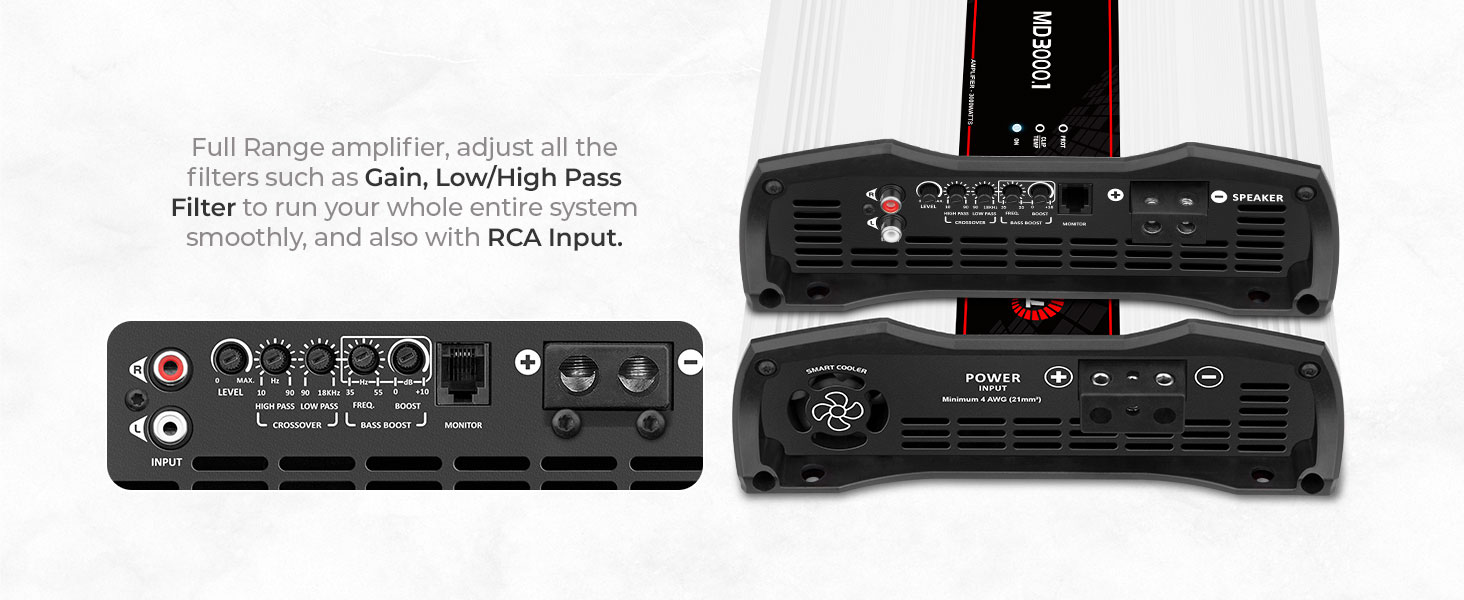
Figure 5: Exploded view showing the internal components, smart fans, and heat dissipation fins of the MD 3000.1 amplifier.
Troubleshooting
If you encounter issues with your amplifier, refer to the LED indicators and the following common troubleshooting steps:
- No Power (ON LED off):
- Check power and ground connections.
- Verify the remote turn-on wire is connected and receiving 12V.
- Inspect the inline fuse or circuit breaker near the battery.
- Protection Mode (PROT LED on):
- Turn off the amplifier immediately.
- Check speaker wiring for short circuits (e.g., frayed wires touching).
- Verify speaker impedance matches the amplifier's rating (2 Ohms).
- Allow the amplifier to cool down if the TEMP LED was also on.
- Check vehicle battery voltage; ensure it's within the 9V-16V operating range.
- Distorted Sound (CLIP LED on):
- Reduce the amplifier's GAIN setting.
- Lower the volume on your head unit.
- Check for proper crossover settings to prevent speakers from playing frequencies outside their optimal range.
- No Sound:
- Ensure all power, ground, and remote connections are secure.
- Check RCA input cables for proper connection and integrity.
- Verify speaker wires are correctly connected and not shorted.
- Confirm the head unit is powered on and sending an audio signal.
Specifications
| Feature | Specification |
|---|---|
| Output Power | 3000 Watts RMS at 2 Ohms |
| Number of Channels | 1 (Monoblock) |
| Minimum Supply Voltage | 9 Volts (DC) |
| Maximum Supply Voltage | 16 Volts (DC) |
| Frequency Response | 10Hz to 20kHz |
| Item Dimensions (L x W x H) | 9.06 x 9.06 x 3.15 inches |
| Item Weight | 5.5 pounds |
| Material | Aluminum |
| What's in the box | x1 MD 3000.1 2 Ohms amplifier |
Warranty and Support
For warranty information and technical support, please refer to the documentation included with your product or visit the official Taramp's website. Keep your proof of purchase for warranty claims.


