
MYAMIA B07L3CMP5V
MYAMIA 14Pcs U-Mount Jigsaw Blades Set
Instruction Manual
Product Overview
The MYAMIA 14-piece U-mount jigsaw blade set is designed for efficient cutting of various materials including metal, plastic, and wood. This versatile set is compatible with Black and Decker jigsaws and similar tools that accept U-shank blades. The blades are crafted from durable cobalt alloy steel and high-grade steel, ensuring longevity and performance.
Each blade type is color-coded for easy identification, allowing users to quickly select the appropriate blade for their specific cutting task. The set includes a range of tooth counts to accommodate different material densities and cutting requirements.
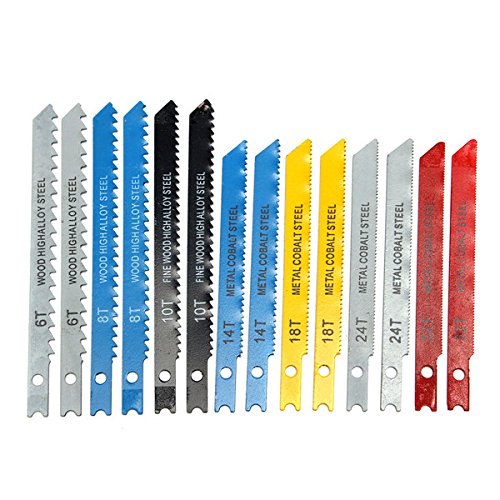
Image: The complete set of 14 MYAMIA U-mount jigsaw blades, displaying their varied designs and color coding for different applications.
Package Contents
The MYAMIA 14Pcs U-Mount Jigsaw Blades Set includes the following:
- 2 x 6-tooth blades (for wood)
- 2 x 8-tooth blades (for wood)
- 2 x 10-tooth blades (for fine wood)
- 2 x 14-tooth blades (for metal/cobalt steel)
- 2 x 18-tooth blades (for metal/cobalt steel)
- 2 x 24-tooth blades (for metal/cobalt steel)
- 2 x 32-tooth blades (for metal/cobalt steel)
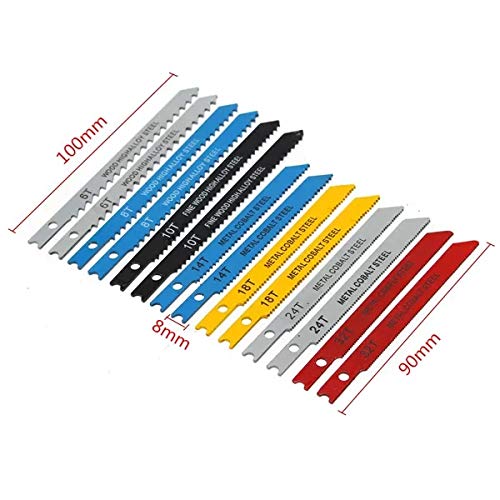
Image: Various blades from the set, illustrating their typical lengths (90mm and 100mm) and width (8mm).
Setup and Installation
These U-mount jigsaw blades are designed for quick and secure installation into compatible jigsaws. Always ensure your jigsaw is unplugged or its battery is removed before attempting to change blades.
- Safety First: Disconnect power from your jigsaw. Wear appropriate safety gear, including eye protection and gloves.
- Identify Blade Type: Determine the correct blade for your material and cutting task using the color coding and tooth count.
- Open Blade Clamp: Locate the blade clamp or quick-release mechanism on your jigsaw. Follow your jigsaw's specific instructions to open it.
- Insert Blade: Insert the U-shank end of the blade into the blade clamp until it clicks or is firmly seated. Ensure the teeth are facing forward, away from the jigsaw's body.
- Secure Blade: Close the blade clamp securely. Gently pull on the blade to confirm it is locked in place and will not come loose during operation.
- Check Clearance: Ensure the blade has proper clearance and does not rub against any part of the jigsaw.
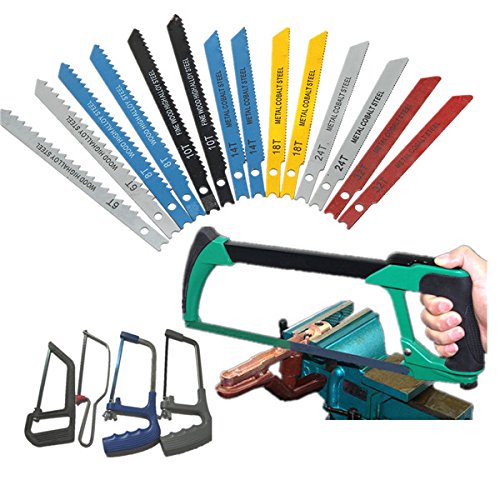
Image: The jigsaw blades displayed alongside a typical jigsaw frame, illustrating their intended use with such tools.
Operating Instructions
Once the correct blade is installed, you can begin your cutting task. Always prioritize safety and follow your jigsaw's operating manual.
- Material Selection: Choose the appropriate blade based on the material you are cutting (wood, metal, plastic). Refer to the blade tooth count and material compatibility.
- Secure Workpiece: Always clamp your workpiece firmly to a stable surface to prevent movement during cutting.
- Start Cut: Place the base plate of the jigsaw flat on the workpiece. Start the jigsaw before the blade makes contact with the material.
- Guide the Cut: Guide the jigsaw smoothly along your cutting line. Do not force the tool; let the blade do the work.
- Blade Cooling (for metal): When cutting metal, consider using cutting fluid or oil to cool the blade and extend its life.
- Finish Cut: Continue cutting until the piece is separated or the cut is complete. Turn off the jigsaw and wait for the blade to stop before lifting the tool.
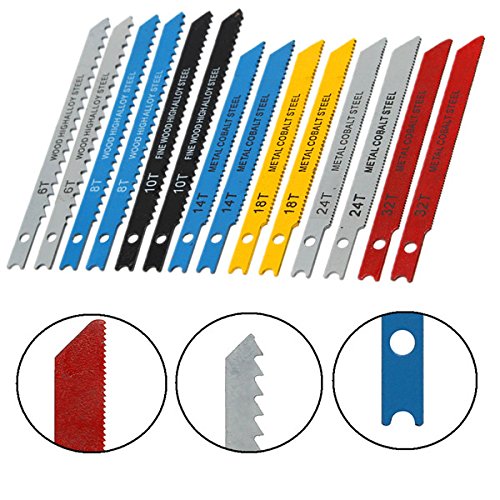
Image: Detailed view of the U-mount shank and various tooth configurations, highlighting the design for secure fitting and different cutting applications.
Maintenance and Storage
Proper maintenance and storage will extend the life of your MYAMIA jigsaw blades.
- Cleaning: After each use, clean any debris, sawdust, or metal shavings from the blades using a brush or cloth.
- Inspection: Regularly inspect blades for signs of wear, damage, or dullness. A dull blade can lead to poor cuts and increased strain on your jigsaw.
- Rust Prevention: For metal blades, apply a light coat of rust-preventative oil if storing for extended periods, especially in humid environments.
- Storage: Store blades in their original packaging or a dedicated blade case to protect the teeth from damage and prevent accidental injury. Keep them in a dry place.
- Disposal: Dispose of worn or damaged blades responsibly, following local regulations for sharp objects.
Troubleshooting
If you encounter issues while using your MYAMIA jigsaw blades, consider the following:
| Problem | Possible Cause | Solution |
|---|---|---|
| Blade not cutting efficiently or burning wood | Dull blade, incorrect blade for material, forcing the cut | Replace blade, select appropriate blade (e.g., fewer teeth for faster wood cuts), reduce feed pressure. |
| Blade breaking frequently | Incorrect blade for material thickness, excessive side pressure, blade not securely clamped | Use a thicker blade for thicker materials, ensure blade is firmly clamped, avoid bending the blade during cuts. |
| Rough or splintered cuts | Dull blade, incorrect blade for finish quality, cutting too fast | Replace blade, use a finer-tooth blade for smoother cuts, reduce cutting speed. |
Specifications
| Feature | Detail |
|---|---|
| Product Name | MYAMIA 14Pcs U-Mount Jigsaw Blades Set |
| Model Number (ASIN) | B07L3CMP5V |
| Material | Cobalt Alloy Steel, High Steel |
| Blade Lengths | 90mm, 100mm |
| Blade Width | 8mm |
| Shank Type | U-Mount (U-Shank) |
| Compatible Materials | Metal, Plastic, Wood |
| Package Dimensions | 13 x 10.4 x 1.6 cm |
| Item Weight | 80 grams |
Warranty and Support
For any questions regarding the MYAMIA 14Pcs U-Mount Jigsaw Blades Set, please contact your retailer or the manufacturer directly. Please refer to your purchase documentation for specific warranty terms and conditions, as these may vary by region and retailer.
When contacting support, please provide the product model number (ASIN: B07L3CMP5V) and a detailed description of your inquiry.
Ask a question about this manual
Ask about setup, troubleshooting, compatibility, parts, safety, or missing instructions. Manuals+ will review the question and use this page’s manual context to help answer it.