
1. Product Overview
The Fortin EVO-ONE-MAZ3 is a remote start and T-Harness system designed for select Mazda Push-To-Start vehicles manufactured from 2013 onwards. This system allows for convenient remote starting of your vehicle using the factory key fob, enhancing comfort and readiness, especially in varying weather conditions.

Image 1: The Fortin EVO-ONE-MAZ3 remote start module, showing its compact design and various connection ports.
2. What's Included
Your Fortin EVO-ONE-MAZ3 kit typically includes the following components:
- Fortin EVO-ONE Module: The main control unit for the remote start system.
- Vehicle-Specific T-Harness: A plug-and-play wiring harness designed for direct connection to your Mazda's existing wiring, minimizing the need for cutting or splicing.
- Pry Tool: A plastic tool to assist in safely removing interior trim panels without causing damage.
- Warning Sticker: To indicate that the vehicle is equipped with a remote start system.
- Installation Guide: A printed manual with step-by-step instructions.
- Zip Ties: For securing wiring and the module for a clean installation.
- Optional Pin Switch: An additional component that can be installed to prevent remote starting if the hood is open. This is often not required if the vehicle has a factory hood pin.
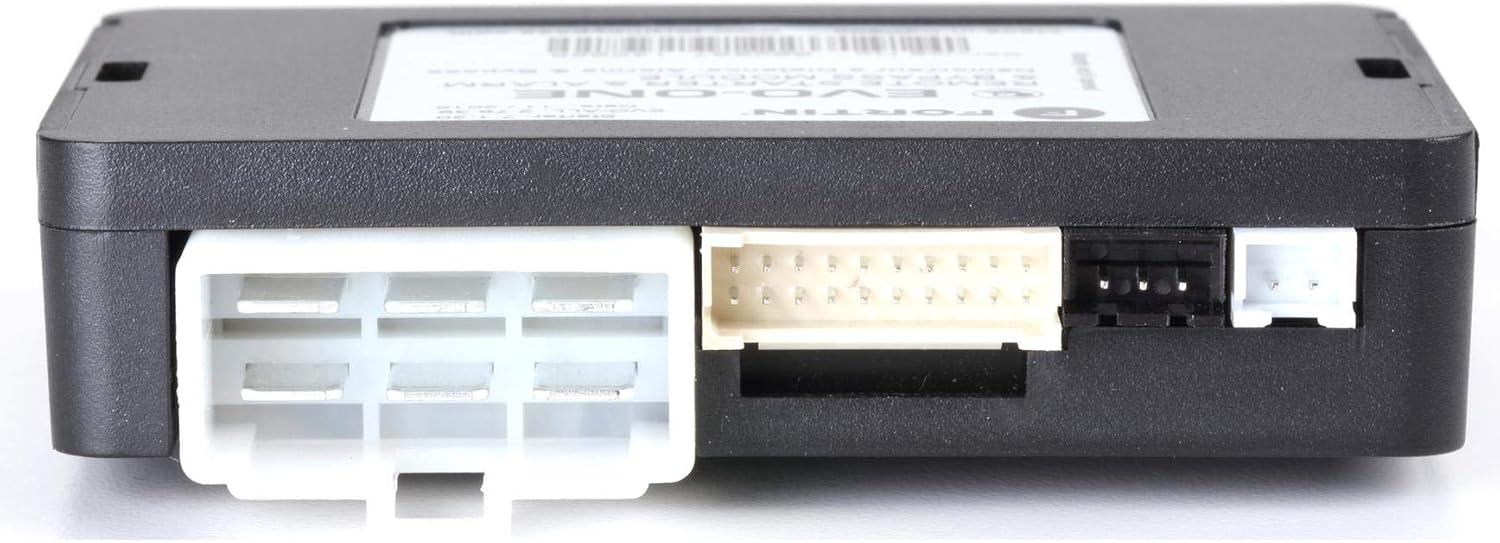
Image 2: Close-up of the Fortin EVO-ONE module, highlighting its various ports for harness connections.

Image 3: The vehicle-specific T-Harness, showing the multiple connectors for seamless integration.
3. Tools Required
For a successful installation, you will need the following basic tools:
- Ratchet with 10mm Socket: To disconnect the vehicle's negative battery terminal.
- Drill with Phillips Bit: For removing screws securing interior panels.
- Pry Tool (included): For safely disengaging plastic trim clips.
- Wire Cutters: To trim excess zip ties for a neat finish.
4. Installation Guide
Follow these steps carefully to install your Fortin EVO-ONE-MAZ3 remote start system:
- Disconnect Battery: Using a ratchet with a 10mm socket, loosen the bolt on the negative battery terminal and slide the connector off. Ensure the cable is securely away from the terminal to prevent accidental reconnection.
- Remove Steering Column Panels: Locate and remove the Phillips screws below the steering column. Use the included pry tool to carefully separate the two halves of the plastic steering column cover. Lower the steering wheel tilt lever to facilitate removal of the lower plastic half.
- Access OEM Connectors: With the steering column panels removed, you will gain access to the vehicle's OEM wiring harnesses. Identify the two white connectors below the steering wheel.
- Disconnect OEM Connectors: Using a flathead screwdriver, press the latch tab upward on each OEM connector and pull the harness toward the front of the vehicle to disconnect it.
- Connect T-Harness: Plug the male connectors from the vehicle's OEM wiring into the female connectors of the Fortin T-Harness. The connectors are different sizes, ensuring they only fit into the correct positions.
- Connect Remote Start Module: Connect all the connectors from the T-Harness into the corresponding ports on the Fortin EVO-ONE module.
- Secure Wiring and Module: Use the provided zip ties to secure the module and excess wiring neatly behind the dash, ensuring no wires interfere with moving parts or pedals. Trim any excess zip tie material.
For a visual guide on the installation process, please refer to the video below:
Video 1: Detailed installation tutorial for the Start-X Remote Start system on select Mazda vehicles (2013-2025 Push-To-Start & Key Ignition models).
5. Programming the Module
After connecting the module and harness, the system needs to be programmed to your vehicle:
- Reconnect Battery: Reconnect the negative battery terminal and tighten the bolt.
- Initiate Programming: With all connections secure, and without pressing the brake pedal, press the vehicle's push-to-start button twice.
- Observe LED Indicator: The LED on the Fortin EVO-ONE module should begin flashing green. This indicates that the module is in programming mode.
- Wait for Solid Green: Be patient; the module will take some time (up to 15 minutes) to program itself to your vehicle. The LED will turn solid green once programming is complete.
- Complete Programming: Once the LED turns solid green and then goes off, press the vehicle's push-to-start button once more to turn the vehicle off. The programming is now complete.
For advanced programming options or firmware updates, you may need a Flashlink Updater tool and access to the Compustar/Idatalink website. Refer to the video below for a general guide on module flashing:
Video 2: Guide on flashing and updating a Blade module and Compustar controller, demonstrating the use of the Idatalink website for firmware and feature configuration.
6. Operation
To operate your Fortin EVO-ONE-MAZ3 remote start system:
- Remote Start: Press the Lock button three times on your factory key fob. The vehicle should start within a few seconds. Some systems may be configured for a Lock-Unlock-Lock sequence.
- Climate Control: The vehicle's climate control system will activate based on the settings it had when the vehicle was last turned off. Adjust your climate settings before exiting the vehicle to ensure desired temperature upon remote start.
- Entering the Vehicle: When the vehicle is remote started, it will not shut off when you open the driver's door. To take over, simply enter the vehicle with your key fob, press the push-to-start button (without pressing the brake pedal), then press the brake pedal and shift into gear.
Experience the convenience of remote start with your factory key fob:
Video 3: Demonstrates the benefits of remote start for warming up or cooling down your vehicle.
7. Troubleshooting
If you encounter issues with your remote start system, consider the following:
- Programming Issues: Ensure all connections are secure and the programming steps were followed precisely. If the module does not program correctly, verify that the Flashlink Updater software and firmware are up-to-date for your specific vehicle model and year.
- Module Not Recognized: If your computer does not recognize the Fortin EVO-ONE-MAZ3 module during firmware updates, ensure the correct drivers are installed and try a different USB port or computer.
- Remote Start Not Activating: Check your vehicle's battery connections and ensure the factory key fob is functioning correctly. Verify that the hood is fully closed if an optional hood pin switch was installed.
- Refer to Online Resources: Fortin provides vehicle-specific guides and FAQs on their website (fortin.ca). YouTube also hosts various community-created installation and troubleshooting videos.
8. Specifications
- Manufacturer: FORTIN
- Brand: Fortin
- Item Weight: 1.14 pounds
- Package Dimensions: 6.3 x 6.14 x 2.8 inches
- Model Number: EVO-ONE-MAZ3
- ASIN: B07L3BH2SQ
- First Available: January 8, 2019
9. Warranty and Support
For warranty information, technical support, or further assistance, please refer to the official Fortin website or contact their customer service directly. Keep your purchase receipt and product serial number handy for any inquiries.


