
BOROFONE BE5
BOROFONE BE5 Magnetic Absorption Portable Wireless Bluetooth Earphones
Model: BE5 | Brand: BOROFONE
1. Introduction
This manual provides detailed instructions for the operation, maintenance, and troubleshooting of your BOROFONE BE5 Magnetic Absorption Portable Wireless Bluetooth Earphones. Please read this manual thoroughly before using the product to ensure proper functionality and longevity.

Image 1.1: Front view of the BOROFONE BE5 Magnetic Absorption Portable Wireless Bluetooth Earphones.
Key Features:
- Ergonomic Design: Lightweight (19g) with silica gel ear hooks for comfortable and secure fit, suitable for extended wear and physical activities.
- Magnetic Absorption: Earbuds can magnetically connect, allowing them to be worn around the neck when not in use, preventing loss.
- Bluetooth 4.2 Connectivity: Ensures fast and stable wireless connection up to 10 meters, compatible with various Bluetooth-enabled devices.
- Intuitive On-ear Controls: Easy access buttons for music playback (pause/play, skip tracks) and call management.
- Built-in Microphone: For hands-free calling.
- Long Battery Life: Up to 4 hours of music playback, 4.5 hours of talk time, and 180 hours of standby time on a single charge.
2. Setup Guide
2.1. Charging the Earphones
Before first use, fully charge the earphones. A full charge takes approximately 2 hours.
- Locate the Micro USB charging port on the control module of the earphones.
- Connect the provided Micro USB cable to the charging port.
- Connect the other end of the USB cable to a compatible USB power source (e.g., computer USB port, USB wall adapter).
- The indicator light will illuminate during charging and change color or turn off once charging is complete.
2.2. Bluetooth Pairing
Follow these steps to pair your BOROFONE BE5 earphones with your device:
- Ensure the earphones are fully charged and turned off.
- Press and hold the multi-function button on the earphone's control module until the indicator light flashes red and blue alternately, indicating pairing mode.
- On your smartphone, tablet, or other Bluetooth-enabled device, go to the Bluetooth settings and turn Bluetooth on.
- Search for available devices. "BOROFONE BE5" or a similar name should appear in the list.
- Select "BOROFONE BE5" to connect. Once connected, the indicator light will typically flash blue slowly or turn off, and you may hear a confirmation tone.
- The earphones can connect to two phones simultaneously. After pairing with the first device, disable Bluetooth on the first device, pair with the second, then re-enable Bluetooth on the first device. The earphones should connect to both.
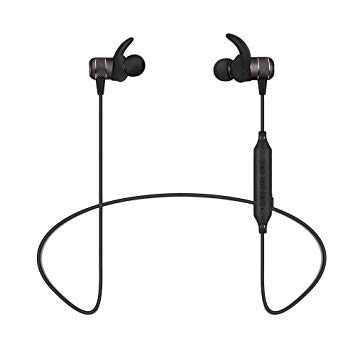
Image 2.1: Full view of the BOROFONE BE5 earphones, showing the cable and control module.

Image 2.2: Illustration of the ergonomic design and various ear cap sizes for a perfect fit.
3. Operating Instructions
3.1. Basic Functions
- Power On: Press and hold the multi-function button until the indicator light turns blue.
- Power Off: Press and hold the multi-function button until the indicator light turns red and then off.
- Play/Pause Music: Press the multi-function button once.
- Next Track: Press and hold the Volume + button.
- Previous Track: Press and hold the Volume - button.
- Volume Up: Press the Volume + button briefly.
- Volume Down: Press the Volume - button briefly.
3.2. Call Management
- Answer Call: Press the multi-function button once when an incoming call rings.
- End Call: Press the multi-function button once during a call.
- Reject Call: Press and hold the multi-function button for approximately 2 seconds when an incoming call rings.
- Redial Last Number: Double-press the multi-function button.
3.3. Magnetic Absorption Feature
The BOROFONE BE5 earphones feature magnetic earbuds. When not in use, the earbuds can be magnetically attached to each other, forming a necklace-like loop around your neck. This design helps prevent loss and provides a convenient way to carry them.
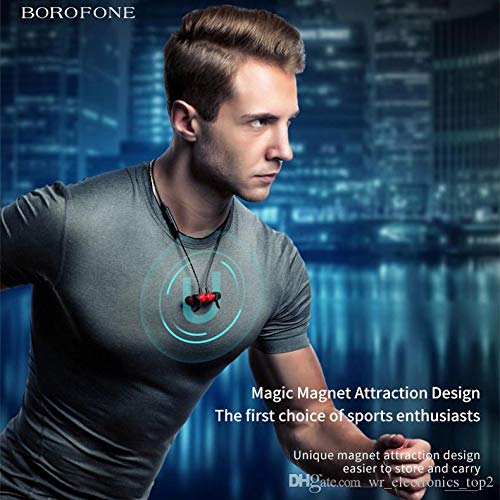
Image 3.1: The magnetic absorption design allows the earphones to be worn securely around the neck when not in use.

Image 3.2: The sweat-proof and lightweight design makes the earphones suitable for various activities like running, yoga, and cycling.
4. Maintenance and Care
- Cleaning: Use a soft, dry cloth to wipe the earphones. Do not use abrasive cleaners or solvents.
- Storage: Store the earphones in a cool, dry place away from direct sunlight and extreme temperatures.
- Water Resistance: The earphones are sweat-proof, but they are not waterproof. Avoid submerging them in water or exposing them to heavy rain.
- Battery Care: To prolong battery life, avoid fully discharging the battery frequently. Charge the earphones regularly, even if not in use for extended periods.
5. Troubleshooting
| Problem | Possible Cause | Solution |
|---|---|---|
| Earphones do not power on. | Low battery. | Charge the earphones fully. |
| Cannot pair with device. | Earphones not in pairing mode; Bluetooth off on device; too far from device. | Ensure earphones are in pairing mode (flashing red/blue). Turn on Bluetooth on your device. Move earphones closer to the device (within 10m). Clear previous Bluetooth connections on your device. |
| No sound or low volume. | Volume too low on earphones or device; earphones not connected properly. | Increase volume on both earphones and connected device. Reconnect the earphones to your device. |
| Intermittent connection. | Interference; too far from device; low battery. | Move away from sources of interference (Wi-Fi routers, other Bluetooth devices). Stay within 10m range. Charge the earphones. |
6. Specifications
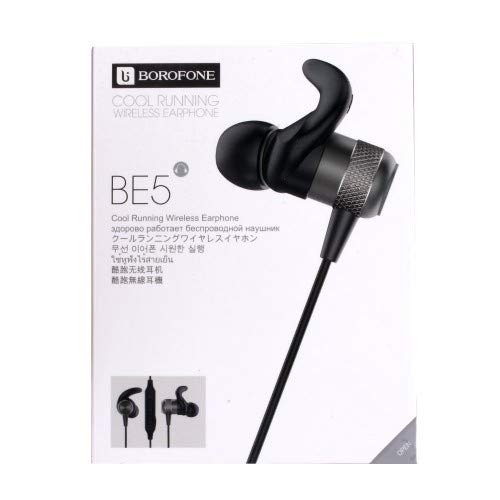
Image 6.1: Key technical parameters of the BOROFONE BE5 earphones.
| Feature | Detail |
|---|---|
| Model Name | BE5 |
| Bluetooth Version | 4.2 |
| Bluetooth Protocol | A2DP, AVRCP, HSP, HFP |
| Wireless Frequency Range | 2.4GHz - 2.48GHz |
| Voice Frequency Range | 20Hz - 20KHz |
| Transmission Distance | Up to 10m |
| Line Length | 55cm |
| Impedance | 10 ohm |
| Battery Capacity | 60mAh rechargeable Li-ion battery (built-in) |
| Charging Time | Approximately 2 hours |
| Talking Time | Approximately 4.5 hours |
| Music Playing Time | Approximately 4 hours |
| Stand-by Time | Up to 180 hours |
| Charging Port | Micro USB |
| Material | Metal + ABS + TPE |
| Weight | 19g |
| Product Dimensions (LxWxH) | 10 x 6 x 4 cm |
7. Warranty and Support
Specific warranty details for the BOROFONE BE5 earphones are not provided within this product information. For warranty claims, technical support, or further inquiries, please contact the retailer where you purchased the product or visit the official BOROFONE website for their customer service contact information.
Please retain your proof of purchase for any warranty-related issues.
Ask a question about this manual
Ask about setup, troubleshooting, compatibility, parts, safety, or missing instructions. Manuals+ will review the question and use this page’s manual context to help answer it.