
OTYTY W808
OTYTY 8000LM 100W Rechargeable Portable LED Work Light with Stand Instruction Manual
Model: W808 | Brand: OTYTY
1. Introduction
Thank you for choosing the OTYTY 8000LM 100W Rechargeable Portable LED Work Light. This powerful and versatile work light is designed to provide exceptional illumination for various applications, including camping, hiking, fishing, car repairing, workshop tasks, and job site lighting. Its robust design, multiple brightness modes, and portability make it an essential tool for both indoor and outdoor use. Please read this manual thoroughly before operating the device to ensure safe and efficient use.
2. Safety Information
- Do not look directly into the LED light when it is on, as it can cause eye strain or damage.
- Keep the work light away from flammable materials and explosive gases.
- Ensure the charging port is dry before connecting the power cable.
- Do not attempt to disassemble or modify the work light. Refer all servicing to qualified personnel.
- Store the device in a cool, dry place when not in use.
- Keep out of reach of children.
- The work light is IP65 waterproof, meaning it is protected against dust and low-pressure water jets. Do not immerse it in water.
3. Package Contents
Please check the package contents to ensure all items are present and in good condition:
- OTYTY 8000LM 100W Rechargeable Portable LED Work Light
- Adjustable Stand
- High-quality Power Cable with DC Plug
- 6 x AA Batteries (pre-installed or included separately)
- Installation Hardware (if required for stand assembly)
- User Manual (this document)
4. Product Features
- Extreme Brightness & Power Saving: 100W 8000 Lumen super bright LED work light with 100 LEDs.
- Adjustable Brightness: Three brightness levels (30W, 50W, 100W) to suit different lighting requirements.
- 4 Modes & IP65 Waterproof: Includes 2000 lumen (30W), 5000 lumen (50W), 8000 lumen (100W) brightness, and blue & red emergency flashing modes. IP65 waterproof rating ensures functionality in rainy conditions.
- Easy to Use: Simple installation and operation. Efficient battery charging.
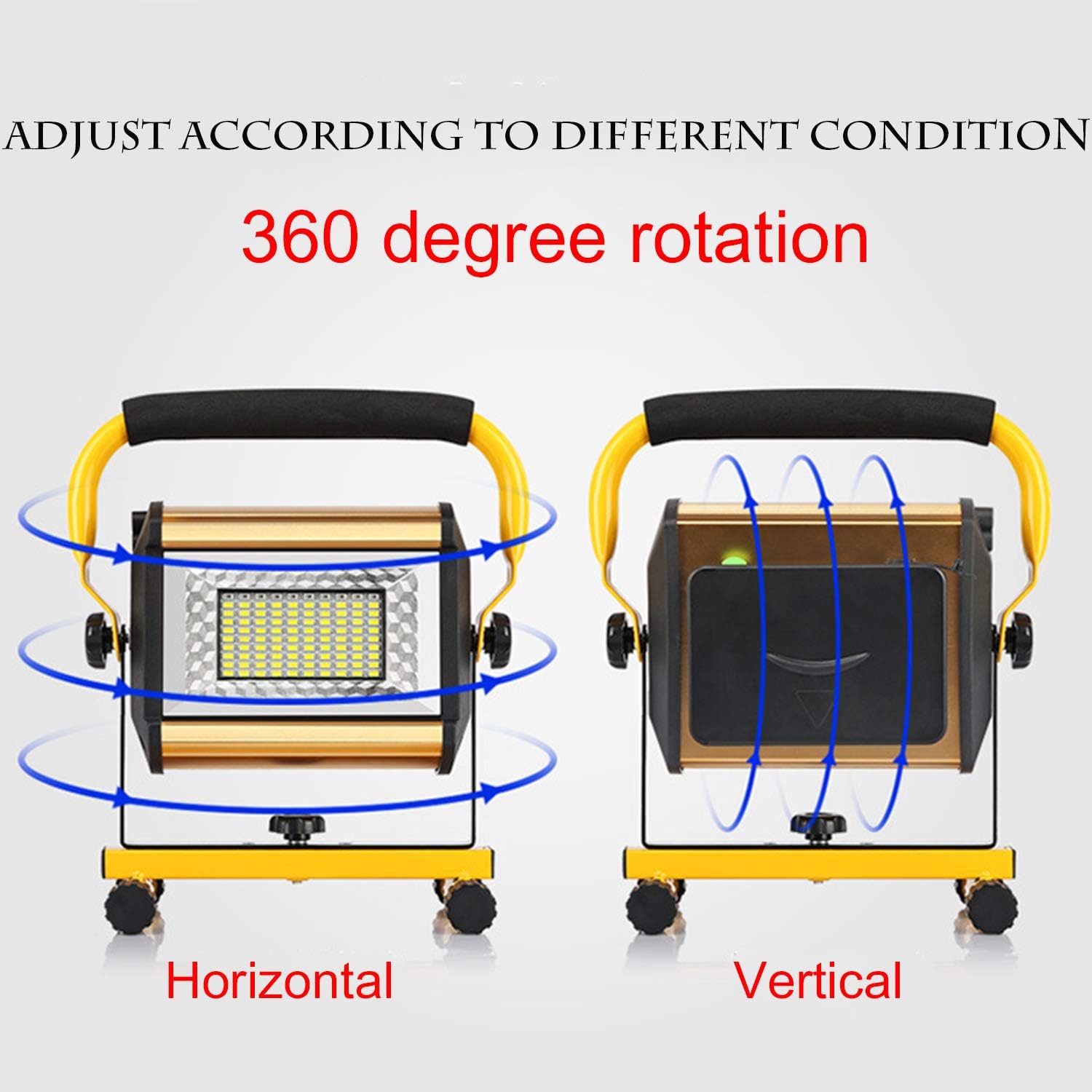
- Portable & Flexible: Lightweight design with a handle for easy transport. Adjustable knobs allow 360-degree vertical and 360-degree axial rotation.
- Versatile Applications: Ideal for camping, hiking, fishing, barbecue, car repairing, workshop, exploring, and other outdoor activities.






5. Setup
5.1 Initial Assembly
The OTYTY work light comes largely pre-assembled. If the stand is detached, align the light unit with the stand's mounting points and secure it using the provided knobs or screws. Ensure the light can rotate freely on its axis and vertically once assembled.
5.2 Charging the Battery
Before first use, fully charge the work light's internal battery. Locate the DC charging port, typically on the side or back of the unit. Connect the provided power cable to the port and plug the other end into a standard electrical outlet. The charging indicator light will typically show red during charging and turn green when fully charged. A full charge can take several hours. The light is equipped with 6 AA lithium polymer batteries.
Note: The light can be operated while charging, but for optimal battery life, it is recommended to fully charge before extensive use.
6. Operating Instructions
6.1 Power On/Off and Brightness Modes
To operate the work light:
- Press the power button once to turn on the light at its lowest brightness setting (2000 lumens / 30W).
- Press the button again to cycle to the medium brightness setting (5000 lumens / 50W).
- Press the button a third time for the highest brightness setting (8000 lumens / 100W).
- A fourth press will activate the blue & red emergency flashing mode.
- Press the button a fifth time to turn the light off.
6.2 Adjusting Light Angle
The work light features adjustable knobs on either side of the main light unit. Loosen these knobs to tilt the light vertically up to 360 degrees. The entire unit can also be rotated 360 degrees on its stand for horizontal adjustment. Tighten the knobs once the desired angle is achieved to secure the light in place.
Official Product Video: OTYTY 100W LED Work Light
7. Maintenance
7.1 Cleaning
Wipe the surface of the work light with a soft, damp cloth. Do not use abrasive cleaners or solvents, as they may damage the finish or internal components. Ensure the charging port is clean and free of debris.
7.2 Storage
When not in use for extended periods, store the work light in a cool, dry place, away from direct sunlight and extreme temperatures. It is recommended to charge the battery every 3-6 months to maintain its health and longevity.
7.3 Battery Care
To maximize battery life, avoid completely draining the battery frequently. Recharge the light as soon as the brightness noticeably diminishes. Use only the provided charging cable to prevent damage to the battery or unit.
8. Troubleshooting
| Problem | Possible Cause | Solution |
|---|---|---|
| Light does not turn on. | Battery is depleted. Power button malfunction. | Charge the battery fully. Ensure the power button is pressed firmly. If still unresponsive, contact customer support. |
| Light is dim or flickers. | Low battery charge. Internal component issue. | Recharge the battery. If the issue persists after charging, contact customer support. |
| Charging indicator not working. | Faulty charging cable or adapter. Charging port damage. | Try a different compatible charging cable/adapter. Inspect the charging port for damage. Contact customer support if damaged. |
| Light does not hold a charge. | Battery degradation. Improper charging. | Ensure proper charging procedures are followed. If battery life has significantly decreased, the battery may need replacement. Contact customer support. |
9. Specifications
| Feature | Detail |
|---|---|
| Model Number | W808 |
| Brand | OTYTY |
| Brightness | 8000 Lumens (Max) |
| Wattage | 100 Watts (Max) |
| Light Source Type | LED (100 LEDs) |
| Color Temperature | 6500 Kelvin |
| Power Source | Battery Powered (Rechargeable Lithium Polymer) |
| Number of Batteries | 6 AA batteries (included) |
| Voltage | 4.2 Volts |
| Material | Metal (frame), Plastic (shade) |
| Item Weight | 3.41 Pounds |
| Product Dimensions | 9.05"L x 10.6"W x 6.3"H |
| Waterproof Rating | IP65 |
| Special Features | Energy Efficient, Portable, Water Resistant |
10. Warranty and Support
OTYTY stands behind the quality of its products. For specific warranty details and terms, please refer to the warranty card included with your purchase or visit the official OTYTY brand store.
If you encounter any issues or have questions regarding your OTYTY LED Work Light, please do not hesitate to contact our customer support team. We are committed to providing excellent service and assistance.
Contact Support:
- Visit the OTYTY Store on Amazon: OTYTY Brand Store
- Refer to your product packaging for direct contact information.
Ask a question about this manual
Ask about setup, troubleshooting, compatibility, parts, safety, or missing instructions. Manuals+ will review the question and use this page’s manual context to help answer it.