
Acoustic Audio by Goldwood AA5400D
Acoustic Audio Bluetooth 5.1 Speaker System User Manual
Model: AA5400D
Product Overview
The Acoustic Audio by Goldwood AA5400D is a versatile 5.1 channel Bluetooth home theater speaker system designed to deliver immersive audio. It features an integrated power amplifier, a subwoofer with an LED illuminated display, and five satellite speakers. The system supports multiple input options including Bluetooth, RCA, optical, USB, and SD card, making it compatible with a wide range of audio sources such as TVs, computers, DVD players, and mobile devices.

Image: The complete Acoustic Audio AA5400D 5.1 speaker system, including the powered subwoofer, five satellite speakers, remote control, and various connection cables.
Key features include Bluetooth 5.1 for wireless streaming, a Pro Surround function to convert stereo audio to 5.1 sound, and an illuminated subwoofer with multiple color and pattern flashing light displays. The system is designed for easy plug-and-play connections, offering a comprehensive audio solution for your home entertainment needs.
Package Contents
Please verify that all items listed below are included in your package:
- 1 x Powered Subwoofer Speaker
- 5 x Passive Wired Satellite Speakers
- 1 x Full Function Remote Control
- 1 x 3.5mm to RCA Cable
- 3 x RCA to RCA Jack Cables
- 1 x Instruction Manual
- 1 x AADAC Digital to Analog Converter with Cables

Image: Visual representation of the package contents, including the subwoofer, satellite speakers, remote, input cables, instruction manual, and optical to RCA converter.
Setup Instructions
Speaker Placement
Proper speaker placement is crucial for optimal 5.1 surround sound experience. Position the subwoofer in a location that provides the best bass response for your listening area. The five satellite speakers should be placed as follows:
- Front Left and Right: Place these speakers on either side of your TV or primary listening position, equidistant from the listener.
- Center: Position the center speaker directly above or below your TV, ensuring dialogue is clear and centered.
- Rear Left and Right: Place these speakers behind your primary listening position, ideally slightly to the sides, to create the surround effect.
Connecting the System
Follow these steps to connect your speaker system to your audio source:
- Connect Satellite Speakers: The satellite speakers connect to the back of the powered subwoofer. The two front and one center satellite speakers have 7.5-foot raw wire cables, while the two rear speakers have 25.5-foot raw wire cables. Ensure correct polarity (positive to positive, negative to negative) when connecting the bare wires.
- Connect Audio Source:
- RCA Inputs: Use the provided RCA cables to connect your audio source (e.g., DVD player, game console) to the corresponding 6 independent RCA inputs on the subwoofer for true 5.1 surround sound. For stereo sources, use the stereo RCA AUX inputs.
- Digital Optical Input: If your TV or audio device has a digital optical output, use the included AADAC Digital to Analog Audio Converter. Connect the optical cable from your device to the AADAC, then connect the RCA outputs from the AADAC to the RCA inputs on the speaker system.
- Bluetooth: For wireless audio, ensure your device's Bluetooth is enabled and pair with the speaker system (refer to Operating Instructions for details).
- Power Connection: Once all audio connections are made, connect the subwoofer's power cord to a standard US 110V grounded wall plug.

Image: A visual guide illustrating how to connect the speaker system to a TV via RCA or Bluetooth, showing the subwoofer, satellite speakers with varying cable lengths, and the full-function remote control.

Image: The rear panel of the powered subwoofer, detailing the RCA input/output ports and power switch. Also shown are the dimensions of the satellite speakers and examples of RCA cables.
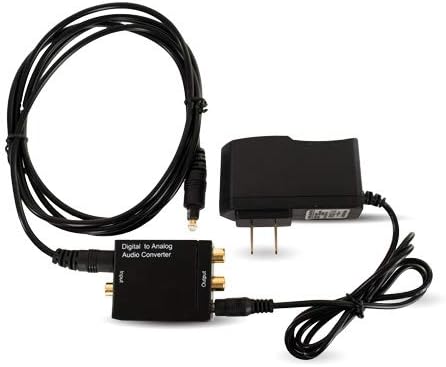
Image: The Acoustic Audio AADAC Digital to Analog Audio Converter, including the optical cable and power cable, used for connecting devices with digital optical outputs.
Operating Instructions
Familiarize yourself with the controls on the front panel of the subwoofer and the full-function remote control for optimal operation.
Power On/Off
Use the power button on the front panel or the remote control to turn the system on or off. The LED display will illuminate when the system is active.
Input Selection
Press the 'Input' button on the front panel or remote to cycle through available audio sources: Bluetooth, AUX (RCA stereo), 5.1 (RCA surround), Optical, USB, and SD card. The selected input will be displayed on the subwoofer's LED screen.
Volume Control
Adjust the master volume using the dedicated volume controls on the front panel or the remote. Individual channel volume (e.g., center, surround, subwoofer) can also be adjusted via the remote for fine-tuning the 5.1 sound experience.
Bluetooth Pairing
Select the Bluetooth input. The system will enter pairing mode automatically. On your mobile device, search for 'Acoustic Audio' or similar in your Bluetooth settings and select it to pair. A confirmation sound will indicate successful pairing.
USB/SD Playback
Insert a USB drive or SD card into the respective slot on the subwoofer. The system will automatically switch to the USB or SD input and begin playing compatible audio files. Use the remote for playback controls (play/pause, skip track).
FM Tuner Operation
Select the FM input. Use the remote to scan for available radio stations. You can save your favorite stations for quick access.
LED Light Control
The subwoofer features an LED illuminated display with multiple color and pattern flashing light options. Use the dedicated button on the remote to cycle through different light modes or turn the lights off.

Image: A graphic highlighting key features such as 5.1 Home Theater capability, wireless Bluetooth streaming, and the LED illuminated subwoofer with multiple color options.

Image: A diagram illustrating various connectivity options, including standard RCA for direct connection, optical out for smart TVs (with AADAC converter), and music streaming via Bluetooth, USB, or SD card.
Maintenance
To ensure the longevity and optimal performance of your Acoustic Audio speaker system, follow these maintenance guidelines:
- Cleaning: Use a soft, dry cloth to wipe down the surfaces of the speakers and subwoofer. Avoid using abrasive cleaners, waxes, or solvents as they may damage the finish.
- Ventilation: Ensure adequate ventilation around the subwoofer, as it contains the amplifier. Do not block any ventilation openings.
- Environment: Keep the system away from direct sunlight, heat sources, excessive dust, moisture, and extreme temperatures.
- Cables: Periodically check all cable connections to ensure they are secure and free from damage.
Troubleshooting
If you encounter issues with your speaker system, refer to the table below for common problems and their solutions.
| Problem | Possible Solution |
|---|---|
| No power | Ensure the power cord is securely plugged into a working wall outlet and the power switch on the subwoofer is in the 'ON' position. |
| No sound from speakers | Check all audio input cables are correctly connected. Verify the correct input source is selected on the subwoofer. Increase the volume level. Ensure satellite speaker wires are securely connected to the subwoofer. |
| Distorted sound | Reduce the volume level. Check audio source quality. Ensure cables are not damaged or loose. |
| Bluetooth pairing issues | Ensure the system is in Bluetooth input mode. Turn off and on Bluetooth on your device. Move your device closer to the speaker system. Clear previous Bluetooth connections on your device. |
| Remote control not working | Check and replace batteries in the remote. Ensure there are no obstructions between the remote and the subwoofer's IR receiver. |
Technical Specifications
| Feature | Detail |
|---|---|
| Model Name | Bluetooth 5.1 Speaker System with Sub Light FM and Optical Input Home Theater 6 Speaker Set |
| Model Number | AA5400D |
| Speaker Type | Subwoofer, Satellite |
| Surround Sound Channel Configuration | 5.1 |
| Speaker Maximum Output Power | 300 Watts |
| Frequency Response | 30Hz-20 kHz |
| Subwoofer Dimensions (H x W x D) | 11.75" x 7.5" x 10.5" |
| Satellite Speaker Dimensions (H x W x D) | 7" x 4.5" x 4" each |
| Subwoofer Diameter | 7.5 Inches |
| Connectivity Technology | Bluetooth, USB, Auxiliary, Optical |
| Wireless Communication Technology | Bluetooth |
| Control Method | Remote Control |
| Power Source | Corded Electric (Standard US 110V) |
| Item Weight | 13 Pounds |
| UPC | 849155058425 |
Warranty Information
This Acoustic Audio by Goldwood product comes with a limited warranty. For specific details regarding the warranty period, coverage, and terms, please refer to the warranty card included in your product packaging or contact Acoustic Audio by Goldwood customer support.
Support
For further assistance, technical support, or inquiries regarding your Acoustic Audio Bluetooth 5.1 Speaker System, please visit the official Acoustic Audio by Goldwood store or contact their customer service department.
You can find more information and support resources at the Acoustic Audio by Goldwood Store on Amazon.
Related Documents - AA5400D
 |
Acoustic Audio AA15BS, AA15LBS, AA15BT Active Speakers User Manual User manual for Acoustic Audio AA15BS, AA15LBS, and AA15BT active speakers, detailing features, specifications, safety precautions, control panel functions, remote control operation, and MP3 player usage. |
 |
Acoustic Audio AA2170 2.1 Multimedia Speaker System User Manual User manual for the Acoustic Audio AA2170 2.1 Multimedia Speaker System, detailing package contents, specifications, features, setup instructions, and remote control operation. |
 |
Pure Acoustics DREAM NANO Speakers Owner's Manual and Setup Guide Comprehensive owner's manual for Pure Acoustics DREAM NANO speakers, covering setup, connections, positioning, operation, and warranty information for a high-quality audio system. |
 |
ATC C4 Sub Mk2 Active Subwoofer User Manual Comprehensive user manual for the ATC C4 Sub Mk2 12-inch active subwoofer, detailing its features, setup, connections, operation, system configurations, specifications, and maintenance. Learn how to integrate this high-performance subwoofer into stereo and multichannel audio systems. |
 |
JBL CS68 Cinema Sound Speakers Owner's Guide Owner's guide for the JBL CS68 Cinema Sound Speakers system, covering safety precautions, setup, placement, connections, operation, and specifications. Learn how to install and use your JBL home theater speakers. |
 |
TCL Q85H Quick Start Guide: 7.1.4 Channel Dolby Atmos Soundbar Get started with your TCL Q85H soundbar system. This quick start guide provides essential setup information for the 7.1.4 Channel Dolby Atmos Soundbar with Wireless Subwoofer and Satellite Speakers. |