
1. Important Safety Instructions
To reduce the risk of fire, electric shock, or injury, always follow these basic safety precautions when using your Arctic-Pro Portable Digital Ice Maker Machine:
- Read all instructions before use.
- Do not touch hot surfaces. Use handles or knobs.
- To protect against electrical hazards, do not immerse cord, plug, or any part of the appliance in water or other liquids.
- Close supervision is necessary when any appliance is used by or near children.
- Unplug from outlet when not in use and before cleaning. Allow to cool before putting on or taking off parts, and before cleaning the appliance.
- Do not operate any appliance with a damaged cord or plug, or after the appliance malfunctions or has been damaged in any manner. Contact customer service for examination, repair, or adjustment.
- The use of accessory attachments not recommended by the appliance manufacturer may cause hazards.
- Do not use outdoors.
- Do not let cord hang over edge of table or counter, or touch hot surfaces.
- Do not place on or near a hot gas or electric burner, or in a heated oven.
- Always attach plug to appliance first, then plug cord into the wall outlet. To disconnect, turn any control to "off", then remove plug from wall outlet.
- Do not use appliance for other than intended household use.
- This appliance is for household use only.
- Do not use corrosive chemicals or vapors in this appliance.
- This ice maker must be grounded.
- Do not puncture refrigerant tubing.
2. Product Overview
The Arctic-Pro Portable Digital Ice Maker Machine is designed to produce ice quickly and efficiently. It features a compact design suitable for various settings.
2.1 Components
- Ice Maker Unit
- Removable Ice Basket
- Ice Scoop
- Power Cord (3-prong plug)
2.2 Features
- Digital Screen: An easy-to-read LCD control panel for selecting ice size, setting timers, and controlling cleaning functions.
- Clear View Window Lid: Allows observation of the ice making process.
- Fill Sensor: Detects water level to ensure proper operation.
- Intelligent Sensors: Prevents the ice basket from overfilling.
- Two Ice Cube Sizes: Choose between small (0.75 x 0.75 inches) and large (1 x 0.75 inches) ice cubes.
- Fast Ice Production: Produces first batch of ice in 6-8 minutes.
- Daily Capacity: Capable of producing up to 26 pounds of ice per day.
- Enhanced Cooling System: Features a fan for efficient heat dissipation.

Figure 1: Key features and components of the ice maker.
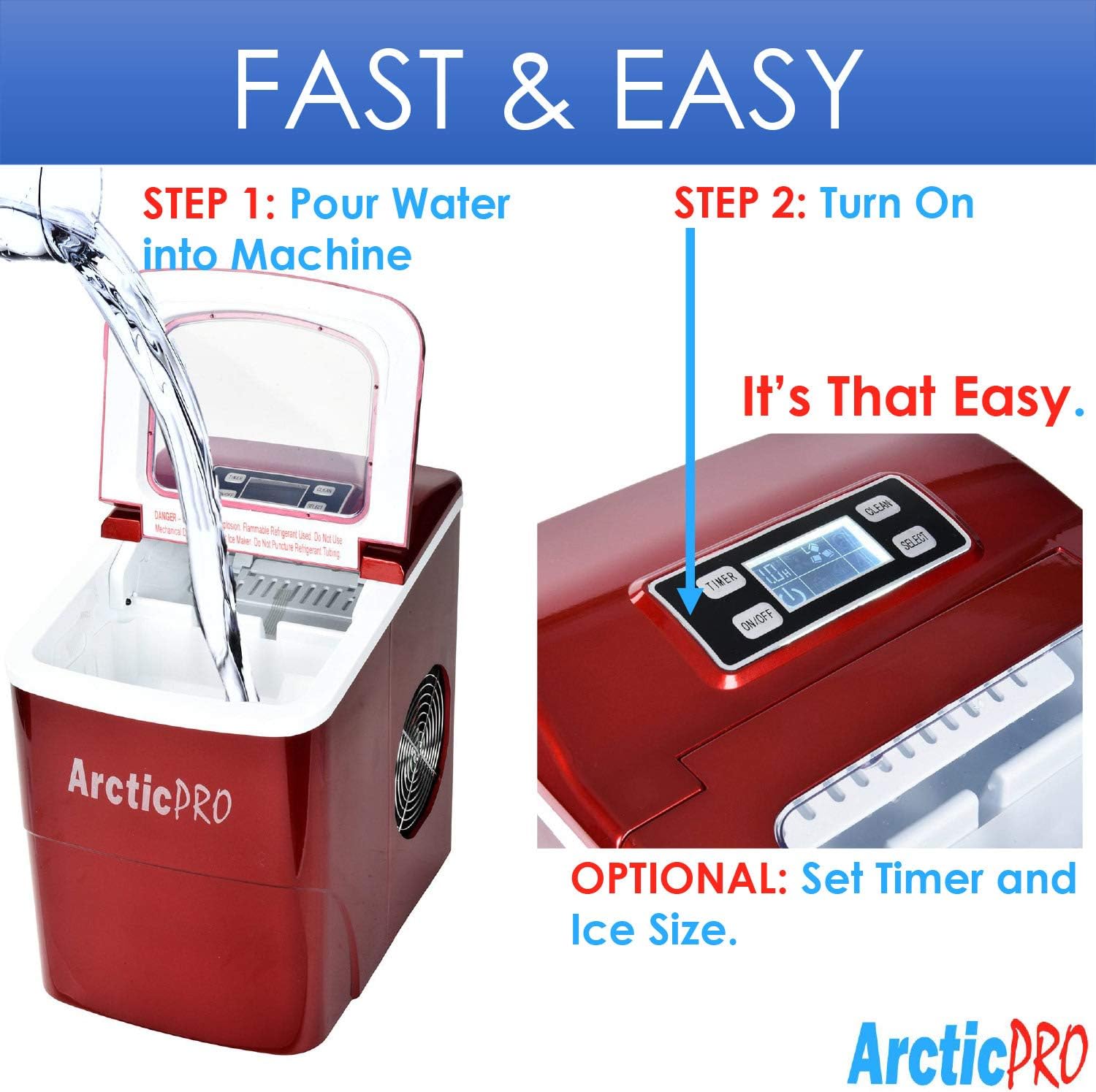
Figure 2: Ice production capabilities.
3. Setup Instructions
3.1 Unpacking
- Remove all packaging materials from the unit.
- Inspect the ice maker for any damage. If damaged, do not operate and contact customer service.
- Remove the ice basket and ice scoop from inside the unit.
3.2 Initial Cleaning
Before first use, clean the interior of the ice maker:
- Wash the ice basket and ice scoop with warm water and mild detergent. Rinse thoroughly.
- Clean the interior of the ice maker with a soft cloth dampened with warm water and a small amount of vinegar or mild detergent. Rinse with clean water and drain.
- Ensure all parts are dry before reassembling.
3.3 Placement
- Place the ice maker on a stable, level surface away from direct sunlight and heat sources.
- Ensure there is adequate ventilation around the unit, especially at the back and sides where the cooling fan is located.
- Allow at least 4 inches of space around the unit for proper air circulation.
3.4 Power Connection
- Plug the 3-prong power cord into a grounded electrical outlet (115V, 60Hz).
- Allow the unit to rest for at least one hour before adding water and operating, especially if it was tilted during transport.
4. Operating Instructions
Operating your Arctic-Pro ice maker is a simple two-step process:

Figure 3: Simple operating steps.
4.1 Adding Water
- Open the lid of the ice maker.
- Pour potable water into the water reservoir. Do not exceed the 'MAX FILL LINE' indicated inside the reservoir.
- Close the lid.

Video 1: Demonstrates adding water to the ice maker. Note: This video is a customer-generated preview and may not represent official instructions.
4.2 Starting Ice Production
- Press the ON/OFF button on the digital control panel to turn on the unit.
- Use the SELECT button to choose your desired ice cube size: Small (S) or Large (L). The selected size will be indicated on the digital screen.
- The ice maker will begin its cycle. The first batch of ice cubes will typically be ready in 6-8 minutes.
4.3 Indicators
- ICE FULL: An indicator light or message on the digital screen will illuminate when the ice basket is full. The unit will automatically pause ice production. Remove ice from the basket to resume production.
- ADD WATER: An indicator light or message will illuminate when the water reservoir is low. Add water to the reservoir to resume ice production.
4.4 Timer Function (Optional)
The digital screen allows you to set a timer for operation. Refer to the specific instructions in your product packaging for detailed timer setup.
5. Maintenance and Cleaning
Regular cleaning and maintenance ensure optimal performance and longevity of your ice maker.
5.1 Daily Cleaning
- After each use, unplug the unit.
- Remove the ice basket and empty any remaining ice.
- Drain any remaining water from the reservoir using the drain plug located at the bottom of the unit.
- Wipe the interior with a soft cloth.
5.2 Weekly Cleaning
- Perform the daily cleaning steps.
- Prepare a solution of warm water and a small amount of white vinegar or a food-grade ice maker cleaner.
- Pour the solution into the water reservoir and allow it to sit for 10-15 minutes.
- Drain the solution completely.
- Rinse the reservoir thoroughly with clean water multiple times to remove any residue.
- Wipe down the exterior with a soft, damp cloth.
5.3 Storage
If storing the ice maker for an extended period:
- Ensure the unit is thoroughly cleaned and completely dry.
- Leave the lid slightly ajar to prevent mold and mildew growth.
- Store in a cool, dry place.
6. Troubleshooting
Review the following common issues and solutions before contacting customer service.
| Problem | Possible Cause | Solution |
|---|---|---|
| Ice maker not turning on | No power supply | Check if the power cord is securely plugged into a grounded outlet. Test the outlet with another appliance. |
| No ice production | Lack of water in reservoir | Add water to the reservoir up to the MAX FILL LINE. |
| Ambient temperature too high | Ensure the ice maker is in a cool environment and not exposed to direct sunlight or heat sources. | |
| Air circulation blocked | Ensure adequate space around the unit for ventilation. Clean any dust from the fan vents. | |
| Ice cubes are too small or cloudy | Water temperature too high | Use colder water when filling the reservoir. |
| Mineral buildup | Perform a thorough cleaning and descaling as per maintenance instructions. Use filtered water. | |
| "ICE FULL" indicator is on, but basket is not full | Ice blocking sensor | Rearrange ice in the basket or remove some ice to clear the sensor path. |
| Unusual noise during operation | Normal operation sounds | Some gurgling or fan noise is normal. If the noise is excessive or unusual, contact customer service. |
7. Specifications
| Feature | Specification |
|---|---|
| Model Name | Portable Ice Maker Machine |
| Model Number | 21738 |
| Dimensions (D x W x H) | 11.5" x 8.75" x 12.5" |
| Daily Ice Production Capacity | Up to 26 Pounds |
| First Ice Production Time | 6-8 Minutes |
| Ice Cube Sizes | Small (0.75"x0.75"), Large (1"x0.75") |
| Wattage | 100 watts |
| Voltage | 115 Volts |
| Noise Level | 45 Decibels |
| Material | Plastic |
| Included Components | Ice Maker, Ice Basket, Small Ice Scoop |

Figure 4: Product dimensions.
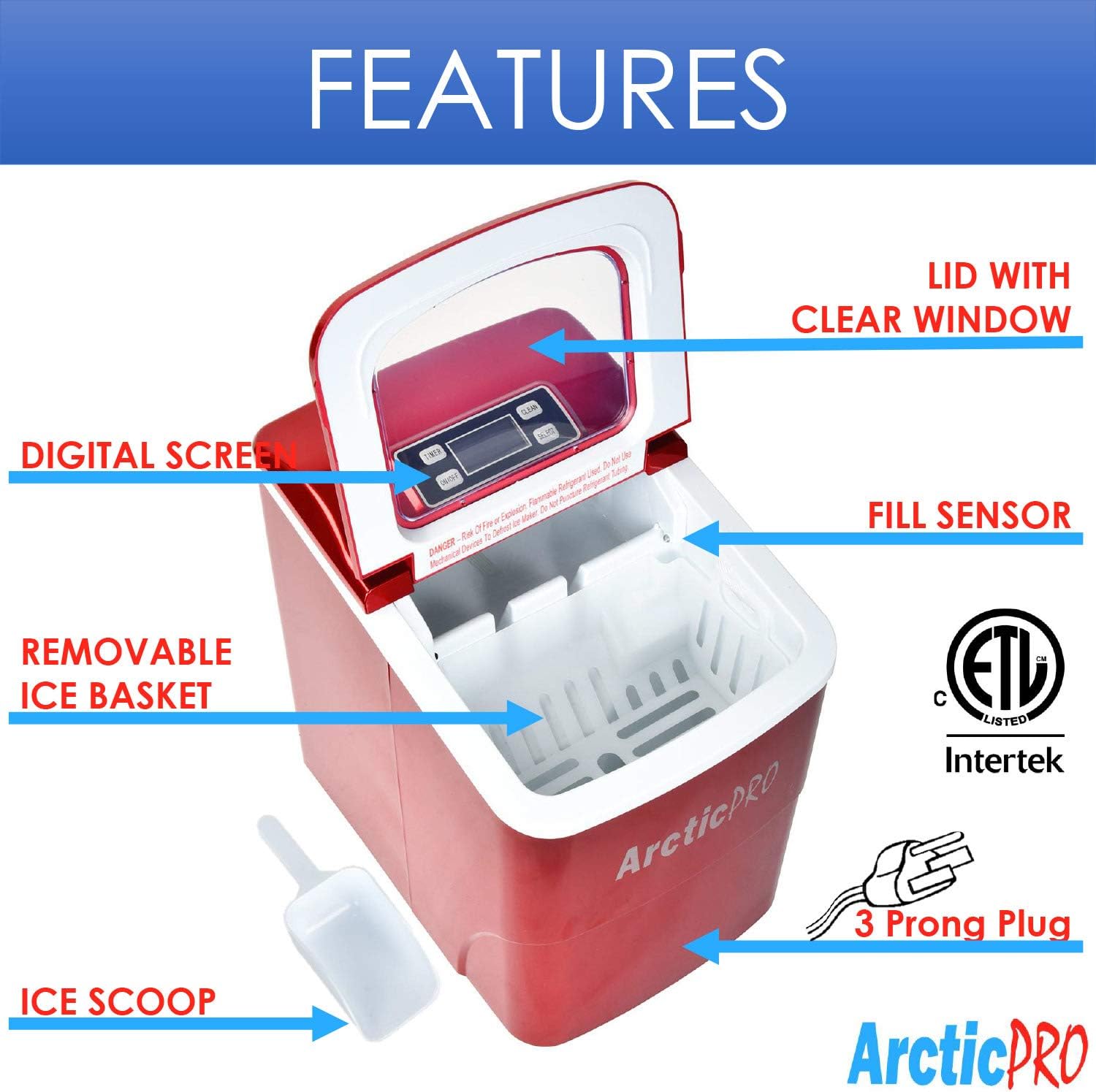
Figure 5: Ice cube size comparison.
8. Warranty and Customer Support
Arctic-Pro products are manufactured to high-quality standards. For warranty information, product registration, or technical assistance, please refer to the warranty card included with your purchase or visit the official Arctic-Pro website.
If you encounter any issues not covered in this manual, please contact Arctic-Pro customer support for further assistance.