1. Introduction
The EZVIZ H3c is a high-performance 2K 3MP Wi-Fi outdoor security camera designed to provide reliable surveillance for your property. Featuring advanced AI human detection, color night vision, two-way talk, and active defense mechanisms, this camera offers comprehensive security day and night. Its IP67 weather-resistant design ensures durability in various outdoor conditions.
2. Product Overview
Familiarize yourself with the key features and components of your EZVIZ H3c camera.
Key Features:
- 2K (3MP) Resolution with Color Night Vision: Captures clear, detailed footage. The camera can illuminate the area with built-in spotlights for full-color night vision, in addition to sharp infrared night vision.
- AI-Powered Human Motion Detection: Utilizes AI algorithms to distinguish human movement from other objects, reducing false alarms caused by falling leaves or insects.
- Active Defense: When intruders are detected, the camera activates a loud siren and flashes its spotlights to deter them.
- Two-Way Talk: Allows for real-time communication through the camera using your smartphone. You can also pre-record a 10-second voice message to be played automatically upon human detection.
- IP67 Weatherproof Design: Built to withstand harsh weather conditions, including rain, storms, and snow.
- Flexible Storage Options: Supports MicroSD card storage (up to 512GB) and EZVIZ CloudPlay Storage for encrypted cloud backup.
Camera Components:

Image: Front view of the EZVIZ H3c camera, showing the lens and main body.

Image: Side view of the EZVIZ H3c camera, highlighting the antenna and mounting arm.

Image: Back view of the EZVIZ H3c camera, showing the mounting base and antenna connections.
3. Setup
Follow these steps to set up your EZVIZ H3c camera.
- Unpack the Camera: Carefully remove all components from the packaging.
- Power On: Connect the camera to a power source using the provided power adapter. The indicator light will turn on.
- Download the EZVIZ App: Search for "EZVIZ" in the App Store (iOS) or Google Play Store (Android) and download the application.
- Create an EZVIZ Account: Open the app and follow the on-screen instructions to register a new account or log in if you already have one.
- Add the Camera: In the EZVIZ app, tap the "+" icon to add a new device. Scan the QR code located on the camera or its packaging. Follow the in-app prompts to connect the camera to your Wi-Fi network. Ensure your Wi-Fi network is 2.4 GHz.
- Mount the Camera: Choose a suitable outdoor location for optimal coverage. Use the provided mounting template and screws to securely attach the camera to a wall or ceiling. Ensure the camera is within Wi-Fi range and has a stable power supply.
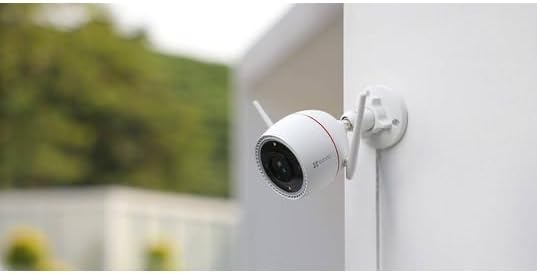
Image: The EZVIZ H3c camera securely mounted on an outdoor wall, demonstrating a typical installation scenario.
4. Operating Instructions
Learn how to use your EZVIZ H3c camera effectively through the EZVIZ app.
Live View and Recording:
- Open the EZVIZ app and select your camera to view the live feed.
- You can manually record video or take snapshots directly from the live view screen.
Motion Detection and Alerts:
- The camera automatically detects human motion and sends instant alerts to your smartphone.
- Adjust detection sensitivity and areas within the app settings to minimize unwanted notifications.

Image: An illustration showing the EZVIZ H3c camera's AI human shape detection feature, highlighting a child and a dog in a yard.
Two-Way Talk:
- Tap the microphone icon in the live view to speak through the camera's speaker.
- You can also record custom voice alerts (up to 10 seconds) that play automatically when human motion is detected.

Image: A scenario depicting the two-way talk feature, where a user communicates with a delivery person at the door via the EZVIZ H3c camera.

Image: A screenshot of the EZVIZ app interface showing options for customizable voice alerts, including intensive, soft, mute, and custom sound settings.
Active Defense:
- Enable or disable the active defense feature in the app settings. When enabled, the camera will trigger a siren and strobe lights upon detecting an intruder.

Image: An illustration demonstrating the EZVIZ H3c camera's active defense mechanism, showing light and sound waves deterring an approaching figure.
5. Maintenance
Proper maintenance ensures the longevity and optimal performance of your camera.
- Cleaning: Regularly wipe the camera lens and body with a soft, damp cloth to remove dust and dirt. Do not use harsh chemicals.
- Firmware Updates: Keep your camera's firmware updated through the EZVIZ app to access new features and security enhancements.
- Storage Management: If using a MicroSD card, periodically check its status and ensure there is sufficient space. Back up important footage as needed.

Image: A graphic illustrating the EZVIZ H3c camera's support for both MicroSD card storage (up to 512GB) and EZVIZ CloudPlay Storage.
Weather Resistance:
The camera is rated IP67 for dust and water resistance, making it suitable for outdoor use in various weather conditions.

Image: The EZVIZ H3c camera shown enduring rain, emphasizing its IP67 weatherproof rating.
6. Troubleshooting
If you encounter issues with your EZVIZ H3c camera, refer to the following common problems and solutions.
| Problem | Possible Solution |
|---|---|
| Camera offline | Check power connection. Ensure Wi-Fi signal is strong. Restart the camera and your router. Re-add the camera in the EZVIZ app if necessary. |
| Poor image quality | Clean the camera lens. Ensure there are no obstructions. Check network bandwidth. Adjust video quality settings in the app. |
| No motion detection alerts | Verify motion detection is enabled in the app. Adjust sensitivity and detection zones. Check app notification settings on your phone. |
| Two-way talk not working | Ensure microphone and speaker permissions are granted to the EZVIZ app on your phone. Check camera's volume settings in the app. |
7. Specifications
| Feature | Detail |
|---|---|
| Model Name | EZVIZ H3c |
| Model Number | CS-H3c-R100-1K3WKFL |
| Brand | EZVIZ |
| Color | White |
| Form Factor | Bullet-style Outdoor Camera |
| Effective Video Resolution | 2K (3MP) |
| Connectivity Technology | Wireless (Wi-Fi) |
| Power | 3 Watts (Wired Power) |
| Water Resistance Level | IP67 (Water Resistant) |
| Special Features | Color Night Vision, AI Human Detection, Two-Way Talk, Active Defense |
| Indoor/Outdoor Use | Outdoor |
| Compatible Devices | Smartphone (iOS/Android) |
| Controller Type | Amazon Alexa |
| Storage Options | MicroSD Card (up to 512GB), EZVIZ CloudPlay Storage |
8. Warranty and Support
For warranty information and technical support, please refer to the official EZVIZ website or contact their customer service directly. Keep your purchase receipt for warranty claims.


