
Introduction
Thank you for purchasing the Giantex Gaming Desk (Model HW60238). This manual provides detailed instructions for the assembly, operation, maintenance, and troubleshooting of your new desk. Please read this manual thoroughly before assembly and use to ensure proper function and longevity of the product. Keep this manual for future reference.
Setup and Assembly
Assembly is required for this product. Please ensure all components are present before beginning. It is recommended to assemble the desk on a soft, clean surface to prevent scratches.
Components Checklist
Before assembly, verify that all parts listed in your packaging are included. Typical components include:
- Desk tabletop (ergonomic surface)
- K-shaped leg frames
- Crossbars/support beams
- Cup holder
- Headphone/VR headset hook
- Rear power strip holder
- Adjustable feet pads
- Assembly hardware (screws, bolts, Allen wrench)
Assembly Instructions
- Unpack Components: Carefully remove all parts from the packaging and lay them out on a protected surface.
- Attach Leg Frames: Secure the K-shaped leg frames to the underside of the desk tabletop using the provided hardware. Ensure all screws are tightened firmly but do not overtighten.
- Install Support Beams: Attach any crossbars or support beams between the leg frames as indicated in the included diagram to enhance stability.
- Mount Accessories:
- Cup Holder: Attach the cup holder to the designated slot on the side of the desk.
- Headphone Hook: Install the headphone/VR headset hook to the underside of the desk.
- Rear Power Strip Holder: Secure the rear power strip holder to the back edge of the desk.
- Adjust Feet Pads: Once assembled, place the desk in its desired location. Adjust the circular feet pads at the bottom of the legs to stabilize the desk and prevent scratching the floor. These can also be used to fine-tune the desk's height.
Refer to the detailed assembly diagram included in your product packaging for specific screw placements and orientation.
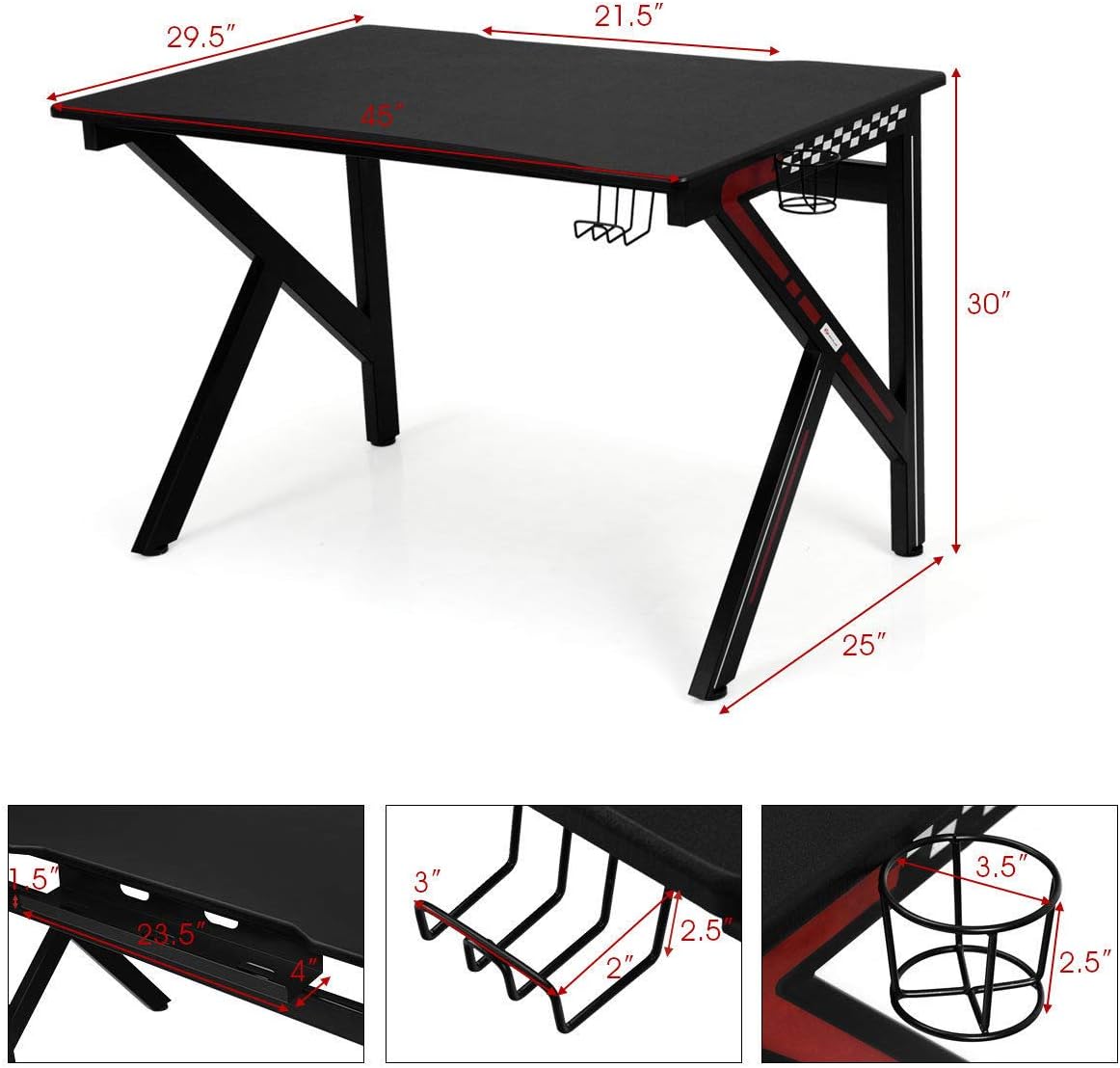
Image: Overview of the Giantex Gaming Desk with key dimensions labeled, including tabletop length (45"), width (29.5"), and height (30").
Operation and Features
The Giantex Gaming Desk is designed for comfort and functionality, suitable for gaming, office work, or study. Utilize its features to optimize your workspace.
Key Features:
- Ergonomic Surface: The desk features an ergonomically designed curved surface for enhanced comfort during extended use.
- Large Gaming Surface: The spacious tabletop (45”L x 29.5”W) accommodates monitors, keyboards, PCs, laptops, speakers, and other peripherals.
- K-Shaped Leg Design: Provides continuous stable support and high load-bearing capacity.
- Round Corners: Designed to prevent accidental bumps and reduce potential safety hazards.
- Under-Desk Cup Holder: Conveniently place beverages to prevent spills on the desk surface.
- Headphone/VR Headset Hook: Easily hang your headphones or VR headset for quick access and to keep your desk tidy.
- Rear Power Strip Holder: A dedicated area to store power boards or other supplies, helping to manage cables and save space.
- Adjustable Feet Pads: Circular feet pads prevent floor scratching and allow for minor height adjustments to stabilize the desk on uneven surfaces.

Image: Diagram highlighting key features of the desk, including the round corner, rear power strip holder, under-desk cup holder, headphone/VR headset hook, and circular floor feet.
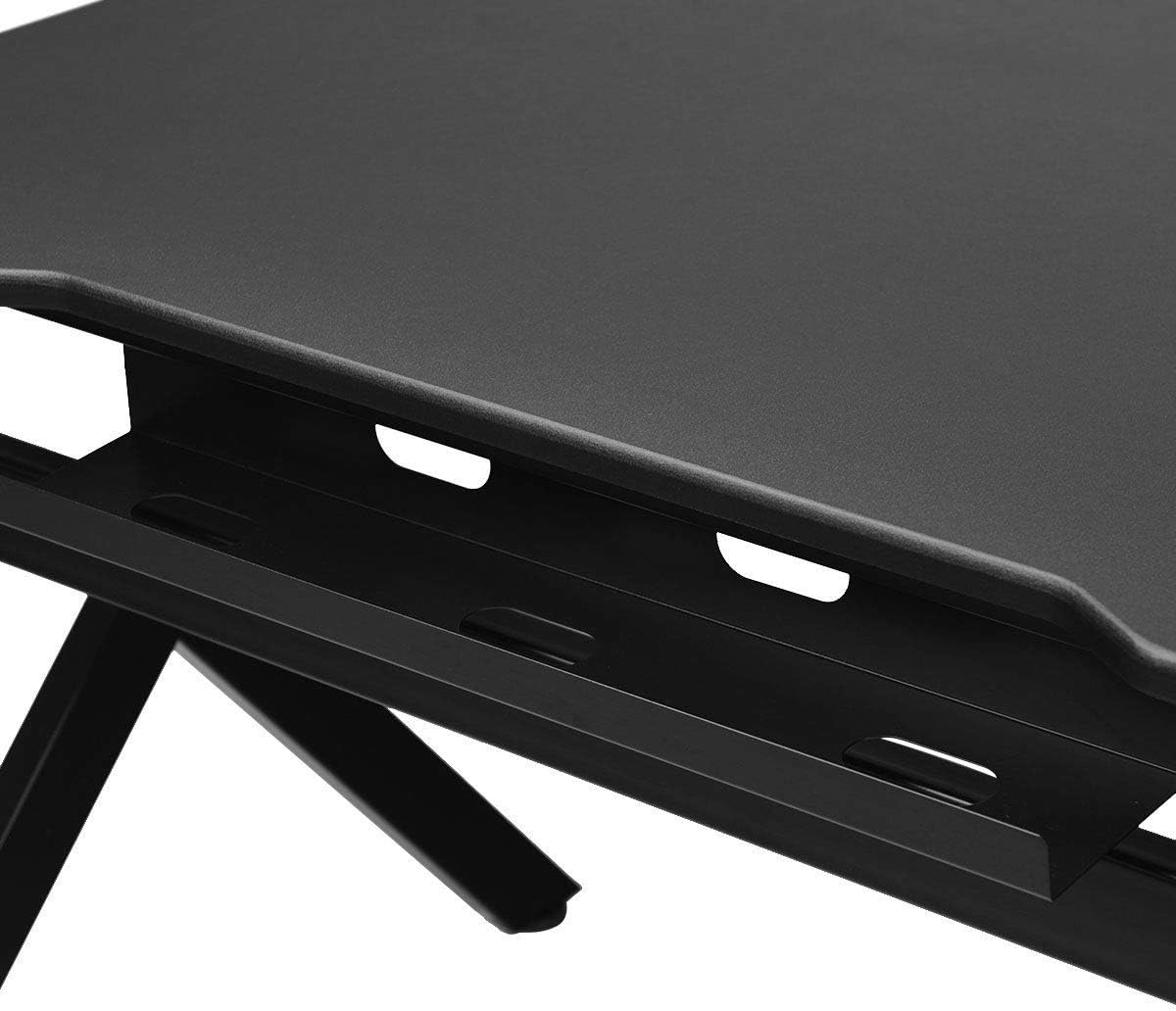
Image: Close-up view of the integrated rear power strip holder, designed for cable management.

Image: Close-up view of the convenient headphone/VR headset hook located under the desk surface.

Image: Close-up view of the under-desk cup holder, designed to securely hold beverages.
Care and Maintenance
Proper care and maintenance will help preserve the appearance and extend the lifespan of your Giantex Gaming Desk.
- Cleaning: The desk surface is made of high-quality density MDF with a coated PVC surface. It can be easily cleaned with a soft, damp cloth and mild soap or water. Avoid using harsh chemicals or abrasive cleaners, which may damage the finish.
- Spills: Wipe up spills immediately to prevent staining or damage to the surface.
- Protection: Use coasters for drinks and mouse pads to protect the desk surface from scratches and wear.
- Inspection: Periodically check all screws and connections to ensure they remain tight. Retighten if necessary to maintain stability.
Troubleshooting
If you encounter any issues with your Giantex Gaming Desk, refer to the following common solutions:
- Desk is Wobbly:
- Ensure all assembly screws are securely tightened.
- Adjust the circular feet pads on the bottom of the legs. Rotate them to level the desk on uneven floors.
- Scratches or Surface Damage:
- Minor scratches may be minimized with furniture polish or markers designed for black finishes.
- For significant damage, contact customer support for advice.
- Missing Parts:
- If any parts were missing upon delivery, contact Giantex customer support immediately with your purchase details.
Specifications
| Feature | Detail |
|---|---|
| Model Number | HW60238 |
| Brand | Giantex |
| Desk Design | Computer Desk (Gaming Style) |
| Overall Dimensions | Based on product images and feature bullets:
|
| Color | Black |
| Top Material Type | Engineered Wood (MDF with PVC surface) |
| Base Material | Alloy Steel |
| Item Weight | 23.1 Pounds |
| Special Features | Ergonomic Surface, K-Shaped Legs, Round Corners, Under-Desk Cup Holder, Headphone Hook, Rear Power Strip Holder, Adjustable Feet Pads |
| Assembly Required | Yes |
Warranty and Customer Support
Giantex is committed to providing high-quality products. For specific warranty information, please refer to the documentation included with your purchase or contact Giantex customer support directly.
- Returns: This product typically includes a 30-day easy return policy. Please check your purchase details for exact terms.
- Customer Support: For any questions, missing parts, or assistance with assembly or product issues, please contact Giantex customer support. You can often find contact information on the seller's page or your order confirmation.
- Online Resources: Visit the official Giantex store on Amazon for additional product information and support: Giantex Store