
Aurosports 10-30x40
Aurosports 10-30x40 Zoom Monocular Instruction Manual
Model: 10-30x40
Brand: Aurosports
1. Introduction
Thank you for choosing the Aurosports 10-30x40 Zoom Monocular. This device is designed to provide clear, magnified views for various outdoor activities such as bird watching, hunting, traveling, and camping. This manual provides essential information for the proper setup, operation, and maintenance of your monocular.

Image 1.1: The Aurosports 10-30x40 Zoom Monocular, a compact optical device for magnified viewing.
2. Product Features
- 10-30x Adjustable Magnification: Allows for variable zoom from 10x to 30x to observe objects at different distances.
- 40mm Objective Lens: A large objective lens diameter ensures ample light collection for brighter images, even in low-light conditions.
- BAK4 Prism & FMC Lens: Equipped with advanced BAK4 prism and fully multi-coated (FMC) lenses for superior light transmission, contrast, and color fidelity.
- Compact and Portable Design: Measuring approximately 153 mm in length and weighing 162 grams, it is designed for easy carrying in a pocket or bag.
- Waterproof & Fog Proof: Nitrogen-filled and sealed to prevent internal fogging and water damage, suitable for use in various weather conditions.
- Rubber Armored Body: Provides shock resistance and a secure grip.
- Tripod Mountable: Features a standard tripod screw hole for stable viewing.

Image 2.1: Labeled diagram illustrating the key components of the monocular, including the eye lens, adjustable eyecups, magnification adjustment wheel, concealed rope and tripod connector, adjustable focus ring, and object lens.

Image 2.2: Comparison showing the visual difference between BAK7 and BAK4 prisms, highlighting the superior clarity and color of BAK4 prisms used in this monocular.
3. Package Contents
Upon opening the package, please ensure all items are present:
- Aurosports 10-30x40 Zoom Monocular
- Carrying Pouch
- Lens Cleaning Cloth
- Lanyard
- User Manual (this document)
4. Setup
- Remove Dust Covers: Carefully remove the dust covers from both the objective lens and the eyepiece.
- Adjust Eyecup: If you do not wear glasses, rotate the eyecup counter-clockwise to extend it to a comfortable height. If you wear glasses, keep the eyecup in its retracted position.
- Set Initial Zoom: Confirm the zoom wheel is set to the 10x position. This provides the widest field of view and makes it easier to locate your target.
- Extend Monocular: Select an object to view. Aim the monocular at the object, then pull the monocular body to its longest extended position.
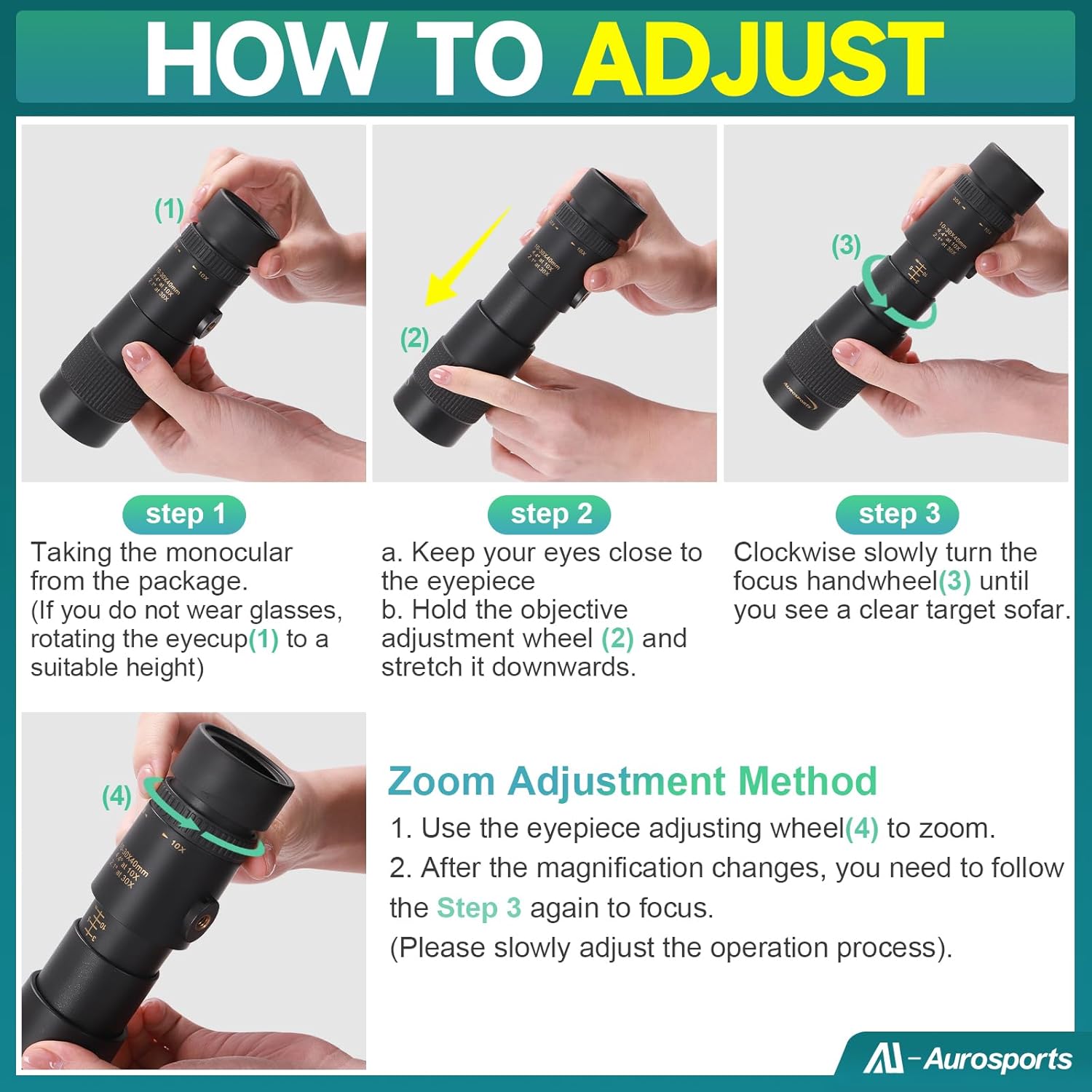
Image 4.1: Visual guide demonstrating the steps for adjusting the monocular, including extending the body, adjusting the eyecup, and using the focus wheel.
Video: Aurosports Monocular Video Focusing Manual
Video 4.1: This video provides a detailed demonstration of how to properly focus the Aurosports monocular, guiding users through the adjustment process for clear viewing.
5. Operating Instructions
- Focusing: While looking through the eyepiece, slowly turn the focus wheel (located near the objective lens) clockwise or counter-clockwise until the image becomes clear and sharp.
- Zooming: To adjust the magnification, rotate the magnification adjustment ring (zoom wheel) to your desired power between 10x and 30x. After changing the magnification, you may need to re-adjust the focus wheel to achieve a sharp image.
- Using with a Smartphone Adapter: The monocular can be attached to a smartphone adapter (sold separately) and a tripod for stable viewing and photography. Secure the monocular to the adapter, align your phone's camera with the eyepiece, and then attach the assembly to a tripod.

Image 5.1: Illustrates the effect of 10x, 20x, and 30x zoom on a distant object, demonstrating the variable magnification capability of the monocular.

Image 5.2: Shows the monocular being used with a smartphone adapter and tripod, demonstrating how to attach a phone for magnified photography or video recording.
Video: Aurosports Zoom Monocular For Adults
Video 5.1: This video showcases the Aurosports Zoom Monocular in various outdoor settings, demonstrating its ease of use and the clarity of its magnified views for adults.
6. Maintenance
- Cleaning Lenses: Use the provided lens cleaning cloth or a soft, lint-free cloth to gently wipe the lenses. For stubborn smudges, a small amount of lens cleaning fluid can be applied to the cloth, not directly to the lens. Avoid using abrasive materials or excessive force.
- Storage: When not in use, store the monocular in its carrying pouch in a cool, dry place. Ensure the dust covers are in place to protect the lenses from dust and scratches.
- Waterproof/Fog Proof: While the monocular is designed to be waterproof and fog-proof, avoid submerging it in water or exposing it to extreme temperature changes unnecessarily. If it gets wet, wipe it dry with a soft cloth.
7. Troubleshooting
- Blurry Image: Ensure the focus wheel is properly adjusted. Extend the monocular fully. If wearing glasses, try adjusting the eyecup.
- Difficulty Focusing: Make sure the monocular is fully extended. Start focusing at 10x magnification, then zoom in and fine-tune the focus.
- Image Not Bright Enough: Ensure the objective lens is clean. The monocular performs best in moderate to good light conditions; it is not designed for completely dark environments.
- Unstable Image at High Magnification: At 30x zoom, even slight hand movements can cause image instability. For best results at high magnification, use a tripod.
8. Specifications
| Feature | Specification |
|---|---|
| Model Number | 10-30x40 |
| Magnification | 10-30x (Adjustable) |
| Objective Lens Diameter | 40 mm |
| Eyepiece Lens Description | Prism |
| Optical Tube Length | 1000 Millimeters |
| Focus Type | Stretch or Rotate focus |
| Item Weight | 5.7 ounces (162 Grams) |
| Product Dimensions | 7.3 x 2.6 x 2.6 inches (1.57"D x 0.39"W x 1.18"H) |
| Telescope Mount Description | Tripod Mount |
| Compatible Devices | Smartphone (with adapter) |
9. Safety Information
- Do Not Look Directly at the Sun: Never look directly at the sun through the monocular, as this can cause severe and permanent eye damage.
- Keep Out of Reach of Children: This product is not a toy. Keep it away from small children to prevent misuse or accidental injury.
- Handle with Care: Avoid dropping or subjecting the monocular to strong impacts, which can damage the optical components.
Ask a question about this manual
Ask about setup, troubleshooting, compatibility, parts, safety, or missing instructions. Manuals+ will review the question and use this page’s manual context to help answer it.