
GREX B601 R N-Com
Nolan B601 R N-Com Bluetooth Communication System
Model: B601 R N-Com | Brand: Nolan N-Com
1. Introduction and Overview
The Nolan B601 R N-Com is an advanced Bluetooth communication system designed for seamless integration into compatible Nolan helmets. It provides a comprehensive solution for motorcycle riders, enabling communication, navigation, and entertainment on the go. This system is engineered for ease of use, even with motorcycle gloves, and offers robust performance for both solo riders and groups.
Key functionalities include rider-to-passenger intercom, bike-to-bike communication, phone calls, GPS navigation audio, and music streaming. The B601 R N-Com enhances the riding experience by keeping you connected and informed.

Figure 1.1: The Nolan B601 R N-Com Bluetooth Communication System packaging, showcasing the control unit and a compatible helmet.
2. Features
The B601 R N-Com system is equipped with a range of features to optimize your riding communication:
- Bluetooth Connectivity: Connects wirelessly to mobile phones, GPS devices, and MP3 players for calls, navigation, and music.
- Driver/Passenger Intercom: Enables clear communication between the rider and a passenger.
- Bike-to-Bike Intercom: Supports communication between two motorcycles up to 250 meters in open terrain without obstacles. Features one-to-one conversations and a "Call motorcycle" function.
- Music Sharing: Allows sharing of music with a passenger.
- Voice Prompts: Provides audible feedback for system status and functions.
- Compatibility: Specifically designed for integration with Nolan N100-5, N104, N87, N70-2, N44, and N40 helmet models.
- Ergonomic Keypad: Features a 3-button keypad designed for easy operation even while wearing motorcycle gloves.
- Software Updates: Supports updates via Windows and Mac computers to ensure optimal performance and access to new features.

Figure 2.1: Overview of the N-Com system's capabilities, including various intercom modes, phone connectivity, multimedia options, and additional features.
3. Package Contents
Upon opening the package, verify that all the following components are present:
- Nolan B601 R N-Com Control Unit
- Microphone (boom or wired, depending on helmet type)
- Speakers (left and right)
- USB Cable for charging and data transfer
- Mounting Hardware and Adhesives (if applicable)
- User Manual (this document)

Figure 3.1: The N-Com system's microphone, an essential component for voice communication.
4. Setup and Installation
The B601 R N-Com system is designed for straightforward installation into compatible Nolan helmets. Refer to your specific helmet model's instructions for precise speaker and microphone placement within the helmet's interior.
- Prepare the Helmet: Remove the helmet's inner padding as instructed by your helmet's manual to access the speaker pockets and cable routing channels.
- Install Speakers: Place the speakers into the designated ear pockets within the helmet. Ensure they are positioned comfortably and do not cause pressure points.
- Install Microphone: Secure the microphone in the appropriate location. For full-face helmets, this is typically near the mouth. For modular or open-face helmets, a boom microphone is usually used. Route the microphone cable neatly.
- Mount Control Unit: Attach the B601 R N-Com control unit to the side of the helmet using the provided mounting bracket. Ensure it is securely fastened and accessible for operation.
- Connect Cables: Connect the speaker and microphone cables to the control unit. Ensure all connections are firm.
- Reassemble Helmet: Carefully reinsert the helmet's inner padding, ensuring no cables are pinched or exposed.

Figure 4.1: A Nolan helmet with the B601 R N-Com control unit visibly installed on the left side.

Figure 4.2: Rear perspective of a Nolan helmet, illustrating the integrated communication system and internal cable management.
5. Operating Instructions
The B601 R N-Com control unit features an intuitive 3-button keypad for easy operation. Familiarize yourself with the button functions before riding.
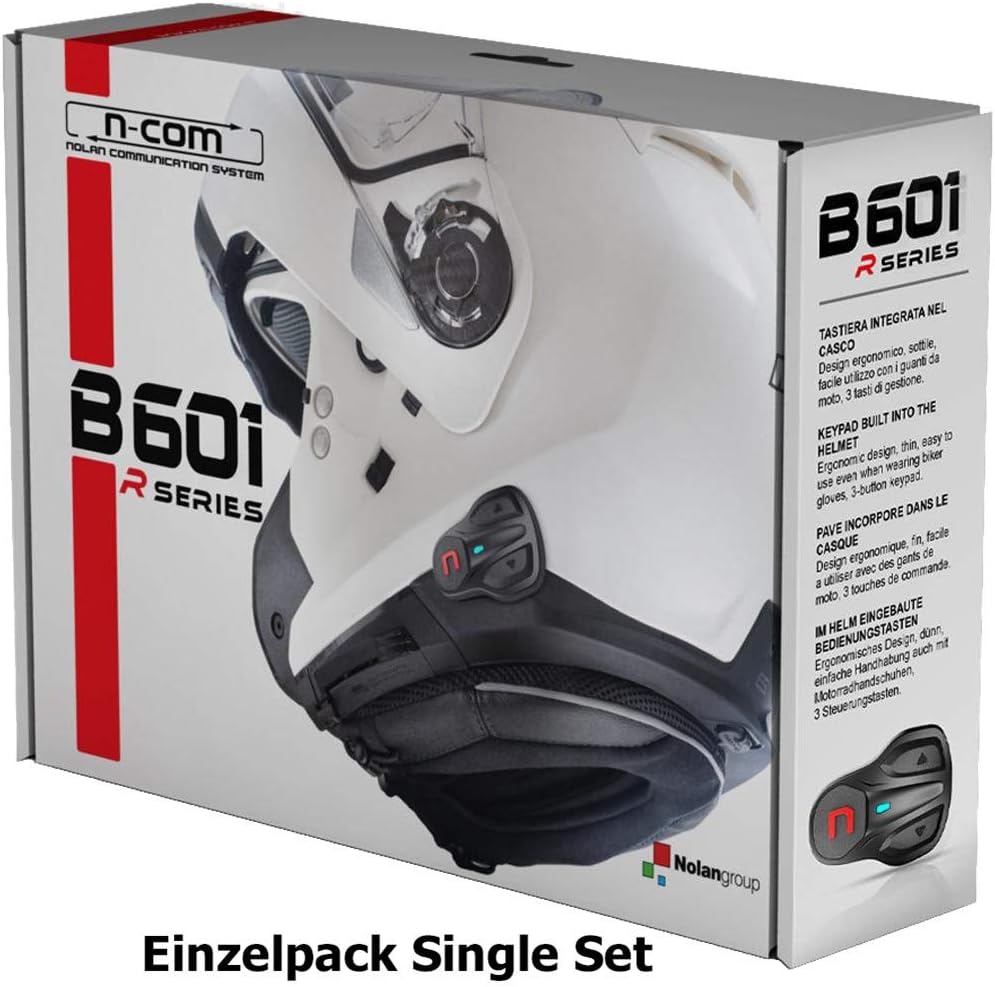
Figure 5.1: The ergonomic 3-button keypad of the B601 R N-Com control unit, designed for easy gloved operation.
5.1. Power On/Off
- To Power On: Press and hold the central button until you hear an audible confirmation.
- To Power Off: Press and hold the central button until you hear an audible confirmation of shutdown.
5.2. Bluetooth Pairing
To connect your B601 R N-Com system with a mobile phone, GPS, or MP3 player:
- Ensure the B601 R N-Com is powered on.
- Activate Bluetooth pairing mode on your device (e.g., phone settings).
- On the B601 R N-Com, enter pairing mode (refer to the full digital manual for specific button combinations, usually a long press of a specific button).
- Select "Nolan B601 R N-Com" from the list of available devices on your phone/GPS.
- Confirm pairing if prompted.
5.3. Intercom Functions
- Driver/Passenger Intercom: Once paired, communication is typically initiated by a short press of a specific button.
- Bike-to-Bike Intercom: For motorcycle-to-motorcycle communication, both units must be within range (up to 250m) and paired. Follow the pairing procedure for intercom units.
5.4. Music and GPS Audio
- Music Playback: Once paired with an MP3 player or phone, music can be controlled directly from the B601 R N-Com unit (play/pause, skip tracks).
- GPS Instructions: Audio navigation prompts from a paired GPS device will automatically override other audio sources.
6. Maintenance
Proper maintenance ensures the longevity and optimal performance of your Nolan B601 R N-Com system.
- Cleaning: Use a soft, damp cloth to clean the control unit. Avoid harsh chemicals or abrasive materials. Do not immerse the unit in water.
- Battery Care: Charge the unit regularly, especially if not used for extended periods. Avoid fully discharging the battery frequently.
- Software Updates: Periodically check the official Nolan N-Com website for firmware updates. Updates can improve performance, add new features, and resolve bugs. Connect the unit to your computer via the provided USB cable for updates.
- Storage: Store the unit in a cool, dry place when not in use.
7. Troubleshooting
If you encounter issues with your B601 R N-Com system, try the following troubleshooting steps:
| Problem | Possible Cause / Solution |
|---|---|
| No Power / Unit Not Turning On | Battery is discharged. Charge the unit fully. Ensure the charging cable is properly connected. |
| Cannot Pair with Device | Ensure both devices are in pairing mode. Move devices closer. Turn off and on Bluetooth on both devices. Clear previous pairings and try again. |
| Poor Audio Quality / No Sound | Check speaker and microphone connections. Ensure speakers are correctly positioned in the helmet. Adjust volume. Check for obstructions to the microphone. |
| Intercom Not Working | Ensure both intercom units are powered on and within range. Re-pair the intercom units. Check for obstacles between units. |
| Unit Freezes / Unresponsive | Perform a soft reset (refer to the full digital manual for specific instructions, usually a long press of a combination of buttons). Ensure firmware is up to date. |
For more detailed troubleshooting or advanced issues, please refer to the comprehensive digital user manual available on the official Nolan N-Com website.
8. Specifications
| Feature | Detail |
|---|---|
| Model Name | B601 R N-Com |
| Bluetooth Version | (Assumed modern, e.g., Bluetooth 4.1 or higher for features listed) |
| Intercom Range | Up to 250 meters (bike-to-bike, in open terrain) |
| Compatibility | Nolan N100-5, N104, N87, N70-2, N44, N40 helmets |
| Control Interface | 3-button ergonomic keypad |
| Connectivity | Mobile phone, GPS, MP3 player |
| Software Updates | Via USB (Windows/Mac compatible) |
| Package Dimensions | 26 x 17.5 x 5.9 cm |
| Weight | 320 g (package weight) |
| Manufacturer | Nolan Helmets |

Figure 8.1: Comprehensive feature comparison table for various Nolan N-Com communication systems, including the B601 R.
9. Warranty and Support
The Nolan B601 R N-Com system is covered by a manufacturer's warranty against defects in materials and workmanship. Please retain your proof of purchase for warranty claims.
For detailed warranty information, technical support, frequently asked questions (FAQs), and the latest software updates, please visit the official Nolan N-Com website:
Visit Nolan N-Com Official Website
Regularly checking the website for updates is recommended to ensure your system operates with the latest features and optimal performance.