
Introduction
The Kithouse K380A Wireless Microphone System provides dual UHF handheld cordless microphones with a rechargeable Bluetooth receiver, designed for various audio applications such as karaoke, speeches, meetings, and performances. This system offers a plug-and-play experience with no complex setup required.
What's in the Box
- 2 x Kithouse K380A Wireless Microphones
- 1 x Rechargeable Bluetooth Receiver (K380A RX)
- 1 x USB Charging Cable
- 2 x AA Batteries (for microphones)
- 2 x Microphone Windscreen (foam covers)
- 1 x User Manual
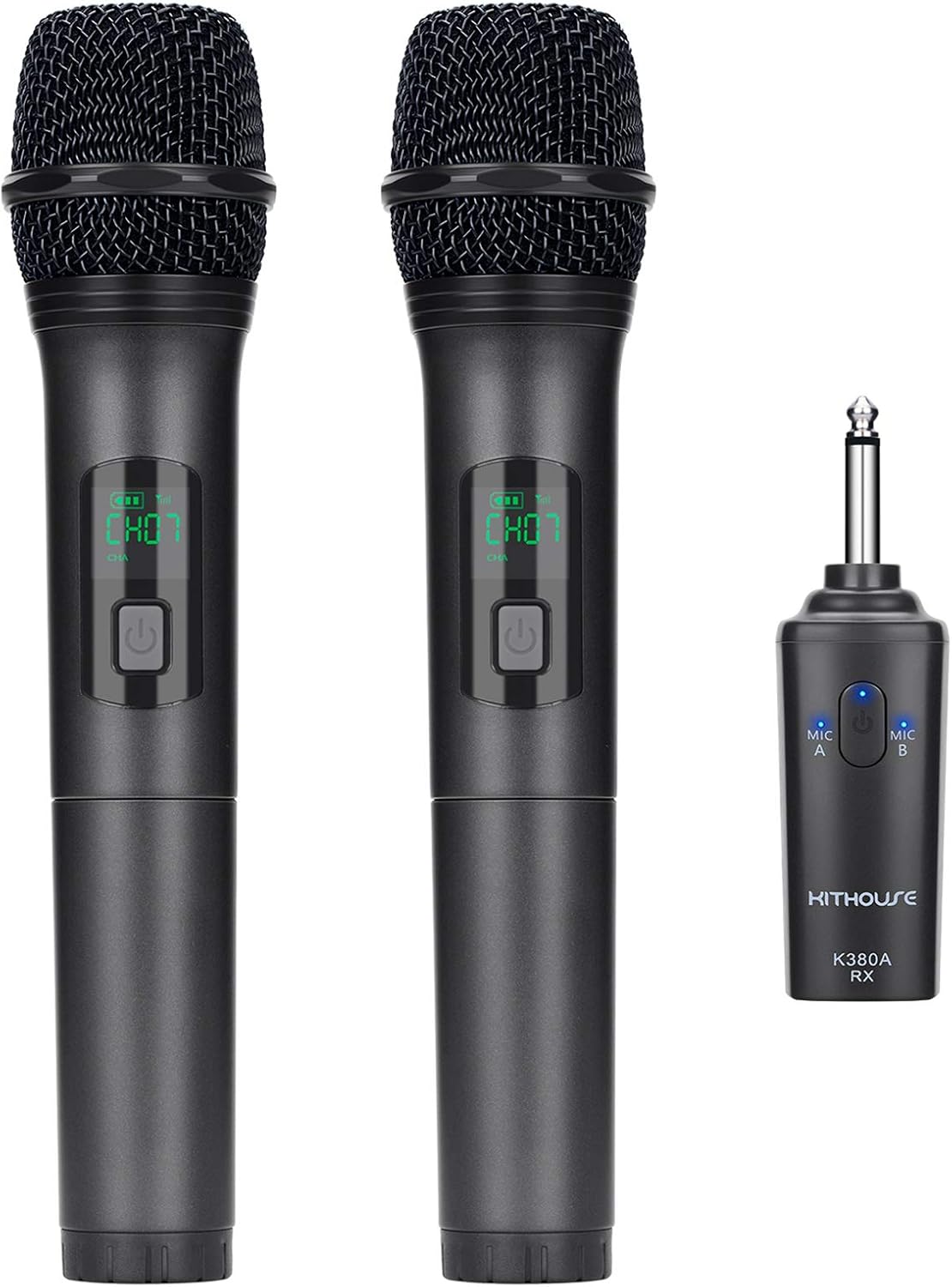
Setup
- Powering the Microphones: Each microphone requires 2 x AA batteries (included). Open the battery compartment at the bottom of the microphone and insert the batteries, observing the correct polarity.
- Charging the Receiver: The K380A receiver has a built-in rechargeable battery. Use the provided USB charging cable to charge the receiver. A full charge is recommended before first use.
- Connecting the Receiver: Insert the 1/4 inch (6.35mm) audio output of the receiver into the MIC jack of your audio device (e.g., outdoor karaoke speaker, PA speaker system, power amplifier). Note: This system is not designed for direct connection to Bluetooth speakers, phones, or PCs for microphone audio output. Ensure you use the MIC jack, not an AUX jack.
- Initial Pairing: The microphones and receiver use UHF connection technology and are typically pre-paired. Simply power on both the microphones and the receiver. The system should connect automatically. If no sound is heard, refer to the Troubleshooting section for re-pairing instructions.

Operating Instructions
Microphone Operation:
- Power On/Off: Press and hold the power key on the microphone to turn it on or off.
- Channel Selection: The system features 10 UHF variable channels (CH01-CH10). The current working channel is displayed on the microphone's LED screen. If interference occurs, you can change the channel.
- Mute Function: The microphone has a mute function. Refer to the specific button layout on the microphone for activation.
Receiver Operation:
- Power On/Off: Use the Power On/Off button on the receiver.
- Bluetooth Connectivity (for Background Music): The receiver has a Bluetooth function that allows you to connect your phone or other Bluetooth devices to play background music. The receiver will then transmit both the microphone voice and the background music signal to your connected speaker. The Bluetooth range is typically 16ft - 33ft outdoors.
- Connection Indicators: The receiver features connection indicators for Microphone A and Microphone B, as well as a low battery indicator.
- Power Saving Function: The receiver includes a power-saving function that activates after 5 minutes of no use.

Maintenance
- Battery Replacement: Replace AA batteries in the microphones when the battery indicator shows low power.
- Receiver Charging: Recharge the receiver's built-in battery regularly to ensure optimal performance.
- Cleaning: Use a soft, dry cloth to clean the microphones and receiver. Avoid using harsh chemicals or abrasive materials.
- Protection: Keep the microphones and receiver away from dust, moisture, and direct sunlight. Use the included microphone windscreens to protect the microphone heads from dust and spit, which also helps improve sound quality.

Troubleshooting
- No Sound from Microphone:
- Ensure both the microphone and receiver have sufficient power (check battery indicators).
- Verify the receiver is inserted into the MIC jack of your audio device, not the AUX jack.
- If the issue persists, you may need to re-pair the microphone and receiver. Refer to the re-pairing instructions in the full user manual (if available, otherwise imply a simple power cycle).
- Interference or Poor Sound Quality:
- Change the UHF channel on the microphone to one of the 10 available variable channels (CH01-CH10).
- Ensure the microphone and receiver are within the optimal operating range (Indoor >50ft, Outdoor >100ft).
- Minimize obstacles between the microphone and receiver.
- Bluetooth Connection Issues (for background music):
- Ensure the receiver's Bluetooth is enabled and discoverable.
- Check that your phone or Bluetooth device is within the Bluetooth range (16ft - 33ft Outdoor).
- Disconnect and reconnect the Bluetooth connection.
Specifications
| Feature | Detail |
|---|---|
| Model | K380A |
| Microphone Form Factor | Handheld |
| Connectivity Technology | UHF Wireless (Microphone to Receiver), Bluetooth (Receiver for Background Music) |
| Connector Type | 6.35 mm Jack |
| Number of Channels | 10 UHF variable channels (CH01-CH10) |
| Frequency Response | 50Hz - 18kHz |
| Signal-to-Noise Ratio (SNR) | >70dB |
| Microphone Power Source | 2 x AA batteries (included) |
| Receiver Power Source | Built-in rechargeable battery |
| Indoor Range | >50ft |
| Outdoor Range | >100ft |
| Bluetooth Range (Receiver) | 16ft - 33ft (Outdoor) |
| Material | Iron plate and zinc alloy |
| Item Weight | 470 Grams (1.04 pounds) |
| Product Dimensions (L x W x H) | 9.6 x 1.9 x 1.9 inches |
Warranty and Support
KITHOUSE offers a 1-year warranty and free replacement service for the K380A Wireless Microphone System. If you have any questions or encounter issues with your product, please contact KITHOUSE customer support. Your feedback is valuable for continuous product improvement.
For support, please refer to the contact information provided with your product packaging or visit the official Kithouse website.