
Akozon MS6508
Akozon MS6508 Digital Thermo-hygrometer User Manual
Model: MS6508
Brand: Akozon
1. Introduction
The Akozon MS6508 is a professional digital thermo-hygrometer designed for accurate measurement of ambient temperature, relative humidity, dew point temperature, and wet bulb temperature. This versatile instrument is an essential tool for environmental monitoring in various applications, providing reliable data for optimal conditions.

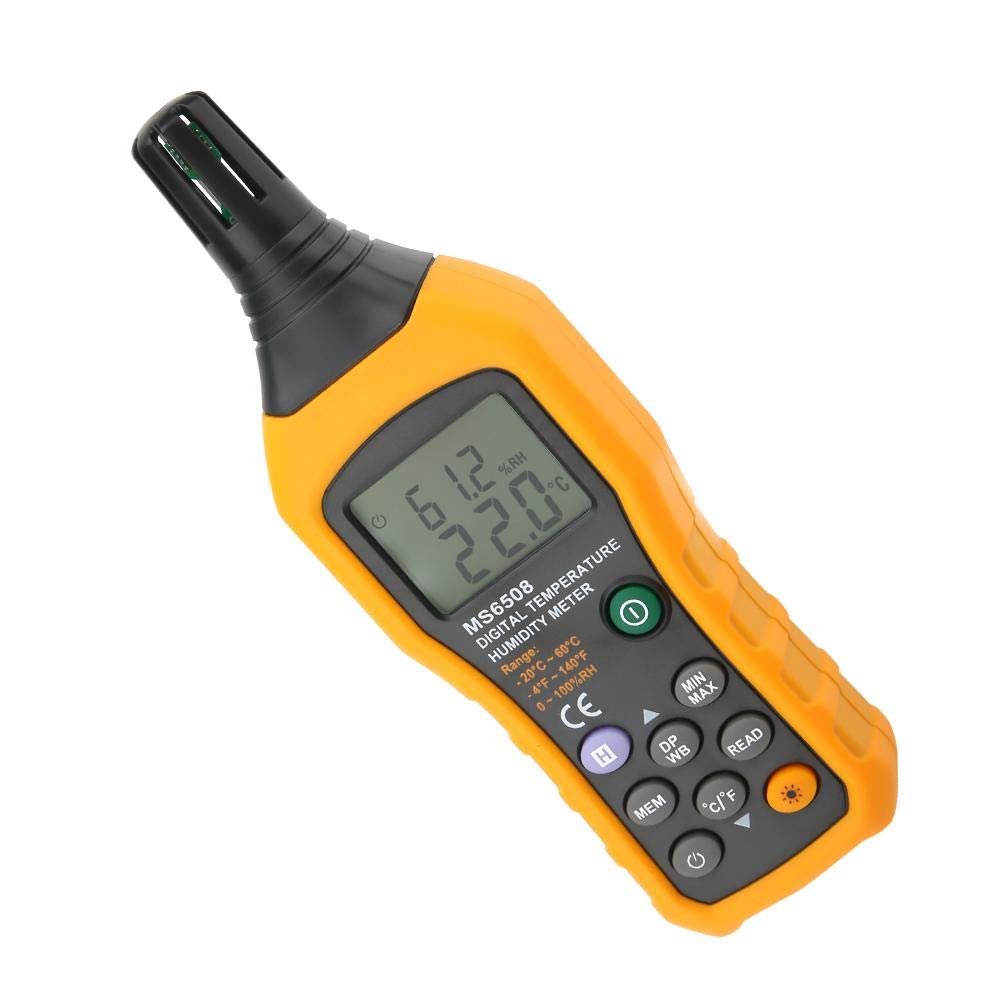
Front view of the Akozon MS6508 Digital Thermo-hygrometer, displaying its clear LCD screen and ergonomic design.
2. Key Features
- Multi-functional Measurement: Accurately measures ambient temperature, relative humidity, dew point temperature, and wet bulb temperature.
- High-Precision Sensor: Equipped with a professional temperature and humidity sensor for fast response and reliable readings.
- Clear LCD Display: Large, easy-to-read digital display with backlight for visibility in various lighting conditions.
- Data Hold Function: Freeze the current reading on the display for easy recording.
- MAX/MIN Recording: Records and displays maximum and minimum measured values.
- Data Storage: Capable of storing up to 99 data records for later review.
- Unit Conversion: Easily switch between Celsius (°C) and Fahrenheit (°F).
- Auto Power Off: Conserves battery life by automatically shutting down after a period of inactivity.
- Durable Construction: Features a double injection body (ABS+TPE) for enhanced durability, anti-drop, and wear-resistant properties.

The Akozon MS6508 is suitable for a wide range of applications including nursery planting, storage rooms, warehouse storage, experimental use, and animal husbandry.
3. Product Components
Familiarize yourself with the various parts and controls of your MS6508 device:

This diagram illustrates the key components and controls of the MS6508, including the sensor, LCD display, and various function buttons.
- Sensor: Located at the top, responsible for temperature and humidity measurements.
- Clear LCD Display: Shows all measurement readings and indicators.
- ON/OFF Button: Powers the device on or off.
- H (Data Hold) Button: Freezes the current reading on the display.
- MIN/MAX Button: Toggles between maximum, minimum, and current readings.
- DP/WB Button: Switches between Dew Point and Wet Bulb temperature displays.
- MEM (Memory) Button: Stores the current reading into memory.
- READ (Data Recall) Button: Recalls stored data from memory.
- °C/°F Button: Changes the temperature unit between Celsius and Fahrenheit.
- Backlight Button: Activates or deactivates the display backlight.
- Auto Off: The device automatically powers off after a period of inactivity to save battery.

Detailed view of the high-precision temperature and humidity sensor, ensuring accurate and fast measurements.
An inside look at the special chip and high-performance processor, crucial for accurate data processing.

Illustration of the double injection body (ABS+TPE) design, providing robust protection against drops and wear.
4. Specifications
| Parameter | Value |
|---|---|
| Product Dimensions | 7.17 x 2.36 x 1.18 inches (184 x 60 x 29 mm) |
| Item Weight | 9.12 ounces (258.5 g) |
| Battery Description | Alkaline (6 Volts) |
| Mounting Type | Tabletop |
| Operating Humidity Range | 0-100% RH |
| Temperature Accuracy | ±1°C |
| Operating Temperature Range | -20°C to 60°C (-4°F to 140°F) |
| Manufacturer | Akozon |
| Country of Origin | China |

The physical dimensions of the Akozon MS6508, approximately 184mm (7.2in) in height, 60mm (2.4in) in width, and 29mm (1.1in) in depth.
5. Setup and Battery Installation
Before using your Akozon MS6508, you will need to install the batteries.
- Locate the battery compartment on the back of the device.
- Open the battery compartment cover by sliding it or unscrewing it, depending on the design.
- Insert four (4) AAA alkaline batteries (not included) into the compartment, ensuring correct polarity (+ and -) as indicated inside the compartment.
- Close the battery compartment cover securely.
- The device is now ready for use.
6. Operating Instructions
Follow these steps to operate your Akozon MS6508:
6.1 Power On/Off
- Press the ON/OFF button to turn the device on.
- Press and hold the ON/OFF button for a few seconds to turn the device off.
6.2 Measurement Modes
- Upon powering on, the device will typically display ambient temperature and relative humidity.
- Press the DP/WB button once to display the Dew Point Temperature.
- Press the DP/WB button again to display the Wet Bulb Temperature.
- Press DP/WB a third time to return to the ambient temperature and humidity display.
6.3 Unit Conversion (°C/°F)
- Press the °C/°F button to switch the temperature unit between Celsius and Fahrenheit.
6.4 Data Hold (H)
- Press the H button to freeze the current reading on the display. The "HOLD" indicator will appear.
- Press the H button again to release the data hold function and resume live readings.
6.5 Maximum/Minimum (MIN/MAX)
- Press the MIN/MAX button once to display the maximum recorded temperature and humidity since power-on. The "MAX" indicator will appear.
- Press the MIN/MAX button again to display the minimum recorded temperature and humidity. The "MIN" indicator will appear.
- Press the MIN/MAX button a third time to return to live readings.
6.6 Data Memory (MEM/READ)
- To store a reading: Press the MEM button. The display will briefly show the memory location number (e.g., "01") and then return to live readings. The device can store up to 99 data sets.
- To recall stored data: Press the READ button. The display will show the first stored data set.
- Press READ repeatedly to cycle through all stored data sets.
- To exit memory recall mode, press the MEM button or wait for the device to auto-off.

The MS6508 offers 99 data record storage, meeting a variety of environmental monitoring needs for ambient, dew point, and wet bulb temperatures.
6.7 Backlight
- Press the Backlight button (sun icon) to turn the display backlight on or off. This is useful in low-light conditions.

The backlight design ensures the display is clear and readable whether it's day or night, making it a very handy temperature and humidity meter.
7. Maintenance
Proper care and maintenance will ensure the longevity and accuracy of your Akozon MS6508.
- Cleaning: Wipe the device with a soft, dry cloth. Do not use abrasive cleaners, solvents, or corrosive chemicals, as these may damage the casing or internal components.
- Sensor Care: Keep the sensor area at the top of the device clean and free from dust, debris, or moisture. Avoid touching the sensor directly.
- Battery Replacement: Replace batteries when the low battery indicator appears on the display to ensure continuous accurate operation. Remove batteries if the device will not be used for an extended period to prevent leakage.
- Storage: Store the device in a cool, dry place, away from direct sunlight, extreme temperatures, and high humidity.
8. Troubleshooting
If you encounter issues with your Akozon MS6508, refer to the following common problems and solutions:
| Problem | Possible Cause | Solution |
|---|---|---|
| Device does not power on | Dead or incorrectly installed batteries | Check battery polarity or replace with new batteries. |
| Inaccurate readings | Sensor is dirty or obstructed; Device is outside operating range | Clean the sensor carefully. Ensure the device is used within its specified temperature and humidity ranges. |
| Display is dim or flickering | Low battery power | Replace batteries. |
| Cannot store or recall data | Memory full; Incorrect button sequence | The device has 99 memory slots. Ensure you are pressing MEM to store and READ to recall. If memory is full, you may need to clear it (refer to advanced functions if available, or overwrite older data). |
9. Warranty Information
Akozon products are manufactured to high-quality standards. For specific warranty terms and conditions, including duration and coverage, please refer to the warranty card included with your product packaging or visit the official Akozon website. Keep your purchase receipt as proof of purchase for any warranty claims.
10. Customer Support
If you require further assistance, technical support, or have questions not covered in this manual, please contact Akozon customer service. You can typically find contact information on the official Akozon website or through the retailer from whom you purchased the product.
For the latest information and support resources, please visit the Akozon Store on Amazon.
Related Documents - MS6508
 |
Marathon Professional Collection Comfort Index Thermo-Hygrometer User Manual User manual for the Marathon Professional Collection Comfort Index Thermo-Hygrometer. Details features, specifications, setup, operation, and warnings for indoor temperature and humidity monitoring. |
 |
Govee H5074 Smart Thermo-Hygrometer User Manual User manual for the Govee H5074 Smart Thermo-Hygrometer, detailing its features, specifications, installation, app connection, usage, and troubleshooting. |
 |
Hygrometer Thermometer Instructions User manual and specifications for the Thlevel digital thermometer and hygrometer, featuring temperature and humidity measurement details. |
 |
PAIRIER Digital Thermo-Hygrometer User Manual: Features, Operation, and Comfort Indicator Detailed user manual for the PAIRIER digital thermo-hygrometer. Learn about its features, temperature and humidity measurement ranges, operation methods, and comfort indicator for indoor environments. |
 |
Govee H5074 Smart Thermo-Hygrometer User Manual User manual for the Govee H5074 Smart Thermo-Hygrometer. Learn about its features, specifications, installation, app connection, troubleshooting, and customer service. |
 |
KD50 Thermo-hygrometer User Manual User manual for the KD50 Thermo-hygrometer, providing detailed product specifications and key operational functions for temperature and humidity monitoring. |
Ask a question about this manual
Ask about setup, troubleshooting, compatibility, parts, safety, or missing instructions. Manuals+ will review the question and use this page’s manual context to help answer it.