
Introduction
The YHAAVALE 6203 Car Amplifier Police Siren System is a comprehensive emergency electronic PA system designed for various vehicle applications. This manual provides detailed instructions for the proper installation, operation, and maintenance of your new siren and loudspeaker system to ensure optimal performance and longevity.
Safety Information
Please read all safety warnings and instructions carefully before installation and operation to prevent injury or damage to the product or vehicle.
- Electrical Safety: Ensure the vehicle's power is disconnected before installation. Incorrect wiring can cause electrical shock, fire, or damage to the system and vehicle.
- Voltage Compatibility: This system operates on DC12V. Do not connect to any other voltage supply.
- Sound Levels: The siren produces high sound pressure levels (115-122dB). Prolonged exposure to loud sounds can cause hearing damage. Use hearing protection when testing or operating the siren in close proximity.
- Mounting: Securely mount all components to prevent detachment during vehicle movement. Ensure mounting locations do not obstruct airbags or other safety features.
- Ventilation: Ensure the amplifier is installed in a location with adequate ventilation to prevent overheating.
- Water Exposure: Protect the amplifier and controller from direct water exposure. The speaker is designed for outdoor use but avoid submerging it.
Product Components
The YHAAVALE 6203 system includes the following components:
- 1x 100W Siren Amplifier
- 1x 100W Ultra Slim Metal Speaker
- 1x Handheld Remote Controller with Microphone
- 1x Wiring Harness
- Mounting Accessories
- 1x User Manual (this document)

Figure 1: Overview of the YHAAVALE 6203 Car Amplifier Police Siren System, showing the amplifier, speaker, handheld controller, and wiring harness.

Figure 2: Detailed view of the packing list, illustrating each component included in the YHAAVALE 6203 system: (1) Speaker, (2) Amplifier, (3) Handheld Controller with holder, (4) Controller Cable, (5) Wiring Harness.

Figure 3: The YHAAVALE 6203 ultra-slim metal speaker and the 100W siren amplifier, showcasing their compact design.

Figure 4: A close-up view of the YHAAVALE 6203 ultra-slim metal speaker, highlighting its robust construction and warning label.
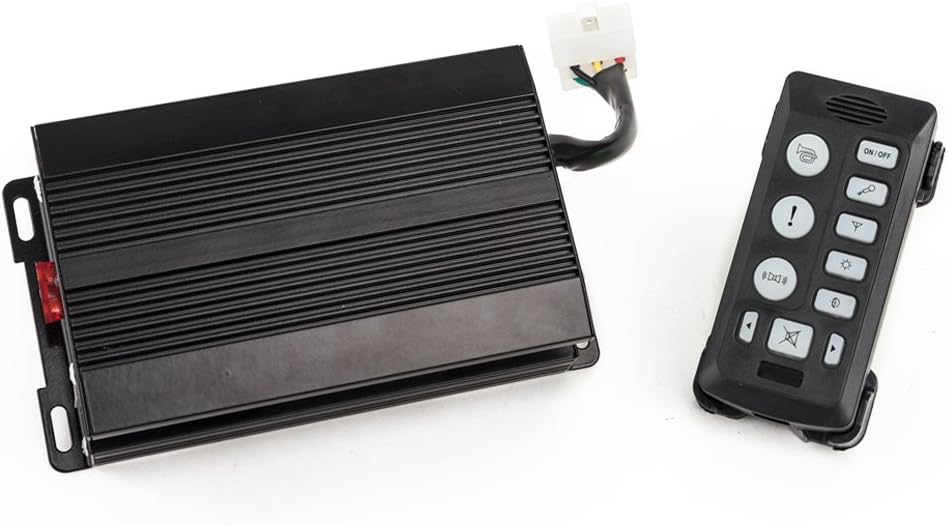
Figure 5: The YHAAVALE 6203 amplifier and the handheld remote controller, illustrating their connection and compact form factor.

Figure 6: The YHAAVALE 6203 handheld remote controller alongside its mounting bracket, showing the various control buttons for siren tones and PA functions.
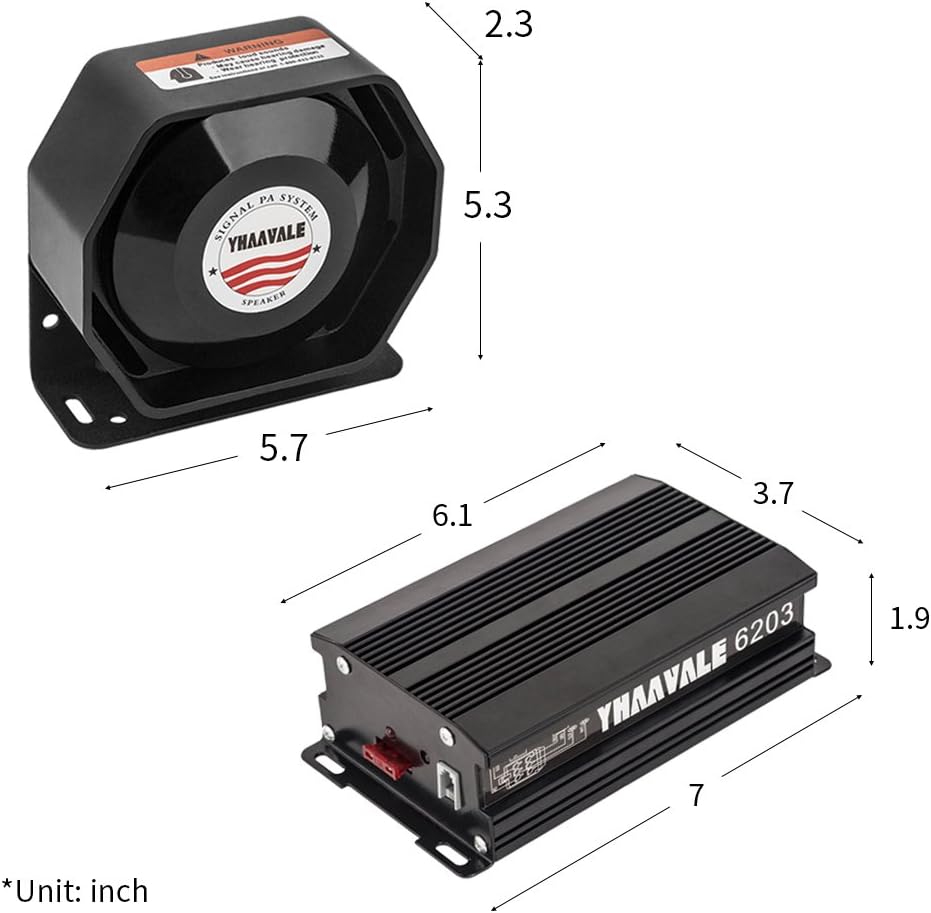
Figure 7: Dimensional diagram of the YHAAVALE 6203 speaker and amplifier, with measurements provided in inches for installation planning.
Specifications
| Parameter | Value |
|---|---|
| Input Voltage | 10-16VDC |
| Input Current | ≤15A |
| Output Power | 100W |
| Operating Temperature | 0℃ ~ +55℃ |
| Impedance | 8̚ |
| Light Line Current | ≤15A |
| Frequency Range | 300~5000HZ |
| Sound Pressure | 115-122dB |
| Material | Metal |
| Item Weight | 4.06 kg |
| Package Dimensions | 26.9 x 21 x 16.3 cm |
Setup and Installation
Proper installation is crucial for the performance and safety of your siren system. It is recommended that installation be performed by a qualified professional.
Mounting Components
- Amplifier: Choose a dry, well-ventilated location inside the vehicle, such as under a seat or in the trunk. Ensure it is secured with the provided mounting accessories to prevent movement.
- Speaker: Mount the speaker in a location that allows for clear sound projection, typically behind the grille or bumper of the vehicle. Ensure it is securely fastened and protected from direct impact.
- Handheld Controller: Install the controller holder in an easily accessible location within the driver's reach, ensuring it does not interfere with driving or vehicle controls.
Wiring Instructions
Refer to the wiring harness for color-coded connections. Always disconnect the vehicle's battery before beginning any wiring.
- Power Connection: Connect the red wire (positive) to the vehicle's 12V battery positive terminal, preferably through a fused connection (fuse not included, recommended 20A). Connect the black wire (negative) to a solid chassis ground point.
- Speaker Connection: Connect the speaker wires to the designated speaker output terminals on the amplifier. Observe polarity if indicated.
- Controller Connection: Plug the handheld controller's cable into the corresponding port on the amplifier.
- Light Control (Optional): If using the light control function, connect the light output wires from the amplifier to your auxiliary lights. Ensure the lights' current draw does not exceed 15A.
- Horn Button Integration (Optional): The system can be connected to your car's existing horn button for siren activation. Consult a professional for this integration to avoid conflicts with the vehicle's original horn system.
- Audio Input (Optional): For the audio signal input zoom function, connect your car's audio signal source to the designated input on the amplifier.
After all connections are made, carefully reconnect the vehicle's battery and test the system's functions.
Operating Instructions
The handheld remote controller provides full control over the siren and PA functions.
Controller Functions
- ON/OFF Button: Powers the siren system on or off. The controller buttons will illuminate when powered on.
- Horn Button: Activates a momentary horn sound.
- Siren Tone Buttons: The controller features dedicated buttons for various siren tones. The YHAAVALE 6203 offers 9 distinct alarm tones, including two primary siren types (e.g., Wail, Yelp, Phaser, Horn, Hi-Lo, etc.). Press the desired button to activate the tone.
- Manual Horn/Siren: Some buttons may allow for manual activation of horn or siren sounds by holding them down.
- Microphone (PA System): To use the PA function, press the dedicated microphone button (often indicated by a microphone icon). Speak clearly into the microphone on the handheld controller.
- Volume Control: Use the volume up/down buttons on the controller to adjust the microphone volume for the PA system.
- Light Control Buttons: If connected, use the designated buttons to turn auxiliary lights on or off.
- Audio Input Zoom: If an external audio source is connected, activate this function via the controller to amplify the signal through the speaker.
Observe the work indicator displays on the function keys to confirm active modes.
Maintenance
Regular maintenance ensures the longevity and reliable operation of your YHAAVALE 6203 siren system.
- Cleaning: Keep the amplifier and controller clean and free of dust. Use a soft, dry cloth. Avoid using harsh chemicals or abrasive cleaners.
- Connections: Periodically check all wiring connections to ensure they are secure and free from corrosion. Loose connections can lead to intermittent operation or damage.
- Speaker Inspection: Inspect the speaker for any physical damage or obstructions that might affect sound output.
- Fuse Check: If the system stops working, check the inline fuse (if installed) and replace it with a fuse of the correct rating if blown.
Troubleshooting
If you encounter issues with your siren system, refer to the following table for common problems and solutions.
| Problem | Possible Cause | Solution |
|---|---|---|
| System does not power on | No power supply; Blown fuse; Loose wiring connection | Check battery connection; Replace fuse; Secure all power wires. |
| No sound from speaker | Speaker wires disconnected; Faulty speaker; Amplifier issue | Check speaker wiring; Test speaker with another audio source; Contact support if amplifier is suspected. |
| Microphone not working | Microphone button not pressed; Volume too low; Faulty controller | Ensure microphone button is active; Increase volume; Check controller connection. |
| Siren tones are distorted or weak | Low voltage; Speaker impedance mismatch; Damaged speaker | Check vehicle's battery voltage; Ensure speaker is 8̚; Inspect speaker for damage. |
| Controller buttons not responding | Controller cable loose; Controller malfunction | Ensure controller cable is fully inserted; Contact support if issue persists. |
Warranty and Support
YHAAVALE products are manufactured to high quality standards. For specific warranty information, please refer to the documentation provided at the time of purchase or contact your retailer. If you require technical assistance or have questions not covered in this manual, please contact YHAAVALE customer support through the official website or your point of purchase.