
Introduction
This manual provides comprehensive instructions for the installation, operation, and maintenance of your Ywhomal Ruby Record Player Needle. Designed for compatibility with a wide range of turntables, this replacement stylus ensures high-quality sound reproduction and extends the life of your vinyl records.

Image: A pack of four red ruby ceramic record player needles, ready for replacement.
Compatibility
The Ywhomal Ruby Ceramic Record Player Needle is designed to be compatible with most record players currently available on the market. This includes, but is not limited to, models from the following brands:
- Crosley: NP1, NP6, CR248, CR27, CR43, CR44, CR46C, CR48C, CR49B, CR49TA, CR49TW, CR50TW, CR53, CR67, CR69, CR70, CR73, CR77, CR78, CR79, CR704, CR711, CR712CD, CR87CD, CR6019A, CR8005A, CR7008A, G6082ION, and other Crosley CR series turntable players.
- ION Audio: iCT05RS, iCT09RS, Quick Play LP, Power Play LP, Quick Play Flash, Contour LP, Vertical Vinyl, iLP, Archive LP, Forever LP, Live LP, Pure LP, Max LP, and other Innovative-Technology basic model turntable players.
- Victrola: VSC-550BT-BK, ITRR-501, ITRRS-300, ITVS-750, and other Victrola Nostalgic and suitcase turntable players.
- Jensen: JTA222, JTA230, JTA300, JTA380, JTA410, JTA420, JTA450, JTA460, JTA475, JTA22Tyler.
- Boytone: BT-17TB, BT-17TBC, BT-17DJB, BT-17DJM, BT-17DJS, BT-19DJB-C, BT-19DJM-C, BT-19DJS-C, BT-16DJB-C, BT-21DJM-CDSP, BT-14TBB-SP, BT-15TBM.
- Other brands including 1byone, Jenson, Sylvania, and more.
If you are unsure about compatibility with your specific turntable model, it is recommended to compare your existing cartridge with the images provided or consult the manufacturer's specifications for your record player.

Image: A visual representation of the extensive compatibility list for the Ywhomal stylus, showing various turntable models from Crosley, ION, Victrola, and Jensen.
Installation
Replacing your record player needle is a straightforward process that does not require special tools. Follow these steps carefully to ensure proper installation and optimal performance.
- Preparation: Ensure your record player is turned off and unplugged from the power source to prevent accidental damage or injury.
- Locate the Old Needle: Gently lift the tonearm and locate the existing needle (stylus) on the cartridge.
- Remove the Old Needle: Carefully grasp the old needle from the front, usually by a small tab or the plastic housing. Gently pull it downwards and outwards to detach it from the cartridge. It should snap off with minimal force. Avoid touching the cantilever or the diamond tip.
- Install the New Needle: Take the new Ywhomal ruby needle. Align the new needle with the cartridge slot. Push it upwards and inwards until it clicks securely into place. Ensure it is firmly seated and does not wobble.
- Verify Installation: Visually inspect the newly installed needle to ensure it is straight and properly aligned within the cartridge.

Image: A sequence of images demonstrating the process of removing an old stylus and installing a new one by hand, showing the gentle pull-down and push-up motions.

Image: A diagram illustrating the correct angles and movements for detaching and attaching the stylus to the cartridge.
Operation
Once the new needle is installed, your record player is ready for use. The Ywhomal needle supports playback of 33 1/3, 45, and 78 RPM records.
- Place Record: Carefully place your vinyl record onto the turntable platter.
- Select Speed: Ensure the turntable speed setting matches the record's RPM (33 1/3, 45, or 78).
- Position Tonearm: Gently lift the tonearm using the cueing lever (if available) or by hand. Position the needle directly above the lead-in groove of the record.
- Lower Needle: Slowly lower the tonearm onto the record. The needle will begin tracking the grooves, and sound will be produced.
- End of Playback: At the end of the record, the tonearm may automatically return to its rest, or you may need to manually lift it and return it to the rest.

Image: A close-up view of the Ywhomal stylus cartridge mounted on a turntable's tonearm, positioned over a vinyl record.
Maintenance
Proper maintenance of your record player needle will ensure its longevity and maintain optimal sound quality.
- Needle Cleaning: Periodically inspect the needle tip for dust and debris. Use a soft, anti-static brush designed for stylus cleaning, brushing gently from back to front (away from the cantilever). Do not use harsh chemicals or excessive force.
- Record Cleaning: Keep your vinyl records clean. Dust and grime on records can transfer to the needle, affecting sound quality and potentially damaging the stylus.
- Storage: When not in use, ensure the tonearm is securely placed in its rest. If your turntable has a stylus guard or lid, use it to protect the needle from accidental damage.
- Replacement: Needles have a finite lifespan. Replace your needle when you notice a degradation in sound quality, increased skipping, or visible wear on the stylus tip. The lifespan can vary depending on usage and record condition.

Image: The Ywhomal stylus shown alongside a clear protective lid, emphasizing the importance of covering the needle when not in use.
Troubleshooting
If you encounter issues after installing your new needle, refer to the following common problems and solutions:
| Problem | Possible Cause | Solution |
|---|---|---|
| No sound or very low sound. | Needle not fully seated; audio cables disconnected; amplifier/speaker issues. | Ensure needle is securely clicked into the cartridge. Check all audio connections from the turntable to the amplifier/speakers. Test with other audio sources. |
| Skipping or jumping. | Dust/debris on needle or record; turntable not level; damaged record; incorrect tracking force (if adjustable). | Clean the needle and record. Ensure the turntable is on a stable, level surface. Inspect the record for deep scratches. Consult your turntable's manual for tracking force adjustment if applicable. |
| Distorted or muffled sound. | Dirty needle; worn needle; damaged record; incorrect speed setting. | Clean the needle. If the needle is old, consider replacing it. Check the record for damage. Verify the turntable speed matches the record's RPM. |
| Needle does not fit the cartridge. | Incompatibility with turntable model. | Double-check the compatibility list in this manual and your turntable's specifications. Ensure you are attempting to install it correctly. |
Specifications
Key technical specifications for the Ywhomal Ruby Record Player Needle:
- Needle Type: Ruby Ceramic
- Stylus Material: Conical Diamond
- Body Material: High-Grade ABS Plastic and Aluminum arm
- Color: Red
- Maximum Rotational Speed Supported: 78 RPM
- Channel Balance (at 1kHz): Below 2 dB
- Included Components: 4 Turntable Needles
- Item Weight: Approximately 0.07 Pounds (1.12 ounces)
- Package Dimensions: 2.56 x 2.52 x 0.75 inches
- Model Number: 43528-39555
- First Available: November 13, 2018
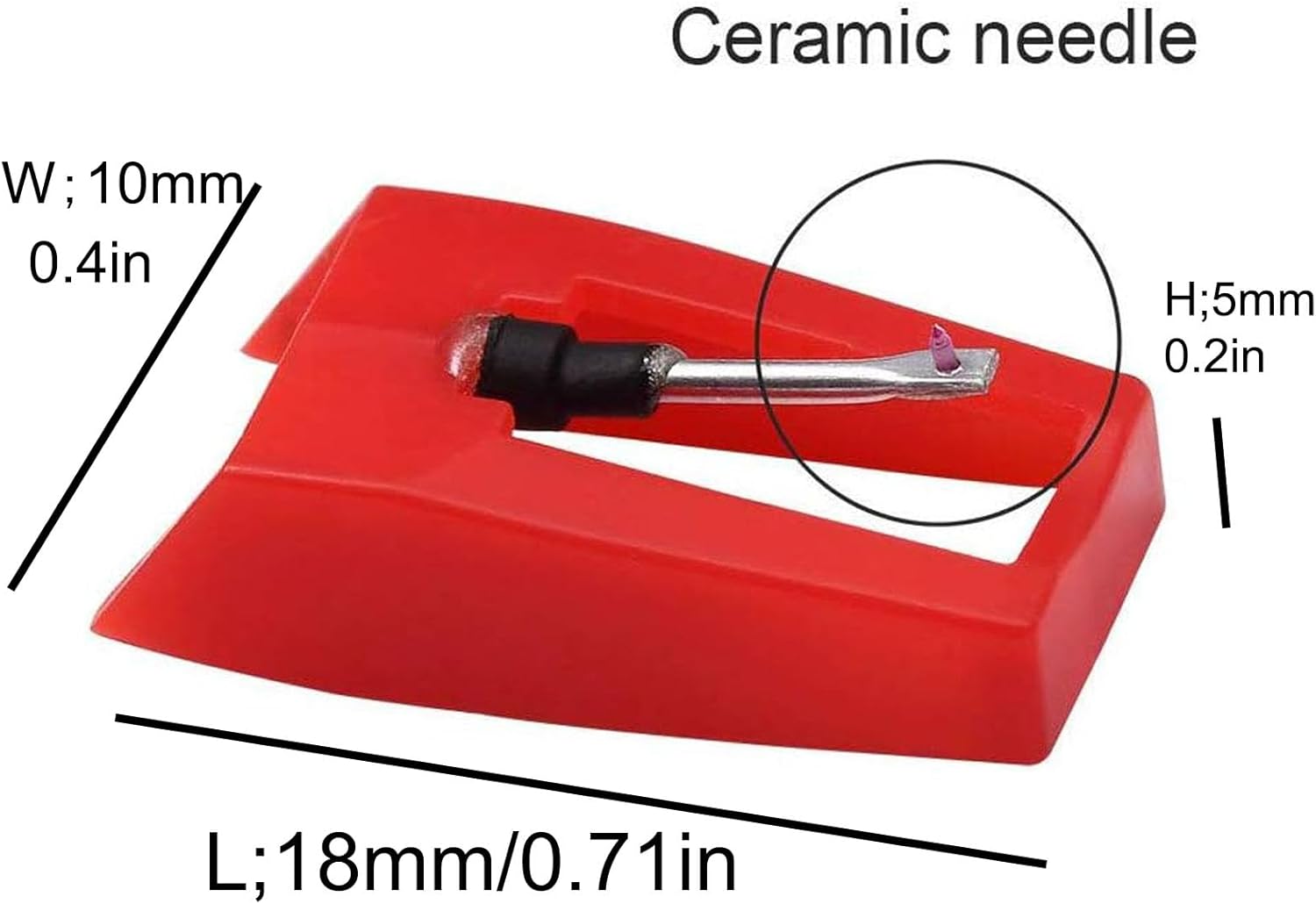
Image: A detailed diagram showing the length (18mm/0.71in), width (10mm/0.4in), and height (5mm/0.2in) of the ceramic needle.
Warranty and Support
For any questions regarding your Ywhomal Ruby Record Player Needle, please refer to the retailer where the product was purchased. For product support or warranty inquiries, please contact Ywhomal customer service through their official channels or the platform where the product was acquired.
Always ensure to purchase genuine Ywhomal products from authorized sellers to guarantee product authenticity and eligibility for support.


