
1. Introduction and Overview
Thank you for choosing the RSHTECH RSH-518 7-Port USB 3.0 Powered Hub. This device is designed to expand your computer's USB connectivity, allowing you to connect multiple USB peripherals simultaneously with high-speed data transfer and stable power delivery.
This hub is ideal for connecting devices such as keyboards, mice, card readers, USB hard drives, USB video adapters, and more, ensuring efficient and organized workspace management.
2. Package Contents
Please verify that all items listed below are included in your package:
- 1 x RSHTECH 7-Port USB 3.0 Hub (Model: RSH-518)
- 1 x 10W (5V/2A) Power Adapter
- 1 x 120 cm Power Cable
- 1 x 100 cm Removable USB 3.0 Cable
- 1 x User Manual (this document)

Image: Contents of the RSHTECH RSH-518 USB Hub package, showing the hub, power adapter, USB 3.0 cable, and a small instruction booklet.
3. Setup Instructions
Connect the Power Adapter: Plug the 120 cm power cable into the 10W (5V/2A) power adapter, then connect the power adapter's barrel connector to the "DC 5V" input port on the back of the RSHTECH USB Hub. Plug the power adapter into a standard wall outlet. This external power supply ensures stable operation, especially when connecting power-hungry devices like external hard drives.
Connect to Your Computer: Connect one end of the 100 cm removable USB 3.0 cable to the USB 3.0 input port on the RSHTECH USB Hub. Connect the other end of the USB 3.0 cable to an available USB 3.0 port on your computer (laptop or desktop).
Plug and Play: The hub is plug-and-play compatible. Your operating system (Windows, Mac OS, Linux) should automatically detect and install the necessary drivers. No manual driver installation is required.

Image: The RSHTECH RSH-518 USB Hub with its power adapter and USB data cable, illustrating the primary connections.
4. Operating Instructions
4.1 Connecting Devices
Once the hub is connected to your computer and powered, you can begin connecting your USB devices to any of the seven available USB 3.0 ports.
- Keyboards and Mice
- USB Flash Drives and External Hard Drives
- Printers and Scanners
- Game Consoles (e.g., PS4, Xbox)
- USB Fans, Lights, and other accessories

Image: The RSHTECH USB Hub in use, demonstrating its ability to connect multiple USB devices simultaneously to a laptop.
4.2 Individual Port Control and LED Indicators
Each of the seven USB 3.0 ports on the RSH-518 hub is equipped with an individual on/off switch and a blue LED indicator.
- Individual Switches: Press the button next to each port to turn that specific port on or off. This allows you to manage power to individual devices without unplugging them, preventing interference and saving power.
- LED Indicators: The blue LED light next to each port illuminates when the port is active. The LED will blink when data is being transferred through that port, providing visual confirmation of activity.
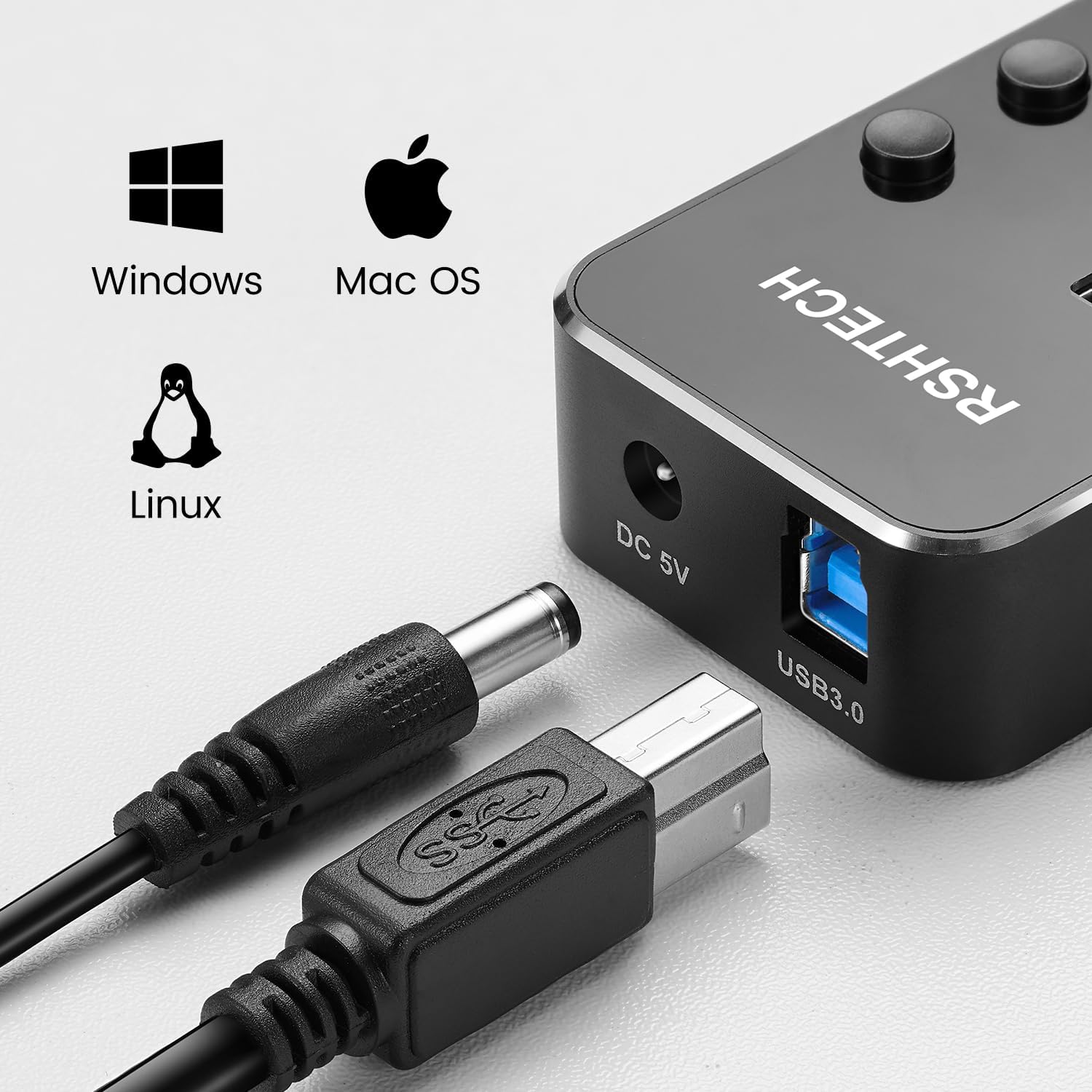
Image: A detailed view of the RSHTECH USB Hub's individual port switches and LED indicators, along with the DC 5V power input and USB 3.0 data input ports.
4.3 Data Transfer and Charging
The RSHTECH RSH-518 hub supports USB 3.0 SuperSpeed data transfer rates of up to 5 Gbps, which is significantly faster than USB 2.0 (480 Mbps).
With its 5V/2A (10W) external power supply, the hub provides stable power to all connected devices, ensuring reliable data transfer and efficient charging for compatible devices.

Image: A visual comparison of USB 3.0 (5 Gbps) and USB 2.0 (480 Mbps) transfer speeds, demonstrating the high-speed capability of the RSHTECH USB Hub.

Image: The RSHTECH USB Hub facilitating charging for a smartphone and powering an external hard drive, connected to a laptop and a wall outlet.
5. Maintenance
- Cleaning: Use a soft, dry cloth to clean the surface of the hub. Do not use liquid cleaners or aerosol sprays, as they may damage the device.
- Storage: When not in use, store the hub in a cool, dry place away from direct sunlight and extreme temperatures.
- Handling: Avoid dropping the hub or subjecting it to strong impacts, which could damage internal components.
6. Troubleshooting
| Problem | Possible Cause | Solution |
|---|---|---|
| Device not recognized or unstable connection. |
|
|
| Slow data transfer speed. |
|
|
| Individual port LED not lighting up. |
|
|
7. Specifications
| Brand | RSHTECH |
| Model Number | RSH-518 |
| Color | Black |
| Material | Aluminum |
| Total USB Ports | 7 |
| USB Standard | USB 3.0 (backward compatible with USB 2.0/1.1/1.0) |
| Data Transfer Rate | Up to 5 Gbps |
| External Power Supply | 5V/2A (10W) |
| Operating System Compatibility | Windows, Mac OS, Linux |
| Special Features | Powered, Plug and Play, Individual Port Switches, LED Indicators, Charge Transmission |
| Dimensions (L x W x H) | 12.9 cm x 4.7 cm x 2.1 cm |
| USB Cable Length | 100 cm |
| Power Cable Length | 120 cm |
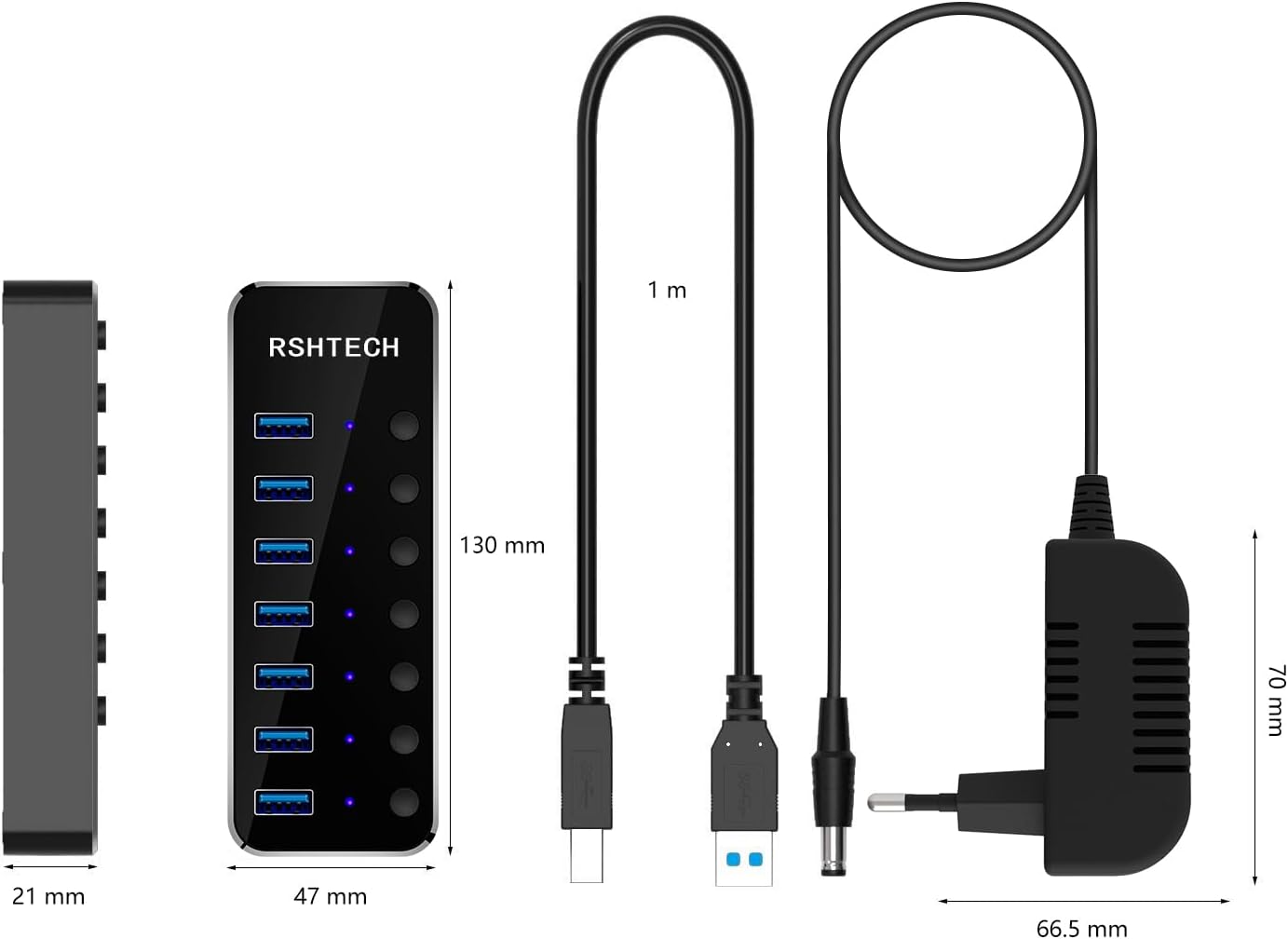
Image: Dimensional drawing of the RSHTECH RSH-518 USB Hub, its USB cable, and the power adapter, with measurements in millimeters and meters.
8. Warranty and Support
Specific warranty details are not provided in the product information. For warranty claims, technical support, or any inquiries regarding your RSHTECH RSH-518 USB Hub, please contact RSHTECH customer service directly through their official website or the retailer where the product was purchased.
Please retain your purchase receipt as proof of purchase for any warranty or support requests.


