
1. Introduction
This manual provides essential information for the proper installation, operation, and maintenance of your Acogedor RTD PT100 Temperature Sensor Probe. Please read this manual thoroughly before using the product to ensure safe and efficient performance.
2. Product Overview and Features
The Acogedor RTD PT100 Temperature Sensor Probe is designed for accurate temperature measurement in various industrial and scientific applications. It utilizes a thin-film resistor for stable performance and high precision.
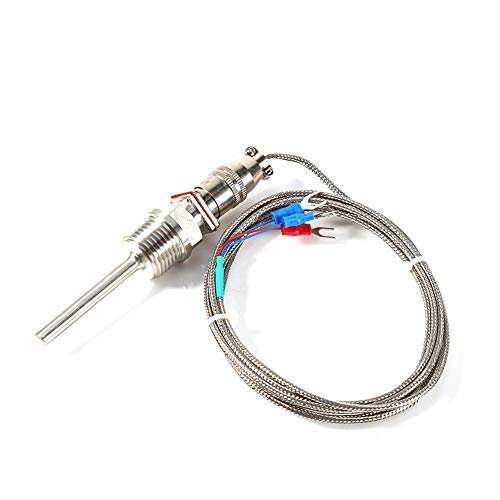
Figure 1: Acogedor RTD PT100 Temperature Sensor Probe with cable and connectors.
Key Features:
- Stainless steel inner thread base for robust installation.
- High precision resistance chip ensures accurate temperature readings.
- Designed for high temperature resistance.
- Waterproof and oil-proof wire with tin-plated copper for durability and corrosion resistance.
- Wide working temperature range: -50°C to 300°C (-58°F to 572°F).
3. Specifications
| Parameter | Value |
|---|---|
| Type | RTD PT100 (membrane) A class |
| Working Temperature | -50°C to 300°C (-58°F to 572°F) |
| Probe Length | 50mm (2 inches) |
| Probe Diameter | 6mm (0.23 inches) |
| Thread Size | 1/2" NPT (National Pipe Thread Standard, US) |
| Nominal Outside Diameter (NPT) | 0.84 inches |
| Probe Material | Stainless steel |
| Wire Type | Tin plated copper wire |
| Wire Length | 2m (6.6 feet) |
| Weight | Approximately 100g (3.53 oz) |
| Product Dimensions | 3.94 x 3.94 x 3.94 inches (packaged) |
Note: The 1/2" NPT thread size refers to the National Pipe Thread standard (US). Please verify this is the correct size for your application before installation.

Figure 2: Detailed dimensions of the RTD PT100 sensor probe, showing probe length, diameter, thread size, and cable length.
4. Setup and Installation
Proper installation is crucial for accurate readings and longevity of the sensor. Follow these general guidelines:
- Preparation: Ensure the installation environment is clean and free from debris. Verify that the 1/2" NPT thread size matches your intended port.
- Mounting:
- Carefully thread the sensor probe into the designated 1/2" NPT port.
- Tighten the probe securely to prevent leaks, but avoid over-tightening which could damage the threads or the sensor. A suitable sealant or thread tape may be used if necessary, following manufacturer recommendations for your specific application.
- Wiring:
- The sensor comes with tin-plated copper wires. Connect these wires to your RTD measurement device (e.g., PLC, temperature controller, data logger) according to the device's wiring diagram for a PT100 sensor.
- Typically, PT100 sensors use a 2-wire, 3-wire, or 4-wire configuration. This probe is designed for a 3-wire connection (two blue, one red, as shown in Figure 3). Ensure correct polarity and connection points.
- Secure all connections to prevent accidental disconnection or short circuits.

Figure 3: Close-up view of the sensor's wiring terminals (red and blue spade connectors) and the threaded base.

Figure 4: Detailed view of the sensor probe's threaded body and the connection point for the cable, highlighting the robust construction.
5. Operation
Once installed and wired, the RTD PT100 sensor will provide resistance values that correspond to temperature. Your connected measurement device will convert this resistance into a temperature reading.
- Power On: Activate your RTD measurement device.
- Monitoring: Observe the temperature readings on your device. Ensure the readings are within the expected range for your application.
- Environmental Considerations: While the sensor is waterproof and oil-proof, avoid exposing the wiring connections to excessive moisture or corrosive environments unless they are properly sealed and protected.
6. Maintenance
The Acogedor RTD PT100 sensor is designed for low maintenance. However, periodic checks can help ensure continued accuracy and performance.
- Cleaning: If the probe tip is exposed to contaminants, gently clean it with a soft cloth. Avoid abrasive materials that could damage the stainless steel.
- Connection Check: Periodically inspect the wiring connections for corrosion, looseness, or damage. Re-tighten or replace as necessary.
- Physical Inspection: Check the probe body and cable for any signs of physical damage, such as bends, cuts, or cracks.
- Recalibration: For critical applications, periodic recalibration of the sensor and/or the measurement device may be required to maintain accuracy. Refer to your measurement device's manual for calibration procedures.
7. Troubleshooting
If you encounter issues with your RTD PT100 sensor, consider the following common troubleshooting steps:
| Problem | Possible Cause | Solution |
|---|---|---|
| No temperature reading or erratic readings |
|
|
| Inaccurate temperature readings |
|
|
| Sensor resistance out of range |
|
|
8. Warranty and Support
This Acogedor product is covered by a standard manufacturer's warranty. For specific warranty terms, technical support, or service inquiries, please refer to the product packaging or contact Acogedor customer service through their official channels. Keep your purchase receipt as proof of purchase.
For further assistance, you may visit the Acogedor Store on Amazon.