
Introduction
The Dexen GM8K-1 IPI Control Module is a high-performance replacement designed for Hearth and Home Technologies fireplace systems utilizing the GM8K-1 or GM8K1-OC setup. This module is compatible with H3V valve systems and is engineered for use with various Heatilator, Heat N Glo, and Quadra-Fire models. It offers 5-step flame modulation, thermostat support, and essential safety shut-off capabilities to ensure safe and efficient fireplace operation.
Compatibility
This control module is compatible with H3V valve systems in Heatilator, Heat N Glo, and Quadra-Fire gas fireplaces. It directly replaces part numbers 2166-347 and 2166-307. Supported models include, but are not limited to:
- 6000CL-IPI, 6000CL-IPILP, 6000CLX-IPI, 6000CLX-IPILP
- 8000CL-IPI, 8000CL-IPILP, 8000CLX-IPI, 8000CLX-IPILP
- MEZZO36/48/60/72 and MEZZO36ST/48ST/60ST/72ST (including -B variants)
- ESCAPE I30/I35, COSMO I30/I35 (all variants), TRUE 36/42/50 (C/H/S)
- SUPREME I30, GRAND I35, REVO-H31, REVO-S21, REVO-V12
- QFI30, QFI35, BV4236DBI, BV4842DBI, CARODG36/42, LUX36/42, SL-3X, SL-5X, SL-7X, SL-9X
Features
- 5-step flame modulation for adjustable flame height.
- Thermostat support for temperature control.
- Automatic safety shut-off for failed ignition.
- Supports a 90-second ignition cycle with up to 3 automatic re-ignition attempts.
- Volatile lockout mode if ignition fails.
- Designed for indoor fireplace integration.
- Includes a 5.5-meter (approx. 16 ft) wall switch wire.
- Powered by 4 AA batteries or a 6VDC transformer.
- Plastic housing with a front-facing orientation for easy access.
Setup and Installation
Installation of the Dexen GM8K-1 IPI Control Module is designed to be straightforward. The module installs inside the fireplace. Ensure all power is disconnected before beginning installation.

Figure 1: Top view of the Dexen GM8K-1 IPI Control Module, showing the main label with specifications and trouble codes.

Figure 2: Angled view of the Dexen GM8K-1 IPI Control Module, highlighting various connection points.
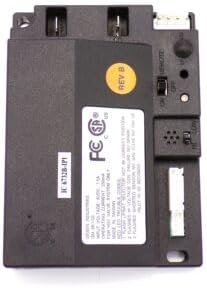
Figure 3: Another angled view of the Dexen GM8K-1 IPI Control Module, showing the Rev B sticker and additional ports.
The module features a front-facing plastic housing for easy access to connections and controls. It can be powered by either 4 AA batteries or a 6VDC transformer. A 5.5-meter wall switch wire is included for remote operation.
Remote Control Pairing (RC300)
If using an RC300 remote control, follow these steps to pair it with the module:
Video 1: Heat & Glo RC300 remote pairing instructions. This video demonstrates the process of pairing an RC300 remote control with a compatible fireplace module.
- Ensure the module's 3-way switch is in the 'Remote' position and has power. Cycle the power by switching the module to 'Off' and then back to 'Remote'. The module will beep once to indicate power has been restored.
- Locate the 'Learn' button on the module. Depress and release it once with a paper clip or similar tool. The module will beep and flash green for 10 seconds, indicating it is searching for a remote frequency.
- While the LED is blinking, press the power button on the RC300 remote handset. The module will double beep, confirming successful pairing.
If more than 10 seconds elapse before pressing the remote button, repeat step 2.
Operating Instructions
The Dexen GM8K-1 module provides 5-step flame modulation, allowing you to adjust the flame height to your preference. It also supports thermostat functionality for maintaining a desired room temperature.
Maintenance
For optimal performance and safety, it is recommended that fireplaces used heavily throughout the year should be serviced every 12 months. Fireplaces with light use should be serviced every 24 months. All hearth service should be performed by a qualified professional.
Troubleshooting
Volatile Lockout
If the system enters volatile lockout mode due to ignition failure, disconnect power (either batteries or transformer) for 10 seconds before restoring. Always check for secure wiring before attempting to restart the system.
General Troubleshooting
Video 2: System Troubleshooting - DEXEN. This video provides a detailed guide on how to troubleshoot common issues with a Dexen fireplace system, including checking components and connections.
Remote Control Troubleshooting (RC300)
If your RC300 remote control is not responding to commands, it may be in a lockout state or unpaired. The module may flash a red LED if it's in a lockout state.
Video 3: Heat & Glo RC300 remote troubleshooting. This video offers solutions for common problems encountered with the Heat & Glo RC300 remote control, such as unresponsiveness or pairing issues.
To resolve a lockout state, power cycle the fireplace using its isolation switch. Turn the switch to the 'Off' position, wait approximately 30 seconds for any stored power to discharge, then turn the switch back to the 'On' position. You should hear an audible beep from the module indicating power has been restored.
If the remote is still not responding after power cycling, it may need to be re-paired following the instructions in the 'Remote Control Pairing' section above.
Specifications
| Attribute | Value |
|---|---|
| Brand | Hearth and Home Technologies |
| Model Number | GM8K-1 (Replaces 2166-347) |
| UPC | 652174898428 |
| Product Dimensions | 4.57 x 6.06 x 1.46 inches |
| Item Weight | 0.01 ounces |
| Color | Black |
| Material | Plastic |
| Voltage | 6 Volts |
| Operating Temperature | 68 Degrees Fahrenheit |
Warranty and Support
The Dexen GM8K-1 module is backed by reliable support and engineered for seamless performance. For specific warranty details or further technical assistance, please refer to the official Hearth and Home Technologies documentation or contact their customer support.