
1. Introduction
The VEROVAL Duo Control Digital Arm Blood Pressure Monitor is designed for accurate and reliable blood pressure measurement. It is particularly suitable for individuals who require daily monitoring, including those with cardiac arrhythmias. This device utilizes advanced DUO SENSOR technology, which combines two professional measurement methods: the oscillometric method and the Korotkoff method, ensuring high precision even in the presence of irregular heart rhythms.
This manual provides essential information for the safe and effective use of your VEROVAL Duo Control monitor. Please read it thoroughly before first use and keep it for future reference.
2. Safety Information
- Consult your physician before using this device if you have any medical conditions, especially cardiac arrhythmias.
- Do not self-diagnose or self-medicate based on measurement results. Always consult a healthcare professional.
- Keep the device out of reach of children.
- Use only the original cuff provided with the device.
- Avoid taking measurements in stressful environments or immediately after physical activity.
3. Package Contents
Verify that all items are present in the package:
- VEROVAL Duo Control Blood Pressure Monitor
- Medium Arm Cuff (22-32 cm)
- Storage Bag
- 4 x AA 1.5V Batteries
- Instruction Manual

Image: VEROVAL Duo Control Blood Pressure Monitor, arm cuff, and storage bag.
4. Device Components
Familiarize yourself with the main parts of your blood pressure monitor:
- Display: Large, illuminated screen for easy reading of values.
- Start/Stop Button: Initiates and ends measurements.
- User 1 Button: Selects user profile 1.
- User 2 Button: Selects user profile 2.
- Cuff Connector: Port for connecting the arm cuff.
- Cuff: Ergonomically designed for correct and secure application.

Image: Close-up of the VEROVAL Duo Control monitor, showing the display and control buttons.
5. Setup
5.1. Battery Installation
- Open the battery compartment cover on the back of the device.
- Insert the four AA 1.5V batteries, ensuring correct polarity (+/-).
- Close the battery compartment cover securely.
5.2. Setting Date and Time
Upon first use or after battery replacement, the device will prompt you to set the date and time. Follow the on-screen instructions using the user buttons to adjust values and the Start/Stop button to confirm.
5.3. User Profile Selection
The device supports two user profiles, each with 100 memory slots, plus a guest mode. Select your desired user profile (User 1 or User 2) before taking a measurement to ensure results are stored correctly.
6. Operating Instructions
6.1. Cuff Application
- Ensure the cuff size is appropriate for your arm circumference (Medium: 22-32 cm).
- Sit comfortably with your arm resting on a flat surface, palm facing up.
- Slide your arm through the cuff loop. The air tube should run down the inside of your arm.
- Position the cuff so its lower edge is approximately 2 cm above your elbow joint.
- Tighten the cuff securely but not too tightly. The ergonomic design and pull-up system facilitate correct placement.
- Connect the cuff tube to the monitor's cuff connector.

Image: Correct application of the VEROVAL Duo Control arm cuff, highlighting its ergonomic design.
6.2. Measurement Procedure
Before measuring, rest for at least 5 minutes. Avoid talking or moving during the measurement.
- Select your user profile (User 1 or User 2).
- Press the Start/Stop button to begin the measurement. The cuff will inflate automatically.
- The device will perform the measurement using DUO SENSOR technology.
- Once complete, your systolic, diastolic, and pulse values will be displayed.

Image: A user performing a blood pressure measurement with the VEROVAL Duo Control monitor, illustrating the DUO SENSOR technology.
6.3. Understanding Results
The large, illuminated display shows your measurement values. A color traffic light system on the side of the display provides an immediate categorization of your blood pressure reading according to WHO guidelines.
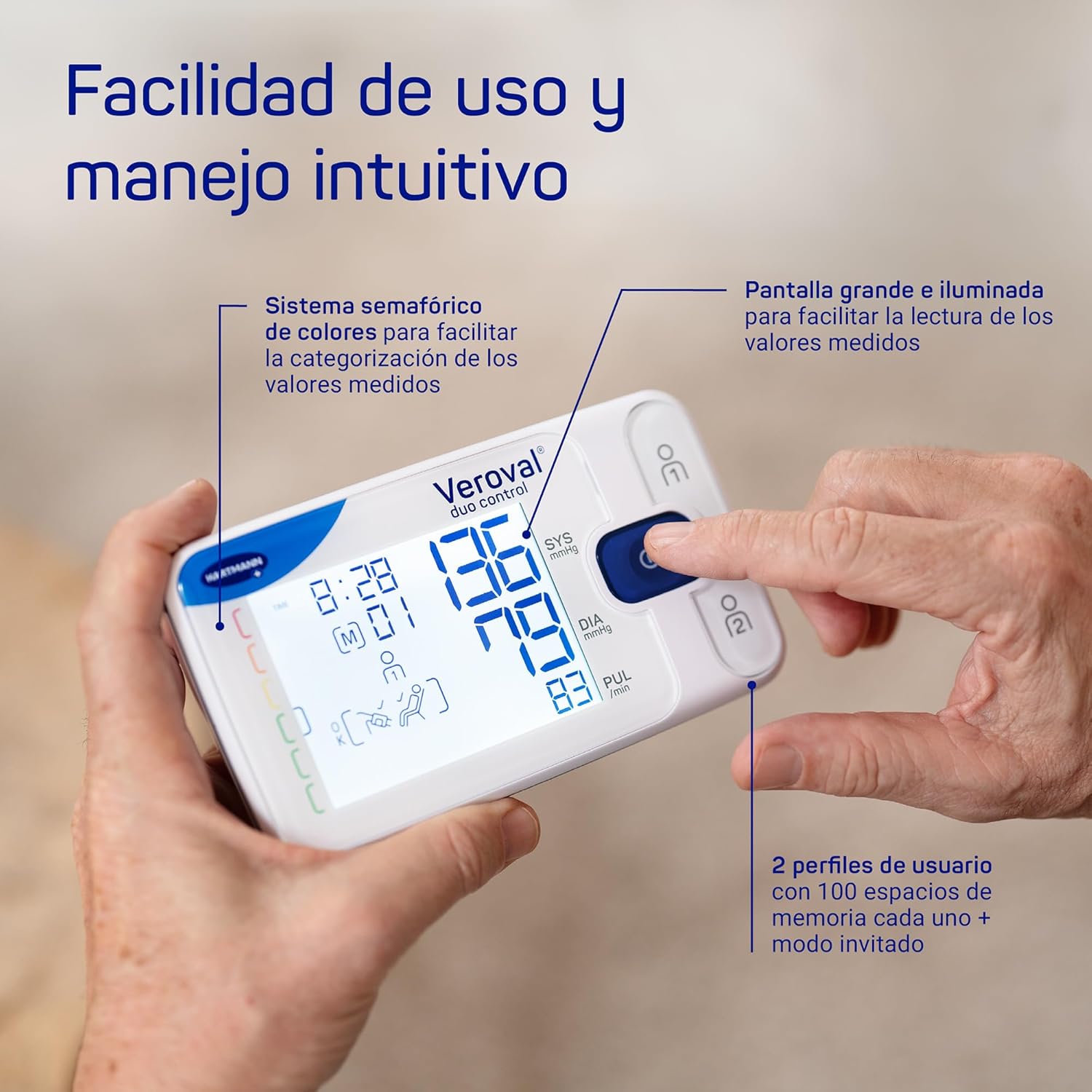
Image: Detailed view of the VEROVAL Duo Control display, showing measurement values and the color-coded indicator for easy interpretation.
7. Data Management
7.1. Veroval medi.connect App
The VEROVAL Duo Control monitor features simple Bluetooth connectivity for transferring your measurement data to the Veroval medi.connect application. This app is available for Android and iOS devices, including tablets, and allows for long-term data storage and analysis.
- Download the Veroval medi.connect app from your device's app store.
- Follow the in-app instructions to pair your monitor via Bluetooth.
- Once connected, your measurement data will be transferred for storage and analysis.

Image: A user interacting with the Veroval medi.connect application on a smartphone, demonstrating Bluetooth data transfer from the monitor.
8. Maintenance and Care
- Clean the device and cuff with a soft, dry cloth. Do not use abrasive cleaners or immerse in water.
- Store the device and cuff in the provided storage bag in a cool, dry place, away from direct sunlight and extreme temperatures.
- Replace batteries when the low battery indicator appears on the display.
9. Troubleshooting
If you encounter issues with your device, refer to the following common solutions:
- Device does not turn on: Check battery installation and ensure batteries are not depleted. Replace if necessary.
- Error message on display: Refer to the specific error code in the full user manual for detailed instructions. Often, this indicates incorrect cuff placement or movement during measurement.
- Inconsistent readings: Ensure proper cuff placement, rest adequately before measurement, and avoid talking or moving. Consult a physician if readings remain inconsistent.
- Bluetooth connectivity issues: Ensure Bluetooth is enabled on your smartphone/tablet and the device is within range. Restart both the monitor and your mobile device.
10. Technical Specifications
| Feature | Specification |
|---|---|
| Model Number | 1622044 |
| Measurement Method | DUO SENSOR Technology (Oscillometric and Korotkoff) |
| Cuff Size | Medium (22-32 cm) |
| Memory Capacity | 200 readings (100 for each of 2 users) |
| Power Source | 4 x AA 1.5V Batteries |
| Display Type | Digital, Illuminated LCD |
| Connectivity | Bluetooth |
| Product Weight | 1 Grams (device only, approximate) |
| Dimensions (Package) | 24.2 x 17.3 x 8.3 cm |
11. Warranty and Support
The VEROVAL Duo Control Blood Pressure Monitor comes with a 5-year warranty from the date of purchase. Please retain your proof of purchase for warranty claims.
For technical support, warranty service, or further inquiries, please contact VEROVAL customer service through the official HARTMANN website or your local distributor. Contact information can typically be found in the full user manual or on the product packaging.


