
1. Introduction
This manual provides detailed instructions for the safe and effective operation of your SOCOTRAN SC-R40 Rechargeable FRS Two-Way Radio. Please read this manual thoroughly before use and retain it for future reference.
2. Package Contents
Your SOCOTRAN SC-R40 package includes the following items:
- 2 x SOCOTRAN SC-R40 Two-Way Radios
- 2 x Rechargeable Lithium-Ion Batteries
- 2 x Adjustable Lanyards
- 1 x USB Charging Cable
- 1 x User’s Manual (this document)

Figure 2.1: Included components of the SOCOTRAN SC-R40 package.
3. Product Features
The SOCOTRAN SC-R40 Two-Way Radio offers a range of features designed for reliable communication:
- Rechargeable Li-ion Battery: 1500mAh battery provides up to 72 hours of standby time and 18 hours of continuous use.
- Extended Range: Up to 5 miles communication range with 0.5W output (actual range varies by terrain).
- Integrated Flashlight: Built-in flashlight for illumination in low-light conditions.
- VOX Function: Voice-activated transmission for hands-free operation.
- Keypad Lock: Prevents accidental changes to settings.
- 22 Channels with Auto Scan: Easy channel selection and scanning for active channels.
- 121 Privacy Codes (CTCSS/DCS): Offers 3,124 channel options to minimize interference.
- Rugged Design: Built with 1.2m drop resistance for durability.

Figure 3.1: Overview of SOCOTRAN SC-R40 key features.
4. Setup
4.1 Battery Installation
- Locate the battery compartment cover on the back of the radio.
- Slide the cover downwards to open the compartment.
- Insert the rechargeable Li-ion battery, ensuring correct polarity.
- Replace the battery compartment cover and slide it upwards until it clicks into place.
4.2 Charging the Batteries
The SC-R40 radios feature a convenient USB charging design.
- Connect the provided USB charging cable to the charging port on the side of the radio.
- Plug the other end of the USB cable into a compatible power source such as a power bank, laptop, car charger, or PC.
- The charging indicator light will illuminate to show the charging status.
- Allow approximately 2 hours for a full charge.
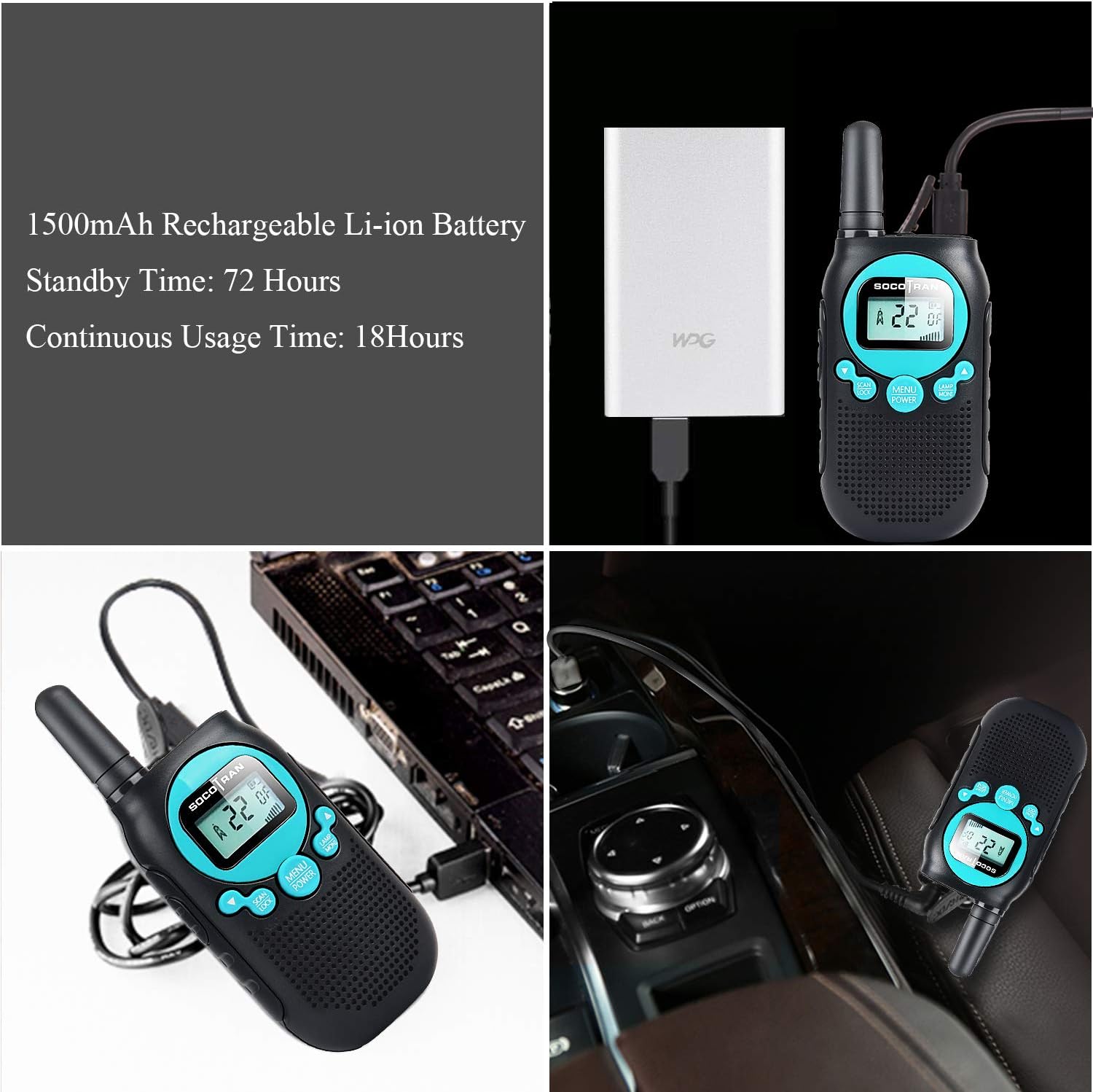
Figure 4.1: Various charging methods for the SC-R40 walkie-talkie.
4.3 Attaching Lanyard and Belt Clip
To attach the adjustable lanyard, thread it through the small loop located at the top of the radio. The belt clip can be attached to the designated slot on the back of the radio for easy carrying.

Figure 4.2: Walkie-talkie with attached lanyard for convenient carrying.
5. Operating Instructions
5.1 Power On/Off
To power on the radio, rotate the power/volume knob clockwise until you hear a click and the display illuminates. To power off, rotate the knob counter-clockwise until it clicks off.
5.2 Channel Selection
Your SC-R40 radio has 22 FRS channels. To change channels:
- Press the MENU button once. The channel number on the display will flash.
- Use the UP or DOWN arrow buttons to select your desired channel.
- Press MENU again to confirm your selection, or wait a few seconds for the setting to automatically save.
5.3 Adjusting Volume
Rotate the power/volume knob clockwise to increase the volume and counter-clockwise to decrease it.
5.4 Transmitting and Receiving (PTT)
To transmit, press and hold the PTT (Push-To-Talk) button located on the side of the radio. Speak clearly into the microphone. Release the PTT button to receive incoming transmissions.
5.5 VOX (Voice Operated Exchange) Function
The VOX function allows for hands-free communication. When activated, the radio will automatically transmit when it detects your voice, without needing to press the PTT button.
- Press the MENU button multiple times until the VOX icon appears on the display.
- Use the UP or DOWN arrow buttons to select the VOX sensitivity level (1-3, with 3 being most sensitive) or turn VOX off.
- Press MENU to confirm.
5.6 Keypad Lock
To prevent accidental changes to your settings, you can lock the keypad. Press and hold the MENU button until the key lock icon appears on the display. Repeat the process to unlock the keypad.
5.7 Flashlight
To activate the built-in flashlight, press the LAMP button. Press it again to turn off the flashlight.
5.8 Channel Scan
The auto scan feature allows you to quickly find active channels. Press the SCAN button to initiate channel scanning. The radio will stop on any active channel. Press SCAN again to resume scanning or PTT to transmit on the current channel.
5.9 Privacy Codes (CTCSS/DCS)
To ensure private communication, you can use privacy codes. Your radio supports 121 privacy codes (38 CTCSS and 83 DCS). To set a privacy code:
- Press the MENU button twice (for CTCSS) or three times (for DCS). The code number will flash.
- Use the UP or DOWN arrow buttons to select your desired code.
- Press MENU to confirm.
6. Range and Environment
The SOCOTRAN SC-R40 offers an ideal range of up to 5 miles. However, actual range can vary significantly based on terrain, weather conditions, and obstructions. For optimal performance, use in open, flat areas with minimal interference.

Figure 6.1: The compact size of the SC-R40 walkie-talkie.
7. Maintenance
7.1 Battery Care
- Fully charge batteries before first use.
- Recharge batteries when the low battery alert flashes.
- Avoid exposing batteries to extreme temperatures.
7.2 Cleaning
Wipe the radio with a soft, damp cloth. Do not use harsh chemicals or abrasive cleaners.
8. Troubleshooting
If you experience issues with your radio, try the following:
- Ensure both radios are powered on and have sufficient battery charge.
- Verify that both radios are set to the same channel and privacy code.
- Check the volume level on both radios.
- Move to an area with fewer obstructions if experiencing poor reception.
9. Specifications
| Feature | Specification |
|---|---|
| Model Number | SC-R40 |
| Item Weight | 1.6 ounces |
| Product Dimensions | 4.9 x 1.9 x 0.9 inches |
| Batteries | 2 Lithium Ion batteries (included) |
| Number of Channels | 22 |
| Frequency Range | FRS |
| Talking Range Maximum | 5 Kilometers |
| Voltage | 2 Volts |
| Water Resistance Level | Not Water Resistant |
10. Warranty and Support
SOCOTRAN provides a one-year warranty for all SOCOTRAN walkie-talkies. If you encounter any issues such as damaged packaging, need an exchange, or require a refund, please contact customer service for assistance.
11. Official Product Videos
Rechargeable Walkie Talkies for Kids 2 Packs
Video 11.1: A seller-provided video demonstrating the features and use of rechargeable walkie-talkies for children.
rechargeable walkie talkies for kids play at neighborhood enjoy outdoor weekend sunshine
Video 11.2: A seller-provided video showcasing children using rechargeable walkie-talkies for outdoor play.