
1. Introduction
Thank you for choosing the SOCOTRAN SC-R40 Rechargeable Two-Way Radio. This manual provides essential information for the safe and efficient use of your device. Please read it thoroughly before operation and retain it for future reference.

Image: The SOCOTRAN SC-R40 two-way radio, a compact black device with a screen and buttons, shown in an outdoor setting.
2. Product Features
- Rechargeable Li-ion Battery: Equipped with a 1500mAh Li-ion battery, offering extended standby time.
- USB Charging: Convenient charging via USB, compatible with power banks, laptops, car chargers, and PCs.
- VOX Function: Voice-activated transmission for hands-free communication.
- Keyboard Lock: Prevents accidental channel changes or setting adjustments.
- Extended Range: Up to 3-5 miles communication range under optimal conditions (0.5W output).
- Integrated Flashlight: A built-in flashlight for illumination in low-light conditions.
- 22 Channels with Auto Scan: Easy access to 22 FRS/GMRS channels and 121 privacy codes (38 CTCSS, 60 CDCSS).
- Compact and Lightweight Design: Weighing only 45g, designed for portability.
- IP65 Rating: Provides protection against dust and low-pressure water jets.

Image: A hand holding the compact SOCOTRAN SC-R40 walkie talkie, demonstrating its small size and light weight, with a lanyard attached.
3. Component Identification

Image: A detailed diagram of the SOCOTRAN SC-R40 walkie talkie, labeling its key components including Antenna, MIC/DC port, PTT button, LED indicator, UP button, DOWN button, SCAN/LOCK button, MENU/POWER button, LAMP/MONI button, and Microphone.
- Antenna: For transmitting and receiving radio signals.
- MIC/DC: Microphone and DC charging port.
- PTT (Push-To-Talk) Button: Press and hold to transmit your voice.
- LED Indicator: Illuminates during transmission or reception.
- UP Button: Navigates menus upwards or increases values.
- DOWN Button: Navigates menus downwards or decreases values.
- SCAN/LOCK Button: Initiates channel scan or locks the keypad.
- MENU/POWER Button: Accesses menu settings or turns the radio on/off.
- LAMP/MONI Button: Activates the flashlight or monitors the current channel.
- Microphone: Captures your voice for transmission.
4. Setup
4.1 Battery Installation
The SOCOTRAN SC-R40 uses a rechargeable Li-ion battery. If the battery is not pre-installed, follow these steps:
- Locate the battery compartment cover on the back of the radio.
- Slide the cover downwards or unclip it to open.
- Insert the Li-ion battery into the compartment, ensuring the contacts align correctly.
- Replace the battery compartment cover and secure it.
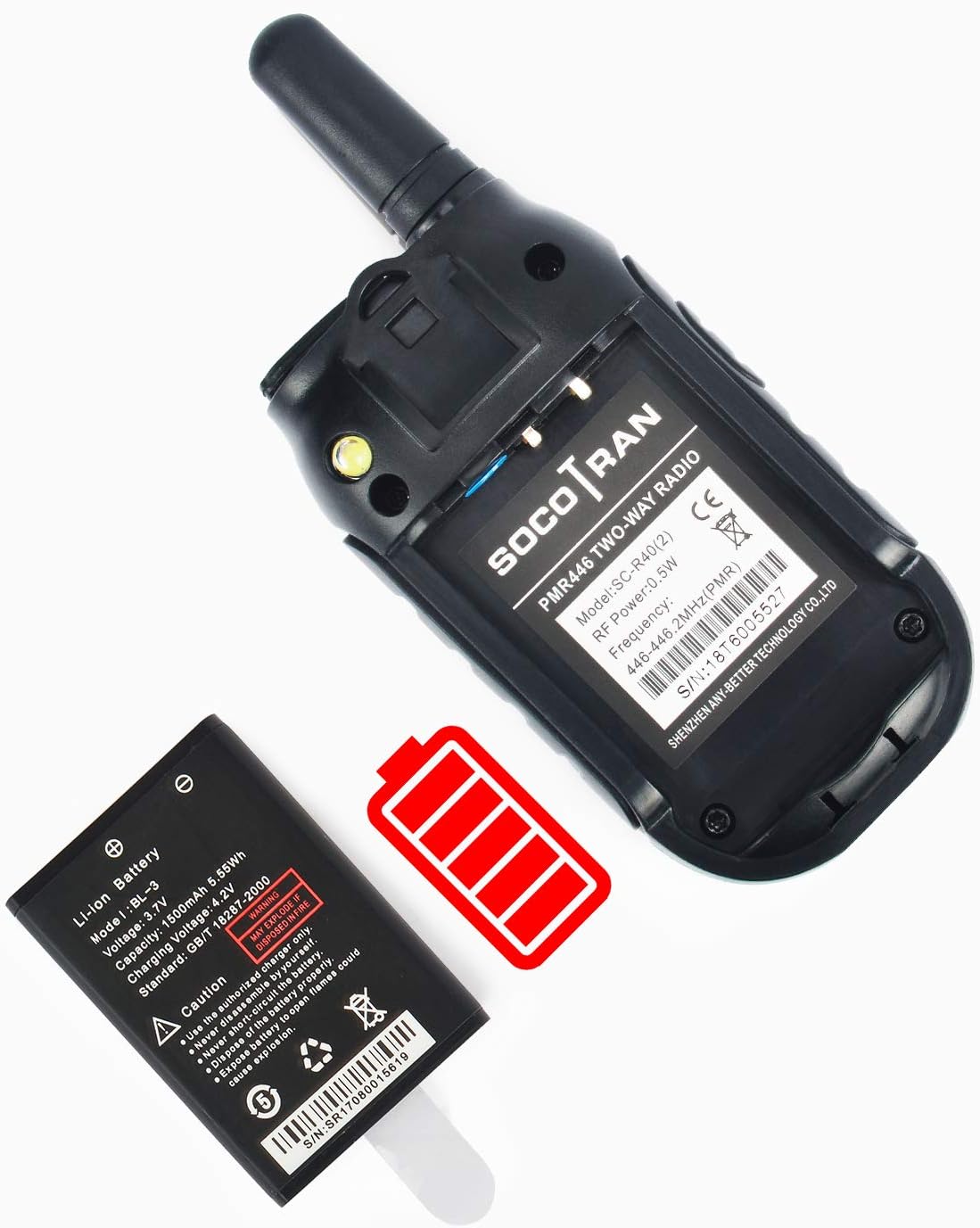
Image: The back of the SOCOTRAN SC-R40 radio with the battery compartment open, showing the removable Li-ion battery and its proper orientation for installation.
4.2 Charging the Battery
Before first use, fully charge the battery. The radio features a USB charging port.
- Connect the USB charging cable to the MIC/DC port on the radio.
- Connect the other end of the USB cable to a compatible power source such as a USB wall adapter, power bank, laptop, or PC.
- The LED indicator will typically show charging status (e.g., red for charging, green for fully charged).
- Allow sufficient time for a full charge before initial use.
5. Operating Instructions
5.1 Power On/Off
- To turn on: Press and hold the MENU/POWER button until the display illuminates.
- To turn off: Press and hold the MENU/POWER button until the display turns off.
5.2 Channel Selection
Your radio has 22 FRS/GMRS channels.
- Press the MENU/POWER button once to enter channel selection mode. The channel number will flash.
- Use the UP or DOWN buttons to select your desired channel (1-22).
- Press the MENU/POWER button again to confirm the selection and exit channel selection mode.
5.3 Privacy Codes (CTCSS/CDCSS)
Privacy codes help reduce interference from other users on the same channel. Your radio supports 38 CTCSS and 60 CDCSS codes.
- After selecting a channel, press the MENU/POWER button twice to enter privacy code selection mode. The privacy code will flash.
- Use the UP or DOWN buttons to select your desired privacy code.
- Press the MENU/POWER button again to confirm.
- Note: For successful communication, both radios must be set to the same channel and privacy code.
5.4 Transmitting and Receiving
- To transmit: Press and hold the PTT button. Speak clearly into the microphone. Release the PTT button to stop transmitting.
- To receive: Ensure the PTT button is not pressed. The radio will automatically receive signals on the selected channel and privacy code.
5.5 VOX Function (Voice-Activated Transmission)
VOX allows you to transmit without pressing the PTT button.
- Press the MENU/POWER button repeatedly until the VOX setting appears on the display.
- Use the UP or DOWN buttons to select a VOX sensitivity level (e.g., 1-3, with 3 being most sensitive). Select "OFF" to disable VOX.
- Press MENU/POWER to confirm.
5.6 Keyboard Lock
To prevent accidental changes to settings:
- To lock: Press and hold the SCAN/LOCK button until a lock icon appears on the display.
- To unlock: Press and hold the SCAN/LOCK button again until the lock icon disappears.
5.7 Scan Function
The scan function allows you to search for active channels.
- To activate: Briefly press the SCAN/LOCK button (do not hold). The radio will begin scanning through channels.
- The scan will pause on an active channel. To stop scanning, press the SCAN/LOCK button again.
5.8 Flashlight Operation
The radio includes a built-in flashlight.
- To turn on/off: Briefly press the LAMP/MONI button.

Image: A close-up view of the SOCOTRAN SC-R40 walkie talkie, showing the integrated flashlight emitting light from the top side of the device.
5.9 Monitor Function
The monitor function allows you to listen to weak signals on the current channel by temporarily disabling squelch.
- To activate: Press and hold the LAMP/MONI button.
- To deactivate: Release the LAMP/MONI button.
6. Maintenance
- Cleaning: Use a soft, damp cloth to clean the radio's exterior. Do not use harsh chemicals or abrasive cleaners.
- Battery Care: To prolong battery life, avoid fully discharging the battery frequently. Recharge the battery regularly, especially if the radio will not be used for an extended period.
- Storage: Store the radio in a cool, dry place away from direct sunlight and extreme temperatures. Remove the battery if storing for very long periods.
- Water Resistance: The radio has an IP65 rating, meaning it is protected against dust ingress and low-pressure water jets from any direction. It is not designed for submersion. Avoid exposing the charging port to moisture when not in use.
7. Troubleshooting
| Problem | Possible Cause | Solution |
|---|---|---|
| Radio does not power on. | Battery is depleted or not installed correctly. | Charge the battery. Ensure the battery is correctly inserted. |
| Cannot communicate with other radios. | Different channels or privacy codes. Out of range. | Verify both radios are on the same channel and privacy code. Move closer to the other radio. |
| Poor audio quality or static. | Weak signal, interference, or out of range. | Move to an open area. Check for obstructions. Use the Monitor function to listen for weak signals. |
| Keyboard is unresponsive. | Keyboard lock is active. | Press and hold the SCAN/LOCK button to unlock the keyboard. |
| Battery drains quickly. | Frequent use, old battery, or radio left on. | Ensure radio is turned off when not in use. Consider replacing the battery if it's old and performance has degraded significantly. |
8. Specifications
| Feature | Detail |
|---|---|
| Model Number | SC-R40 |
| Brand | SOCOTRAN |
| Color | Black |
| Number of Channels | 22 (FRS/GMRS) |
| Privacy Codes | 38 CTCSS, 60 CDCSS (Total 121) |
| Output Power | 0.5W |
| Maximum Talking Range | Up to 5 Miles (terrain and conditions dependent) |
| Battery Type | 1500mAh Rechargeable Lithium Ion |
| Voltage | 5 Volts (charging) |
| Item Weight | 45 g |
| Noise Level | 60 Decibels |
| International Protection Rating | IP65 |
| Tuner Type | UHF |
| UPC | 797153446914 |
9. Warranty and Support
SOCOTRAN is committed to customer satisfaction. If you encounter any issues with your SC-R40 two-way radios, please contact our customer support for assistance. We aim to provide a satisfactory resolution for any product-related concerns.
For support, please refer to the contact information provided with your purchase or visit the official SOCOTRAN website.