
JJC CABLE-R2
JJC 2.5mm Remote Shutter Release Cable Cord User Manual
Model: CABLE-R2
1. Product Overview
The JJC 2.5mm Remote Shutter Release Cable Cord (Model: CABLE-R2) is designed to connect a remote shutter release receiver with a 2.5mm jack to compatible Fujifilm cameras. This coiled cable provides flexibility and extends from approximately 12 inches (coiled) to 24 inches (stretched), offering convenience for various shooting setups.

Image 1.1: The JJC 2.5mm Remote Shutter Release Cable Cord, showing its coiled design and 2.5mm connectors.
2. Compatibility
This cable is compatible with a wide range of Fujifilm cameras that utilize a 2.5mm remote jack, serving as a replacement for the Fujifilm RR-100 remote cable. Compatible camera models include:
- Fujifilm X-T5, X-T4, X-T3, X-T2, X-T1
- Fujifilm X-T30 II, X-T30, X-T20, X-T10
- Fujifilm X-T100, X-Pro2
- Fujifilm X-E3, X-E2S, X-E2
- Fujifilm X-A5, X-A10, X-H1
- Fujifilm X100VI, X100V, X100F, X100T
- Fujifilm X70, X30, XF10
- Fujifilm GFX 50S, GFX 50S II, GFX 50R, GFX 100, GFX 100S
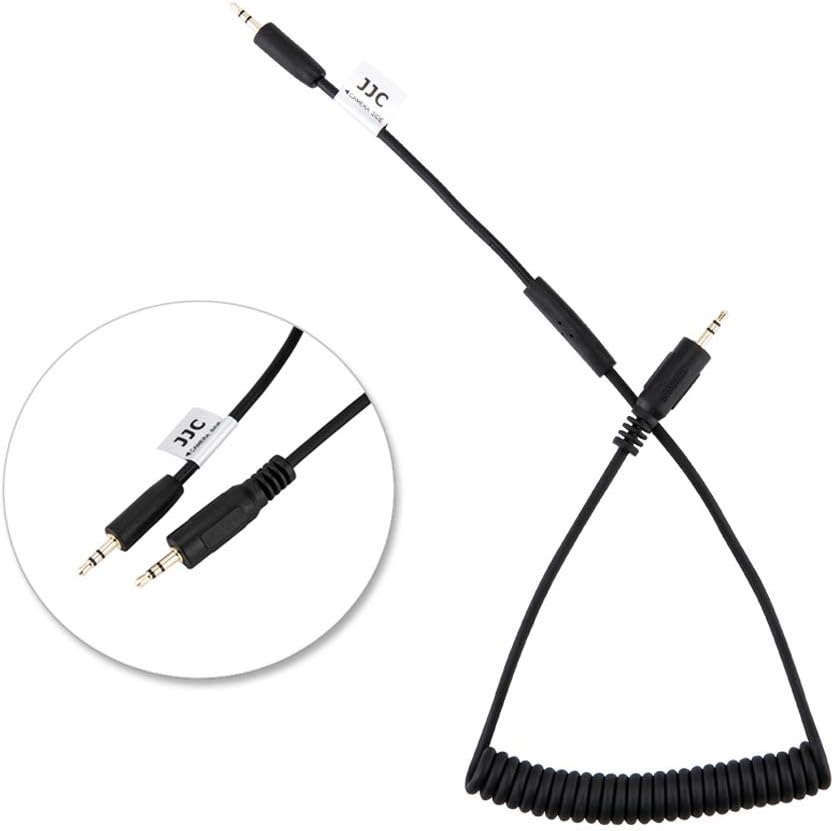
Image 2.1: The cable illustrating its connection points, one end for the remote receiver and the other for the camera's 2.5mm port.
3. Specifications
| Feature | Detail |
|---|---|
| Model Number | CABLE-R2 |
| Connector Type | 2.5mm Jack |
| Coiled Length | Approx. 12 inches (30.5 cm) |
| Stretched Length | Approx. 24 inches (61 cm) |
| Product Dimensions | 6.69 x 0.47 x 2.95 inches (packaged) |
| Item Weight | 0.64 ounces (18.1 grams) |
| Manufacturer | JJC |
4. Setup
To set up the JJC 2.5mm Remote Shutter Release Cable Cord, follow these steps:
- Identify Connectors: The cable has two 2.5mm male connectors. One end is typically labeled or designed to connect to the camera, and the other to the remote receiver.
- Connect to Camera: Locate the 2.5mm remote port on your compatible Fujifilm camera. Gently insert one end of the JJC cable into this port. Ensure it is fully seated.
- Connect to Remote Receiver: Take your remote shutter release receiver (e.g., a wireless trigger receiver) and locate its 2.5mm output jack. Insert the other end of the JJC cable into this jack.
- Secure Connections: Verify that both connections are firm and secure to ensure proper signal transmission.

Image 4.1: A close-up view of the 2.5mm connectors on the JJC cable, highlighting their design for secure connection.
5. Operation
Once the JJC 2.5mm Remote Shutter Release Cable Cord is properly connected between your camera and remote receiver, its operation is straightforward:
- Power On Devices: Ensure both your camera and the remote shutter release receiver are powered on.
- Activate Remote: Use your remote shutter release transmitter (not included with this cable) to send a signal to the receiver.
- Shutter Activation: The receiver will transmit the signal through the JJC cable to your camera, triggering the camera's shutter. Depending on your remote, this may include half-press for autofocus and full-press for shutter release.
- Testing: It is recommended to perform a test shot after setup to confirm that the connection and remote system are functioning correctly.
6. Maintenance
Proper care and maintenance will extend the lifespan of your JJC 2.5mm Remote Shutter Release Cable Cord:
- Storage: When not in use, store the cable in a clean, dry place, away from extreme temperatures and direct sunlight. Avoid tightly coiling or bending the cable sharply, which can damage the internal wires.
- Cleaning: If the cable becomes dirty, gently wipe it with a soft, dry cloth. Do not use harsh chemicals or abrasive materials.
- Handling: Always grasp the connectors when plugging or unplugging the cable, rather than pulling on the cord itself, to prevent strain and damage to the wiring.
- Inspection: Periodically inspect the cable and connectors for any signs of wear, fraying, or damage. If damage is observed, discontinue use to prevent potential issues with your camera or remote.
7. Troubleshooting
If you encounter issues while using the JJC 2.5mm Remote Shutter Release Cable Cord, consider the following troubleshooting steps:
- Cable Not Working:
- Ensure both ends of the cable are fully and securely inserted into the camera and the remote receiver.
- Verify that your camera and remote receiver are powered on and have sufficient battery life.
- Confirm that your camera model is listed in the compatibility section.
- Test the remote receiver with another compatible cable (if available) to isolate the issue to the cable or the remote system.
- Intermittent Connection:
- Check for any visible damage to the cable or its connectors.
- Ensure the connectors are clean and free of dust or debris.
- Avoid excessive bending or stretching of the coiled cable during use.
If the problem persists after attempting these steps, the cable may be damaged and require replacement.
8. Warranty and Support
JJC products are manufactured to high-quality standards. For specific warranty information regarding your JJC 2.5mm Remote Shutter Release Cable Cord, please refer to the packaging or contact JJC customer support directly. Keep your purchase receipt as proof of purchase.
For further assistance or inquiries, please visit the official JJC website or contact their customer service department. Contact information can typically be found on the product packaging or the manufacturer's website.

Image 8.1: The retail packaging for the JJC 2.5mm Remote Shutter Release Cable Cord, which may contain warranty details and contact information.
Ask a question about this manual
Ask about setup, troubleshooting, compatibility, parts, safety, or missing instructions. Manuals+ will review the question and use this page’s manual context to help answer it.