
Introduction
This manual provides detailed instructions for the setup, operation, and maintenance of your LEIBOU Professional Folding Portable Vented Manicure Table, Model LBMT-008. Please read this manual thoroughly before using the product to ensure safe and efficient operation.
Safety Information
- Caution: Use care when folding or unfolding the table. Ensure wheels are locked during use.
- Keep fingers clear of moving parts during assembly and disassembly.
- Do not exceed the table's weight capacity.
- Supervise children around the product to prevent accidents.
- Ensure the power cord for the fan is not damaged and is properly connected to a suitable power outlet.
Product Features
- Safety Lock Legs and Vacuum Design: Features four lockable wheels for easy movement and stability. The wheels can be locked to secure the table in place.
- High-Quality Materials: Constructed from high-density board and sturdy metal for durability. The desktop features a waterproof design.
- Foldable and Portable Design: Metal legs fold for space-saving storage and easy transport.
- Round Corners and Comfortable Wrist Pad: Designed with rounded corners to prevent injury and includes an ultra-comfortable wrist pad for user comfort.
- Integrated Dust Collector Fan: A built-in fan with a dust bag helps maintain a clean working environment by collecting nail debris.
Setup Instructions
- Unpack the Table: Carefully remove all components from the packaging. Verify that all parts are present according to the packing list.
- Unfold the Legs: Place the folded table on a flat surface. Gently extend the metal legs outwards until they are fully locked into position. Ensure the support mechanisms are securely engaged.

Figure 1: Unfolding the table legs and securing the firm and stable support.
- Attach Wheels (if not pre-attached): If the wheels are not pre-attached, insert them into the designated slots at the base of the table legs. Press firmly until they click into place. Ensure all four wheels are securely attached.

Figure 2: Detail of the lockable and rotating wheels.
- Install the Dust Collector Bag: Locate the dust collector fan unit underneath the table. Attach the provided dust collection bag securely around the fan's opening. Ensure it is fitted snugly to prevent dust leakage.

Figure 3: Components of the dust collector, including the fan and dust bag attachment.
- Position the Table: Move the table to your desired working location. Lock the wheels by pressing down on the adjustment buttons to prevent unintended movement during use.
- Connect Power: Plug the power cord of the dust collector fan into a standard electrical outlet.
- Optional: Attach Wrist Pad: Place the comfortable wrist pad on the designated area of the table surface.
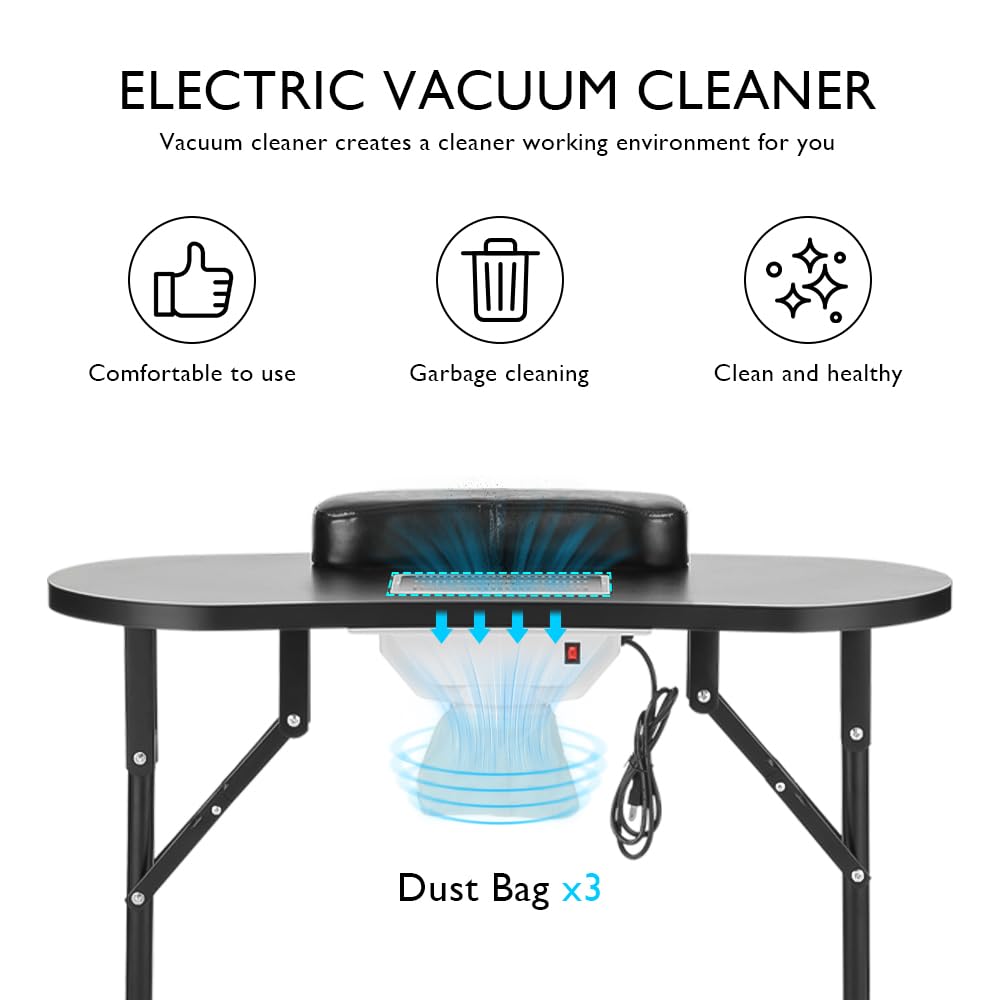
Figure 4: The detachable wrist pad and desktop vent.
- Visual Setup Guide: For a visual demonstration of the setup process, please refer to the official product video below.
Video 1: Official LEIBOU product video demonstrating the assembly and features of the manicure table.
Operating Instructions
- Powering On the Dust Collector: Locate the red on/off switch on the underside of the table, near the dust collector fan. Flip the switch to the 'On' position to activate the fan. The fan will begin to draw air and nail dust into the collection bag.
- Using the Wrist Pad: Position the client's hand comfortably on the detachable wrist pad during manicure procedures. This provides support and stability.
- Working with the Vented Surface: Perform nail filing and other dust-generating activities directly over the vented area of the table. The fan will actively collect airborne particles, contributing to a cleaner workspace.
- Powering Off: After use, flip the red switch on the dust collector to the 'Off' position. Unplug the power cord from the electrical outlet.
Maintenance
- Cleaning the Table Surface: Wipe the table surface with a damp cloth and mild detergent after each use. The waterproof design allows for easy cleaning. Avoid abrasive cleaners that may damage the finish.
- Emptying/Replacing Dust Collector Bag: Regularly check the dust collection bag. When it is full or visibly soiled, carefully remove it from the fan unit. Dispose of the collected dust and replace the bag with a new one. Ensure the new bag is securely attached.
- Cleaning the Fan and Mesh: Periodically, with the power unplugged, remove the protective mesh over the fan and gently clean any accumulated dust from the fan blades and mesh using a soft brush or vacuum cleaner. Reattach the mesh securely.
- General Care: Store the table in a dry place when not in use. When folding for storage or transport, ensure all components are properly secured to prevent damage. The table can be stored in its portable carrying bag.

Figure 5: Storing the folded table in its carrying bag.
Troubleshooting
- Fan Not Turning On:
- Check if the power cord is securely plugged into both the table and the electrical outlet.
- Ensure the on/off switch is in the 'On' position.
- Test the outlet with another device to confirm it is receiving power.
- Weak Dust Collection:
- Check if the dust collection bag is full and needs to be emptied or replaced.
- Ensure the dust bag is properly attached and sealed around the fan opening.
- Clean the protective mesh and fan blades for any obstructions or dust buildup.
- Table Instability:
- Ensure all four legs are fully extended and their support mechanisms are securely locked.
- Verify that all four wheels are locked into position to prevent rolling.
- Place the table on a flat, even surface.
Specifications
| Attribute | Detail |
|---|---|
| Brand | LEIBOU |
| Model Number | LBMT-008 |
| Product Dimensions | 16.5"D x 36"W x 32.3"H (42cm D x 91cm W x 82cm H) |
| Item Weight | 23 Pounds (approx. 10.4 kg) |
| Frame Material | Metal |
| Color | Black |
| UPC | 731717684886 |
| GTIN | 731717684886 |
Figure 6: Product dimensions overview.
Warranty and Support
LEIBOU is committed to providing a satisfying shopping experience. If you encounter any quality problems with your manicure table, please contact LEIBOU customer support as soon as possible. We will work to provide the best solution to resolve the issue.
For further assistance or inquiries, please visit the official LEIBOU store: LEIBOU Store