1. Introduction
This manual provides essential information for the proper use, setup, and maintenance of the ReceiptRoll Ishida AC-Series, BC-3000, BC4000 Astra Continuous Strip. Please read this manual thoroughly before using the product to ensure optimal performance and longevity.
2. Product Overview
The Ishida AC-Series, BC-3000, BC4000 Astra Continuous Strip is a high-quality paper roll designed for use with compatible Ishida weighing scales and label printers. It is specifically manufactured to provide clear and consistent printouts for various applications, including retail, industrial, and scientific settings.
- Product Type: Continuous Strip Paper
- Compatibility: Ishida AC-Series, BC-3000, BC4000 Astra scales/printers
- Dimensions: 64mm width
- Weight: Approximately 13lb per roll (as per product description)
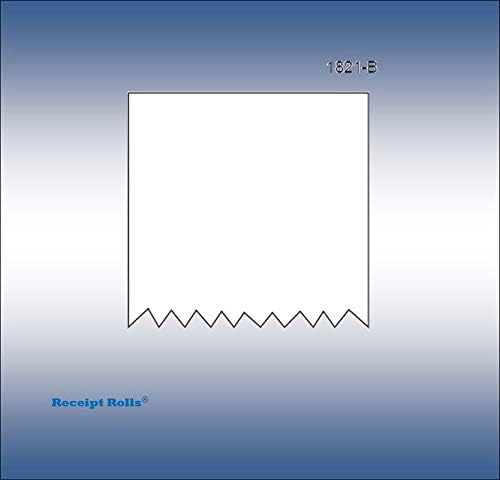
Figure 2.1: Representation of the continuous strip paper. This strip is designed for continuous printing applications, often found in label or receipt printers integrated with weighing scales.
3. Setup and Installation
Proper installation of the continuous strip is crucial for reliable operation and print quality. Refer to your specific Ishida scale or printer's user manual for detailed loading instructions. The general steps are as follows:
- Power Off Device: Ensure the Ishida scale/printer is powered off before attempting to load or replace the paper roll.
- Open Printer Cover: Locate and open the paper roll compartment cover on your Ishida device.
- Remove Old Roll (if applicable): If replacing an existing roll, carefully remove the used core and any remaining paper.
- Insert New Roll: Place the new Ishida Astra Continuous Strip into the compartment. Ensure the paper feeds from the bottom of the roll and is oriented correctly for printing (usually with the printable side facing the print head).
- Feed Paper: Pull a small length of paper out and feed it through the designated slot or mechanism until it emerges from the printer's output slot.
- Close Cover: Securely close the printer compartment cover.
- Power On Device: Turn on your Ishida scale/printer. The device may automatically feed a small amount of paper to calibrate.
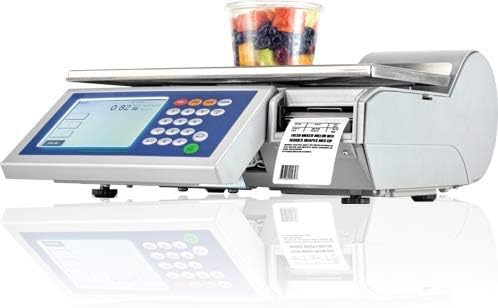
Figure 3.1: An Ishida weighing scale with an integrated printer, demonstrating the typical environment where this continuous strip would be used. Proper loading ensures smooth operation.
4. Operating Instructions
Once the continuous strip is correctly installed, its operation is managed by the Ishida scale or printer itself. The strip functions as the medium for printing labels, receipts, or other data generated by the device.
- Printing: The device will automatically feed and print on the continuous strip as required by its programmed functions (e.g., weighing an item and printing a price label).
- Tearing/Cutting: Many Ishida devices have an integrated cutter or a serrated edge for easy tearing of the printed output. Follow the device's instructions for removing printed labels or receipts.
- Monitoring Paper Levels: Periodically check the paper compartment to ensure sufficient paper remains. Replace the roll when it is nearing its end to avoid interruptions.
5. Maintenance
While the continuous strip itself requires minimal maintenance, proper handling and storage are important for its quality and the longevity of your printing device.
- Storage: Store unused rolls in a cool, dry place away from direct sunlight, excessive heat, and humidity. This prevents premature degradation of the paper and preserves print quality.
- Handling: Handle rolls by their edges to avoid transferring oils or dirt from hands onto the printing surface, which can affect print clarity.
- Printer Cleaning: Regularly clean the print head and paper path of your Ishida device as per its manufacturer's instructions. Dust and paper residue can accumulate and affect print quality or cause paper jams.
6. Troubleshooting
If you encounter issues related to the continuous strip, consider the following common problems and solutions:
- No Print/Faint Print:
- Check if the paper roll is inserted correctly with the printable side facing the print head.
- Ensure the paper roll is not exhausted.
- Clean the print head of your Ishida device.
- Verify printer settings on your Ishida device.
- Paper Jams:
- Ensure the paper roll is properly seated and not too tight or loose in the compartment.
- Check for any foreign objects or paper scraps in the paper path.
- Ensure the paper is not creased or damaged.
- Inconsistent Feeding:
- Verify the roll is centered and freely rotating on its spindle.
- Check for any obstructions in the paper path.
For persistent issues, consult the user manual for your specific Ishida scale/printer model or contact ReceiptRoll customer support.
7. Specifications
| Attribute | Value |
|---|---|
| Brand | ReceiptRoll |
| Model Number | SL64MM1560ISH |
| Item Weight | 11.16 pounds |
| Package Dimensions | 11.26 x 8.39 x 7.2 inches |
| UPC | 696303083811 |
| First Available Date | November 1, 2018 |
8. Warranty and Support
This product is manufactured by ReceiptRoll. For any questions regarding product quality, compatibility, or support, please contact the manufacturer directly. Specific warranty information for consumable items like continuous strips may vary. Please refer to the original purchase documentation or the ReceiptRoll website for the most current warranty details and customer support contact information.
Manufacturer: ReceiptRoll
Contact: Refer to ReceiptRoll's official website or your purchase invoice for support channels.