
1. Introduction
The BTMETER BT-38C is a compact, pen-type digital multimeter designed for accurate and reliable electrical measurements. It features a 6000-count display, auto-ranging capabilities, and various functions including AC/DC voltage, resistance, capacitance, diode, and continuity testing. Its portable design, backlit LCD, and integrated flashlight make it suitable for both professional and household electrical troubleshooting.

Image 1.1: Overview of the BTMETER BT-38C Pen Type Digital Multimeter highlighting its key features such as auto range, diode test, data hold, backlight, lamp light, auto power off, continuity buzzer, and AC/DC voltage/current measurement.
2. Safety Information
Always adhere to safety precautions when using any electrical testing equipment. This device is designed with double insulation protection and meets CE 600V CAT standards. Failure to follow safety guidelines may result in electric shock, fire, or damage to the meter.
- Do not exceed the maximum input values specified for each function.
- Ensure the test leads are properly connected and in good condition before use.
- Do not use the meter if it appears damaged or if the insulation is compromised.
- Exercise extreme caution when working with voltages above 60V DC or 30V AC RMS.
- Always disconnect power to the circuit before making resistance, capacitance, or diode measurements.
- Replace batteries promptly when the low battery indicator appears to ensure accurate readings.

Image 2.1: The multimeter being used to test high voltage, emphasizing the importance of safety precautions.
3. Product Features
The BT-38C multimeter offers a range of features for versatile electrical testing:
- 6000 Counts Display: Provides high-resolution measurements.
- Auto Range: Automatically selects the appropriate measurement range, simplifying operation.
- AC/DC Voltage Measurement: Accurately measures voltage from 600mV to 600V.
- Resistance Measurement: Measures resistance from 600Ω to 60MΩ.
- Capacitance Measurement: Allows for testing of capacitor values.
- Diode Test: Checks the functionality of diodes.
- Continuity Test: Features an audible buzzer for quick circuit continuity checks.
- Data Hold: Freezes the displayed reading for convenient recording.
- Backlit LCD: Ensures clear visibility of readings in low-light conditions.
- Flashlight (Lamp Light): Integrated LED light for illuminating work areas.
- Auto Power Off: Automatically shuts down after 15 minutes of inactivity to conserve battery life (can be disabled).
- Low Battery Indicator: Alerts the user when battery replacement is needed.
- Overload Protection: Designed with double insulation for enhanced safety.
4. Package Contents
Upon opening the package, verify that all items are present and undamaged:
- BTMETER BT-38C Pen Type Digital Multimeter
- Test Leads (integrated)
- User Manual
- Batteries (AAA, typically 2 included)

Image 4.1: The complete package contents, including the BT-38C multimeter, test leads, user manual, and batteries.
5. Setup
5.1 Battery Installation
- Locate the battery compartment cover on the back of the multimeter.
- Use a screwdriver to open the battery compartment.
- Insert the two AAA batteries, observing the correct polarity (+/-).
- Replace the battery compartment cover and secure it with the screw.
5.2 Initial Power On
Press the 'Select' button to turn on the multimeter. The LCD will illuminate, and the device will enter auto-ranging mode by default.
6. Operating Instructions
The BT-38C features an intuitive interface. Use the 'Select' button to cycle through measurement modes and the 'HOLD' button for additional functions.
6.1 AC/DC Voltage Measurement
- Turn on the multimeter. It will default to auto-ranging voltage mode.
- Connect the red test lead to the positive (+) point and the black test lead to the negative (-) point or ground of the circuit under test.
- Read the voltage value displayed on the LCD. The meter will automatically detect AC or DC voltage.
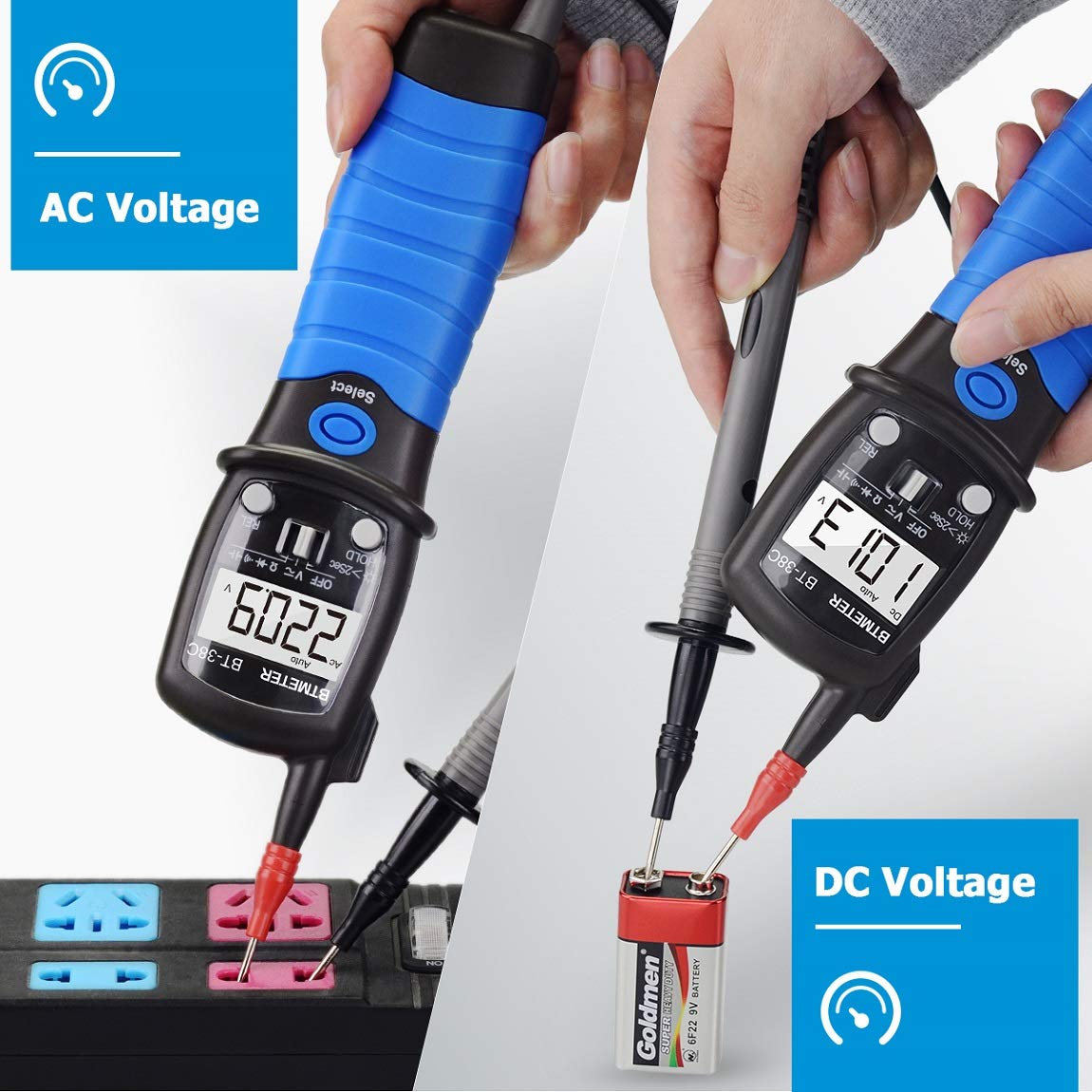
Image 6.1: Demonstrates the measurement of AC voltage from a wall outlet and DC voltage from a 9V battery using the BT-38C multimeter.
6.2 Resistance Measurement
- Ensure the circuit is de-energized before measuring resistance.
- Press the 'Select' button until the resistance symbol (Ω) is displayed.
- Connect the test leads across the component to be measured.
- Read the resistance value on the LCD.

Image 6.2: The multimeter measuring resistance, indicating its capability up to 60M Ohms.
6.3 Capacitance Measurement
- Ensure the capacitor is fully discharged before measurement.
- Press the 'Select' button until the capacitance symbol is displayed.
- Connect the test leads across the capacitor terminals.
- Read the capacitance value on the LCD.
6.4 Diode Test
- Press the 'Select' button until the diode symbol is displayed.
- Connect the red test lead to the anode and the black test lead to the cathode of the diode.
- The forward voltage drop will be displayed. Reverse the leads; an open circuit (OL) reading indicates a good diode.
6.5 Continuity Test
- Ensure the circuit is de-energized.
- Press the 'Select' button until the continuity symbol (speaker icon) is displayed.
- Connect the test leads across the circuit or component.
- If continuity exists (resistance below approximately 50Ω), the buzzer will sound.
6.6 Data Hold Function
Press the 'HOLD' button briefly to freeze the current reading on the display. Press it again to release the hold function.
6.7 Backlight and Flashlight
Press and hold the 'HOLD' button for approximately 2 seconds to activate the backlight and flashlight. Repeat the action to turn them off. This feature is useful for working in dark or dimly lit environments.

Image 6.3: The integrated flashlight illuminating a dark electrical panel, demonstrating its utility in low-light conditions.

Image 6.4: Illustrates the physical dimensions of the multimeter, along with visual cues for the flashlight and backlight features.
6.8 Auto Power Off
The multimeter will automatically power off after approximately 15 minutes of inactivity to save battery life. To disable this feature, press and hold the 'Select' button while turning on the device.
7. Maintenance
7.1 Cleaning
Wipe the meter's casing with a damp cloth and mild detergent. Do not use abrasives or solvents. Ensure the device is dry before storage or further use.
7.2 Battery Replacement
When the low battery indicator appears on the display, replace the batteries as described in Section 5.1. Always use new batteries of the specified type (AAA).
7.3 Storage
If the meter is not used for an extended period, remove the batteries to prevent leakage. Store the device in a cool, dry place, away from direct sunlight and extreme temperatures.
8. Troubleshooting
- Meter does not power on: Check battery installation and ensure batteries are not depleted. Replace if necessary.
- Inaccurate readings: Verify test lead connections. Ensure the correct measurement mode is selected. Check battery level.
- 'OL' (Overload) displayed: The measured value exceeds the meter's range for the selected function, or the circuit is open (e.g., in continuity/resistance mode).
- No continuity buzzer: Ensure the continuity mode is active. Check if the circuit is truly continuous.
9. Specifications
| Parameter | Value |
|---|---|
| Model Number | BT38C |
| Display | 6000 Counts LCD |
| AC/DC Voltage Range | 600mV ~ 600V |
| Resistance Range | 600Ω ~ 60MΩ |
| Capacitance | Yes |
| Diode Test | Yes |
| Continuity Test | Yes (with Buzzer) |
| Auto Range | Yes |
| Data Hold | Yes |
| Backlight | Yes |
| Flashlight | Yes |
| Auto Power Off | Yes (15 minutes, disable option) |
| Power Source | 2 x AAA Batteries |
| Safety Compliance | CE 600V CAT |
| Item Weight | 150 Grams |
| Package Dimensions | 26.8 x 9.2 x 4.5 cm |
10. Warranty and Support
BTMETER provides technical support for its products. For warranty claims, technical assistance, or any inquiries regarding the BT-38C multimeter, please refer to the contact information provided with your purchase or visit the official BTMETER website. Keep your purchase receipt as proof of purchase for warranty purposes.