
Introduction
This manual provides essential instructions for the setup, operation, maintenance, and troubleshooting of your Panasonic DECT 6.0 Cordless Phone, Model KX-TGC380CB. Please read this manual thoroughly before using the product to ensure proper functionality and safety.
Package Contents
Verify that your package contains the following items:
- Cordless Handset
- Base Unit
- AC Power Adapter for Base Unit
- Telephone Line Cord
- Rechargeable Batteries (2x AAA size)
- Handset Cover

Image: Panasonic KX-TGC380CB Cordless Handset and Base Unit. This image displays the cordless handset docked in its base unit, illustrating the primary components of the phone system.

Image: Power Adapter and Telephone Line Cord. This image shows the AC power adapter and the telephone line cord, which are essential for connecting the base unit.
Setup
1. Connecting the Base Unit
- Connect the AC power adapter to the base unit and then to a standard electrical outlet.
- Connect the telephone line cord to the base unit and then to a single-line telephone jack.
- Ensure all connections are secure.
2. Battery Installation and Charging
- Remove the handset cover by sliding it downwards.
- Insert the two supplied rechargeable AAA batteries according to the polarity markings (+ and -).
- Replace the handset cover.
- Place the handset on the base unit to charge. The charge indicator will illuminate. Allow the handset to charge for at least 7 hours before initial use.
3. Initial Settings (Date and Time)
After the handset is charged, you will be prompted to set the date and time. Follow the on-screen instructions:
- Press MENU.
- Scroll to Initial Setting and press SELECT.
- Scroll to Date & Time and press SELECT.
- Enter the current month, day, and year using the dial pad. Press OK.
- Enter the current hour and minute. Select AM or PM. Press OK.
Operating the Phone
Making and Answering Calls
- To Make a Call: Press TALK, then dial the phone number.
- To Answer a Call: Press TALK or SP-PHONE when the phone rings.
- To End a Call: Press OFF.
Using the Speakerphone
During a call, press SP-PHONE to switch between handset and speakerphone mode. Press OFF to end the call.

Image: Illustration of a person using speakerphone. This graphic depicts a user communicating hands-free with the phone placed on a surface, highlighting the speakerphone feature.
Adjusting Volume
During a call, press VOL (up or down arrow) to adjust the receiver or speakerphone volume.
Call Block Feature
The call block feature allows you to block unwanted numbers. You can register up to 30 numbers in the call block list.
- To Block a Number during a Call: Press CALL BLOCK.
- To Block a Number from Caller ID History: Press CALL BLOCK, then select the number from the Caller ID list and follow the prompts.

Image: Illustration of call block feature. This graphic depicts a phone with a "block" symbol, indicating the ability to prevent unwanted calls.
Intercom Function
If you have multiple handsets, you can use the intercom feature for internal communication.
- Press INTERCOM.
- Dial the desired handset number (e.g., 2 for handset 2).
- Press TALK to start the intercom call.
- Press OFF to end the intercom call.

Image: Intercom button on handset. This image highlights the dedicated "INTERCOM" button on the phone's keypad, used for internal communication between handsets.
Night Mode
Night Mode allows you to silence the handset ringer during a specified period, ensuring undisturbed rest. Calls will still be recorded in the Caller ID log.
- Press MENU.
- Scroll to Night Mode and press SELECT.
- Set the desired start and end times for Night Mode.
- Press SAVE.

Image: Handset display showing Night Mode activated. This image illustrates the phone's screen displaying "Night mode" and a crescent moon icon, indicating the feature is active.
ECO Mode
The Intelligent ECO Mode automatically reduces power consumption when the handset is close to the base unit, extending battery life and reducing radiation.
Maintenance
Cleaning the Unit
- Wipe the exterior surfaces of the handset and base unit with a soft, damp cloth.
- Do not use abrasive cleaners, waxes, or solvents.
- Avoid spraying cleaning products directly onto the unit.
Battery Care
- Use only the rechargeable batteries specified for this unit.
- If the unit will not be used for an extended period, remove the batteries from the handset.
- Dispose of used batteries according to local regulations. Do not incinerate.
Troubleshooting
If you experience issues with your phone, refer to the following common problems and solutions:
No Dial Tone / Cannot Make or Receive Calls
- Ensure the AC power adapter and telephone line cord are securely connected to the base unit and their respective outlets.
- Check if the handset batteries are charged. Place the handset on the base unit to charge.
- Verify that your telephone line service is active.
Poor Sound Quality / Static
- Move the handset closer to the base unit.
- Avoid using the phone near other electrical appliances (e.g., microwaves, computers) that may cause interference.
- Ensure the telephone line cord is not tangled or damaged.
Handset Does Not Charge
- Clean the charging contacts on both the handset and the base unit with a dry cloth.
- Ensure the AC power adapter is properly connected.
- Verify that the batteries are correctly installed and are rechargeable.
Display Shows "No Link to Base"
- Move the handset closer to the base unit.
- Ensure the base unit is powered on.
- If the issue persists, try re-registering the handset to the base unit (refer to the full operating instructions for detailed steps).
Specifications
| Feature | Detail |
|---|---|
| Model Number | KX-TGC380CB |
| Frequency | DECT 6.0 |
| Handset Display | 1.6 inch Amber Backlit LCD |
| Call Block Capacity | Up to 30 numbers |
| Expandability | Up to 6 handsets |
| Battery Type | 2 x AAA Ni-MH rechargeable batteries (included) |
| Base Unit Dimensions (H x W x D) | Approx. 85 mm x 90 mm x 108 mm |
| Handset Dimensions (H x W x D) | Approx. 165 mm x 48 mm x 32 mm |
| Weight | Approx. 250 grams (handset with batteries) |
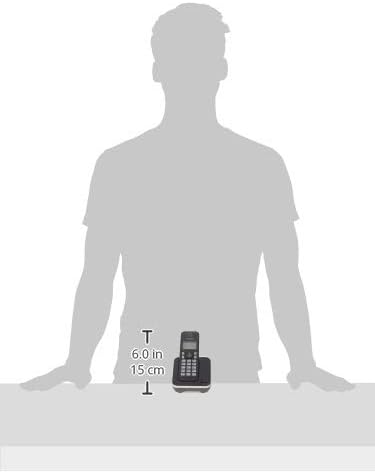
Image: Dimensions of Panasonic KX-TGC380CB Handset and Base Unit. This image provides a visual reference for the physical size of the handset and base unit, showing key measurements.
Support and Warranty
For further assistance, technical support, or warranty information, please refer to the official Panasonic website or contact their customer service. Keep your purchase receipt for warranty claims.
Online Support: Visit the Panasonic Official Website