
Product Overview
The iSaddle Dash Cam Suction Mount (Model CH-MK03) provides a secure and adjustable solution for mounting dash cameras in vehicles. This mount is designed for attachment to either the windshield or dashboard, offering flexibility and stability for various dash cam models. It includes a variety of joints to ensure compatibility with a wide range of devices.
Package Contents
The iSaddle Dash Cam Suction Mount package typically includes:
- Suction cup base
- Adjustable arm/joint components
- Various dash cam adapter joints
- 3M mounting pad (for dashboard installation)

Figure 1: Included adapter joints for broad compatibility.
Setup and Installation
Follow these steps to properly install your iSaddle Dash Cam Suction Mount:
- Prepare the Mounting Surface:
- For windshield installation, ensure the glass surface is clean and dry.
- For dashboard installation, clean the dashboard surface thoroughly. If using the 3M mounting pad, peel off the protective film and firmly press the pad onto the desired dashboard location. Allow sufficient time for the adhesive to cure before attaching the suction cup.
- Assemble the Mount:
- Select the appropriate adapter joint for your dash cam.
- Connect the chosen adapter joint to the adjustable arm, and then connect the arm to the suction cup base. Ensure all connections are secure.

Figure 2: Assembly of the mount components.

Figure 3: Assembled suction mount ready for dash cam attachment.
- Attach the Mount:
- Press the suction cup firmly against the clean windshield or the 3M mounting pad on the dashboard.
- Engage the suction lever or mechanism to create a vacuum seal, securing the mount in place.
- Attach Your Dash Cam:
- Slide or clip your dash cam onto the installed adapter joint. Ensure it is firmly seated.
Operating and Adjustment
Once installed, the mount allows for flexible positioning of your dash cam:
- Angle Adjustment: Loosen the adjustment knob(s) on the mount to change the angle and orientation of your dash cam. Tighten the knob(s) once the desired position is achieved.
- 360° Rotation: The mount features a ball joint design that allows for 360-degree rotation, enabling you to achieve the optimal viewing angle for your dash cam.

Figure 4: The mount offers 360-degree rotation for optimal camera positioning.
Maintenance
To ensure the longevity and optimal performance of your iSaddle Dash Cam Suction Mount, consider the following maintenance tips:
- Clean Suction Cup: Periodically clean the suction cup and the mounting surface with a damp cloth to remove dust and debris. This helps maintain a strong vacuum seal.
- Check Connections: Regularly inspect all joints and connections to ensure they remain tight and secure.
- Heat Exposure: In environments with high temperatures, prolonged exposure to direct sunlight can affect the suction cup's adhesion. If the mount frequently detaches, consider reapplying it to a freshly cleaned surface or using the 3M adhesive pad for a more permanent solution on the dashboard.
Troubleshooting
If you encounter issues with your iSaddle Dash Cam Suction Mount, refer to the following common solutions:
- Mount Does Not Stick or Falls Off:
- Ensure the mounting surface (windshield or dashboard pad) is clean, dry, and smooth.
- Press the suction cup firmly against the surface before engaging the lever.
- If using the 3M pad, ensure it has had sufficient time to bond to the dashboard.
- Extreme temperatures (hot or cold) can affect suction. Try reapplying in moderate conditions.
- Dash Cam Does Not Fit the Adapter:
- Verify that you are using the correct adapter joint for your specific dash cam model. The kit includes various joints for broad compatibility.
- Some dash cams may require minor modifications or shims (e.g., a small piece of folded paper) to achieve a snug fit if the adapter is slightly loose.
- Note that while the mount is designed for wide compatibility, it may not fit every dash cam model on the market. Please check your dash cam's connector type against the provided adapters.
- Mount is Loose or Wobbly:
- Tighten all adjustment knobs and screws on the mount's arm and joints.
- Ensure the suction cup is securely attached to the surface.
Specifications
| Brand | iSaddle |
| Model Name | CH-MK03 |
| Model Number | CH-MK03 |
| Mounting Type | Dashboard, Windshield |
| Compatible Devices | Cameras (Dash Cams, Action Cams) |
| Item Weight | 0.14 Kilograms |
| Enclosure Material | Plastic or Engineered Plastic |
| UPC | 701599832415 |
| GTIN | 701599832415 |

Figure 5: Approximate dimensions of the mount.
For a list of widely applicable models, refer to the images below:
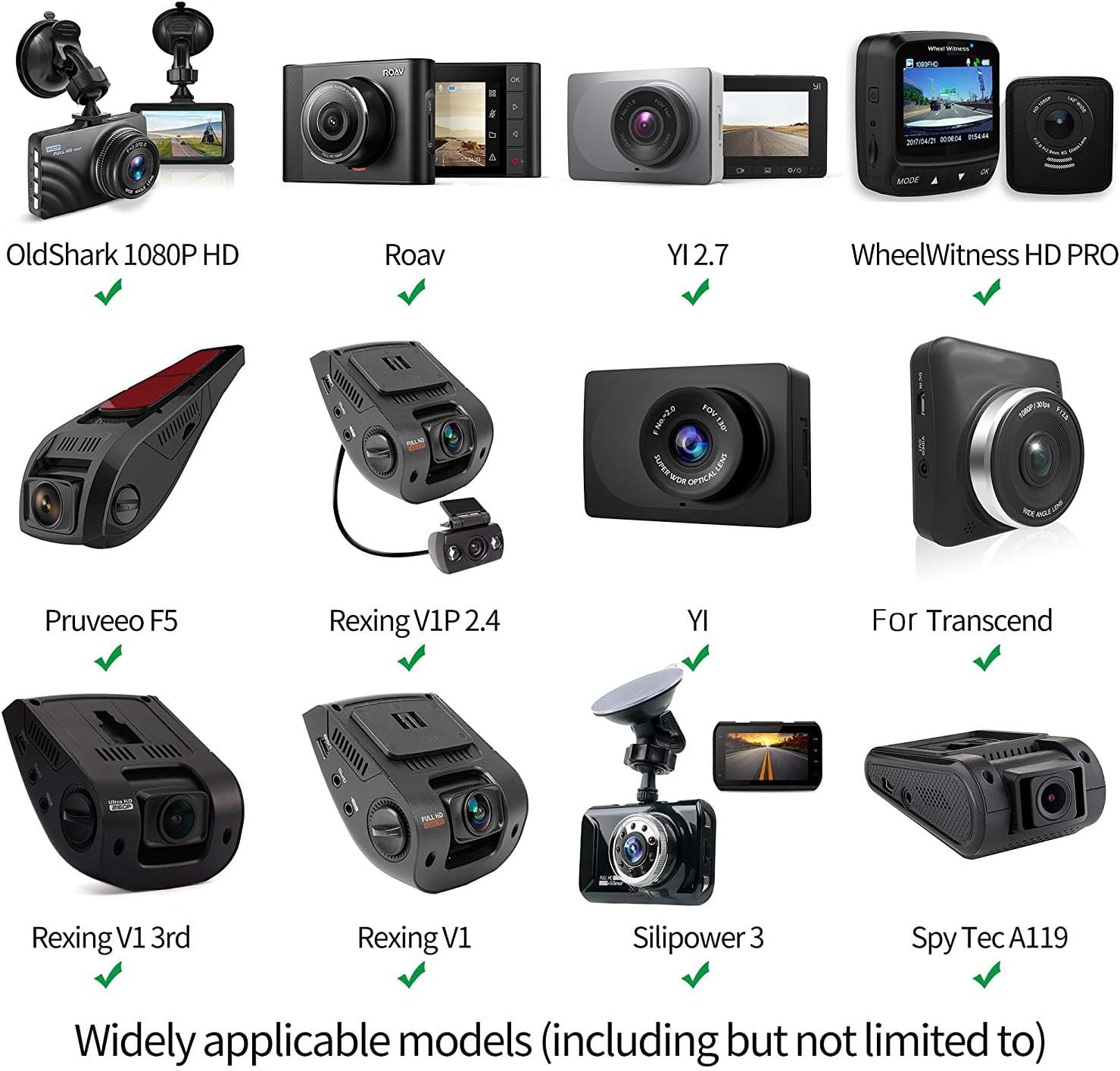
Figure 6: Examples of compatible dash cam models (Part 1).

Figure 7: Examples of compatible dash cam models (Part 2).
Warranty Information
The iSaddle Dash Cam Suction Mount (Model CH-MK03) comes with a 12-month warranty from the date of purchase. This warranty covers manufacturing defects and material flaws under normal use. Please retain your proof of purchase for warranty claims.
Customer Support
If you have any questions, require assistance with installation, or experience issues not covered in this manual, please contact iSaddle customer support. Refer to the product packaging or the retailer's website for contact details.
