Introduction
This manual provides essential information for the proper setup, operation, and maintenance of your Easytry123 Replacement Remote Control, model Easytry4030. This remote is designed as a replacement for various Sony TV models, including those compatible with original remote models such as RM-ED019, RM-ED032, RM-936, RM-938, RM-940, RM-943, RM-945, RM-946, and RM-952. Please note that as a replacement, some advanced functions of your original remote may not be fully supported. Ensure your TV model is listed as compatible before use.
Setup
1. Battery Installation
The remote control requires two (2) AAA batteries for operation. Batteries are not included with the remote and must be purchased separately.
- Locate the battery compartment on the back of the remote control.
- Slide the battery compartment cover downwards to open it.
- Insert two AAA batteries, ensuring the positive (+) and negative (-) terminals align correctly with the markings inside the compartment.
- Slide the battery compartment cover back into place until it clicks securely.

Figure 1: Battery Compartment
This image shows the rear of the remote control with the battery cover removed, revealing the two slots for AAA batteries. Observe the correct polarity markings for battery insertion.
2. Initial Use
This replacement remote control is designed to work immediately with compatible Sony TV models without requiring complex programming. Simply point the remote towards your television and press the desired function button.
Important Note: Due to the nature of replacement remotes, some specific or advanced functions present on your original remote may not be replicated or may behave differently. This remote is primarily designed for core television functions.
Operating Instructions
The Easytry123 remote control features an ergonomic design with clearly labeled buttons for intuitive operation. Below is a general guide to common button functions:
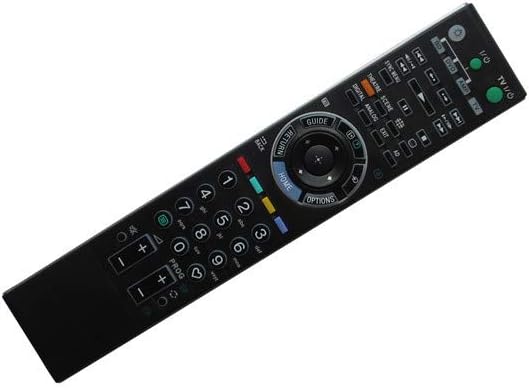
Figure 2: Remote Control Layout
This image displays the front face of the remote control, highlighting the arrangement and labeling of all functional buttons, including power, volume, channel, navigation, and numerical keys.
- Power (I/O): Turns the television on or off.
- TV/Video: Switches between TV and external video inputs.
- Number Buttons (0-9): Used for direct channel selection or inputting numbers.
- Volume (+/-): Increases or decreases the audio volume.
- Channel (PROG +/-): Changes the television channel up or down.
- Mute: Silences the television audio.
- Navigation Pad (Up, Down, Left, Right, Enter): Used to navigate menus and confirm selections.
- HOME: Accesses the TV's main menu or smart TV interface.
- OPTIONS: Displays context-sensitive options for the current screen.
- RETURN/BACK: Returns to the previous screen or menu.
- GUIDE: Opens the electronic program guide (EPG).
- Colored Buttons (Red, Green, Yellow, Blue): Functionality varies depending on the TV model and current menu/application.
- Playback Controls (Play, Pause, Stop, Rewind, Fast Forward): For controlling media playback on compatible devices or TV functions.
Ensure there is a clear line of sight between the remote control's infrared emitter and the TV's IR receiver for optimal performance.
Maintenance
Battery Replacement
Replace batteries when the remote control's response becomes sluggish or stops working. Always replace both batteries simultaneously with new AAA batteries. Do not mix old and new batteries, or different types of batteries.
Cleaning
To clean the remote control, gently wipe its surface with a soft, dry cloth. For stubborn dirt, a slightly damp cloth can be used, but ensure no moisture enters the remote. Do not use abrasive cleaners, alcohol, or solvents.
Storage
Store the remote control in a cool, dry place away from direct sunlight, extreme temperatures, and high humidity. If the remote will not be used for an extended period, it is recommended to remove the batteries to prevent leakage.
Troubleshooting
| Problem | Possible Cause | Solution |
|---|---|---|
| Remote not responding. | Dead or incorrectly inserted batteries. Obstruction between remote and TV. | Replace batteries, ensuring correct polarity. Remove any objects blocking the signal path. Ensure you are within effective range and pointing directly at the TV's IR receiver. |
| Some functions do not work. | The replacement remote may not support all original TV functions. | This is expected for a replacement remote. Verify if the function is critical. If so, the original remote may be required for that specific function. |
| Buttons are sticky or unresponsive. | Dirt or debris under the buttons. | Clean the remote control as described in the Maintenance section. |
Specifications
- Model Number: Easytry4030
- Brand: Easytry123
- Compatible Devices: Television (Various Sony models)
- Connectivity Technology: Infrared (IR)
- Controller Type: Button Control
- Special Feature: Ergonomic design
- Batteries Required: 2 x AAA (not included)
- Manufacturer: Easytry123
- Country of Origin: China
- Date First Available: October 31, 2018
- ASIN: B07K236QV4
Warranty and Support
Information regarding specific warranty terms or direct customer support for this Easytry123 product is not provided in the product details. For any inquiries or issues, please refer to the retailer or platform from which the product was purchased.