
Introduction
Thank you for choosing the HUTACT 10x50 Binoculars. This manual provides detailed instructions for the proper setup, operation, and maintenance of your binoculars, which feature a built-in rangefinder and compass. Please read this manual thoroughly before using your device to ensure optimal performance and longevity.
Product Overview
The HUTACT 10x50 Binoculars are designed for various outdoor activities, offering 10x magnification and 50mm objective lenses. They incorporate BAK4 Porro prisms and fully multi-coated (FMC) optics for clear, bright images. Key features include an integrated rangefinder reticle and a directional compass.

Figure 1: Binocular Components. This image displays the HUTACT 10x50 Binoculars with various parts labeled, including the right eyepiece focusing ring, left eyepiece focusing, turndown eyeshade, anti-skidding sheath, compass lighting interface, light source switch, battery bin, connected objective lens cover, reticle inside, and tripod interface.
Optical System
- Magnification: 10x
- Objective Lens Diameter: 50mm
- Prism Type: BAK4 Porro Prism for enhanced light transmission and image clarity.
- Lens Coating: Fully Multi-Coated (FMC) for improved brightness, contrast, and color fidelity.
- Field of View: 396 feet at 1000 yards.
- Exit Pupil Diameter: 5mm
- Eye Relief: 7.1mm

Figure 2: Premium BAK4 & FMC Optics. This image highlights the optical quality of the binoculars, showing the large field of view and clear image provided by the BAK4 Porro structure and fully multi-coated lenses.
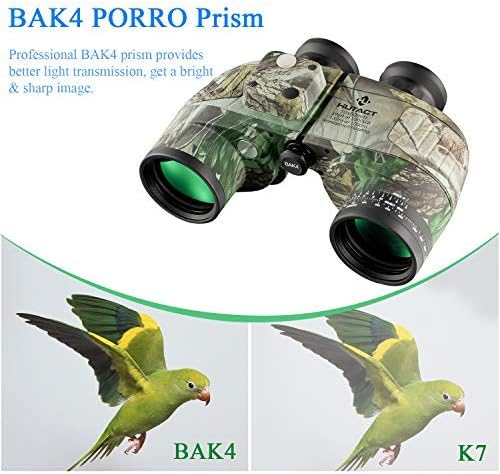
Figure 3: BAK4 Porro Prism Advantage. This image illustrates the superior light transmission and sharper image quality achieved with BAK4 prisms compared to K7 prisms, shown with a bird image comparison.
Setup
- Interpupillary Distance Adjustment: Hold the binoculars with both hands and look through them. Adjust the distance between the two barrels by moving them closer or further apart until you see a single, clear circular field of view.
- Diopter Adjustment:
- Close your right eye and focus on a distant object using only your left eye by rotating the center focus wheel.
- Once the left eye image is sharp, open your right eye and close your left eye. Adjust the right eyepiece focusing ring (diopter ring) until the image in your right eye is also sharp.
- Now, both eyepieces are adjusted to your vision. For subsequent use, you will only need to use the center focus wheel to adjust for different distances.
- Eyecup Adjustment: If you wear eyeglasses, twist down the eyecups (turndown eyeshade) to bring your eyes closer to the lenses for a full field of view. If you do not wear eyeglasses, keep the eyecups in the up position.
- Harness Strap Attachment: Attach the provided harness strap to the binocular's strap lugs. Adjust the strap for comfortable carrying, ensuring the weight is distributed across your shoulders for extended viewing periods.

Figure 4: Harness Strap Usage. This image demonstrates how the harness strap is worn to distribute the weight of the binoculars, providing a more comfortable and stable viewing experience.
- Battery Installation for Compass Lighting: Locate the battery bin (refer to Figure 1). Open the compartment and insert the required battery type (typically a button cell, not specified in data, assume common type) to power the compass lighting. Ensure correct polarity.
- Tripod Mounting: For extended viewing or increased stability, the binoculars can be mounted on a tripod. Locate the tripod interface (refer to Figure 1), usually a threaded socket under the central hinge, and attach a compatible tripod adapter (sold separately).
Operating Instructions
Basic Viewing
After completing the setup, hold the binoculars steady and use the center focus wheel to bring distant objects into sharp focus. Ensure your interpupillary distance and diopter settings are correct for your eyes.
Using the Rangefinder Reticle
The binoculars feature an internal rangefinder reticle (refer to Figure 1, "Reticle inside") to estimate distances. This reticle typically consists of horizontal and vertical scales. To use it:
- Align the reticle with an object of known height or width.
- Read the value on the scale that corresponds to the object's size.
- Use a formula or chart (often provided separately or printed on the binoculars) to calculate the distance based on the object's known size and the reticle reading.

Figure 5: Rangefinder Reticle. This image shows the internal reticle with vertical and horizontal angle-dividing rules used for estimating distances. It also includes a note about keeping the white light hole unblocked for the azimuth dial.
Important Note: When using the rangefinder or compass, ensure the white light hole (light source switch area, refer to Figure 1) is clear and unobstructed. Blocking this area may prevent the azimuth dial from being visible or functioning correctly.
Using the Directional Compass
The integrated compass provides directional information. To activate the compass lighting, press the light source switch (refer to Figure 1). The compass will display the direction you are facing.
- 0° / 360°: North
- 90°: East
- 180°: South
- 270°: West

Figure 6: Directional Compass. This image illustrates the compass functionality, showing how to read cardinal directions (North, East, South, West) based on the degree readings.
Recommended Uses
These binoculars are suitable for a wide range of activities:
- Marine observation
- Hunting
- Bird watching
- Hiking and outdoor exploration
- Safari and wildlife viewing
- Sightseeing
- Camping
- Fishing

Figure 7: Usage Scenarios. This collage depicts various outdoor activities where the binoculars can be effectively used, including hiking, marine observation, safari, sightseeing, camping, fishing, and birdwatching.
Maintenance
- Cleaning Lenses: Use a soft, lint-free cloth specifically designed for optical lenses. Gently wipe the lens surfaces. For stubborn smudges, use a small amount of lens cleaning fluid applied to the cloth, not directly to the lens. Avoid using abrasive materials or excessive force.
- Cleaning Body: Wipe the body of the binoculars with a soft, damp cloth. Do not use harsh chemicals or solvents.
- Storage: Store the binoculars in a cool, dry place, away from direct sunlight and extreme temperatures. Use the provided carrying bag to protect them from dust and scratches.
- Waterproof and Fog Resistant: These binoculars are designed to be waterproof and fog resistant. However, avoid submerging them in water for extended periods or exposing them to rapid temperature changes that could exceed their design limits. Always ensure lens caps are on when not in use, especially in wet conditions.
- Battery Replacement: Replace the compass lighting battery as needed. Dispose of old batteries responsibly.
Troubleshooting
| Problem | Possible Cause | Solution |
|---|---|---|
| Image is blurry or out of focus. | Incorrect focus adjustment; Interpupillary distance not set; Diopter not adjusted. | Adjust the center focus wheel. Adjust interpupillary distance. Perform diopter adjustment as described in the "Setup" section. |
| Double image or two overlapping circles. | Interpupillary distance is incorrect. | Adjust the distance between the binocular barrels until a single circular field of view is seen. |
| Compass lighting not working. | Battery is dead or incorrectly installed; Light source switch not pressed. | Check and replace the battery in the battery bin, ensuring correct polarity. Press the light source switch. |
| Azimuth dial not visible or inaccurate. | White light hole is blocked. | Ensure the white light hole (near the light source switch) is clear and unobstructed. |
| Fogging inside lenses. | Extreme temperature changes or seal compromise. | Allow binoculars to acclimate to ambient temperature. If persistent, contact support. |
Specifications
| Feature | Detail |
|---|---|
| Brand | HUTACT |
| Model Number | 3216583207 |
| Magnification | 10x |
| Objective Lens Diameter | 50 mm |
| Prism Type | Porro Prism (BAK4) |
| Lens Coating | Fully Multi-Coated (FMC) |
| Field of View | 396 Feet (at 1000 yards) |
| Exit Pupil Diameter | 5 mm |
| Eye Relief | 7.1 mm |
| Special Features | Integrated Rangefinder, Directional Compass, Fog Resistant |
| Water Resistance Level | Waterproof |
| Focus Type | Center Focus |
| Mount Type | Tripod Mountable |
| Item Weight | 1.98 Pounds |
| Item Dimensions (L x W) | 8.07"L x 5.91"W |
| Material | Glass (lenses), other materials for body |
Warranty and Support
For information regarding warranty coverage, please refer to the documentation included with your purchase or visit the official HUTACT website. If you encounter any issues or require technical assistance, please contact HUTACT customer support through their official channels. Keep your purchase receipt as proof of purchase for any warranty claims.