
1. Introduction
Thank you for choosing the JEKCA Giraffe 01S building block set. This manual provides detailed instructions for assembling your model, ensuring a sturdy and enjoyable building experience. JEKCA blocks utilize a patented interlocking brick-through system designed for enhanced stability and durability.

Image: The fully assembled JEKCA Giraffe 01S model, showcasing its detailed design and vibrant colors.
2. Safety Information
This product contains small parts. It is recommended for individuals aged 14 years and above. Keep out of reach of small children to prevent choking hazards. Always follow the assembly instructions carefully.
3. What's in the Box
Your JEKCA Giraffe 01S package should contain the following items:
- Instruction Manual
- Bricks (over 2010 pieces)
- Pins
- Pin Driver
- Quick Guide
4. Setup and Assembly
The JEKCA building system uses a unique interlocking mechanism to create highly stable structures. Each brick is secured with pins, ensuring your model remains intact.
4.1 Understanding the Interlocking System
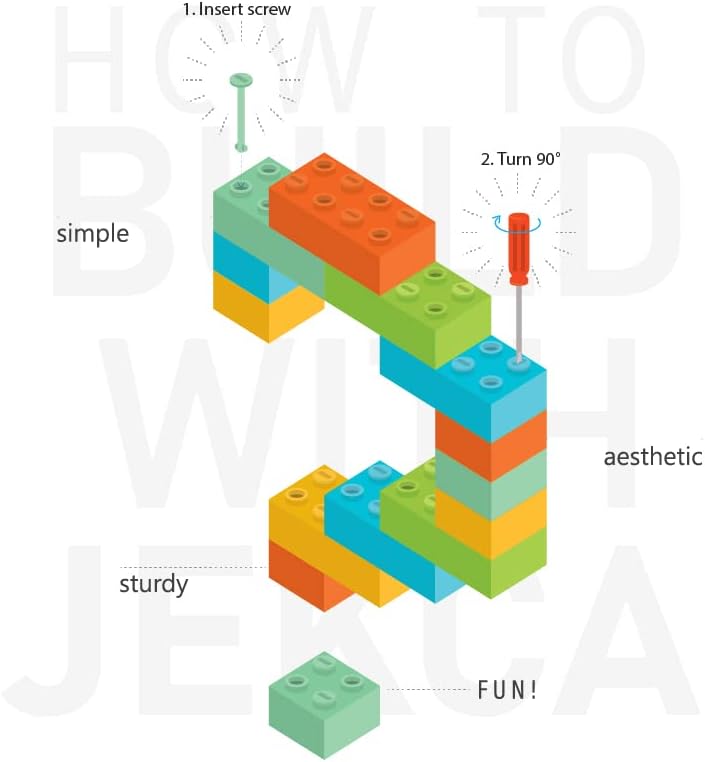
Image: A diagram illustrating the JEKCA interlocking system, showing how bricks are connected using pins and a pin driver.
The core of JEKCA's stability lies in its patented interlocking brick-through system. This involves inserting pins through the bricks to firmly connect them, preventing accidental disassembly.

Image: A three-step visual guide demonstrating how to connect JEKCA bricks: 1. Align bricks, 2. Insert pins, 3. Turn pins 90 degrees with the pin driver for a secure lock.
4.2 Step-by-Step Assembly
- Unpack Components: Carefully open the box and sort the bricks by color and type if desired. Familiarize yourself with the pin driver and pins.
- Follow the Manual: Refer to the included detailed building manual for specific step-by-step instructions for the Giraffe 01S model. Each step will show which bricks to use and where to place the pins.
- Connect Bricks: Place the first brick(s) as indicated in the manual. Align the next brick(s) on top or adjacent to the previous ones.
- Insert Pins: Insert the provided pins through the designated holes in the bricks. Ensure the pins pass through both connecting bricks.
- Secure with Pin Driver: Use the pin driver to turn the pins 90 degrees. This action locks the bricks firmly in place. Repeat this process for all connections.
- Verify Connections: After each section, gently test the connections to ensure they are secure. If a section feels loose, re-check the pin placement and rotation.
- Continue Building: Proceed through the manual, section by section, until the entire Giraffe 01S model is complete.

Image: The completed JEKCA Giraffe 01S model, elegantly displayed on a coffee table in a home environment.
5. Operating Instructions (Building Process)
The primary 'operation' of this product is the assembly process itself. Take your time and enjoy the intricate details of construction. The JEKCA system is designed to be a rewarding experience, culminating in a robust and visually appealing model.
- Patience is Key: Building complex models requires patience. Do not rush the process.
- Organize Your Bricks: Sorting bricks by color or size can significantly streamline the assembly.
- Refer to the Manual Frequently: The included manual is your most important tool. Double-check each step before proceeding.
- Enjoy the Craftsmanship: Experience the joy and pride of creating a detailed model with your own hands.
6. Maintenance
Once assembled, your JEKCA Giraffe 01S model requires minimal maintenance.
- Cleaning: Dust the model regularly with a soft, dry cloth or a soft brush. For more stubborn dirt, a slightly damp cloth can be used, but avoid excessive moisture.
- Storage: If disassembling for storage, keep all bricks and pins organized in a container to prevent loss. Store in a cool, dry place away from direct sunlight to prevent material degradation or color fading.
- Handling: While sturdy, avoid dropping the model or applying excessive force, as this could cause individual bricks to detach or pins to loosen.
7. Troubleshooting
Here are solutions to common issues you might encounter during assembly:
- Loose Connections: If a brick feels loose, ensure the pin is fully inserted and rotated 90 degrees with the pin driver. Sometimes, a slight adjustment or re-insertion of the pin is needed.
- Missing Pieces: Double-check all packaging and work area. If you believe a piece is genuinely missing, contact JEKCA customer support with your model number and purchase details.
- Difficulty Inserting Pins: Ensure the bricks are perfectly aligned. The pins should slide in smoothly. Do not force pins, as this can damage the bricks or pins.
- Incorrect Placement: If you realize a section was built incorrectly, carefully use the pin driver to unlock the pins and disassemble the section. Re-assemble according to the manual.
8. Specifications
Detailed specifications for the JEKCA Giraffe 01S model:
| Specification | Detail |
|---|---|
| Product Dimensions | 13.31 x 5.43 x 18.39 inches (33.8 x 13.8 x 46.7 cm) |
| Item Weight | 3.19 pounds |
| Model Number | ST19ML05 |
| Recommended Age | 14 years and up |
| Number of Pieces | Over 2010 |
| Manufacturer | JEKCA Limited |

Image: The JEKCA Giraffe 01S model displayed alongside a tablet showing its dimensions (Length: 33.8 cm, Width: 13.8 cm, Height: 46.7 cm).
9. Warranty and Support
For information regarding product warranty, missing parts, or further assistance, please contact JEKCA customer support. You can often find contact details on the product packaging or by visiting the official JEKCA store online.
Visit the JEKCA Store for more products and support resources.