
Introduction
Welcome to the user manual for your Contixo F22 4K FHD Camera Drone. This manual provides essential information for setting up, operating, maintaining, and troubleshooting your drone to ensure a safe and enjoyable flight experience. The Contixo F22 is a foldable quadcopter designed for adults and beginners, featuring a 4K FHD camera, GPS-assisted intelligent flight modes, and gesture control.
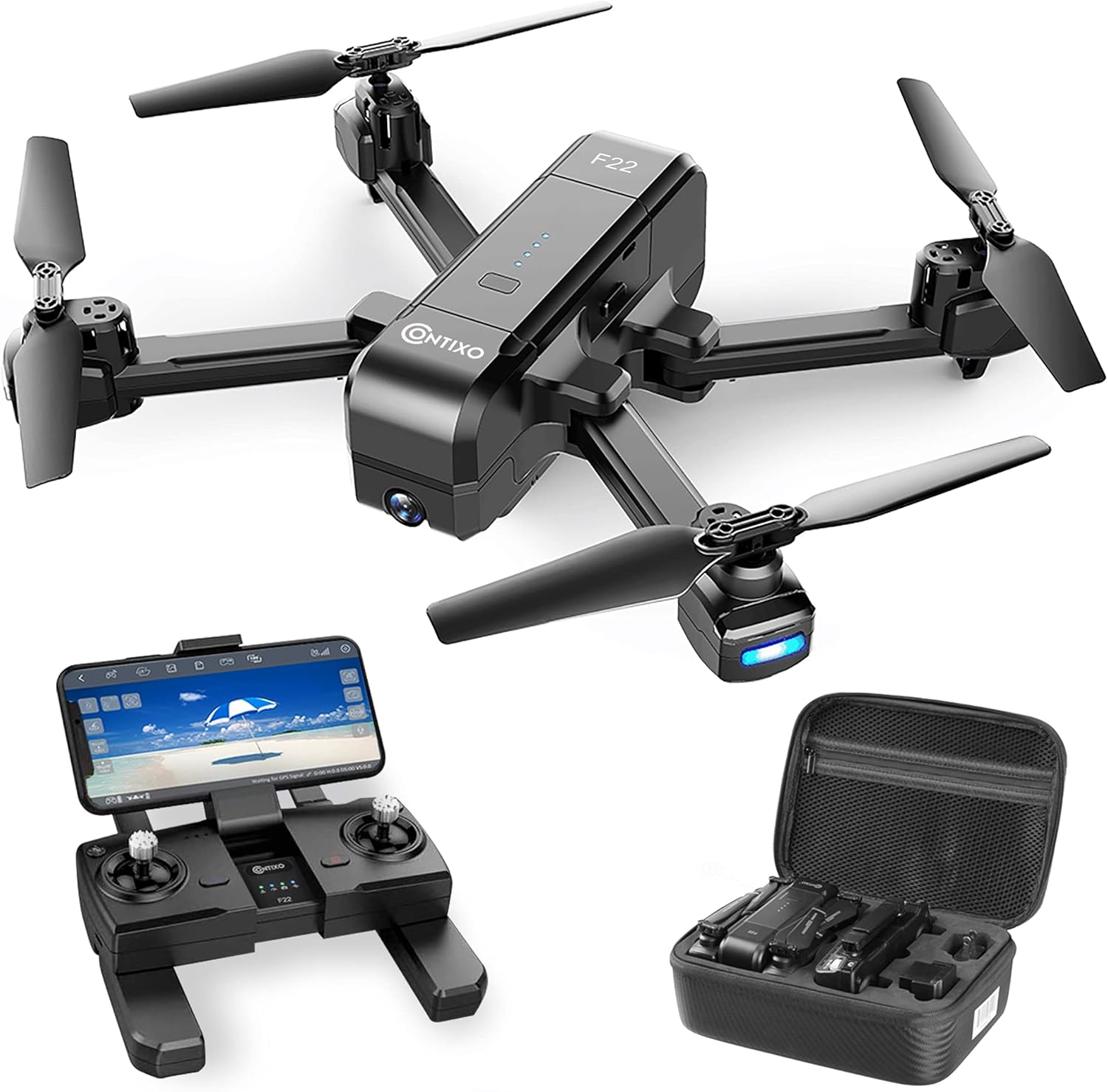
Image: The Contixo F22 drone, its remote controller, and the included carrying case, laid out on a green grassy surface.
What's in the Box
Upon unboxing your Contixo F22 drone, please verify that all components listed below are present:
- Contixo F22 Drone
- Remote Control
- Integrated Camera
- Lithium Polymer Battery
- Charging Cable
- Spare Propellers
- Screwdriver
- Carrying Case

Image: All components of the Contixo F22 drone package, including the folded drone, remote controller, spare propellers, screwdriver, and charging cable, neatly arranged next to the carrying case.
Setup
- Charge the Battery: Ensure the drone's Lithium Polymer battery is fully charged before first use. Connect the charging cable to the battery and a suitable power source.
- Unfold the Drone: Carefully unfold the drone's arms until they lock into place. Ensure the propellers are also unfolded and free to rotate.
- Install Battery: Insert the charged battery into the designated compartment on the drone.
- Prepare the Remote Control: Unfold the remote control's handles and extend the phone holder. Ensure the remote control is also charged or has fresh batteries.
- Download the App: Download the official Contixo F22 app on your smartphone.
- Connect to Wi-Fi: Power on the drone and the remote control. Connect your smartphone to the drone's Wi-Fi network as instructed in the app.
- GPS Calibration: Perform GPS calibration as prompted by the app or manual to ensure stable flight and access to intelligent flight features.

Image: The Contixo F22 drone flying above a stylized globe, with the remote controller and phone displaying flight information. Text highlights "GPS intelligent Return" and features like 1800ft Control Range, GPS Auto Return, and FPV Transmission.
Operating Instructions
The Contixo F22 offers various features for an enhanced flying experience:
- 2K Full HD WiFi Camera with 4K Still Images: The drone features an adjustable 120° FOV wide-angle lens, allowing for both live video streaming (FPV) and high-resolution still images. Images and footage are saved to a Micro SD card in 2K quality.
- GPS Assisted Intelligent Flight Features:
- Follow Me: The drone can automatically follow the pilot using GPS positioning.
- Return Home: If the drone loses signal or power, it can automatically return to its take-off position.
- Altitude Hold: Maintains a stable altitude for easier control and steady shots.
- Headless Mode: Simplifies control by eliminating the need to orient the drone's front.
- Custom Flight (Tap Fly): Design your flight path by tapping multiple points on the app interface, or set the drone to fly in circular motions around a point of interest.
- Gesture Control: Use specific hand gestures to trigger photo or video capture.
- Video Transmission with WiFi: Enjoy real-time video transmission up to 750 feet. Flight duration is approximately 15-20 minutes.

Image: A close-up of the Contixo F22 drone's camera, illustrating its 120° FOV lens and 90° adjustable angle. Comparison images show the wider view of the 2K Full HD WiFi Camera.

Image: Two smartphone screens demonstrating gesture control for the Contixo F22 drone. One shows a "Photo Gesture" (peace sign) and the other a "Video Gesture" (open palm wave), indicating how users can control camera functions with hand movements.
Maintenance
Proper maintenance ensures the longevity and optimal performance of your Contixo F22 drone:
- Cleanliness: Regularly clean the drone body, propellers, and camera lens with a soft, dry cloth. Avoid using harsh chemicals.
- Propeller Inspection: Check propellers for any damage (cracks, bends) before each flight. Replace damaged propellers immediately using the provided spares and screwdriver.
- Battery Care: Store batteries in a cool, dry place. Do not overcharge or over-discharge. If storing for extended periods, charge to about 50% capacity.
- Motor Protection: Avoid operating the drone in sandy or dusty environments, as sand can get into the motors and cause damage.
- Storage: Always fold the drone's arms and propellers and store it in its exclusive carrying case when not in use to protect it from damage.
Troubleshooting
If you encounter issues with your Contixo F22 drone, refer to the following common solutions:
| Problem | Possible Cause | Solution |
|---|---|---|
| Drone does not power on. | Battery not charged or improperly installed. | Ensure battery is fully charged and correctly inserted. |
| Difficulty controlling drone. | Strong winds; improper calibration; interference. | Avoid flying in strong winds. Re-calibrate the drone. Ensure no strong signal interference nearby. |
| Poor image/video quality. | Dirty lens; unstable flight; low light. | Clean the camera lens. Ensure stable flight conditions. Fly in well-lit areas. |
| Drone does not respond to remote. | Not paired; low remote battery; out of range. | Re-pair the remote and drone. Check remote battery. Ensure drone is within control range (up to 750 feet). |
| Drone drifts during hover. | Improper calibration; environmental factors. | Perform a full calibration. Adjust trim settings on the remote if available. |
Specifications
| Feature | Detail |
|---|---|
| Brand | Contixo |
| Model Name | F22 |
| Special Feature | Foldable |
| Color | Black |
| Video Capture Resolution | 4K |
| Connectivity Technology | Wi-Fi |
| Skill Level | Beginner, Intermediate, Expert, Novice, Amateur |
| Item Weight | 16 ounces |
| Video Capture Format | 2K, 4K |
| Remote Control Technology | Remote Control |
| Control Type | Gesture Control |
| Media Type | SD |
| Maximum Range | 350 Feet |
| Material | Plastic |
| Battery Cell Composition | Lithium Polymer |
| Product Dimensions | 9.5"L x 7"W x 4"H |
| UPC | 850001962117 |
Warranty and Support
For warranty information, technical support, or any inquiries regarding your Contixo F22 drone, please refer to the official Contixo website or contact their customer support directly. Keep your purchase receipt as proof of purchase for warranty claims.
You can visit the official Contixo Store for more information: Contixo Store


