
Introduction
The Dgakcvb BT-S3 is a Bluetooth 5.0 helmet intercom headset designed for motorcycle riders. It provides communication, music playback, and hands-free calling capabilities, enhancing the riding experience with advanced features like noise reduction and waterproof design.
Key features include:
- 1000m Bluetooth Communication: Full-duplex intercom for up to 3 riders with a range of 800-1000m (unobstructed).
- Excellent Noise Reduction & Clear Audio: DSP echo cancellation and noise suppression for clear voice quality at speed.
- Bluetooth Hands-free and Wireless Streaming Music (A2DP): Supports call management (answer, reject, redial, auto-answer), music control (play, pause, skip), and FM radio (76-108MHz).
- Convenient & Widely Compatible: Suitable for full-face and most half-face helmets, compatible with smartphones and BT-S series headsets. Features large buttons for easy operation with gloves.
- Excellent Waterproof: Made with waterproof silicone material for use in various weather conditions.
Package Contents
Verify that all items are present in your package:
- BT-S3 Main Unit
- Headset with Microphone and Speakers
- USB Charging Cable
- Helmet Clip
- Adhesive Mount
- Screwdriver
- User Manual
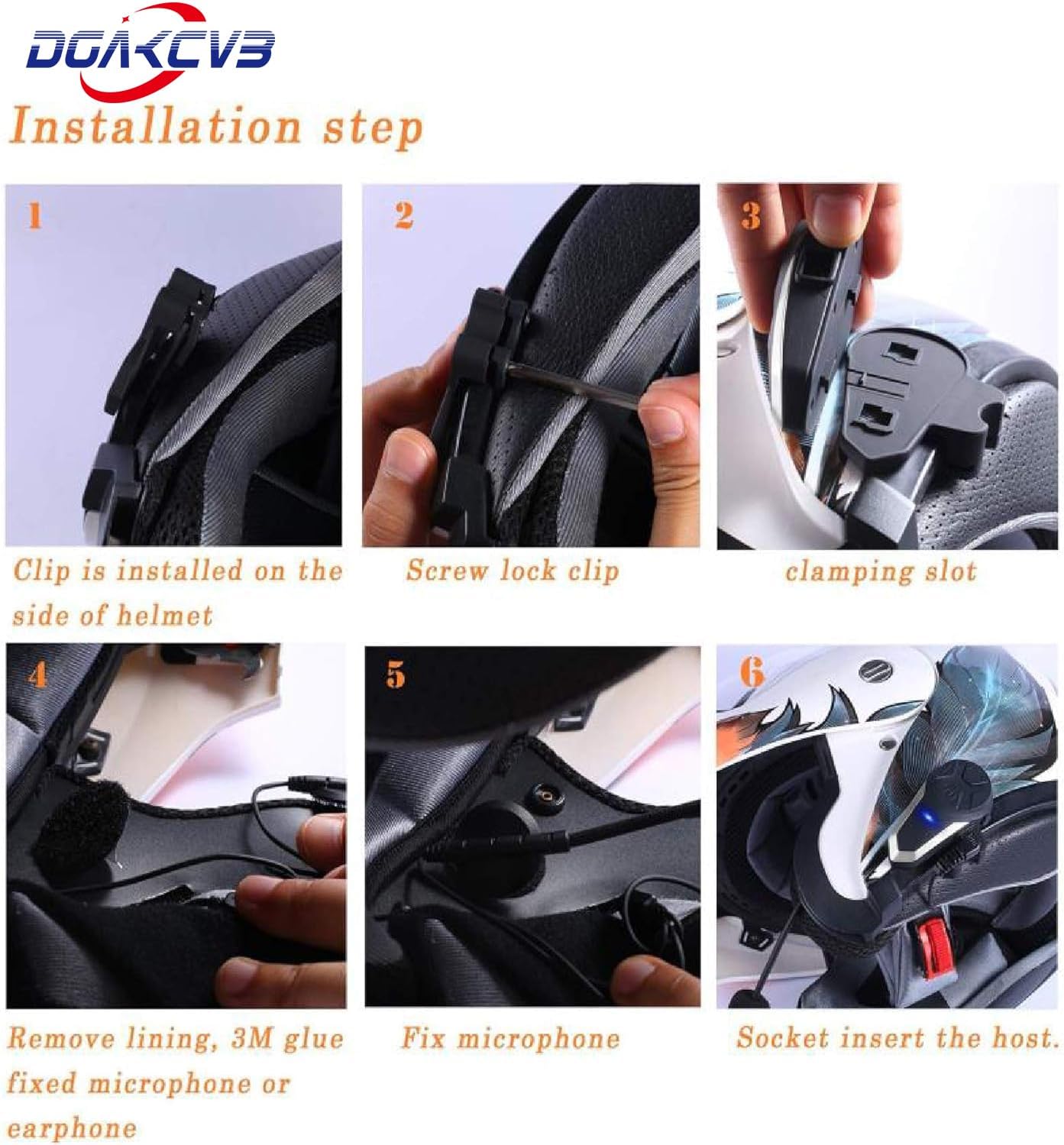
Image: Contents of the BT-S3 package, showing the main unit, microphone/speaker set, charging cable, mounting hardware, and user manual.
Product Overview
The BT-S3 unit features intuitive controls and a robust design for outdoor use.

Image: Overview of the BT-S3 unit highlighting its features with descriptive icons.
The device supports Bluetooth 5.0 for stable connections and efficient power consumption.

Image: Visual representation of Bluetooth 5.0 benefits, including enhanced sound, clarity, and stability.
Installation
Follow these steps to install the BT-S3 headset on your helmet:
- Attach the Clip: Install the helmet clip on the side of your helmet.
- Secure the Clip: Use the provided screwdriver to tighten the screw and lock the clip firmly.
- Insert Main Unit: Slide the BT-S3 main unit into the clamping slot of the secured clip.
- Position Speakers and Microphone: Remove the helmet lining. Fix the microphone and speakers using the 3M adhesive or by tucking them into designated slots. Ensure speakers are placed directly over your ears for optimal sound.
- Connect Headset: Insert the headset's audio jack into the main unit's socket. Ensure the microphone is plugged in the correct direction; incorrect orientation can result in lower volume.
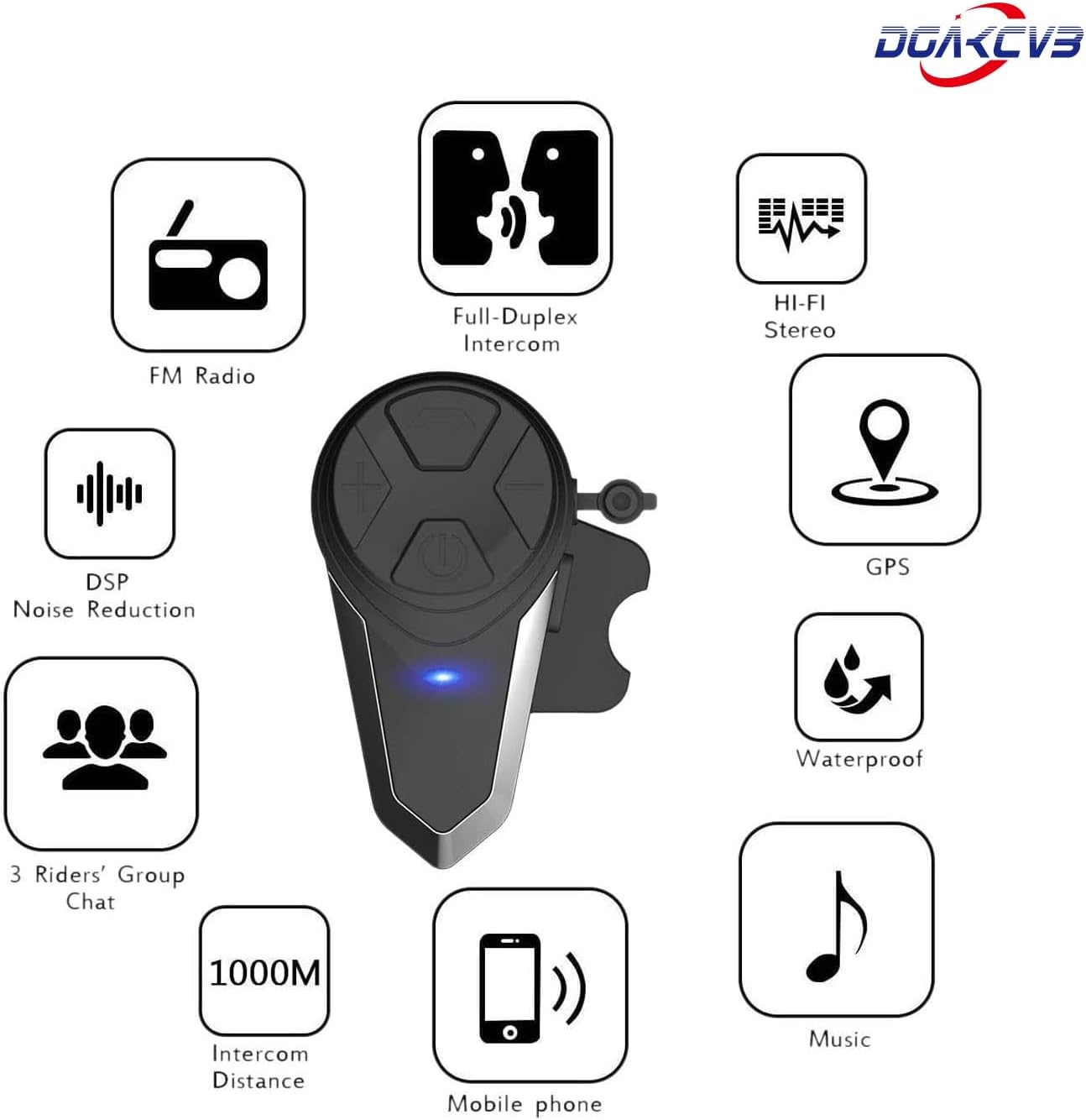
Image: Step-by-step installation guide for the BT-S3 headset.
Important Notes for Optimal Audio:
- Ensure speakers are placed well on your ears for louder sound.
- Plug the speakers port tightly.
- Note the correct direction when plugging in the microphone; incorrect plugging will result in lower volume.

Image: Visual guide for correct microphone connection and speaker placement.
Setup and Pairing
Device Pairing (Bluetooth)
To pair the BT-S3 with your mobile phone or other Bluetooth devices:
- Ensure the BT-S3 is turned off.
- Press and hold the Power button until the LED indicator flashes red and blue alternately, indicating pairing mode.
- On your mobile phone, enable Bluetooth and search for available devices.
- Select "BT-S3" from the list of found devices.
- If prompted, enter "0000" as the PIN.
- Once paired, the LED indicator will flash blue slowly.
Intercom Pairing (Up to 3 Riders)
The BT-S3 supports intercom communication between up to 3 riders. Only 2 riders can talk simultaneously.
- Ensure both BT-S3 units are turned off.
- On the first unit, press and hold the Power button until the LED flashes red and blue alternately.
- On the second unit, press and hold the Power button until the LED flashes red and blue alternately.
- Briefly press the Power button on either unit. The units will search for each other and connect. Once connected, the LED on both units will flash blue slowly.
- To add a third unit, repeat the pairing process with the third unit and one of the already paired units.
Operating Instructions
Power On/Off
- Power On: Press and hold the Power button for approximately 3 seconds until the blue LED flashes.
- Power Off: Press and hold the Power button for approximately 5 seconds until the red LED flashes and the unit powers down.
Volume Control
- Increase Volume: Long press the "+" button. You will hear a "DuDu" sound when the volume reaches maximum.
- Decrease Volume: Long press the "-" button.
Phone Calls
- Answer Call: Briefly press the Power button.
- Reject Call: Press and hold the Power button for 2 seconds.
- End Call: Briefly press the Power button.
- Redial Last Number: Double-press the Power button.
- Automatic Answering: The headset supports automatic answering of incoming calls after a few rings.
Music Playback (A2DP)
- Play/Pause: Briefly press the Power button.
- Next Track: Briefly press the "+" button.
- Previous Track: Briefly press the "-" button.
FM Radio
- Turn On FM: Double-press the "M" button.
- Search Stations: Briefly press the "+" or "-" button to scan for stations.
- Turn Off FM: Double-press the "M" button again.
Voice Assistant
The BT-S3 supports voice commands for Siri (iOS) and Google Assistant (Android).

Image: Features of the BT-S3, including voice assistant support.

Image: Bluetooth 5.0 efficiency and IP67 waterproof rating.

Image: BT-S3 Type-C charging port and battery performance details.
Maintenance
- Cleaning: Wipe the unit with a soft, damp cloth. Do not use harsh chemicals or abrasive cleaners.
- Water Resistance: The BT-S3 is waterproof (IP67 rated). However, avoid submerging it in water for extended periods. Ensure the charging port cover is securely closed when not charging to maintain water resistance.
- Charging: Charge the device using the provided USB Type-C cable. A full charge takes approximately 3 hours.
- Storage: Store the headset in a cool, dry place when not in use.

Image: The BT-S3 headset demonstrating its waterproof design in a snowy environment.
Troubleshooting
| Problem | Possible Cause | Solution |
|---|---|---|
| No power | Low battery | Charge the device for at least 3 hours. |
| Cannot pair with phone | Device not in pairing mode; Bluetooth off on phone; too many paired devices | Ensure BT-S3 is in pairing mode (red/blue flashing LED). Turn on phone's Bluetooth. Clear previous pairings if necessary. |
| Intercom not connecting | Units not in pairing mode; out of range; interference | Ensure both units are in intercom pairing mode. Move closer to each other. Avoid obstacles. |
| Low audio volume | Speakers not positioned correctly; microphone plugged incorrectly; volume too low | Adjust speaker position directly over ears. Check microphone plug direction. Increase volume using the "+" button. |
| Poor sound quality / Noise | Microphone too far from mouth; environmental noise; loose connections | Ensure microphone is close to your mouth. Check all cable connections. DSP noise reduction is active, but extreme noise may still affect clarity. |
Specifications
| Feature | Detail |
|---|---|
| Model Name | BT-S3 |
| Bluetooth Version | 5.0 |
| Connectivity Technology | Wireless |
| Wireless Communication Technology | Bluetooth |
| Noise Control | Active Noise Cancellation (DSP echo cancellation and noise suppression) |
| Intercom Distance | 800-1000m (unobstructed) |
| Max Intercom Riders | 3 (2 simultaneous talkers) |
| Charging Time | Approximately 3 Hours |
| Phone Time | Up to 20 Hours |
| Intercom Time | Up to 10 Hours |
| Standby Time | Up to 300 Hours |
| Water Resistance Level | Waterproof (IP67) |
| Material | Plastic |
| Item Weight | 0.66 Pounds (approx. 10.6 ounces) |
| Compatible Devices | Bluetooth cellular phones, BT-S series Bluetooth Headset, devices with 3.5mm audio jack |
| FM Radio Frequency | 76-108MHz |
| Control Method | Touch / Media Control |
| Headphones Jack | 3.5 mm Jack |
| UPC | 701705629298 |
Warranty and Support
The Dgakcvb BT-S3 headset typically comes with a 1-year warranty from the date of purchase. For warranty claims, technical support, or any inquiries regarding your product, please contact the seller or manufacturer directly.
When contacting support, please have your purchase details and the product model (BT-S3) ready.