
1. Product Overview
The Polar Aurora Gaming Chair is designed for comfort and functionality, suitable for gaming, office work, and relaxation. It features an ergonomic design with adjustable components to support prolonged use.

Image 1: The Polar Aurora Gaming Chair in blue and black, positioned in a home office environment with a computer setup.
Product Overview Video
Video 1: An official seller video showcasing the Polar Aurora Gaming Chair, highlighting its design and features.
2. Product Features
- Smooth & Quiet Operation: Equipped with 5 casters that roll smoothly and quietly on various floor types, having passed a 1,000-mile rolling test.
- Safety & Comfort: Features racing-specific PU leather and high-density shaped sponges for moderate hardness and comfortable rebound. The chair has passed SGS test for the gas lift and BIFMA test for the 5-star base, supporting a maximum weight capacity of 300 lbs.
- Multi-Functionality: Ergonomically designed backrest, lumbar pillow, and headrest conform to body curves, relieving back pressure. The backrest reclines between 90-160 degrees for versatile use, from working to resting.
- Versatile Use: Suitable for game rooms, bedrooms, offices, living rooms, study rooms, or home theaters.
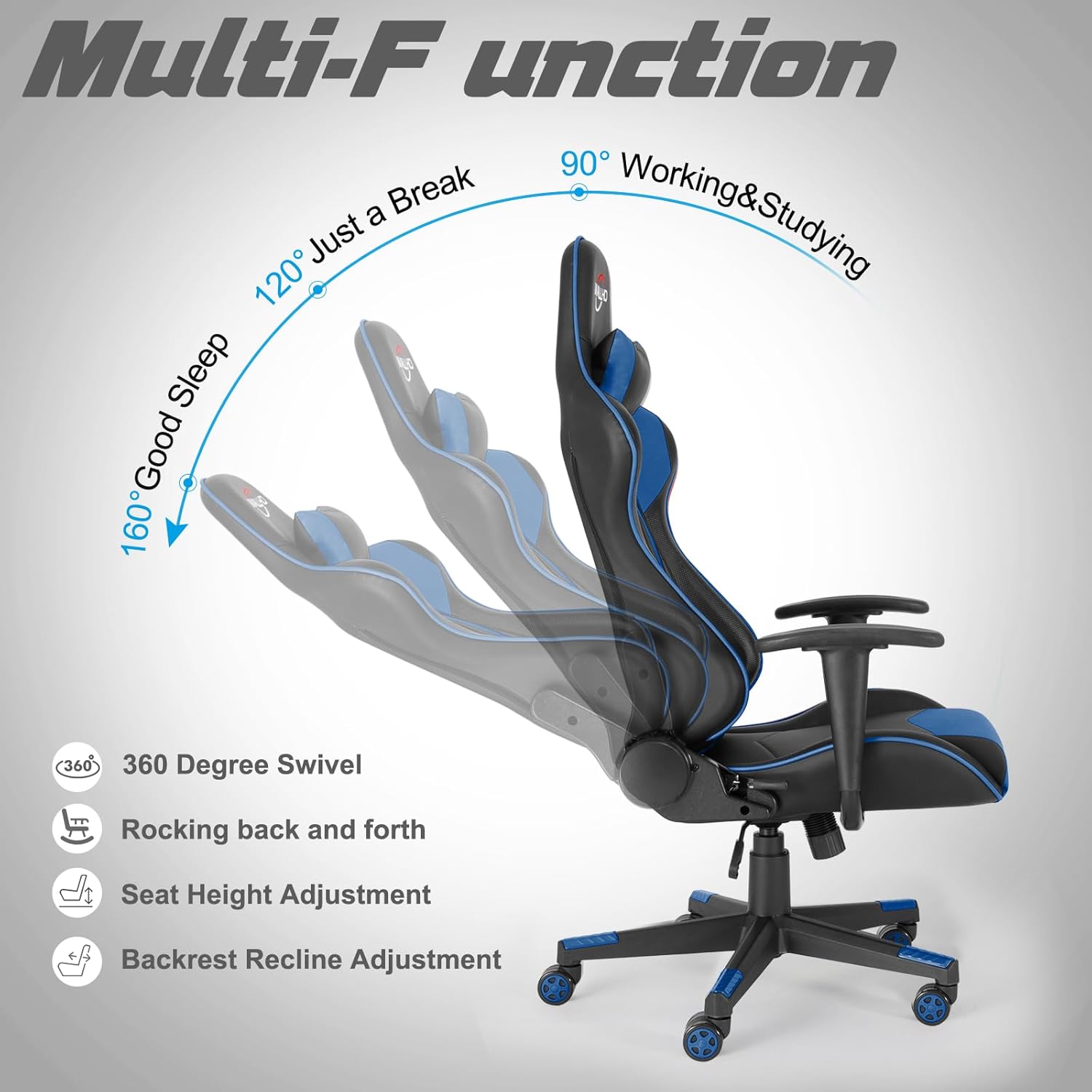
Image 2: An illustration highlighting the chair's multi-functional adjustments, such as 360-degree swivel, rocking, seat height, and recline angles (90°, 120°, 160°).
3. Setup and Assembly
The Polar Aurora Gaming Chair is designed for easy installation. A detailed installation manual and video are typically provided with the product to guide you through the assembly process.
General Assembly Steps:
- Attach the casters to the 5-star base.
- Insert the gas lift into the center of the base.
- Secure the seat plate mechanism to the bottom of the seat cushion.
- Attach the armrests to the seat cushion.
- Connect the backrest to the seat cushion using the provided screws.
- Place the assembled seat onto the gas lift.
- Attach the headrest and lumbar support pillows as desired.
Ensure all screws are tightened securely before use. Do not overtighten.

Image 3: Product dimensions are illustrated, showing key measurements for the backrest, seat, and adjustable height.
4. Operating Instructions
The Polar Aurora Gaming Chair offers several adjustment options to customize your seating experience:
- Seat Height Adjustment: Use the lever located under the seat on the right side to raise or lower the chair. Pull the lever up while seated to lower, or pull it up while standing to raise. Release the lever to lock the height.
- Backrest Recline: Use the lever on the side of the chair (typically the left side) to adjust the backrest angle. Pull the lever up to recline the backrest from 90 to 160 degrees. Release the lever at your desired angle to lock it in place.
- Rocking Function: The chair features a rocking mechanism. A knob under the seat (usually at the front) controls the tension of the rocking motion. Turn clockwise to increase tension (less rocking) and counter-clockwise to decrease tension (more rocking).
- 360-Degree Swivel: The chair's base allows for full 360-degree rotation.
- Lumbar and Headrest Pillows: The included lumbar and headrest pillows are adjustable and can be positioned to provide optimal support for your lower back and neck.
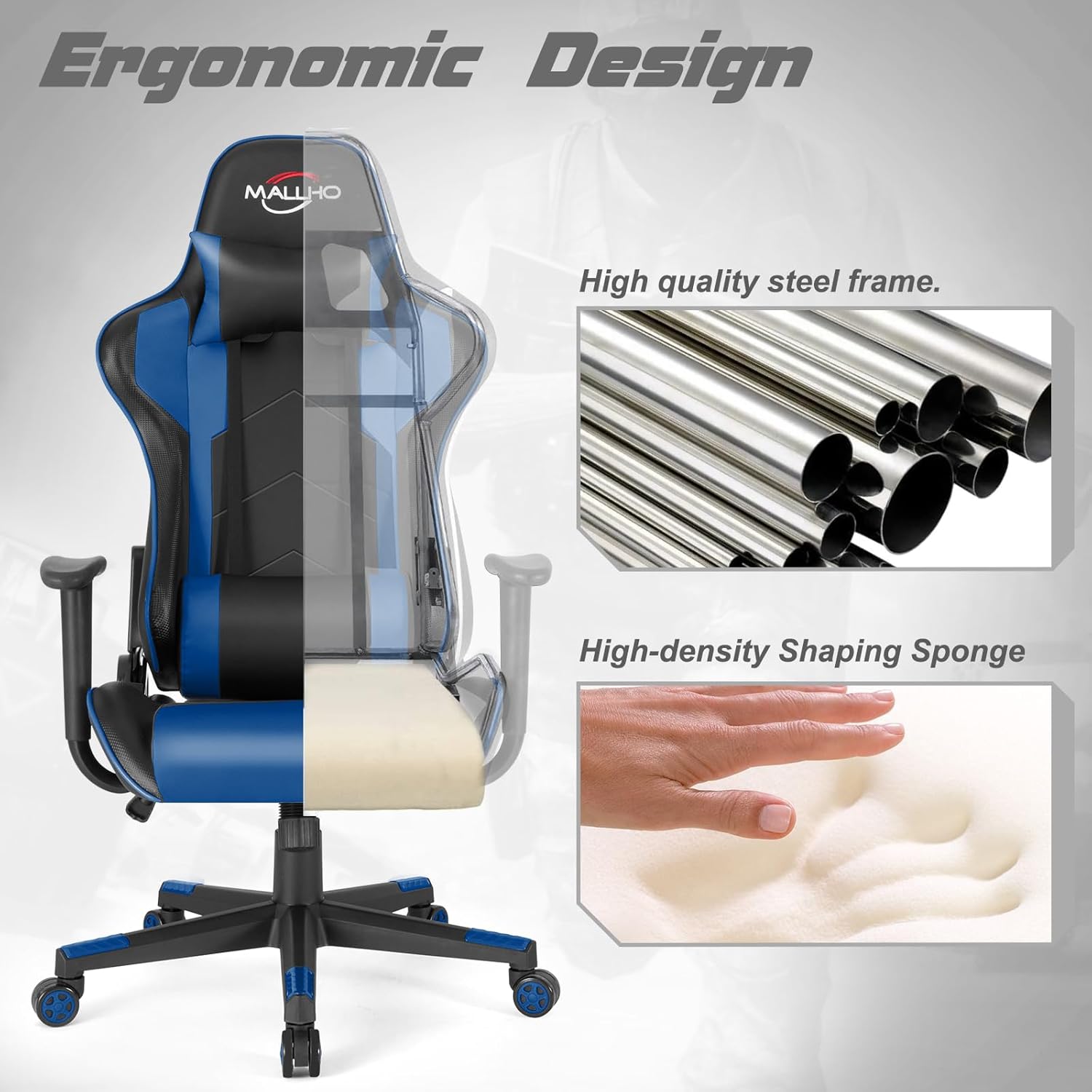
Image 4: The ergonomic design of the chair is shown, emphasizing the high-quality steel frame and high-density shaping sponge for comfort and durability.
5. Maintenance
Proper maintenance ensures the longevity and performance of your gaming chair:
- Cleaning: Wipe the faux leather surfaces with a soft, damp cloth. For stubborn stains, use a mild soap solution and dry immediately. Avoid harsh chemicals or abrasive cleaners.
- Caster Care: Regularly check the casters for hair, dust, or debris that may impede smooth rolling. Clean as needed.
- Hardware Check: Periodically inspect all screws and bolts to ensure they are tight. Re-tighten if necessary to maintain stability and safety.
- Avoid Direct Sunlight: Prolonged exposure to direct sunlight can cause the faux leather to fade or crack. Position the chair away from direct sunlight when possible.
6. Troubleshooting
If you encounter any issues with your chair, refer to the following common troubleshooting tips:
- Chair Sinks or Won't Stay Up: This usually indicates an issue with the gas lift. Ensure the height adjustment lever is fully engaged. If the problem persists, the gas lift may need replacement.
- Chair Wobbles: Check all assembly screws and bolts, especially those connecting the seat to the base and the armrests. Tighten any loose hardware. Ensure the 5-star base is correctly attached to the gas lift.
- Casters Not Rolling Smoothly: Inspect casters for obstructions (hair, dirt) and remove them. If casters are damaged, they may need replacement.
- Backrest Won't Recline/Lock: Verify that the recline lever is functioning correctly and not obstructed. Ensure no foreign objects are preventing the mechanism from engaging.
For issues not covered here, please contact customer support.
7. Specifications
| Brand | Polar Aurora |
| Model Name | Aurora |
| Color | Blue |
| Material | Faux Leather, Foam |
| Product Dimensions (D x W x H) | 31.5"D x 31.5"W x 54.8"H |
| Maximum Weight Recommendation | 300 Pounds (136 kg) |
| Reclining Position Count | 2 (90-160 degrees) |
| Included Components | Caster, Cushion, User Manual |
| Item Weight | 46 pounds (20.8 kg) |
8. Safety Information
WARNING: Do not exceed the maximum weight capacity of 300 lbs (136 kg). Always assemble the chair according to the provided instructions to ensure stability and safety.
- Keep small parts away from children during assembly.
- Ensure all connections are secure before using the chair.
- Avoid standing on the chair or using it as a step stool.
- Do not use the chair on uneven surfaces.
9. Warranty and Support
While specific warranty details are not provided in this manual, Polar Aurora is committed to customer satisfaction.
If you have any questions when you receive the chair or during its use, please contact us for assistance. We are dedicated to offering a perfect solution to any concerns you may have.
For further support, please visit the official Polar Aurora store: Polar Aurora Store