
Introduction
This manual provides detailed instructions for the installation, operation, and maintenance of the SureFit Ignition Switch, model 504-01312. This ignition switch is designed as a replacement part for various lawn and garden equipment, including specific models from John Deere, MTD, AYP, and others. Please read these instructions carefully before installation and use to ensure proper function and safety.
Safety Information
WARNING: Always disconnect the battery before working on electrical systems to prevent electrical shock or damage to the equipment.
- Ensure the equipment is turned off and the key is removed before beginning any installation or maintenance.
- Wear appropriate personal protective equipment, such as safety glasses and gloves.
- If you are unsure about any step, consult a qualified technician.
- Do not modify the ignition switch or its wiring.
- Keep children and bystanders away from the work area.
Package Contents
Verify that all components are present in the package:
- 1x SureFit Ignition Switch (Model 504-01312)
- 1x Ignition Key
- 1x Hex Mounting Nut
- 1x Lock Washer
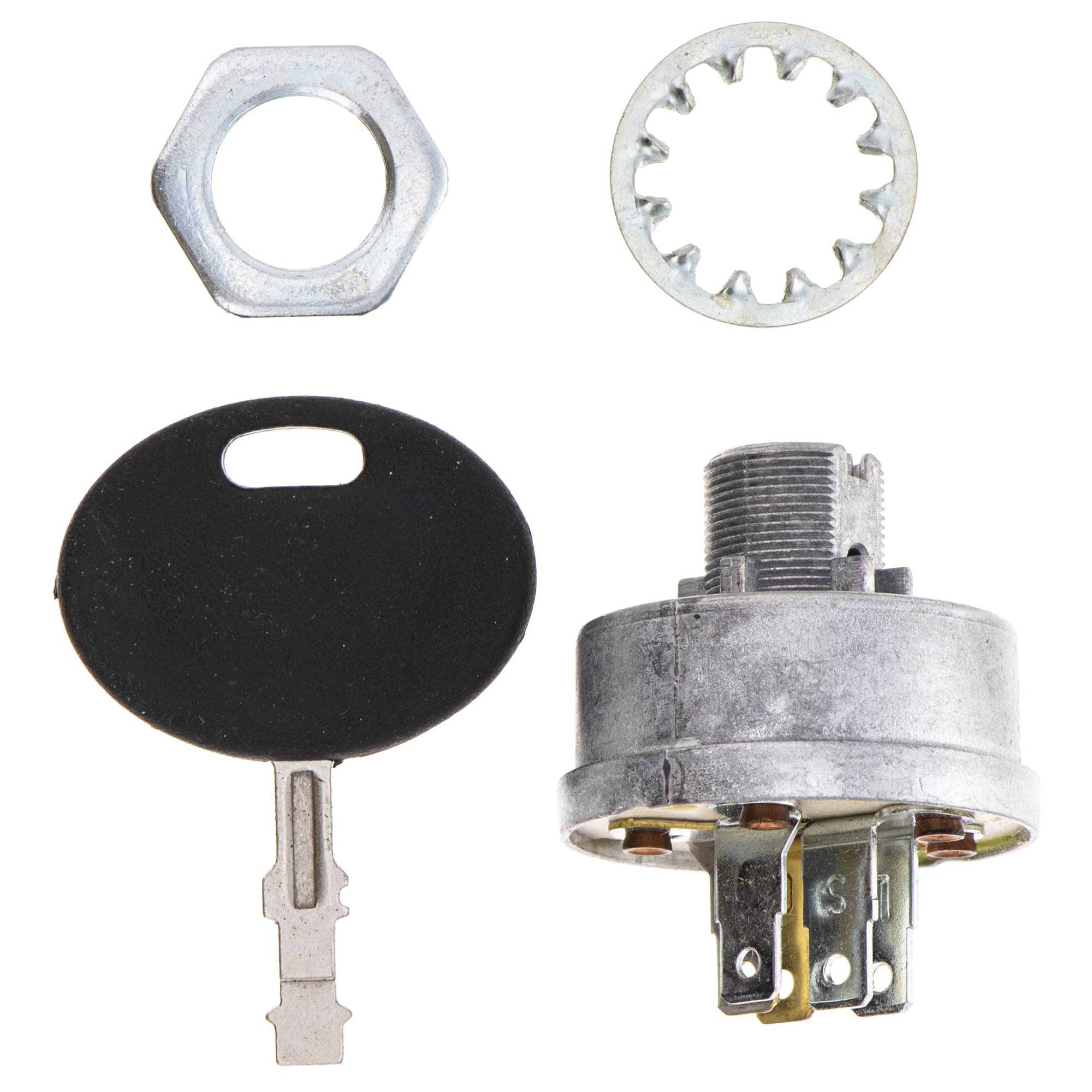
Image: SureFit Ignition Switch components, including the switch body with five spade terminals, a black-handled key, a hexagonal mounting nut, and a star-shaped lock washer.
Specifications
| Feature | Detail |
|---|---|
| Model Number | 504-01312 |
| Terminal Type | 5 Spade Terminals |
| Positions | 3 (Off, On, Start) |
| Mounting Hole Requirement | 5/8 inch |
| Product Dimensions | 10 x 2 x 2 inches |
| Item Weight | 3.2 ounces |
| Manufacturer | Surefit |
Setup and Installation
Follow these steps to replace your existing ignition switch. Refer to your equipment's original owner's manual for specific wiring diagrams if necessary.
- Prepare for Installation:
- Ensure the equipment is turned off and the engine is cool.
- Disconnect the negative terminal of the battery to prevent accidental starting or electrical shorts.
- Locate the existing ignition switch on your equipment's dashboard or control panel.
- Remove Old Switch:
- Carefully label each wire connected to the old ignition switch before disconnecting them. A photograph can be helpful.
- Disconnect all wires from the terminals of the old switch.
- Unscrew the mounting nut holding the old switch in place and remove it from the panel.
- Install New Switch:
- Insert the new SureFit Ignition Switch into the 5/8" mounting hole on the control panel.
- Place the lock washer over the threaded shaft of the switch from the back of the panel.
- Thread the hex mounting nut onto the switch shaft and tighten it securely to hold the switch in place. Do not overtighten.
- Connect Wiring:
- Reconnect the labeled wires to the corresponding 5 spade terminals on the new ignition switch. Ensure connections are firm and secure.
- Double-check all connections against your labels or photographs.
- Test Installation:
- Reconnect the negative battery terminal.
- Insert the key and test the switch positions (Off, On, Start) to ensure proper functionality before operating the equipment.
Operating Instructions
The SureFit Ignition Switch features three distinct positions:
- OFF: In this position, all electrical power to the engine and accessories is disconnected. The key can be inserted or removed in this position.
- ON: Turning the key to the 'ON' position supplies electrical power to the ignition system and accessories. This is the running position for the engine.
- START: This is a momentary position. Turn the key to 'START' to engage the starter motor. Release the key once the engine starts; it will automatically return to the 'ON' position. Do not hold the key in the 'START' position for more than a few seconds to avoid damage to the starter motor.
Maintenance
The SureFit Ignition Switch is designed for durability and requires minimal maintenance. However, periodic inspection can help ensure its longevity:
- Cleaning: Keep the switch area clean and free of dirt, debris, and moisture. Use a dry cloth to wipe down the exterior.
- Connection Check: Periodically inspect the wiring connections to the spade terminals to ensure they remain tight and free from corrosion. If corrosion is present, disconnect the battery and clean the terminals with a wire brush or appropriate electrical contact cleaner.
- Key Operation: Ensure the key turns smoothly through all positions. Do not force the key if it feels stiff.
Troubleshooting
If you encounter issues with your ignition switch, consider the following common troubleshooting steps:
| Problem | Possible Cause | Solution |
|---|---|---|
| Engine does not start when key is turned to 'START'. |
|
|
| No power to accessories when key is in 'ON' position. |
|
|
| Key is difficult to turn or remove. |
|
|
Compatibility
The SureFit Ignition Switch (Model 504-01312) is a replacement for various OEM part numbers and is compatible with a range of equipment models. Always verify compatibility with your equipment's original owner's manual or by cross-referencing OEM part numbers.
Compatible Equipment Models:
- John Deere: 65, 66, 68, S80, S82, S92 Riding Mowers, JD321, 111
- Honda: H1011, H1011H, H1011HK1, H2013SA, H2013SAC, H2013HK1SAC
- Toro: Sand Pro Aerators, Greensmaster 3000G
Replaces OEM Part Numbers:
- John Deere: AM102551, AM34872, 2922, 300295, 44745
- Ariens: 0052400
- AYP: 125104X, 175566, 3621R, 365402, 3L5402, 4406R, 440LR, 532175566, 532365402, STD365402
- Bobcat: (No specific numbers provided in source, but mentioned in bullet)
- Craftsman: 24688, 24695, 3621R, 365402, 4406R, STD365402
- Cub Cadet: 725-0267, 725-3026, 925-0267B
- Husqvarna: 506558701, 506917101, 532125104, 532365402, 539107541
- Murray: 21064, 300295, 421064, 421064MA, 44745
- Poulan: PP60008
- Scag: 48017, 48017-01
- Simplicity: 178280, 178280SM
- Toro: 23-0660
- Troy-Bilt: 1908112, 925-0267B
Warranty and Support
For information regarding warranty coverage or technical support for your SureFit Ignition Switch, please refer to the SureFit official website or contact their customer service directly. Keep your purchase receipt as proof of purchase.
SureFit Customer Service: Please visit the SureFit Store on Amazon or their official website for contact details.