
1. Introduction
Thank you for choosing the SWM-530 Car Stereo Player. This manual provides detailed instructions for the installation, operation, and maintenance of your new car audio system. Please read this manual thoroughly before use to ensure proper functionality and to maximize your listening experience.
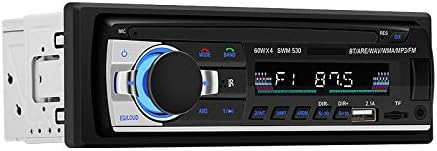
Figure 1: Front view of the SWM-530 Car Stereo Player. This image displays the main unit with its control knob, buttons, LCD screen, USB ports, and TF card slot.
2. Package Contents
Before installation, please verify that all items listed below are included in your package:
- SWM-530 Car Stereo Player Unit
- Instruction Manual
- Remote Control
- Power Cord (Wiring Harness)
- Teardown Keys (Removal Tools)
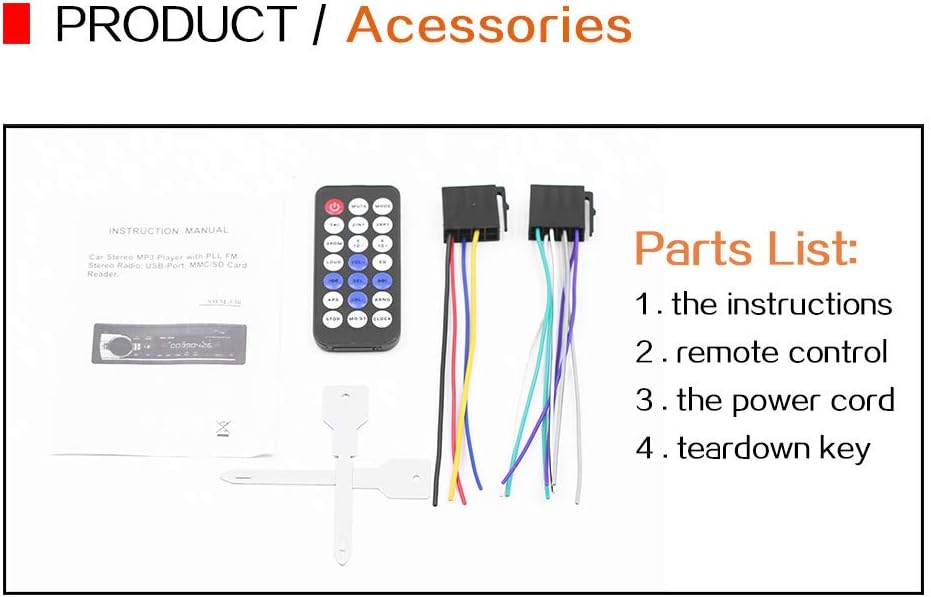
Figure 2: Contents of the SWM-530 package. This image shows the instruction manual, remote control, wiring harness, and teardown keys included with the car stereo.
3. Dimensions
The SWM-530 Car Stereo Player is designed to fit standard 1-DIN openings. Refer to the dimensions below for installation planning:
- Width: Approximately 188 mm
- Height: Approximately 58 mm
- Depth: Approximately 62 mm (from front panel to rear)

Figure 3: Dimensional drawing of the SWM-530 unit. This image illustrates the width (188mm), height (58mm), and approximate depth (62mm) of the car stereo for installation purposes.
4. Setup and Installation
This section guides you through the process of installing the SWM-530 Car Stereo Player in your vehicle. Professional installation is recommended.
4.1. Pre-Installation Checklist
- Ensure the vehicle's ignition is off and the negative battery terminal is disconnected.
- Confirm the vehicle's dashboard opening is a standard 1-DIN size.
- Gather necessary tools (screwdriver, wire stripper, electrical tape, etc.).
4.2. Wiring Diagram
Connect the power cord (wiring harness) according to the following standard color codes. Refer to your vehicle's wiring diagram for specific connections.
- Yellow: Constant 12V (Battery)
- Red: Switched 12V (Ignition/ACC)
- Black: Ground
- Blue: Antenna/Amplifier Remote Turn-On
- Speaker Wires: (e.g., White/White-Black for Front Left, Grey/Grey-Black for Front Right, Green/Green-Black for Rear Left, Purple/Purple-Black for Rear Right)
4.3. Mounting the Unit
- Insert the metal mounting sleeve (if included) into the dashboard opening and bend the tabs to secure it.
- Connect all necessary wiring harnesses (power, speakers, antenna) to the rear of the SWM-530 unit.
- Carefully slide the SWM-530 unit into the mounting sleeve until it clicks into place.
- Reconnect the vehicle's negative battery terminal and test the unit.

Figure 4: SWM-530 Car Stereo Player installed in a vehicle's dashboard. This image demonstrates the unit's appearance when properly mounted in a standard car stereo slot.
5. Operating Instructions
Familiarize yourself with the controls and functions of your SWM-530 Car Stereo Player.
5.1. Basic Controls
- Power Button: Press to turn the unit on/off.
- Volume Knob: Rotate to adjust volume. Press to cycle through audio settings (Bass, Treble, Balance, Fader, Loudness, EQ).
- MODE Button: Press to switch between Radio, Bluetooth, USB, TF, and AUX modes.
- BAND Button: In Radio mode, press to switch between FM1, FM2, FM3 bands.
- AMS Button: In Radio mode, press and hold for automatic station scan and store.
- EQ/LOUD Button: Press to activate/deactivate Loudness. Press and hold to cycle through preset equalizer modes.
- Backlight Knob: The main control knob features an adjustable backlight.
- LCD Screen: Displays current mode, frequency, track information, and time.
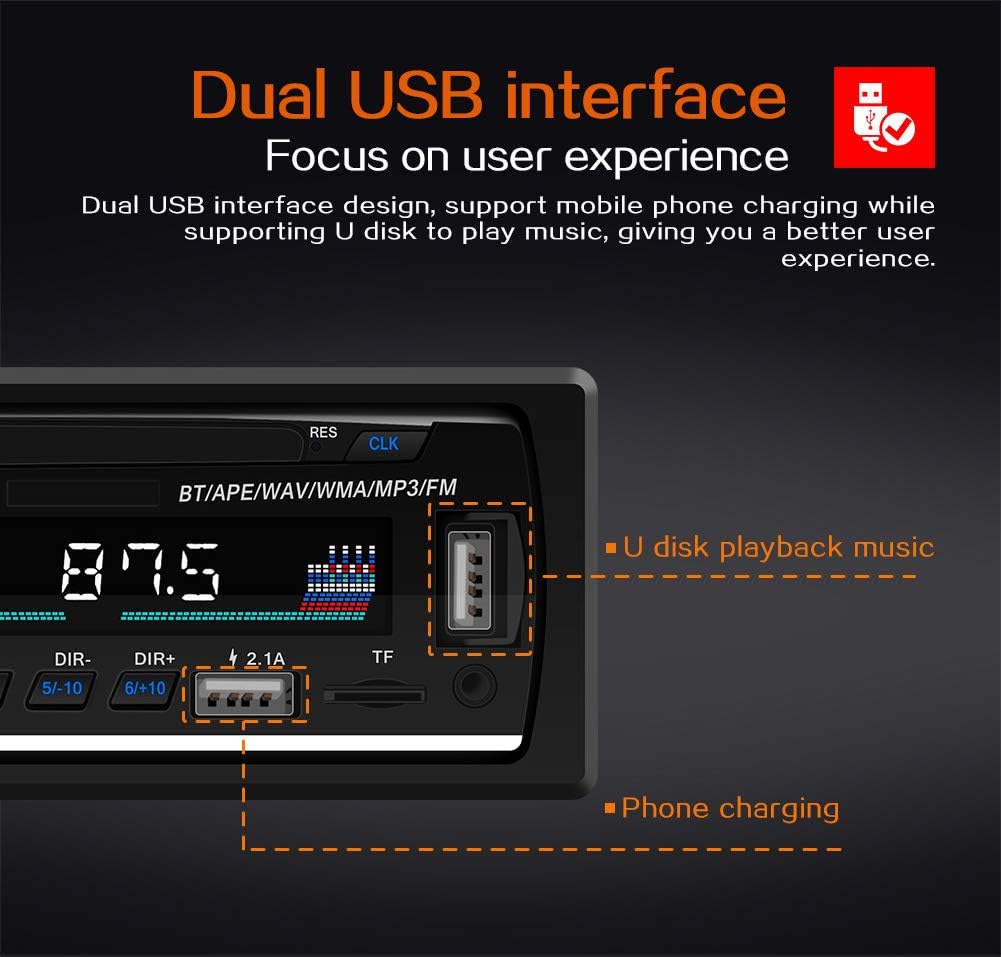
Figure 5: Detailed view of the SWM-530's controls. This image highlights the backlight knob, dual USB ports, and the LCD screen, indicating their functions.
5.2. Radio Operation (FM Tuner)
The unit supports FM radio reception with a frequency range of 87.5-108 MHz.
- Press the MODE button to select FM mode.
- Press the BAND button to select FM1, FM2, or FM3.
- Press the |<< or >>| buttons to manually tune to a station.
- Press and hold |<< or >>| for automatic seek tuning.
- Press and hold AMS to automatically scan and store strong stations to presets.

Figure 6: SWM-530 displaying FM radio functionality. This image illustrates the unit tuned to an FM frequency, emphasizing its ability to receive radio signals within the 87.5-108 MHz range.
5.3. Bluetooth Operation
The SWM-530 features built-in Bluetooth for hands-free calling and audio streaming.
- Press the MODE button to select Bluetooth mode. The LCD will display "BT" or a similar indicator.
- On your mobile device, enable Bluetooth and search for available devices.
- Select "SWM-530" (or similar name) from the list to pair. If prompted for a password, enter "0000".
- Once paired, you can play audio from your device, make calls, or receive calls through the car stereo.
5.4. USB/TF Card Playback
The unit supports music playback from USB drives and TF (MicroSD) cards.
- Insert a USB drive into the designated USB port or a TF card into the TF card slot.
- The unit will automatically switch to USB or TF mode and begin playing compatible audio files (MP3, WMA, WAV, APE).
- Use the |<< and >>| buttons to skip tracks.
- Use the PLAY/PAUSE button to pause or resume playback.

Figure 7: SWM-530's dual USB interface. This image highlights the two USB ports, one for U disk playback and the other primarily for phone charging, demonstrating the unit's versatility.

Figure 8: SWM-530's various input options. This image shows the USB, AUX (3.5mm Jack), and TF card inputs, illustrating the multiple ways to connect external audio sources.
5.5. Phone Charging
The SWM-530 features a dedicated USB port for charging mobile devices.
- Connect your smartphone or other USB-powered device to the 2.1A USB port on the front panel using a compatible USB cable.
- The unit will provide power to charge your device, even while playing music from another source or via Bluetooth.
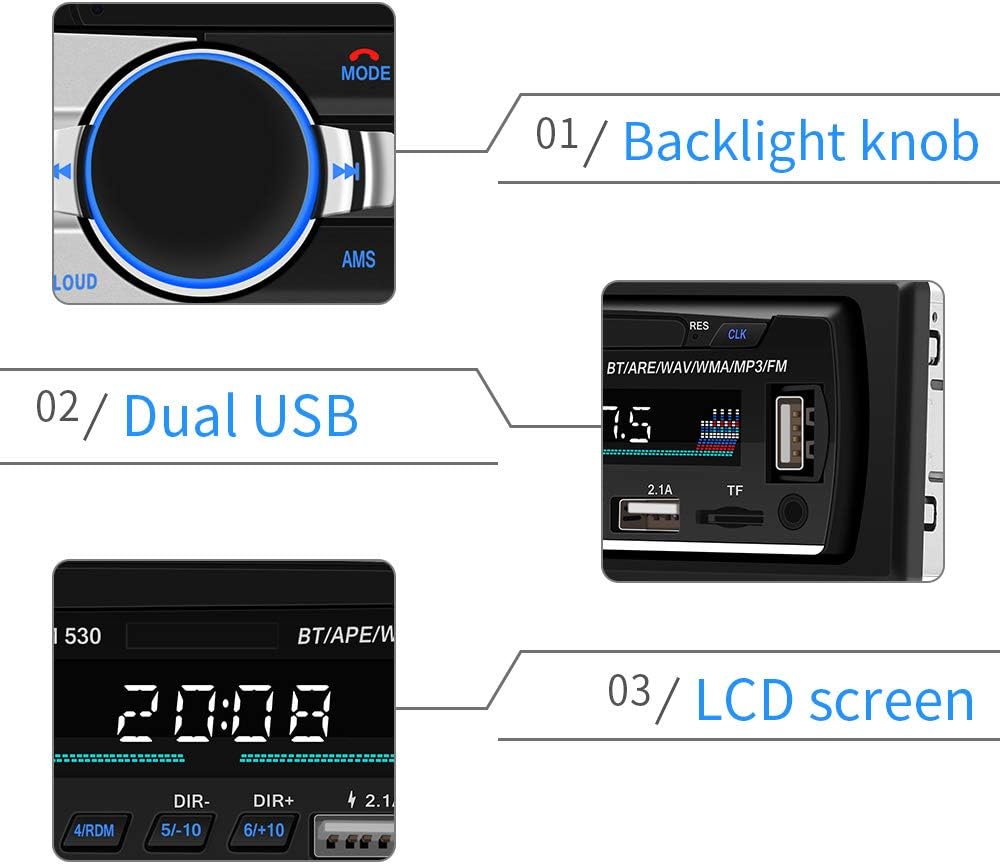
Figure 9: SWM-530 providing phone charging functionality. This image demonstrates a smartphone connected to the car stereo's USB port for charging, highlighting its ability to charge devices while playing audio.
6. Maintenance
Proper care and maintenance will ensure the longevity of your SWM-530 Car Stereo Player.
- Cleaning: Use a soft, dry cloth to clean the unit's front panel. For stubborn dirt, dampen the cloth slightly with water. Avoid using harsh chemicals, abrasives, or solvents.
- Temperature: Avoid exposing the unit to extreme temperatures, direct sunlight for prolonged periods, or high humidity.
- Connections: Periodically check all wiring connections to ensure they are secure and free from corrosion.
7. Troubleshooting
If you encounter issues with your SWM-530, refer to the following common problems and solutions:
| Problem | Possible Cause | Solution |
|---|---|---|
| No Power | Incorrect wiring; Blown fuse; Loose connection. | Check power and ground connections. Verify fuse integrity. Ensure secure wiring. |
| No Sound | Volume too low; Mute activated; Speaker wiring incorrect; Amplifier issue. | Increase volume. Deactivate mute. Check speaker connections. Ensure external amplifier (if used) is powered. |
| Bluetooth Not Connecting | Unit not in Bluetooth mode; Device not discoverable; Incorrect pairing. | Ensure unit is in BT mode. Make sure device's Bluetooth is on and discoverable. Re-pair the device. |
| USB/TF Card Not Reading | Incompatible file format; Corrupted media; Incorrect insertion. | Ensure files are MP3/WMA/WAV/APE. Try a different USB/TF card. Reinsert media correctly. |
| Poor Radio Reception | Antenna not connected; Weak signal area; Damaged antenna. | Check antenna connection. Try tuning to a stronger station. Consider an antenna booster if needed. |
If the problem persists after attempting these solutions, please contact customer support.
8. Specifications
| Feature | Specification |
|---|---|
| Model Name | SWM-530 |
| Display Size | 2.5 inches |
| Placement | In-Dash (1-DIN) |
| Voltage | 12V |
| Output Power | 4 * 60W (Max) |
| Radio Frequency | FM: 87.5 - 108 MHz |
| Connectivity | Bluetooth, USB, TF Card, AUX-IN (3.5mm Jack) |
| Supported Audio Formats | MP3, WMA, WAV, APE |
| Item Weight | 0.5 kg (500 g) |
| Dimensions (W x H x D) | 178mm x 50mm x 68mm (approximate) |
| OSD Language | English |
9. Warranty Information
This product is covered by a standard manufacturer's warranty. Please refer to the warranty card included in your package for specific terms, conditions, and duration. Keep your purchase receipt as proof of purchase for warranty claims.
The warranty typically covers defects in materials and workmanship under normal use. It does not cover damage caused by improper installation, accident, misuse, abuse, neglect, unauthorized modification, or natural disasters.
10. Customer Support
For technical assistance, troubleshooting not covered in this manual, or warranty inquiries, please contact your retailer or the manufacturer's customer service department.
Please have your product model number (SWM-530) and purchase details ready when contacting support.