Introduction
Thank you for choosing the PASNEW Model 1163 Dual Display Sport Watch. This watch combines analog and digital displays with multiple functions designed for active lifestyles. Please read this manual carefully to understand how to operate your watch and ensure its longevity.
Key Features:
- Dual Time Display: Shows both analog and digital time simultaneously.
- Chronograph: Stopwatch function for timing activities.
- Alarm: Set daily alarms.
- Luminous Display: EL backlight for visibility in low light conditions.
- Calendar: Displays date and day of the week.
- Water Resistance: 50 meters (164 feet) for showering, hand washing, and rain splashing.
- Shock Resistant: Durable construction for active use.

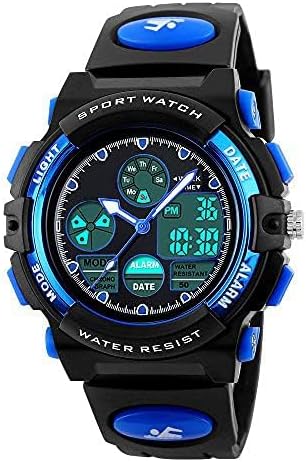
PASNEW Model 1163 Dual Display Sport Watch, featuring a black and blue design with both analog and digital time displays.
Watch Components
Familiarize yourself with the buttons and their functions:

This diagram illustrates the location and labels of the watch's buttons: EL LIGHT, MODE, START/STOP, RESET, ALARM, and DATE.
- LIGHT Button: Activates the EL backlight for illumination.
- MODE Button: Cycles through different modes (Time, Alarm, Stopwatch, Dual Time).
- START/STOP Button: Used to start/stop functions in Chronograph mode or adjust settings.
- RESET Button: Used to reset functions or adjust settings.
- ALARM Button: Accesses or adjusts alarm settings.
- DATE Button: Displays or adjusts the date.
Setup and Time Setting
Setting Digital Time and Date:
- Press the MODE button repeatedly until the digital time display starts flashing, indicating it's in setting mode.
- Use the START/STOP button to adjust the selected value (e.g., hours, minutes).
- Press the RESET button to move to the next setting item (e.g., from hours to minutes, then to date, month, year).
- Once all settings are correct, press the MODE button to exit the setting mode.
Setting Analog Time:
The analog hands are typically set independently. Pull out the crown (the small knob on the side of the watch case) and rotate it to adjust the analog hands to match the digital time. Push the crown back in to secure the setting.
Setting the Alarm:
- Press the MODE button until you reach the Alarm mode.
- Press the ALARM button to enter the alarm setting. The hour digits will flash.
- Use the START/STOP button to adjust the hour.
- Press the RESET button to move to the minute setting, then use START/STOP to adjust minutes.
- Press the ALARM button again to confirm and exit.
A close-up of the watch face, illustrating the digital display with time and day of the week, and the analog hands.
Operating Modes
Chronograph (Stopwatch) Mode:
- Press the MODE button until you reach the Chronograph mode (usually indicated by 'ST' or 'STOPW').
- Press START/STOP to begin timing.
- Press START/STOP again to pause timing.
- Press RESET to clear the stopwatch to zero.
Dual Time Display:
The watch features a dual time display, allowing you to track two different time zones. The digital display can be set to a second time zone while the analog display shows the primary time. Refer to the 'Setting Digital Time and Date' section for adjusting the digital display, ensuring you set it to your desired second time zone.
Luminous Display (EL Backlight):
To illuminate the digital display in dark environments, press the LIGHT button. The backlight will activate for a few seconds, providing clear visibility of the time and other digital information.

This image shows the watch display in normal mode and with the EL backlight activated for improved visibility in the dark.
Water Resistance Guidelines
Your PASNEW Model 1163 watch is water-resistant to 50 meters (164 feet). This means it is suitable for:
- Daily use
- Hand washing
- Rain exposure
- Showering
Important Note: Do NOT press any buttons while the watch is submerged in water. This can compromise the water resistance seal and lead to water damage. Avoid exposure to hot water or steam, as this can also affect the watch's seals.

The watch is shown in a water environment, highlighting its 50M water resistance feature for various activities.
Maintenance
- Cleaning: Wipe the watch regularly with a soft, dry cloth to remove dirt and moisture. For stubborn dirt, use a slightly damp cloth and then dry thoroughly.
- Avoid Chemicals: Do not expose the watch to harsh chemicals, solvents, or detergents, as these can damage the case, strap, or internal components.
- Temperature Extremes: Avoid exposing the watch to extreme temperatures (hot or cold) for prolonged periods, as this can affect battery life and accuracy.
- Battery Replacement: When the display dims or functions become erratic, it may be time to replace the battery. It is recommended to have this done by a professional watch technician to ensure the water resistance seal is properly maintained.
- Strap Care: The PU plastic strap is durable but can be cleaned with mild soap and water if needed. Rinse thoroughly and dry.
Troubleshooting
| Problem | Possible Cause | Solution |
|---|---|---|
| Digital display is blank or dim. | Low battery. | Replace the battery. |
| Time is inaccurate. | Incorrect setting or low battery. | Re-set the time. If problem persists, replace battery. |
| Buttons are unresponsive. | Watch may be in a locked mode or internal issue. | Try pressing all buttons to see if it unlocks. If not, consult support. |
| Water inside the watch. | Buttons pressed underwater or seal compromised. | Immediately take to a professional watch repair service. Do not attempt to dry it yourself. |
Specifications
- Model Number: 1163
- Display Type: Analog-Digital
- Movement: Japanese Quartz
- Case Material: PC Plastic
- Band Material: PU Plastic (Rubber)
- Clasp Type: Buckle
- Water Resistance Depth: 50 Meters (164 Feet)
- Case Diameter: 1.57 Inches (40mm)
- Case Thickness: 0.6 Inches (15mm)
- Band Width: 0.79 Inches (20mm)
- Band Length: 18 Centimeters (7.09 Inches)
- Item Weight: 0.12 Kilograms (4.23 Ounces)
- Battery: 1 Lithium Metal battery (included)
- Additional Features: Chronograph, Timer, Dual-Time-Display, Light, Luminous

Detailed product size specifications for the PASNEW Model 1163 watch, including band width, dial diameter, case diameter, band length, max/min perimeter, and case thickness.
Product Videos
Official video showcasing the PASNEW Kids Watches and their suitability for outdoor sports activities.
Official video demonstrating the waterproof features of the PASNEW Kids Watch for outdoor use.
Warranty and Support
This PASNEW watch comes with a lifetime warranty. For any questions, technical assistance, or warranty claims, please refer to the contact information provided with your purchase or visit the official PASNEW website for support resources.


