1. Overview
The ECOWITT WH51 is a wireless soil moisture sensor designed to measure soil humidity. It is an accessory device and requires a compatible ECOWITT Wi-Fi gateway or display console to function and display data. This manual provides detailed instructions for its setup, operation, and maintenance.

2. Product Features
- Reliable Wireless Soil Moisture Sensor: Equipped with an advanced chip, the WH51 sensor collects soil moisture data within 72 seconds when fully inserted into the soil. The data can be transmitted via a GW1000/GW1100 Wi-Fi gateway (sold separately) and viewed on the WS View Plus or Ecowitt APP after Wi-Fi configuration.
- Support Pairing with Various Ecowitt Gateway/Consoles: The GW1100 Gateway (sold separately) supports up to 8 WH51 Soil Moisture Sensors, with editable channel names. When paired with a Weather Station Console (HP2551/HP3500/HP3501), up to 8 channels of WH51 sensors are supported, allowing real-time data viewing on the display. When paired with Console WH0291, you can view real-time soil moisture data on its display.
- Uploading to Ecowitt Weather Server: Supports uploading data to the free Ecowitt weather server (ecowitt.net) to view soil moisture data graphs and download history records. It also supports setting and receiving email alerts from the server. Channel names can be edited on the website, and remote monitoring is possible via smartphone, laptop, or computer.
- Indoor & Outdoor Use: The IP66 waterproof moisture sensor is suitable for indoor and outdoor potted plants, lawns, gardens, and farms.


3. Setup and Installation
3.1 Battery Installation
The WH51 sensor requires 1x AA Alkaline battery (not included).
- Unscrew the battery cap located at the end of the sensor.
- Insert one AA battery, ensuring correct polarity (+/-).
- Securely screw the battery cap back on to maintain the IP66 waterproof seal.
3.2 Sensor Placement
Insert the soil moisture sensor fully into the soil where you wish to monitor moisture levels. Ensure the black probe is completely submerged in the soil.
Important Note: The sensor is designed to measure soil moisture ONLY. Do not insert it into stones or hard rock soil, as this may damage the probe.

4. Operation
4.1 Pairing with a Gateway/Console
The WH51 sensor does not have a built-in display and must be paired with a compatible ECOWITT gateway (e.g., GW1000, GW1100) or display console (e.g., WH0291, HP2551, HP3500, HP3501) to view data.
Refer to your specific gateway or console's user manual for detailed pairing instructions. Generally, the gateway/console will automatically detect the sensor once it is powered on and within range.
The sensor transmits data every 72 seconds.
4.2 Viewing Data
Once paired, live soil moisture data can be viewed on the WS View Plus or Ecowitt mobile application (after Wi-Fi configuration of the gateway) or directly on the display console.
For gateways connected to ecowitt.net, you can view historical data graphs and download records from the website.

5. Compatibility
The ECOWITT WH51 Soil Moisture Sensor is compatible with various ECOWITT gateways and consoles. The functionality (display vs. upload) varies by device:
| Gateway/Console Model | Max WH51 Sensors Supported | Data Display | Data Upload to Internet |
|---|---|---|---|
| GW1100, GW1200, GW2000 | Up to 8 | No (via app only) | Yes |
| HP2551, HP3500, HP3501 | Up to 8 | Yes (on console) | Yes |
| WS3800, WN1900, WN1980, WS3900, WN3910, WN1910, WN1920 | Up to 8 | No (via app only) | Yes |
| WH0291 | 1 | Yes (on console) | No |

6. Specifications
| Feature | Detail |
|---|---|
| Model | WH51B |
| Brand | ECOWITT |
| Item Weight | 3.52 ounces |
| Package Dimensions | 6.97 x 3.94 x 1.26 inches |
| Color | WH51B (Green) |
| Material | Plastic |
| Item Package Quantity | 1 |
| Mounting Type | Insert into Soil |
| Batteries Required | Yes (1x AA, not included) |
| Frequency | North America: 915MHz; Europe: 868MHz; Other areas: 433MHz |
| Moisture Range | 0-100% |
| Resolution | 1% |
| Sensor Reporting Interval | 72 seconds |
| Transmission Distance | Up to 100m (300 feet) in open field |
| Waterproof Rating | IP66 |

7. Maintenance
7.1 Cleaning
Periodically clean the sensor probe to remove any soil buildup that might affect accuracy. Use a soft cloth and water. Do not use abrasive cleaners.
7.2 Battery Replacement
Replace the AA battery when the low battery indicator appears on your paired gateway/console or app. Expected battery life is a minimum of 12 months.
7.3 Storage
If storing the sensor for an extended period, remove the battery to prevent leakage. Store in a cool, dry place.
8. Troubleshooting
8.1 No Data Displayed
- Sensor cannot be used alone: Ensure the WH51 sensor is paired with a compatible ECOWITT Wi-Fi gateway or display console. It does not have its own display.
- Battery Check: Verify that a fresh AA battery is installed correctly in the sensor.
- Range: Ensure the sensor is within the transmission range (up to 100m/300ft in open field) of its paired gateway/console. Walls and obstacles can reduce range.
- Pairing: Re-check the pairing process according to your gateway/console's manual.
8.2 Inaccurate Readings
- Probe Insertion: Ensure the sensor probe is fully inserted into the soil and not touching any hard objects like rocks.
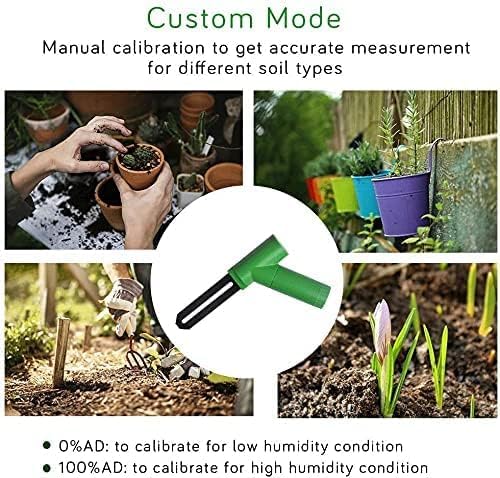
- Soil Type Calibration: The sensor supports custom mode calibration (0% AD and 100% AD settings) for different soil types to improve accuracy. Refer to your gateway/console's advanced settings or the Ecowitt app for details on performing this calibration.
- Probe Cleanliness: Clean the sensor probe as described in the Maintenance section.
8.3 Data Not Uploading to Ecowitt Weather Server
- Ensure your Wi-Fi gateway (e.g., GW1000/GW1100) is properly configured for Wi-Fi and connected to the internet.
- Verify that the gateway is successfully registered with your ecowitt.net account.
- Check your internet connection.
9. Important Notes
- The ECOWITT WH51 soil moisture sensor is an accessory and cannot directly display soil humidity readings. It must be paired with a compatible ECOWITT gateway or display console.
- The sensor is designed exclusively for measuring soil moisture. Do not insert it into hard or rocky ground.
- Each sensor has a unique Sensor ID and will be recognized as a new channel on the WS View app according to the power-on sequence.
- Supports a maximum of 8 channels (sensors) for most compatible gateways/consoles.