
1. Introduction
This manual provides instructions for the safe and effective use of the Pulse-Bac PB-576 Industrial Dust Extractor. The PB-576 is a compact and portable dust collection unit designed for capturing dust generated by power tools and for general jobsite cleanup. It is suitable for applications involving dust from materials such as concrete, drywall, and wood.
The PB-576 model features 176 CFM (Cubic Feet per Minute) airflow and 97 inches of lift, meeting OSHA Silica Rule, Table 1 requirements for 7-inch tools (25 CFM per inch of blade).
2. Safety Instructions
Read all safety warnings and instructions before operating this product. Failure to follow these instructions may result in electric shock, fire, and/or serious injury.
- Always wear appropriate personal protective equipment (PPE), including eye protection, hearing protection, and a dust mask, when operating the dust extractor.
- Ensure the power cord and plug are in good condition. Do not operate the unit with a damaged cord or plug.
- Do not use the dust extractor to pick up flammable or combustible materials, hot ashes, or liquids.
- Always disconnect the power supply before performing any maintenance, cleaning, or filter changes.
- Keep children and unauthorized persons away from the operating area.
- Operate the unit on a stable, level surface to prevent tipping.
3. Product Overview
The Pulse-Bac PB-576 is constructed with durable steel and incorporates a self-cleaning filter system. Key components include a 1.5-inch locking inlet for hose connection and multiple mobility options for ease of transport.

Figure 1: Front view of the Pulse-Bac PB-576 industrial dust extractor. This image displays the main body, motor head, and handle, highlighting its compact design.
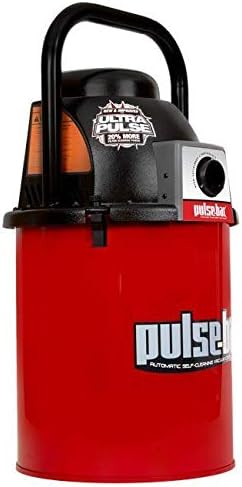
Figure 2: Angled front view of the Pulse-Bac PB-576. This perspective shows the hose inlet on the motor head and the overall structure.
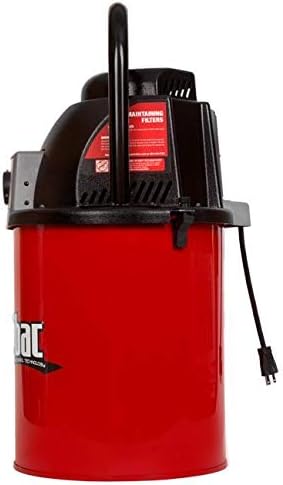
Figure 3: Side view of the Pulse-Bac PB-576. This image illustrates the power cord connection point and the rear ventilation of the unit.
4. Setup
- Unpacking: Carefully remove the dust extractor and all accessories from the packaging. Verify that all components listed in the 'What's in the Box' section are present.
- Filter Installation: Ensure the 5-point HEPA filter(s) are correctly seated within the unit. Refer to the filter compartment diagram if necessary.
- Hose Connection: Attach the vacuum hose to the 1.5-inch locking inlet on the motor head. Ensure the connection is secure to prevent air leaks and maintain optimal suction.
- Power Connection: Plug the power cord into a grounded electrical outlet that matches the voltage requirements specified on the product label.
- Positioning: Place the dust extractor on a stable, level surface near the work area. Utilize the multiple mobility options (if equipped) for convenient placement.
5. Operating Instructions
- Power On: Locate the power switch on the unit and turn it to the 'ON' position. The dust extractor will begin operation.
- Self-Cleaning Technology: The Pulse-Bac PB-576 features automatic self-cleaning technology. This system periodically cleans the filters during operation to maintain consistent airflow and suction without manual intervention.
- Dust Collection: Connect the vacuum hose to your power tool's dust port or use appropriate attachments for general cleanup.
- Power Off: After use, turn the power switch to the 'OFF' position and disconnect the unit from the power supply.
6. Maintenance
Regular maintenance ensures optimal performance and extends the lifespan of your Pulse-Bac PB-576.
- Filter Inspection: Periodically inspect the HEPA filters for damage or excessive buildup. While the unit has self-cleaning technology, filters may eventually require replacement.
- Filter Replacement: When filters are no longer effective or show signs of damage, replace them with genuine Pulse-Bac replacement filters. Refer to the product's specific filter replacement guide for detailed steps.
- Canister Emptying: Empty the dust collection canister regularly to prevent overfilling and maintain suction power. Disconnect power before opening the canister.
- Exterior Cleaning: Wipe down the exterior of the unit with a damp cloth. Do not use harsh chemicals or abrasive cleaners.
- Hose and Accessory Check: Inspect the hose and all accessories for blockages, cracks, or damage. Replace damaged components as needed.
7. Troubleshooting
If you encounter issues with your Pulse-Bac PB-576, refer to the following common troubleshooting steps:
- No Power:
- Check if the power cord is securely plugged into a functional outlet.
- Verify that the power switch is in the 'ON' position.
- Check the circuit breaker or fuse for the outlet.
- Reduced Suction:
- Ensure the hose and all connections are secure and free of leaks.
- Check the hose and attachments for blockages.
- Empty the dust collection canister if it is full.
- Inspect the filters for excessive dust buildup or damage. Replace if necessary.
- Unusual Noise:
- Turn off the unit and check for any foreign objects lodged in the hose or inlet.
- Ensure the motor head is securely latched onto the canister.
If problems persist after attempting these steps, contact Pulse-Bac customer support for further assistance.
8. Specifications
| Model | PB-576 |
| Brand | Pulse-Bac |
| Manufacturer | Pulse-bac |
| Item Weight | 50 pounds |
| Special Features | Compact, Self-Cleaning Technology, 1.5" Locking Inlet, Multiple Mobility Options, 5 Point HEPA Filter(s) |
| Date First Available | October 17, 2018 |
| Included Components | HEPA Filter |