1. Introduction
This manual provides comprehensive instructions for the safe and efficient installation, operation, and maintenance of your Marsrock 1000W MPPT Pure Sine Wave Grid-Tie Micro Inverter. This device is designed to convert direct current (DC) from solar panels or wind turbines into alternating current (AC) for use in your home or to feed into the utility grid. Please read this manual thoroughly before installation and operation to ensure optimal performance and safety.
2. Safety Information
Important Safety Instructions:
- Read all instructions and cautionary markings on the inverter and in this manual before installation or use.
- Installation must be performed by qualified personnel in accordance with local electrical codes and regulations.
- Do not attempt to disassemble, repair, or modify the inverter. Refer all servicing to qualified service personnel.
- Ensure the DC input voltage from your solar panels or wind turbine is within the specified range (20-50V DC). Exceeding this range can damage the inverter.
- Ensure the AC output voltage matches your local grid voltage (110V/120V AC).
- Always disconnect both DC and AC power before performing any maintenance or wiring.
- The inverter can become hot during operation. Ensure adequate ventilation and avoid covering the unit.
- Keep children away from the inverter and its connections.
3. Product Features
The Marsrock 1000W MPPT Pure Sine Wave Grid-Tie Micro Inverter offers several advanced features:
- Compact and Easy Installation: Designed for straightforward setup in various environments.
- Advanced MPPT Functionality: Maximizes power extraction from solar panels or wind turbines, enhancing system efficiency.
- Pure Sine Wave Output: Provides clean, stable power suitable for sensitive electronics, extending appliance lifespan.
- Built-in Cooling Fan: Features an intelligent cooling fan to manage heat and ensure efficient operation under varying loads.
- High Energy Conversion Efficiency: Optimizes the conversion of DC power to usable AC electricity, improving overall system economy.
4. Package Contents
Verify that all items are present in your package:
- Marsrock 1000W Grid-Tie Micro Inverter
- AC Power Cable
- DC Connector Terminals (Red and Black)
- User Manual (this document)
- Warranty Card

Image: Contents of the Marsrock 1000W Grid-Tie Micro Inverter package.
5. Product Overview
Familiarize yourself with the physical components and dimensions of your inverter.

Image: Front view of the Marsrock 1000W Grid-Tie Micro Inverter.

Image: Product dimensions of the inverter.
5.1. AC Side Components

Image: Detailed view of the AC output side of the inverter.
5.2. DC Side Components

Image: Detailed view of the DC input side of the inverter.
5.3. Component Labels

Image: Labeled diagram of inverter components.
6. Specifications
| Feature | Specification |
|---|---|
| Product Dimensions | 11 x 6.5 x 2.2 inches |
| Item Weight | 4.4 pounds |
| Manufacturer | Marsrock Power |
| Model Name | GTI1000W36V120G |
| Brand | Marsrock |
| Recommended Uses | Home |
| Power Source | Solar Powered |
| Wattage | 1000 Watt-hours |
7. Installation
Proper installation is critical for the safe and efficient operation of your grid-tie micro inverter. Follow these steps carefully.
7.1. Mounting Location
- Choose a cool, dry, and well-ventilated area.
- Avoid direct sunlight, high temperatures, and moisture.
- Ensure sufficient clearance around the inverter for proper airflow, especially around the cooling fan.
- Mount the inverter securely to a non-flammable surface.
7.2. Wiring Diagram
Refer to the wiring diagram for a visual guide to connecting your inverter to solar panels and the utility grid.
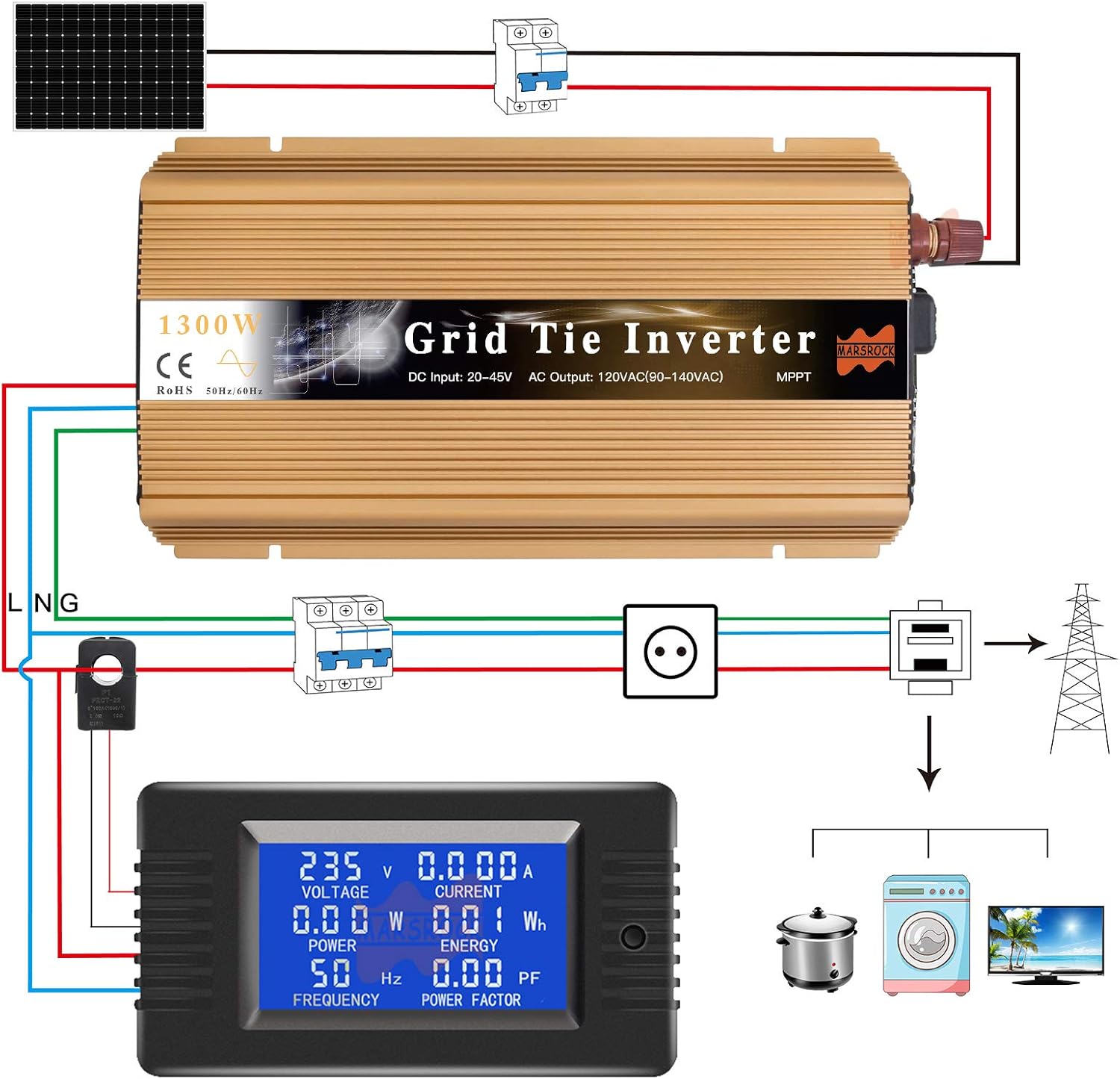
Image: Standard wiring diagram for the grid-tie inverter system.
7.3. DC Input Connection (Solar Panels/Wind Turbine)
Step 1: Connect the DC input cables from your solar panels or wind turbine to the DC input terminals on the inverter. Ensure correct polarity: red for positive (+), black for negative (-).
Video: Demonstrates connecting the DC input to the inverter. Ensure the red clamp connects to the positive terminal and the black clamp to the negative terminal.
Step 2: Verify the DC input voltage is within the inverter's operating range (20-50V DC) using a multimeter.
7.4. AC Output Connection (Grid Connection)
Step 3: Connect the AC power cable from the inverter's AC GRID port to a suitable AC outlet or directly to your home's electrical panel via a dedicated circuit breaker, as per local electrical codes.
Video: Demonstrates connecting the AC output cable to the inverter and then to the power source.
8. Operation
8.1. Powering On the Inverter
After all connections are securely made:
- Ensure the DC input is connected and providing power.
- Flip the red power switch on the inverter to the 'ON' position. The red 'ERROR' light will illuminate briefly, then the green 'RUN' light will start flashing.
- Connect the AC power cable to the grid. The blue 'AC GRID' indicator light will turn on.
- The green 'RUN' light will flash as the inverter synchronizes with the grid. Once synchronized and generating power, the green 'RUN' light will become solid.
Video: Illustrates the power-on sequence, including indicator light behavior during synchronization and stable operation.
8.2. Indicator Lights
- Green RUN Light: Flashing indicates synchronization or standby. Solid indicates normal operation and power generation.
- Red ERROR Light: Indicates a fault or abnormal condition. Refer to the troubleshooting section.
- Blue AC GRID Light: Indicates that the inverter is connected to the AC utility grid.
9. Maintenance
Regular maintenance ensures the longevity and optimal performance of your inverter.
- Cleaning: Periodically clean the exterior of the inverter with a dry, soft cloth. Ensure the cooling fan vents are free from dust and debris. Do not use liquid cleaners.
- Connection Check: Annually inspect all DC and AC connections to ensure they are tight and free from corrosion.
- Environmental Check: Ensure the installation environment remains cool, dry, and well-ventilated.
- Fuse Replacement: If a fuse blows, replace it with one of the same type and rating. Always disconnect power before replacing fuses.
10. Troubleshooting
If you encounter issues with your inverter, refer to the following common problems and solutions:
| Problem | Possible Cause | Solution |
|---|---|---|
| Red ERROR light is on | DC input voltage too high/low, AC grid fault, internal fault, overheating. | Check DC input voltage. Verify AC grid connection. Ensure proper ventilation. If problem persists, contact support. |
| Green RUN light is flashing, but no power output | Inverter is synchronizing with the grid, or insufficient DC input power. | Wait for synchronization (up to a few minutes). Check solar panel output or wind turbine operation. |
| No lights are on | No DC input power, power switch off, or blown fuse. | Check DC input connections. Ensure power switch is ON. Inspect and replace fuses if necessary (after disconnecting power). |
| Low power output | Insufficient sunlight/wind, dirty panels, shading, or suboptimal panel angle. | Ensure panels are clean and unshaded. Adjust panel angle for optimal sun exposure. |
11. Warranty and Support
Your Marsrock 1000W MPPT Pure Sine Wave Grid-Tie Micro Inverter comes with a manufacturer's warranty. Please refer to the included Warranty Card for specific terms and conditions, including warranty period and coverage details.
For technical support, troubleshooting assistance beyond this manual, or warranty claims, please contact Marsrock customer service through the retailer where you purchased the product or visit the official Marsrock website for contact information.
