
1. Introduction
This manual provides essential instructions for the safe and effective use of your Belker 45W Universal AC/DC Power Adapter. This adapter is designed to provide a stable power source for various household electronic devices requiring 5V to 15V DC input and a maximum of 45W power.
2. Safety Information
Please read and understand all safety instructions before using this product. Failure to follow these instructions may result in electric shock, fire, or damage to the product or connected devices.
- Over Voltage Protection (OVP): The adapter is equipped with protection against excessive output voltage.
- Over Current Protection (OCP): The adapter is protected from excessive output current.
- Short Circuit Protection (SCP): The adapter is designed to prevent damage from short circuits.
- Over Temperature Protection (OTP): The adapter includes safeguards against overheating.
- Polarity: The DC plug has an inner positive (+) and outer negative (-) polarity. This polarity is irreversible. Always verify the required polarity of your device before connecting. Incorrect polarity can damage your device.
- Do not use the adapter on devices exceeding 45W.
- Do not use the adapter on constant voltage devices unless specifically designed for such use.
- Keep the adapter away from water, moisture, and high temperatures.
- Do not disassemble or modify the adapter.
3. Package Contents
Verify that all items are present in your package:
- Belker 45W Universal AC/DC Power Adapter
- 10 Adapter Tips (including Micro USB-B, USB C, and LED terminal connector)
- User Manual (this document)

Image: The Belker 45W Universal AC/DC Power Adapter, its 5-foot DC cord, and the assortment of 10 interchangeable adapter tips.
4. Setup Instructions
Follow these steps to correctly set up your universal power adapter:
4.1. Determine Your Device's Power Requirements
Before connecting the adapter, it is crucial to identify the correct voltage and power (wattage) required by your electronic device. This information is usually printed near the power input port or battery compartment of your device.
- Required Voltage: Look for a voltage rating (e.g., 5V, 9V, 12V, 15V).
- Required Amperage: Look for an amperage rating (e.g., 1A, 2A, 3A).
- Required Power (Wattage): Multiply the required voltage by the required amperage (e.g., 15V * 2.4A = 36W). The adapter's wattage (45W) must be equal to or greater than your device's required wattage.
4.2. Select the Correct Voltage
The Belker adapter features a voltage selector switch. Use a small tool (like a coin or screwdriver) to adjust the switch to match your device's required voltage (5V, 6V, 7.5V, 9V, 12V, 13.5V, or 15V).

Image: The compact 45W universal AC adapter, highlighting the voltage selection switch on its side and the integrated USB charging port.
4.3. Choose the Appropriate Adapter Tip
Select the adapter tip that physically fits your device's power input port. The package includes 10 different tips, including standard barrel connectors of various sizes, a Micro USB-B plug, a USB C plug, and an LED terminal connector.
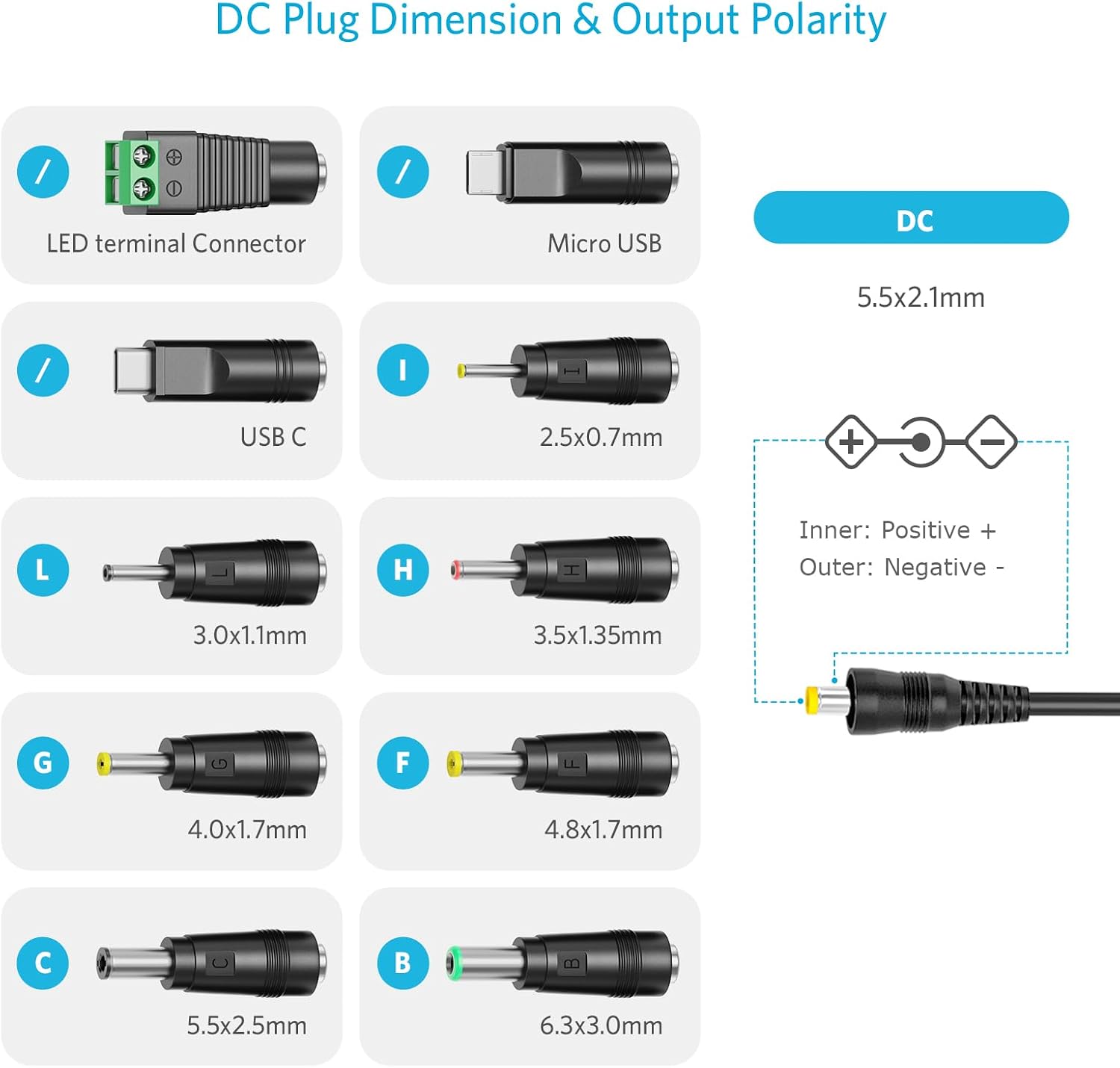
Image: A detailed diagram illustrating the dimensions of various DC plug tips and confirming the standard output polarity (Inner: Positive +, Outer: Negative -).
4.4. Verify Polarity
The Belker adapter's DC plug has an inner positive (+) and outer negative (-) polarity. It is critical to ensure your device requires this specific polarity. Connecting with incorrect polarity can cause irreversible damage to your device. If your device requires reverse polarity, this adapter is not suitable.
4.5. Connect the Adapter
- Attach the selected adapter tip to the DC output cable of the power adapter.
- Plug the adapter tip into your electronic device's power input port.
- Plug the Belker power adapter into a standard AC wall outlet (100-240V~, 50/60Hz).
- Confirm that your device powers on and functions correctly.
5. Operating Instructions
Once properly set up, the Belker 45W Universal AC/DC Power Adapter provides a reliable power source for your compatible devices.
5.1. Powering Devices
The adapter will supply the selected DC voltage (5V to 15V) at up to 3000mA (3A) to your connected device. Ensure the device is compatible with these specifications.

Image: The Belker universal power adapter demonstrating its compatibility with a range of devices including CCTV IP cameras, tablets, TV boxes, power banks, routers, speakers, LED strip lights, and baby monitors.
5.2. Using the USB Charging Port
The adapter includes a dedicated USB output port (5V 2A) for charging smartphones and other USB-powered devices. This port can be used simultaneously with the DC output.

Image: The Belker universal power adapter plugged into a wall socket, simultaneously charging a smartphone via its USB port and powering an external speaker through its DC output.
5.3. Specific Tip Usage
The Micro USB and LED terminal connectors are designed for specific applications:
- Micro USB Connector: For devices that use a Micro USB-B port for power input.
- LED Terminal Connector: For direct wiring to LED strip lights or other devices requiring a screw-terminal connection.

Image: Close-up views of the Micro USB connector and the LED Light terminal connector, demonstrating how they attach to the adapter's DC cable.
6. Maintenance
To ensure the longevity and proper functioning of your Belker power adapter, follow these simple maintenance guidelines:
- Keep the adapter clean and free from dust. Use a dry, soft cloth for cleaning.
- Avoid exposing the adapter to extreme temperatures or direct sunlight.
- Do not pull on the cord to unplug the adapter from the wall outlet or your device. Always grasp the plug itself.
- Store the adapter and tips in a dry, safe place when not in use.
7. Troubleshooting
If you encounter issues with your Belker power adapter, refer to the following common problems and solutions:
- Device not powering on:
- Ensure the adapter is securely plugged into a working wall outlet.
- Verify that the voltage selector switch is set to the correct voltage for your device.
- Check that the correct adapter tip is firmly connected to both the adapter cable and your device.
- Confirm that your device's power requirements (voltage, amperage, wattage) do not exceed the adapter's capabilities (max 15V, 3A, 45W).
- Crucially, re-check the polarity. If your device requires reverse polarity, this adapter will not work and could cause damage.
- Adapter feels hot:
- A slight warmth is normal during operation. If the adapter becomes excessively hot, unplug it immediately. This may indicate an overload or a fault. Ensure the connected device does not exceed 45W.
- USB charging port not working:
- Ensure the adapter is plugged into a wall outlet.
- Try a different USB cable or device to rule out issues with the cable or device.
If problems persist after following these steps, please contact customer support.
8. Specifications
| Feature | Specification |
|---|---|
| Model Number | PA-30450W-ZMX |
| Input Voltage | 100-240V~, 1.0A, 50/60Hz |
| DC Output | 5V, 6V, 7.5V, 9V, 12V, 13.5V, 15V (3000mA Max) |
| USB Output | 5V 2A |
| Max Power | 45W |
| DC Plug Polarity | Inner Positive (+), Outer Negative (-) |
| Included Tips | 8 Barrel Tips (5.5*2.5mm, 4.8*1.7mm, 4.0*1.7mm, 3.5*1.35mm, 3.0*1.1mm, 2.5*0.7mm, 6.3*3.0mm), Micro USB-B, USB C, LED Terminal Connector |
| Safety Features | OVP, OCP, SCP, OTP |
| Material | Plastic |
| Item Weight | 0.33 Pounds |
9. Warranty and Support
9.1. Warranty Information
This Belker product comes with a 12-month global worry-free warranty, ensuring quality and reliability. Please retain your proof of purchase for warranty claims.
9.2. Customer Support
For technical assistance, troubleshooting beyond this manual, or warranty inquiries, please contact Belker customer support through the retailer where you purchased the product or visit the official Belker website for contact information.