1. Product Overview
The Tonton Portable LCD Wireless Security Camera System offers a comprehensive surveillance solution with its 7-inch IPS touchscreen monitor and four 3MP floodlight cameras. Designed for ease of use, this system provides clear video, two-way audio, and smart detection features for both indoor and outdoor environments.
Key features include:
- Portable 7-inch IPS Touchscreen Monitor with pre-installed 32GB SD card (expandable to 128GB).
- 4-Channel Expandable Wireless NVR System, no Wi-Fi required for local use.
- 3MP Ultra-HD Video resolution (2304x1296) with 100ft night vision.
- Two-Way Audio communication via the monitor or mobile app.
- Floodlight Cameras with Color Night Vision and PIR + Motion Detection.
- IP66 Waterproof rating for outdoor use.
- H.265+ Video Compression for efficient storage.
- Remote viewing via "EseeCloud" app on phone or PC.
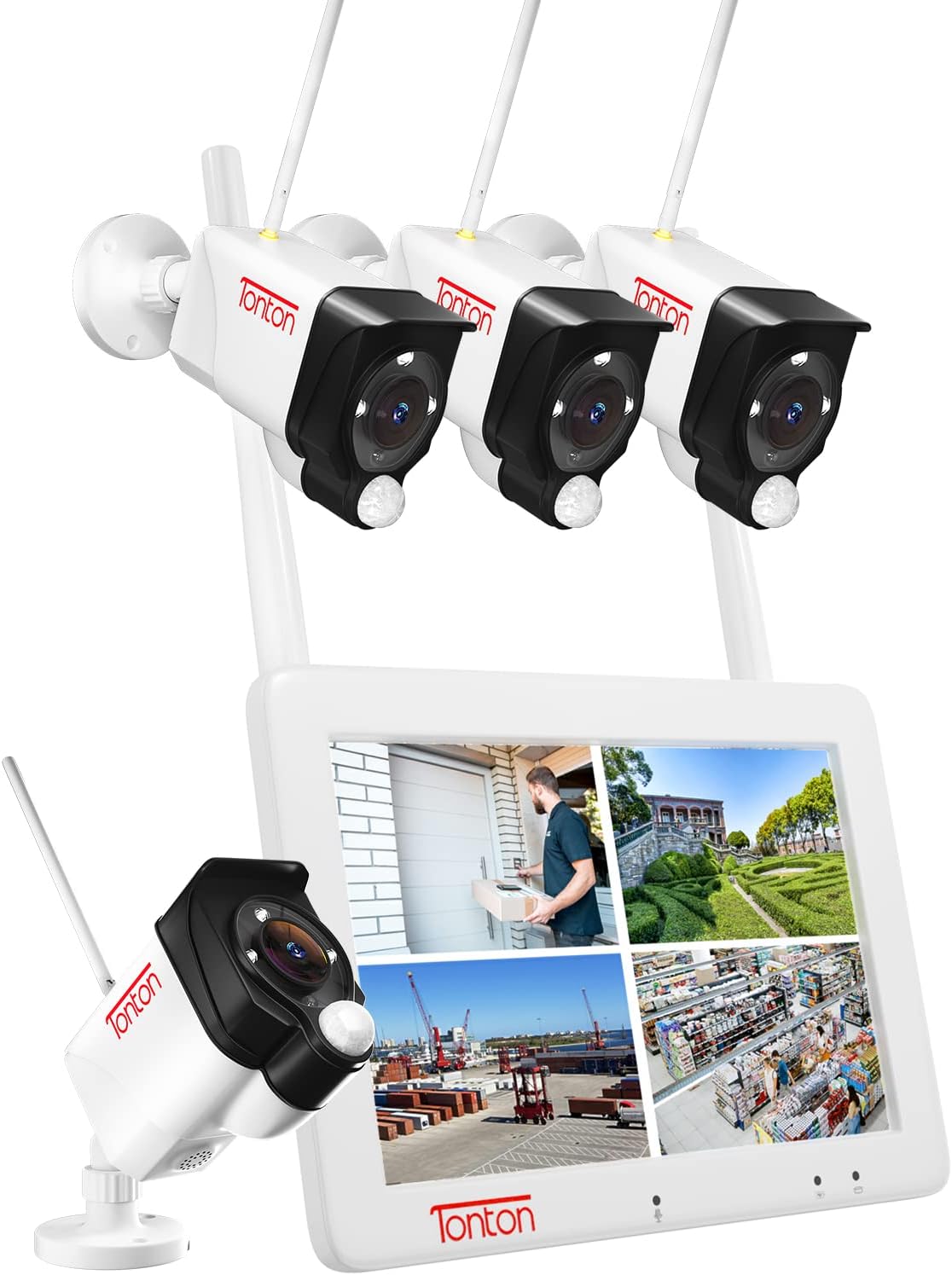
Image 1.1: The Tonton Portable LCD Wireless Security Camera System, showing the 7-inch monitor displaying a quad view and four outdoor cameras.
2. What's in the Box
Upon unboxing your Tonton Security Camera System, please verify that all components listed below are present:
- 1 x Wireless 7-inch LCD NVR with 32GB SD Card
- 2 x Batteries for 7-inch Touchscreen Monitor
- 4 x 3MP Cameras
- 1 x 5V Power Supply for Monitor
- 4 x 12V 3M Long Power Supplies for Cameras
- 5 x Packs of Screws (for cameras and NVR)
- 1 x Wall Sticker
- 1 x User Manual (Quick Guide)

Image 2.1: Contents of the Tonton Security Camera System package, including the NVR monitor, cameras, power adapters, and mounting hardware.
3. System Setup
3.1 Initial Power-Up and Pairing
The Tonton system is designed for plug-and-play functionality. The cameras and NVR (monitor) are pre-paired at the factory. No complex configurations are typically required for initial setup.
- Power the Cameras: Connect each 3MP camera to its respective 12V power adapter and plug it into a power outlet. Ensure the cameras are within range of the NVR for optimal wireless signal.
- Power the Monitor: Connect the 7-inch LCD NVR monitor to its 5V power supply. The monitor has a pre-installed rechargeable battery for portability; however, for continuous operation, keep it plugged in. To charge the monitor's battery, ensure the battery switch is in the "OFF" position.
- View Live Feed: Once powered, the cameras will automatically connect to the NVR, and their live feeds will appear on the monitor. You can switch between single, split, or quad view modes on the touchscreen.

Image 3.1: Illustration of the auto-pairing and plug-and-play setup, showing a camera connected to power and the monitor receiving a wireless signal.
3.2 Remote Access Setup (Optional)
For remote viewing on your smartphone or computer, connect the NVR to your home Wi-Fi network.
- Connect NVR to Internet: Access the NVR's settings menu on the touchscreen monitor to connect it to your local Wi-Fi network.
- Download EseeCloud App: Download the "EseeCloud" app from your smartphone's app store (available on iOS and Android).
- Add Device: Open the EseeCloud app, register an account, and then scan the QR code displayed on the NVR monitor to add your device.
- PC Software: For PC/laptop viewing, download the "ismkit" software. Contact Tonton support for the download link if needed.

Image 3.2: Steps for easy setup, including connecting the NVR to a router, downloading the EseeCloud app, and viewing live footage on a smartphone.

Image 3.3: Remote access options, illustrating viewing on a phone, tablet, laptop, and desktop computer via the EseeCloud app.
Download the EseeCloud app: http://www.dvr163.com/download/indexm.php
4. Operation
4.1 Monitor Functions
- Display Modes: The 7-inch IPS touchscreen monitor supports single, split, or quad view modes to display camera feeds.
- Screen Saver: A screen saver function can be activated to conserve power.
- Two-Way Audio: Use the built-in microphone and speaker on the monitor to communicate with individuals near the cameras.

Image 4.1: Detailed view of the 7-inch touchscreen monitor and a camera, highlighting features like the microphone, speaker, and various ports.
4.2 Camera Features
- 3MP Ultra-HD Video: Cameras provide 2304x1296 resolution for clear images.
- Wide Viewing Angle: Each camera features a 110° wide-angle lens.
- Night Vision: Up to 100ft night vision capability. Cameras support full color mode, infrared mode, or smart mode (default).
- Floodlight & Siren: Integrated floodlights illuminate areas and can deter intruders. A siren alarm can also be activated.
- Two-Way Audio: Speak and listen through the camera via the monitor or app.

Image 4.2: Demonstration of the two-way audio feature, allowing real-time conversation with visitors.

Image 4.3: Enhanced color night vision, illustrating how spotlights and IR LEDs provide clear, colored images in low-light conditions.
4.3 Motion Detection and Alerts
- PIR + Motion Sensors: The cameras utilize both Passive Infrared (PIR) and traditional motion sensors to reduce false alarms caused by environmental factors like leaves or insects.
- Detection Sensitivity: Adjust detection sensitivity and define specific detection areas through the NVR settings or mobile app.
- Instant Alerts: Receive push notifications via the EseeCloud app and email alerts for detected events. The NVR system can also trigger an audible siren.

Image 4.4: An EseeCloud app alert indicating a person detected by the camera, demonstrating the system's notification capabilities.
4.4 Recording Modes
- Recording Options: Choose between auto, manual, or scheduled recording modes.
- Pre-Record Function: The system captures a five-second pre-record period to ensure complete event footage.
- Storage: The NVR comes with a pre-installed 32GB SD card and supports up to 128GB. When the card is full, it automatically overwrites the oldest footage.
- H.265+ Compression: Advanced H.265+ video compression technology saves up to 50% of storage capacity while maintaining video quality.

Image 4.5: Illustration of the system's 24/7 recording feature, showing continuous surveillance across multiple camera feeds.

Image 4.6: Comparison demonstrating the efficiency of H.265+ video compression over H.264, highlighting reduced storage and improved loading speed.
5. Maintenance
- SD Card Management: The system automatically overwrites older footage when the SD card is full. Regularly review important recordings and back them up if necessary. Consider upgrading to a 128GB SD card for extended storage.
- Camera Cleaning: Periodically clean the camera lenses with a soft, damp cloth to ensure clear image quality. Avoid abrasive cleaners.
- Power Connections: Ensure all power adapters are securely connected and free from damage.
- Firmware Updates: Check the EseeCloud app or Tonton's official website for any available firmware updates for your NVR and cameras to ensure optimal performance and security.

Image 5.1: The camera's IP66 waterproof metal casing, suitable for use in diverse weather conditions from rainy days to sunny days, and across different seasons.
6. Troubleshooting
- No Camera Feed on Monitor:
- Ensure both the camera and NVR are powered on.
- Verify the camera is within wireless range of the NVR.
- Check if the cameras are properly paired. If not, refer to the quick guide for re-pairing instructions.
- Remote Access Not Working:
- Confirm the NVR is connected to your home Wi-Fi network.
- Check your internet connection.
- Ensure the EseeCloud app is updated to the latest version.
- Verify the device is correctly added to the app by scanning the QR code.
- False Motion Alerts:
- Adjust the motion detection sensitivity in the NVR settings or EseeCloud app.
- Define specific detection zones to exclude areas with frequent irrelevant movement (e.g., trees swaying).
- Ensure the PIR sensor is not obstructed.
- Spotlight Not Activating:
- Check the camera's night vision mode settings. Ensure it's set to "Smart Mode" or "Full Color Mode" if you want the spotlight to activate.
- Verify that the motion detection is enabled and configured correctly for the area.
- Recording Issues:
- Check the SD card status. Ensure it's properly inserted and not corrupted.
- Verify the recording schedule or motion detection settings.
- Ensure the SD card has sufficient space (though it overwrites automatically, a full card might indicate a problem if new recordings aren't appearing).
7. Specifications
| Feature | Specification |
|---|---|
| Brand | Tonton |
| Model Number | M0719HN4 |
| Connectivity Technology | Wireless |
| Video Capture Resolution | 3MP (2304x1296) |
| Number of Channels | 4 |
| Monitor Size | 7-inch IPS Touchscreen |
| Memory Storage Capacity | 32GB SD Card (Included), Up to 128GB Supported |
| Power Source | Monitor: Battery Powered (rechargeable) / 5V DC; Cameras: 12V DC |
| Night Vision Range | 100 Feet |
| Viewing Angle | 110 Degrees |
| Waterproof Rating | IP66 |
| Video Compression | H.265+ |
| Special Features | Portable, Touchscreen, Spotlight, Color Night Vision, 2-Way Audio, PIR+Motion Sensor, Wi-Fi Connection (for remote access), No Wi-Fi Need (for local use), Split Screen Viewing, Expandable, Five-second Pre-record, Compatible with Alexa |
| Compatible Devices | Cameras, Laptops, Personal Computers, Smartphones, Tablets |
| Operating Temperature | -30°C to 60°C (-22°F to 140°F) |
8. Warranty and Support
Tonton is committed to customer satisfaction. Your product comes with a 1-year warranty and lifetime technical support.
8.1 Contact Information
- Email: sales@tontonsecurity.com (Expect a response within 10 hours)
- WhatsApp: +86 137-2786-5870 (Available during PST 17:00 PM-20:00 PM, 21:00 PM-01:00 AM)
For defective products, replacements will be provided under warranty.

Image 8.1: Scan this QR code with your smartphone to access Tonton support resources.
Visit the Tonton Store for more information: Tonton Amazon Store


