
1. Product Overview
The Pyle P2203ABTU.5 is a versatile 4-channel Bluetooth home power amplifier designed to be the central hub of your home entertainment system. It combines a high-fidelity pre-amplifier and a powerful amplifier in one unit, delivering 2000 watts of peak power. With extensive connectivity options including Bluetooth, USB, SD, AM/FM radio, and multiple audio inputs, it allows you to connect and stream audio from various devices. The unit also features karaoke microphone inputs and comprehensive audio controls for a customized listening experience.

Figure 1: Front view of the Pyle P2203ABTU.5 amplifier, showing controls and display.
2. Features
- 2000-Watt Peak Power: Provides substantial power for multi-speaker setups (2-8 ohms impedance).
- Bluetooth Enabled: Integrated Bluetooth for wireless music streaming from smartphones, tablets, laptops, etc., with a 2.4GHz antenna for extended range.
- Multiple Inputs: Supports headphone, USB, iPod, MP3, AM/FM tuner, AUX, DVD/CD player, and two 1/4'' microphone inputs with echo for karaoke.
- Audio Outputs: Includes RCA line out for recording, RCA preamp out, and two mono RCA outputs dedicated for subwoofers.
- A/B Speaker Selector: Allows selection between speaker set A, B, or both.
- EQ Controls: Crisp buttons for audio sources and selectors, rotary knobs for equalization and master volume adjustments. Features Bass, Treble, and Balance adjustments via remote control.
- Digital Media Support: USB Flash Drive & SD Memory Card Readers for MP3 digital audio files (up to 32GB).
- Display: LCD Digital Display for AM/FM Radio and other functions.
- Design: Front panel button control center, built-in cooling fan, and rack mountable design.

Figure 2: Visual representation of key features including Bluetooth, SD card, USB, AUX, MP3, and FM radio compatibility.
3. What's in the Box
Upon opening the package, please ensure all the following items are present:
- Pre-Amplifier Receiver (Pyle P2203ABTU.5)
- Remote Control
- Power Cable
- AM/FM Antennas
- Detachable Rack Mount Brackets
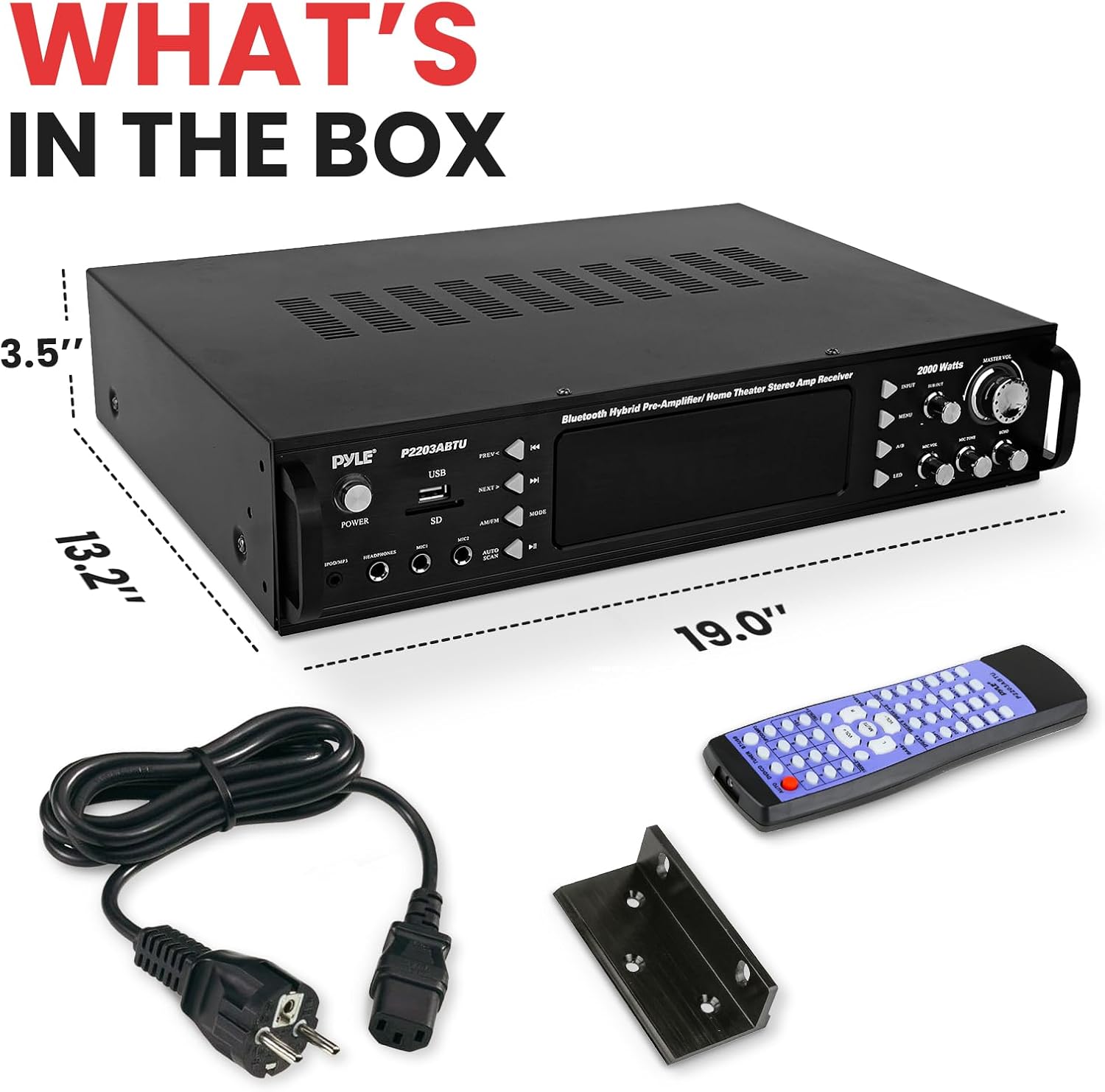
Figure 3: Contents of the Pyle P2203ABTU.5 package, including the amplifier, remote, power cable, and rack mount brackets.
4. Setup Guide
4.1 Unpacking and Placement
- Carefully remove the amplifier and all accessories from the packaging.
- Place the amplifier on a stable, flat surface with adequate ventilation. Ensure there is enough space around the unit for proper airflow, especially around the built-in cooling fan at the rear.
- If rack mounting, attach the provided rack mount brackets to the sides of the amplifier using the appropriate screws.
4.2 Speaker Connection
The P2203ABTU.5 supports up to four speakers (A/B speaker selector). Use high-quality speaker wire for optimal performance.
- Locate the Screw-Type Speaker Terminal Binding Posts on the rear panel.
- Connect your speakers to the corresponding terminals, ensuring correct polarity (positive to positive, negative to negative). Twist the bare wire ends tightly and insert them into the terminals, then tighten the screws to secure the connection.
4.3 Audio Source Connection
Connect your audio sources (CD/DVD player, TV, MP3 player, etc.) to the amplifier's input jacks.
- RCA Inputs: Use RCA cables to connect devices like CD/DVD players to the DVD/CD INPUT or other RCA inputs.
- 3.5mm AUX Input: Connect portable devices (e.g., smartphones, tablets) using a 3.5mm audio cable to the AUX (3.5mm) Input Jack on the front panel.
- USB/SD Card: Insert a USB flash drive or SD memory card into the respective slots on the front panel for MP3 playback.
- Microphones: Connect up to two 1/4'' microphones to the MIC1 and MIC2 inputs on the front panel for karaoke or public address.
- Antennas: Connect the supplied AM and FM antennas to their respective terminals on the rear panel for radio reception.
4.4 Power Connection
- Ensure the amplifier's voltage selector switch (located on the rear panel) matches your local power supply (110V or 220V).
- Connect the power cable to the amplifier's power input and then to a suitable wall outlet.

Figure 4: Rear panel of the Pyle P2203ABTU.5, showing speaker terminals, RCA inputs/outputs, and power connection.
5. Operating Instructions
5.1 Power On/Off
Press the POWER button on the front panel to turn the amplifier on or off. The blue LED lights will illuminate when the unit is powered on.
5.2 Input Selection
Use the input selector buttons on the front panel or the remote control to choose your desired audio source (e.g., Bluetooth, USB, SD, AM/FM, AUX, DVD/CD).
5.3 Volume Control
Adjust the overall volume using the large MASTER VOL rotary knob on the front panel. Individual gain control for preamp and subwoofer channels can be fine-tuned.
5.4 Bluetooth Pairing
- Select the Bluetooth input mode on the amplifier. The display will indicate Bluetooth pairing mode.
- On your device (smartphone, tablet, etc.), enable Bluetooth and search for available devices.
- Select 'Pyle Audio' from the list of devices to pair. Once connected, you can stream audio wirelessly.
5.5 AM/FM Radio Operation
- Select the AM/FM input mode.
- Use the tuning buttons (PREV/NEXT or AUTO SCAN) to find radio stations.
- The unit can store up to 30 radio station memory presets. Refer to the remote control instructions for saving and recalling presets.
5.6 USB/SD Card Playback
- Insert a USB flash drive or SD memory card containing MP3 files into the respective front panel slot.
- The amplifier will automatically switch to USB/SD mode and begin playback.
- Use the playback control buttons (PREV, NEXT, PLAY/PAUSE) on the front panel or remote.
5.7 Microphone and Karaoke Functions
- Connect your microphones to the MIC1 or MIC2 inputs.
- Adjust the MIC VOL knob to control microphone volume.
- Use the ECHO knob to add an echo effect to the microphone audio.
5.8 Equalization (EQ) Controls
Adjust the audio characteristics using the EQ controls:
- BASS: Adjusts the low-frequency output.
- TREBLE: Adjusts the high-frequency output.
- BALANCE: Adjusts the left/right speaker balance.
These adjustments can typically be made via the remote control.

Figure 5: Close-up of the amplifier's front panel, highlighting the various control knobs and input ports for operation.
6. Maintenance
To ensure the longevity and optimal performance of your Pyle P2203ABTU.5 amplifier, follow these maintenance guidelines:
- Cleaning: Regularly wipe the exterior of the unit with a soft, dry cloth. Do not use liquid cleaners or aerosol sprays, as they may damage the finish or internal components.
- Ventilation: Ensure that the ventilation openings on the top, sides, and rear of the amplifier are not blocked. Proper airflow is crucial to prevent overheating.
- Dust Removal: Periodically use a soft brush or a vacuum cleaner with a brush attachment to remove dust from the ventilation grilles and cooling fan.
- Connections: Occasionally check all cable connections (speaker wires, RCA cables, power cable) to ensure they are secure and free from corrosion.
- Storage: If storing the amplifier for an extended period, disconnect it from power, clean it, and store it in a cool, dry place away from direct sunlight and extreme temperatures.
7. Troubleshooting
If you encounter issues with your Pyle P2203ABTU.5 amplifier, refer to the following common problems and solutions:
| Problem | Possible Cause | Solution |
|---|---|---|
| No Power | Power cable not connected; Power outlet faulty; Voltage selector incorrect. | Ensure power cable is securely plugged in. Test the outlet with another device. Verify the voltage selector switch (110V/220V) matches your region. |
| No Sound Output | Incorrect input selected; Volume too low; Speaker connections loose/incorrect; Mute function active. | Select the correct input source. Increase Master Volume. Check all speaker wire connections for correct polarity and tightness. Deactivate mute if active. |
| Distorted Sound | Input signal too high; Speaker impedance mismatch; Damaged speaker wire. | Reduce the volume of the input source. Ensure speakers are within the recommended impedance range (2-8 ohms). Inspect speaker wires for damage. |
| Bluetooth Disconnection/Poor Range | Device too far from amplifier; Obstructions; Interference. | Move the Bluetooth device closer to the amplifier (within 20+ ft). Remove any large metal objects or other electronic devices causing interference. |
| Microphone Not Working | Microphone not plugged in correctly; MIC VOL too low; Microphone faulty. | Ensure microphone is fully inserted into the 1/4'' jack. Increase the MIC VOL knob. Test with another microphone if available. |
If the problem persists after trying these solutions, please contact Pyle customer support for further assistance.
8. Specifications
| Feature | Detail |
|---|---|
| Model Number | P2203ABTU.5 |
| MAX Power Output | 2000 Watt |
| Power Output (RMS) | 600 Watt @ 2 Ohm, 460 Watt @ 4 Ohm, 240 Watt @ 8 Ohm |
| Frequency Response | 40Hz-15kHz, +/-2dB |
| Impedance | 8 Ohm |
| S/N Ratio | >76dB |
| T.H.D. | <1% |
| Radio Station Memory Presets | 30 |
| Tuner Type | Quartz Synthesized Radio |
| Maximum USB/SD Flash Support Size | 32GB |
| Power Supply | 110/220V, Switchable |
| Product Dimensions (L x W x H) | 19.0’’ x 13.2’’ x 3.5’’ |
| Item Weight | 13.9 pounds |
| Connectivity Technology | Bluetooth, USB |
| Audio Output Mode | Stereo |
| Surround Sound Channel Configuration | 4 channel |

Figure 6: Diagram illustrating the dimensions of the Pyle P2203ABTU.5 amplifier.
9. Warranty and Support
Pyle stands by the quality of its products. For specific warranty information, please refer to the warranty card included with your product or visit the official Pyle website. If you require technical assistance, troubleshooting beyond this manual, or have questions regarding your Pyle P2203ABTU.5 amplifier, please contact Pyle customer support. Contact details can typically be found on the Pyle website or in your product packaging.
Online Resources: For additional support and resources, you may visit the Pyle official website: www.pyleusa.com
