
weiwin SL190342
weiwin 19.5V 3.9A AC Adapter Charger Instruction Manual
Model: SL190342
1. Introduction
This instruction manual provides essential information for the safe and efficient operation of your weiwin 19.5V 3.9A AC Adapter Charger. Please read this manual thoroughly before using the product and retain it for future reference. This adapter is designed to provide power to compatible Sony VAIO laptop models.

Image 1.1: The weiwin 19.5V 3.9A AC Adapter Charger. This image displays the main adapter unit with its attached DC output cable and connector.
2. Safety Information
- Ensure the adapter is used with compatible devices only. Refer to the compatibility section.
- Do not expose the adapter to water, moisture, or extreme temperatures.
- Avoid dropping or subjecting the adapter to strong impacts.
- Do not attempt to disassemble or repair the adapter. Contact qualified service personnel if needed.
- Keep the adapter away from children and pets.
- Unplug the adapter from the power outlet when not in use for extended periods.
- Ensure proper ventilation around the adapter during operation to prevent overheating.
3. Package Contents
Verify that all items are present in the package:
- 1x weiwin 19.5V 3.9A AC Power Adapter
- 1x US Power Cord

Image 3.1: The AC Power Adapter unit. This image shows the rectangular adapter block with its integrated DC output cable.
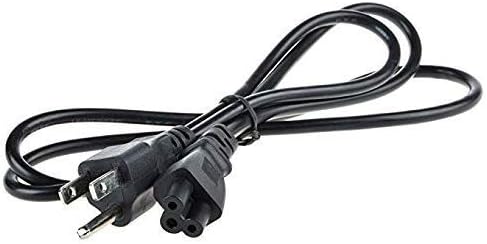
Image 3.2: The included US Power Cord. This cord connects the AC adapter to a wall outlet.
4. Specifications
| Feature | Detail |
|---|---|
| Input Voltage | AC 100V - 240V, 1.3A, 50-60Hz |
| Output Voltage | DC 19.5V |
| Output Current | 3.9A |
| Total Output Power | 76W |
| DC Connector Size | 6.5mm * 4.4mm with center pin |
| Color | Black |
| Model Number | SL190342 |
| Safety Features | Over current protection, Total power protection, Over voltage protection, Short Circuit Protection |

Image 4.1: Close-up of the adapter's label showing input/output specifications and safety certifications.

Image 4.2: Another view of the adapter's label, highlighting model numbers and manufacturing details.
5. Compatibility
This AC adapter is compatible with various Sony VAIO laptop models and adapter types. Please verify your laptop's power requirements and connector size before use.
Compatible Adapter Types:
- ADP-75UB
- ADP-75UB A
- VGP-AC19V38
- VGP-AC19V19
- VGP-AC19V20
- VGP-AC19V27
- VGP-AC19V37
- VGP-AC19V33
Compatible Laptop Models (Partial List):
- Sony VAIO SVE14A27CXH Notebook PC
- Sony Vaio SVE14125CXB
- Sony Vaio SVE14125CXP
- Sony Vaio SVE14125CXW
- Sony Vaio SVE141D11L
- Sony Vaio SVE151E11M
- Sony VAIO Laptop SVE151J11L
- Sony Vaio Laptop SVE151D11M
- Sony Vaio SVE14125CXP Notebook
- Sony PCG-7133L
- Sony PCG-7141L
- Sony PCG-71911L
Note: This is not an exhaustive list. If your model is not listed, compare your original adapter's specifications (voltage, amperage, connector size) with those provided in Section 4.
6. Setup and Operating Instructions
6.1 Initial Setup
- Unpack: Carefully remove the AC adapter and power cord from the packaging.
- Connect Power Cord: Insert the US power cord into the AC input port of the adapter. Ensure it is firmly seated.
- Connect to Wall Outlet: Plug the other end of the US power cord into a standard AC wall outlet (100-240V).
- Connect to Laptop: Insert the DC output connector (the round plug with a center pin) into the power input port of your compatible Sony VAIO laptop.
6.2 Operating the Adapter
- Once connected, the adapter will begin supplying power to your laptop and charging its battery (if applicable).
- The adapter is designed for continuous use, but it is recommended to disconnect it when not in use for extended periods.
- Observe the charging indicator on your laptop to confirm proper power delivery.
7. Maintenance
- Cleaning: Use a soft, dry cloth to clean the adapter. Do not use liquid cleaners or solvents.
- Storage: When not in use, store the adapter in a cool, dry place, away from direct sunlight and extreme temperatures. Avoid tightly coiling the cables to prevent damage.
- Cable Care: Do not bend or crimp the cables excessively. Regularly inspect cables for any signs of wear or damage.
8. Troubleshooting
| Problem | Possible Cause | Solution |
|---|---|---|
| Laptop not receiving power/charging. | Loose connection, faulty outlet, incompatible adapter, damaged cable. |
|
| Adapter feels excessively hot. | Poor ventilation, overloading, internal fault. |
|
9. Warranty Information
This weiwin AC Adapter Charger comes with a 1-year warranty from the date of purchase. This warranty covers manufacturing defects under normal use. It does not cover damage caused by misuse, accidents, unauthorized modifications, or improper installation.
For warranty claims or service, please contact your retailer or the manufacturer with your proof of purchase.
10. Support
For further assistance or inquiries, please refer to the contact information provided by your point of purchase or visit the official weiwin support channels.
Manufacturer: Shenzhen Speed Ronda Electronic Technology Co., Ltd
no relevant documents
Ask a question about this manual
Ask about setup, troubleshooting, compatibility, parts, safety, or missing instructions. Manuals+ will review the question and use this page’s manual context to help answer it.