
Amaz247 NS-RCRMX-18
Insignia NS-RCRMX-18 Roku TV Remote Control User Manual
Model: NS-RCRMX-18
1. Introduction
This manual provides instructions for the Insignia NS-RCRMX-18 Roku TV Remote Control. This remote is designed to operate specific Insignia Roku TV models without requiring any programming or pairing. It functions using infrared (IR) technology.
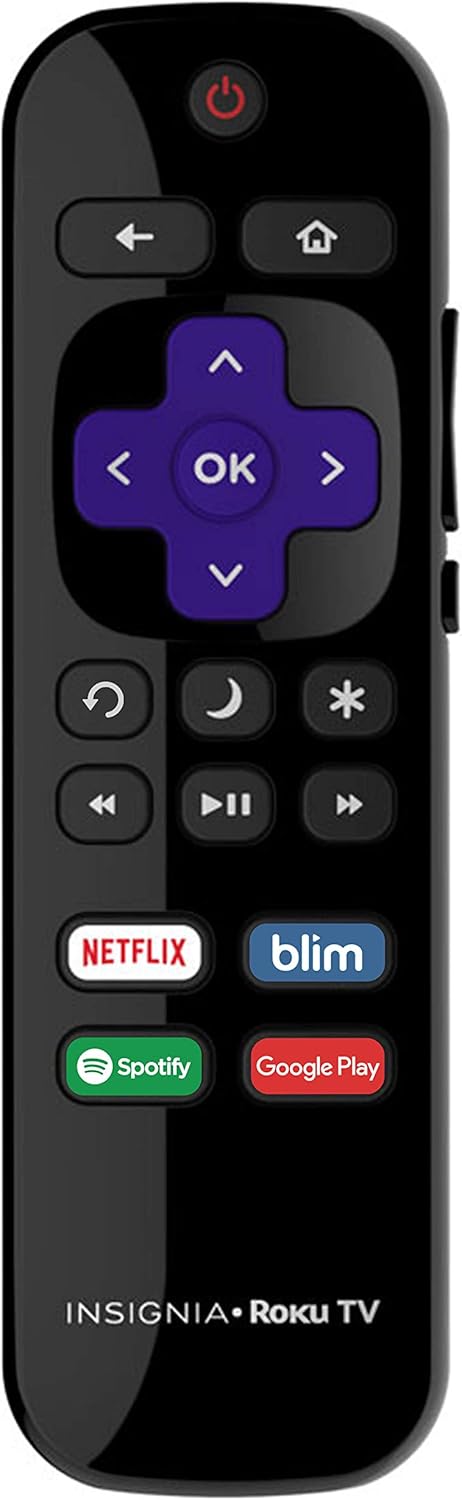
Image 1.1: Front view of the Insignia NS-RCRMX-18 Roku TV Remote Control. It features standard navigation buttons, media playback controls, and dedicated shortcut buttons for streaming services.
2. Compatibility
The NS-RCRMX-18 remote control is specifically designed for use with Insignia Roku TVs only. It operates directly out of the box with compatible models without any setup or pairing process.
2.1 Compatible Insignia Roku TV Models:
- NS-39DR510NA17, NS-43DR710NA17, NS-50DR710NA17, NS-55DR710NA17
- NS39DR510NA17, NS43DR710NA17, NS50DR710NA17, NS55NSDR710NA17
- NS24DR220CA18, NS-24DR220CA-18, NS24DR220NA18, NS-24DR220NA-18
- NS24ER310NA17, NS-24ER310NA17
- NS32DR310NA17, NS-32DR310NA17, NS-32DR420NA16, NS-32DR420NA16A, NS-32DR420NA16B
- NS-40DR420NA16, NS-40DR420NA16B
- NS43DR620CA18, NS-43DR620CA18, NS-43DR620CA-18, NS-43DR620NA18
- NS43DR710NA17, NS-43DR710NA17
- NS-48DR420NA16, NS48DR510NA17, NS-48DR510NA17
- NS49DR420NA18, NS-49DR420NA18, NS-49DR420NA-18
- NS50DR620CA18, NS-50DR620CA18, NS-50DR620CA-18, NS-50DR620NA18
- NS50DR710NA17, NS-50DR710NA17
- NS-55DR420NA16, NS55DR620CA18, NS-55DR620CA18, NS-55DR620CA-18, NS-55DR620NA18
- NS55DR710NA17, NS-55DR710NA17
- NS65DR620NA18, NS-65DR620NA18, NS-65DR620NA-18, NSRCRUS17
2.2 Incompatible Devices:
This remote control is NOT compatible with the following devices:
- Roku Streaming Stick (e.g., Model 3500, 3500x, 3600, 3600x)
- Any Roku Box (standalone Roku players)
- Insignia Regular TVs (non-Roku models)

Image 2.1: Visual representation of compatibility, indicating the remote works only with Insignia Roku TVs and not with standalone Roku Players.

Image 2.2: Guide to identify a Roku TV. Look for the 'Roku TV' branding on the screen's home interface or on the TV's physical label. If 'Roku TV' is not present, this remote will not function.
3. Setup
The Insignia NS-RCRMX-18 Roku TV Remote Control is designed for immediate use with compatible Insignia Roku TVs. No programming or pairing is required.
3.1 Battery Installation:
- Locate the battery compartment on the back of the remote control.
- Slide the battery compartment cover downwards to open it.
- Insert two AAA batteries (not included), ensuring the positive (+) and negative (-) terminals align correctly with the markings inside the compartment.
- Slide the battery compartment cover back into place until it clicks securely.
Once batteries are installed, the remote is ready to operate your Insignia Roku TV.

Image 3.1: Rear view of the remote control, highlighting the battery compartment cover.
4. Operating the Remote Control
The remote control provides intuitive access to your Insignia Roku TV's functions.
4.1 Key Functions:
- Power Button (⏻): Turns the TV on or off.
- Navigation Pad (Up, Down, Left, Right, OK): Used to navigate menus and select items.
- Home Button (🏠): Returns to the Roku TV home screen.
- Back Button (←): Returns to the previous screen or menu.
- Volume Up/Down (🔊 / 🔉): Adjusts the TV volume. Located on the side of the remote.
- Mute Button (🔇): Mutes or unmutes the TV audio. Located on the side of the remote.
- Instant Replay (↺): Replays the last few seconds of video.
- Sleep Timer (🌙): Accesses the sleep timer function.
- Asterisk/Options Button (*): Accesses options or settings within certain apps or menus.
- Media Playback Controls (Rewind, Play/Pause, Fast Forward): Controls video playback.
4.2 Dedicated Shortcut Buttons:
The remote includes four dedicated shortcut buttons for quick access to popular streaming services:
- Netflix
- SlingTV (Note: The image shows 'blim', but product features list 'SlingTV'. Please refer to your remote's specific buttons.)
- HBO NOW
- Google Play

Image 4.1: Side view of the remote control, illustrating the placement of the volume up, volume down, and mute buttons.
5. Maintenance
5.1 Battery Replacement:
Replace batteries when the remote's response becomes sluggish or stops working. Always replace both batteries at the same time with new AAA alkaline batteries. Do not mix old and new batteries, or different types of batteries.
5.2 Cleaning:
To clean the remote control, gently wipe it with a soft, dry cloth. Do not use liquid cleaners, sprays, or abrasive materials, as these can damage the remote's surface or internal components.
6. Troubleshooting
6.1 Remote Not Responding:
- Check Batteries: Ensure batteries are inserted correctly with the correct polarity (+/-). Replace old batteries with new ones.
- Line of Sight: Ensure there is a clear line of sight between the remote control and the TV's infrared sensor. Obstructions can block the signal.
- Remote Compatibility: Verify that your TV is an Insignia Roku TV model listed in the compatibility section. This remote will not work with non-Roku Insignia TVs or standalone Roku players.
6.2 Intermittent Functionality:
- Weak Batteries: Replace batteries if they are low.
- Interference: Ensure no strong light sources (like direct sunlight or bright fluorescent lights) are interfering with the IR signal.
7. Specifications
| Feature | Specification |
|---|---|
| Model Number | NS-RCRMX-18 |
| Connectivity Technology | Infrared (IR) |
| Compatible Devices | Insignia Roku Televisions |
| Power Source | 2 x AAA Batteries (not included) |
| Item Weight | 1.87 ounces (approximately 53 grams) |
| Package Dimensions | 5.59 x 1.89 x 0.75 inches (approximately 14.2 x 4.8 x 1.9 cm) |
8. Warranty and Support
This product is sold by Amaz247. For specific warranty information or support inquiries, please refer to the seller's policies or contact Amaz247 directly through your purchase platform. Keep your purchase receipt as proof of purchase.
Ask a question about this manual
Ask about setup, troubleshooting, compatibility, parts, safety, or missing instructions. Manuals+ will review the question and use this page’s manual context to help answer it.