1. Introduction
Thank you for choosing the Costzon Ride on Excavator. This versatile 3-in-1 construction vehicle toy is designed to provide an engaging play experience for children aged 36 months to 3 years. It functions as a ride-on excavator, a push car, and a sliding car, promoting motor skills and balance. The toy features an adjustable bucket, realistic sound effects, and convenient under-seat storage.
This manual provides essential information for the safe assembly, operation, and maintenance of your new ride-on toy. Please read all instructions carefully before use and retain this manual for future reference.

Image: The Costzon Ride on Excavator showcasing its 3-in-1 versatile design as a scooter, digger, and with under-seat storage.
2. Safety Information
WARNING: To prevent serious injury:
- Adult assembly required.
- Adult supervision is required at all times.
- Recommended for children aged 36 months to 3 years.
- Maximum weight capacity: 55 lbs (25 kg).
- Do not use near stairs, swimming pools, steep inclines, or public roads.
- Ensure the child wears appropriate safety gear, such as the included helmet, during play.
- Inspect the toy regularly for loose parts or damage. Discontinue use if any damage is found.
- This toy is not a battery-powered ride-on car; it is manually operated.
3. Parts List
Please ensure all parts are present before beginning assembly. If any parts are missing or damaged, contact Costzon customer service.
- Bulldozer Body (Main Vehicle)
- Bucket
- Bucket Fixture (x2)
- Front Fixed Handle
- Rear Fixed Handle
- Control Handle
- Helmet
- Toy Stones (x3)
- Screws: 5.5*11*3mm (x1), 4.5*9*3mm (x4)

Image: Thumbnail for the Kids Ride on Excavator Assembly Video, showing all included parts.
4. Assembly Instructions
Follow these steps to assemble your Costzon Ride on Excavator. A screwdriver is required (not included).
Step 1: Assemble the Helmet
- Take the helmet and the white plastic inner frame.
- Insert the tabs of the inner frame into the corresponding slots inside the helmet.
- Ensure all tabs are securely fastened to create a comfortable fit.
Image: Step-by-step visual guide for assembling the safety helmet.
Step 2: Install Batteries for Sound Effects
- Lift the seat of the bulldozer body to reveal the battery compartment.
- Open the battery compartment cover.
- Insert 3 x AA batteries (not included) according to the polarity indicators.
- Close the battery compartment cover and secure the seat.
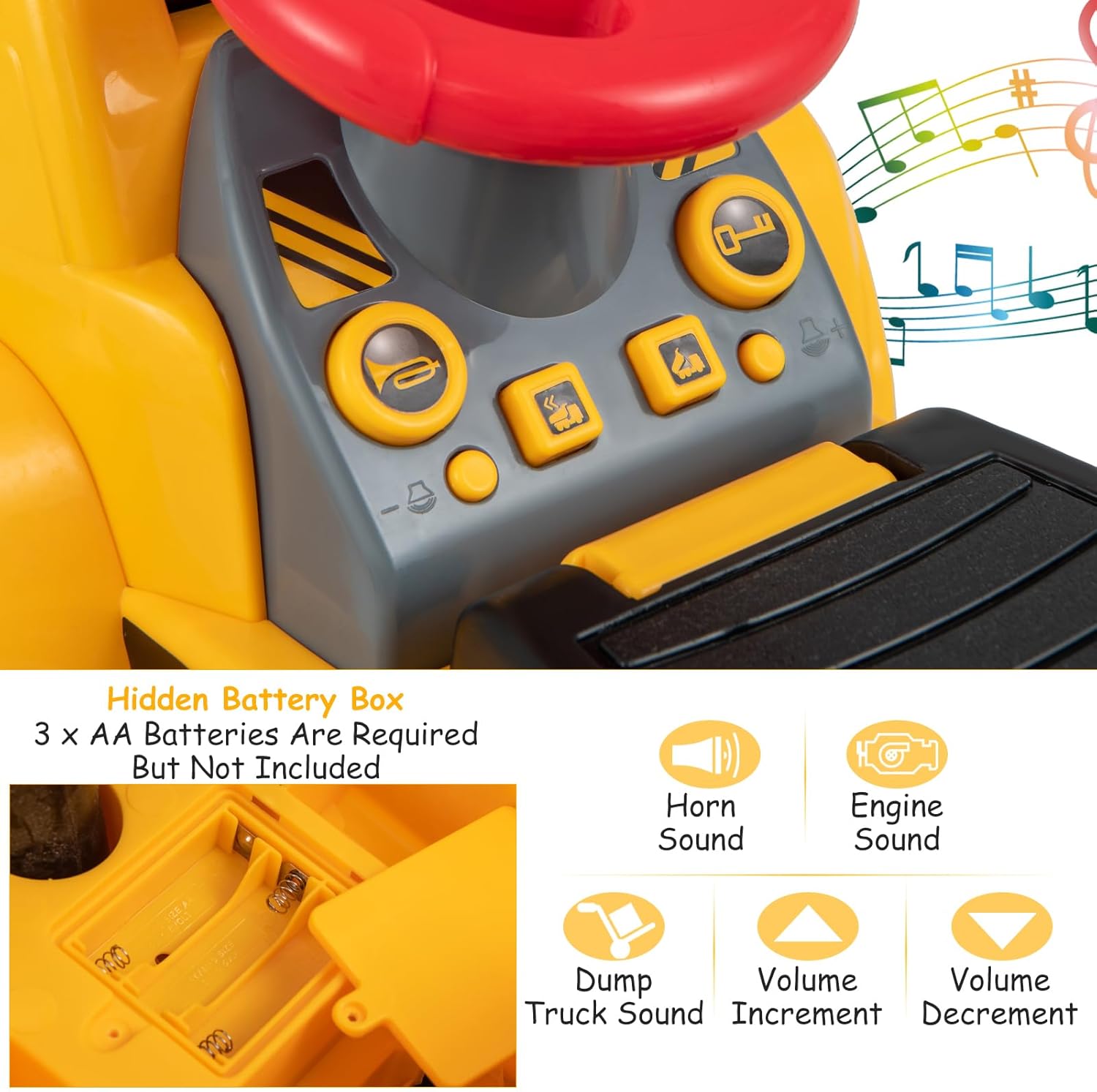
Image: Close-up of the hidden battery box under the seat, showing where to insert 3 AA batteries for sound functions.
Step 3: Attach the Bucket
- Align the bucket with the front arm of the bulldozer body.
- Secure the bucket to the arm using the two bucket fixtures and 4.5*9*3mm screws (x4). Ensure a tight fit.
Image: Visual steps for attaching the front bucket to the main vehicle body.
Step 4: Install Handles
- Attach the Front Fixed Handle and Rear Fixed Handle to the top of the excavator arm. Secure them with the appropriate screws (4.5*9*3mm x2).
- Insert the Control Handle into the designated slot on the side of the excavator arm. Secure it with the 5.5*11*3mm screw (x1).
Image: Instructions for attaching the fixed and control handles to the excavator arm.
Assembly Video
Video: Official assembly guide for the Costzon Ride on Excavator. This video demonstrates the complete assembly process from unboxing to final setup.
5. Operating Instructions
Riding the Excavator
- To move the excavator, the child sits on the seat and uses their feet to push the toy forward or backward.
- The steering wheel allows for directional control.
Operating the Adjustable Bucket
- Use the red Control Handle on the side of the excavator arm to raise and lower the bucket.
- The bucket's angle can also be adjusted to scoop up or dump materials like the included toy stones, sand, or dirt.
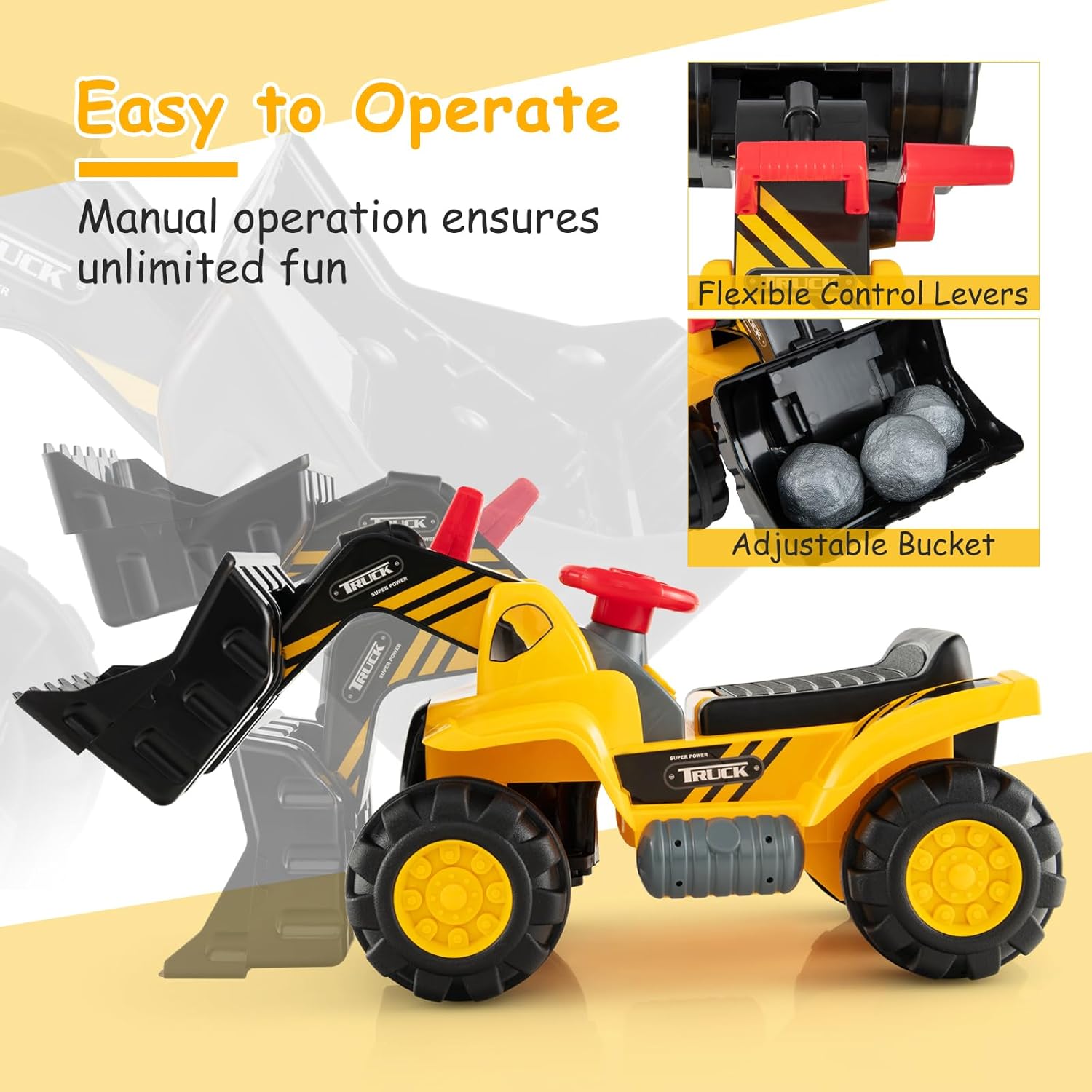
Image: A child demonstrating the use of the adjustable bucket with the control levers.
Sound Effects
- Press the buttons on the dashboard to activate various realistic sound effects, including horn, engine, and dump truck sounds.
- Volume can be adjusted using the dedicated volume increment and decrement buttons.

Image: The dashboard with buttons for various sound effects and volume control.
Under-Seat Storage
- Lift the seat to access the storage compartment, perfect for holding small toys, snacks, or the included toy stones.
Product Overview Video
Video: A brief overview of the Costzon Ride on Excavator, highlighting its features and play scenarios.
6. Maintenance
- Cleaning: Wipe the toy with a damp cloth and mild soap. Do not use abrasive cleaners.
- Storage: Store the toy in a cool, dry place away from direct sunlight when not in use.
- Battery Replacement: Replace AA batteries when sound effects become faint or stop working.
- Inspection: Periodically check all screws and connections to ensure they are secure.
7. Troubleshooting
| Problem | Possible Cause | Solution |
|---|---|---|
| No sound from buttons | Batteries are dead or incorrectly installed. | Replace with new AA batteries, ensuring correct polarity. |
| Bucket not moving smoothly | Debris in the mechanism or loose connections. | Check for obstructions and ensure handles/fixtures are securely attached. |
| Difficulty moving the toy | Uneven surface or excessive weight. | Use on flat, smooth surfaces. Ensure weight does not exceed 55 lbs. |
8. Specifications
| Feature | Detail |
|---|---|
| Model Number | 609M |
| Product Dimensions | 33.5 x 12.5 x 17.5 inches (L x W x H) |
| Item Weight | 7 pounds |
| Recommended Age | 36 months - 3 years |
| Weight Capacity | 55 lbs (25 kg) |
| Batteries Required | 3 x AA batteries (not included) |
| Material | High-quality plastic (PP, HDPE) |
| Certifications | ASTM, CPSIA |

Image: Visual representation of product dimensions, recommended age, weight capacity, and included accessories (helmet, toy stones).
9. Warranty and Support
For any questions, concerns, or to report missing/damaged parts, please contact Costzon customer service. Refer to your purchase documentation for specific warranty details.
You can visit the official Costzon store for more information and support:


