
Panasonic NN-SB428S
Panasonic NN-SB428S Microwave Oven User Manual
Model: NN-SB428S
Introduction
Thank you for purchasing the Panasonic NN-SB428S 0.9 Cu. Ft. 900W Microwave Oven. This manual provides important information regarding the safe operation, installation, maintenance, and troubleshooting of your new appliance. Please read this manual thoroughly before using the microwave oven and keep it for future reference.
Important Safety Instructions
When using electrical appliances, basic safety precautions should be followed, including the following:
- Read all instructions before using the appliance.
- Do not operate any appliance with a damaged cord or plug, or after the appliance malfunctions or has been damaged in any manner.
- Do not heat sealed containers, as they may explode.
- Do not use corrosive chemicals or vapors in this appliance.
- Always ensure the turntable and roller ring are correctly in place before operation.
Setup and Installation
Unpacking
Carefully remove the microwave oven from its packaging. Remove all packing materials, including any protective film or tape from the exterior and interior surfaces. Inspect the oven for any damage, such as dents or a misaligned door. Do not operate the oven if it is damaged.
Placement
Place the microwave oven on a flat, stable surface that can support its weight (approximately 34 pounds). Ensure there is adequate ventilation space around the unit. Maintain a minimum of 4 inches (10 cm) of clearance on the top, back, and sides for proper airflow. This is a countertop installation type microwave.
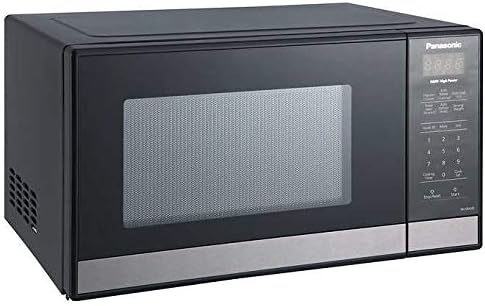
Image: Front view of the Panasonic NN-SB428S microwave oven, showcasing its compact design and stainless steel finish. This image illustrates the typical appearance of the unit when placed on a countertop.

Image: The Panasonic NN-SB428S microwave oven positioned on a kitchen countertop, demonstrating its compact footprint and how it integrates into a kitchen environment. This view helps visualize the required space for installation.
Power Connection
Plug the microwave oven into a grounded 3-prong outlet. Ensure the electrical circuit can support the 900 Watts of power consumption. Do not use extension cords or adapters.
Initial Setup (Setting the Clock)
After plugging in the oven, the display will show "0:00" or similar. To set the clock:
- Press the Clock Set button.
- Use the number pad to enter the current time.
- Press the Clock Set button again to confirm.
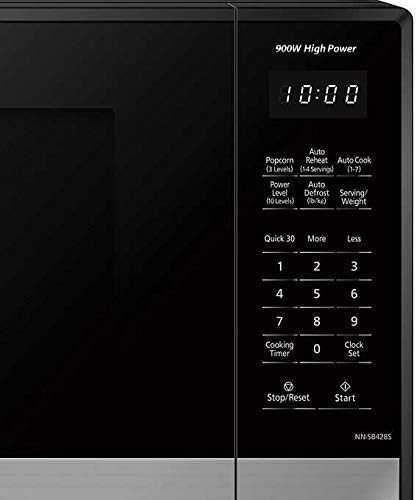
Image: A detailed view of the control panel on the Panasonic NN-SB428S microwave, highlighting the digital display, number pad, and function buttons like "Clock Set", "Start", and "Stop/Reset". This image assists users in locating specific controls for initial setup and operation.
Operating Instructions
Basic Microwave Cooking
To cook food using a specific time and power level:
- Place food in a microwave-safe dish and put it inside the oven.
- Close the oven door securely.
- Press the Cooking Timer button.
- Enter the desired cooking time using the number pad.
- Press the Power Level button repeatedly to select the desired power level (1-10 levels available). The default is 10 (full power, 900W).
- Press the Start button to begin cooking.

Image: The interior of the Panasonic NN-SB428S microwave oven, showing a casserole dish placed on the glass turntable. This illustrates the internal capacity and how food items are positioned for cooking.
Quick 30 Seconds Function
For quick heating, press the Quick 30 button. Each press adds 30 seconds of cooking time at full power. You can press it multiple times for longer durations.
Preset Auto Cook Menu
The oven features 7 preset auto cook menus for common food items. Refer to the label inside the oven door or the full manual for specific codes and instructions for each menu item (e.g., Popcorn, Auto Reheat, Auto Cook, Auto Defrost).
- Popcorn Button: Press the Popcorn button to cook popcorn. You can choose from 3 power level options for optimal popping.
- Auto Reheat: Use this function to reheat various foods. The oven will automatically determine the appropriate cooking time.
- Auto Defrost: This feature allows for automatic defrosting based on the weight or type of food.
Maintenance and Care
Cleaning the Interior
To clean the interior of the oven, wipe with a damp cloth after each use. For stubborn stains, use a mild detergent or a microwave-safe cleaner. Do not use abrasive cleaners or scouring pads.
Cleaning the Exterior
Wipe the exterior surfaces with a soft, damp cloth. For stainless steel surfaces, use a specialized stainless steel cleaner to maintain its finish. Avoid spraying cleaners directly onto the control panel.
Turntable and Roller Ring
The glass turntable and roller ring can be removed for cleaning. Wash them in warm, soapy water or in the dishwasher. Ensure they are completely dry before placing them back into the oven.
Troubleshooting
If you experience issues with your microwave oven, consult the following table before contacting customer service.
| Problem | Possible Cause | Solution |
|---|---|---|
| Oven does not start | Door not closed properly; Plug not inserted fully; Fuse blown or circuit breaker tripped. | Ensure door is latched; Check plug connection; Reset circuit breaker or replace fuse. |
| Food not heating | Incorrect cooking time/power level; Door not closed properly. | Increase cooking time/power; Ensure door is latched. |
| Light not working | Bulb needs replacement. | Contact qualified service personnel for bulb replacement. |
Product Specifications
| Feature | Specification |
|---|---|
| Model Number | NN-SB428S |
| Brand | Panasonic |
| Capacity | 0.9 Cubic Feet |
| Power Consumption | 900 Watts |
| Installation Type | Countertop |
| Material | Stainless Steel |
| Item Dimensions (LxWxH) | 25 x 18 x 13 inches |
| Item Weight | 34 Pounds |
| Special Features | Auto Cook, Defrost, Quick 30sec, Popcorn Button |
| Human Interface Input | Buttons, Keypad |
Warranty Information
This Panasonic NN-SB428S Microwave Oven comes with a 1-Year Warranty from the date of purchase. This warranty covers defects in materials and workmanship under normal use. For detailed warranty terms and conditions, please refer to the warranty card included with your product or visit the official Panasonic website.
Customer Support
For technical assistance, troubleshooting beyond this manual, or to inquire about replacement parts, please contact Panasonic customer support. You can find contact information on the official Panasonic website or through the link provided below.
Official Panasonic Store: Visit the Panasonic Store on Amazon
Ask a question about this manual
Ask about setup, troubleshooting, compatibility, parts, safety, or missing instructions. Manuals+ will review the question and use this page’s manual context to help answer it.