
TA8151 Digital Sound Level Meter
TA8151 Digital Sound Level Meter User Manual
Model: TA8151 Digital Sound Level Meter
Brand: Generic
1. Introduction
The TA8151 Digital Sound Level Meter is designed to accurately measure sound levels in various environments. This device is essential for Safety Engineers, Health and Industrial Safety offices, and for general sound quality control in settings such as factories, offices, traffic areas, homes, and audio systems.
Key features of this equipment include:
- CE certification for quality and safety compliance.
- Modern, compact, and portable design for ease of use and transport.
- High accuracy up to 1.5 dB for reliable measurements.
- Wide measurement range from 30 dBA to 130 dBA.
- Backlight display for clear readings in various lighting conditions.

Figure 1: Front view of the TA8151 Digital Sound Level Meter, showing the microphone, display, and control buttons.
2. Setup and Battery Installation
Before using your TA8151 Digital Sound Level Meter, you will need to install the batteries.
- Locate the battery compartment cover on the back of the device.
- Gently slide or unclip the cover to open the compartment.
- Insert the required batteries (typically AAA, check device markings if unsure) into the compartment, ensuring correct polarity (+/-) as indicated inside the compartment.
- Replace the battery compartment cover, ensuring it clicks securely into place.
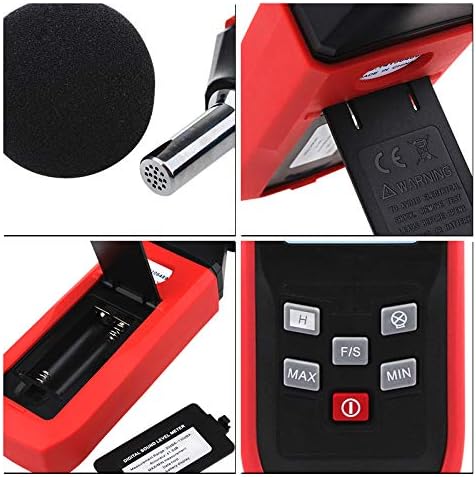
Figure 2: Detailed view of the TA8151, highlighting the microphone (top left), battery compartment (bottom left), and control buttons (bottom right).
3. Operating Instructions
Follow these steps to operate your sound level meter:
3.1 Power On/Off
- To power on the device, press the Power button (red circle with line) located below the display.
- To power off the device, press and hold the Power button until the display turns off.
3.2 Taking Measurements
- Once powered on, the device will immediately begin displaying the current sound level in decibels (dBA).
- Position the microphone towards the sound source you wish to measure. Ensure there are no obstructions between the microphone and the sound source.
- Read the sound level directly from the digital display. The display shows the current decibel reading, typically with one decimal place.
3.3 Button Functions
The device features several control buttons for enhanced functionality:
- MAX Button: Press to display the maximum sound level recorded since the device was powered on or reset. Press again to return to real-time measurement.
- MIN Button: Press to display the minimum sound level recorded since the device was powered on or reset. Press again to return to real-time measurement.
- F/S Button: (Fast/Slow) This button typically toggles between Fast and Slow response times. Fast response captures rapid changes in sound, while Slow response provides a more averaged reading.
- H Button: (Hold) Press to hold the current reading on the display. The reading will not change until the button is pressed again to release the hold function.
- Backlight Button: (Often indicated by a sun or lightbulb icon) Press to turn the display backlight on or off for improved visibility in low-light conditions.
4. Maintenance
Proper maintenance will ensure the longevity and accuracy of your sound level meter:
- Cleaning: Wipe the device with a soft, dry cloth. Do not use abrasive cleaners or solvents.
- Storage: When not in use for extended periods, remove the batteries to prevent leakage and store the device in a cool, dry place, away from direct sunlight and extreme temperatures.
- Microphone Care: Keep the microphone clean and free from dust or debris. Avoid touching the microphone directly. The foam windscreen helps protect the microphone and should be kept in place during use.
- Calibration: For professional applications requiring high accuracy, periodic calibration by a certified laboratory is recommended.
5. Troubleshooting
| Problem | Possible Cause | Solution |
|---|---|---|
| Device does not power on. | Low or dead batteries; Incorrect battery installation. | Replace batteries with new ones; Ensure batteries are inserted with correct polarity. |
| Inaccurate readings. | Microphone obstructed; Device not calibrated; Environmental interference. | Ensure microphone is clear; Consider professional calibration; Minimize background noise. |
| Display is dim or unreadable. | Backlight off; Low batteries. | Press the backlight button; Replace batteries. |
6. Specifications
- Model Number: TA8151 Digital Sound Level Meter
- Measurement Range: 30 dBA to 130 dBA
- Accuracy: ±1.5 dB
- Display: Digital with Backlight
- Certification: CE
- Manufacturer: China
- First Available Date: September 25, 2018
7. Warranty and Support
For information regarding warranty, technical support, or service, please refer to the contact details provided by your retailer or the manufacturer's official website. Please note that specific warranty terms may vary by region and seller.
Ask a question about this manual
Ask about setup, troubleshooting, compatibility, parts, safety, or missing instructions. Manuals+ will review the question and use this page’s manual context to help answer it.