1. Introduction
Thank you for purchasing the Garosa 300ml Ultrasonic Humidifier. This device is designed to increase the humidity in your environment, providing a comfortable atmosphere in your home or office. Its ultrasonic technology ensures quiet operation and a fine cool mist output. Please read this manual carefully before use to ensure proper operation and maintenance.
Important Note: This product is a humidifier and is not designed for aromatherapy. Do not add essential oils or any other aromatic substances to the water tank. Doing so may damage the unit and void the warranty.
2. Safety Instructions
- Always place the humidifier on a flat, stable, and water-resistant surface.
- Keep the humidifier out of reach of children and pets.
- Use only clean tap water or distilled water. Do not use hot water.
- Do not add essential oils, perfumes, or any other chemicals to the water tank. This can damage the ultrasonic membrane and internal components.
- Do not block the mist outlet.
- Unplug the humidifier from the power outlet before filling, cleaning, or moving it.
- Do not immerse the unit in water or other liquids.
- If the unit emits an unusual smell or sound, unplug it immediately and discontinue use.
- Do not attempt to repair or disassemble the unit yourself. Contact customer support for assistance.
- Ensure your hands are dry when plugging or unplugging the power cord.
3. Package Contents
Please check the package for the following items:
- 1 x Garosa 300ml Ultrasonic Humidifier
- 1 x USB Cable
- 1 x User Manual (This document)
4. Product Overview
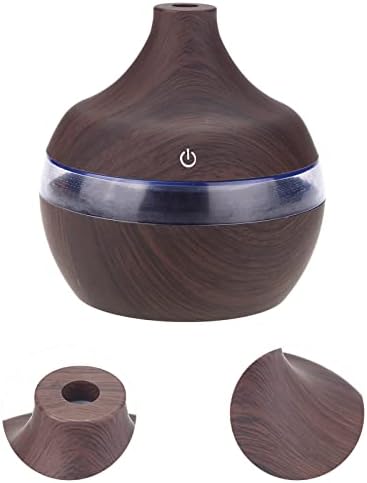
The Garosa 300ml Ultrasonic Humidifier features a compact design with a wood grain finish and a touch-sensitive power button. It includes a 300ml water tank and a 7-color LED light function.

5. Setup Instructions
Follow these steps to set up your humidifier:
- Open the Upper Cover: Gently twist and lift the top section of the humidifier to access the water tank.
- Fill with Water: Pour clean tap water or distilled water into the water tank. Do not exceed the maximum fill line (300ml capacity).
- Secure the Upper Cover: Place the top cover back onto the base and twist it to secure. Ensure it is properly aligned and sealed.
- Connect Power: Plug the USB cable into the humidifier's power port and then into a compatible USB power adapter (not included) or a USB port on a computer.

6. Operating Instructions
Once set up, operate your humidifier as follows:
- Power On/Off: Press the power button (marked with a power symbol) on the front of the unit to turn the humidifier on. Press it again to turn it off.
- Mist Output: The humidifier will start producing a cool mist immediately after being turned on.
- LED Light Control: The humidifier features a 7-color LED light. A single press of the power button will activate the mist and the color-changing light mode. To turn off the light while the mist is still active, press and hold the power button for 3 seconds. To turn the light back on, press and hold the power button again for 3 seconds.
- Automatic Shut-off: The humidifier will automatically shut off when the water level is too low or after approximately 6 hours of continuous operation to prevent damage.


7. Maintenance
Regular cleaning is essential to maintain optimal performance and hygiene.
7.1 Daily Maintenance
- Empty any remaining water from the tank daily.
- Wipe the inside of the water tank with a clean, soft cloth.
- Refill with fresh, clean water before each use.
7.2 Weekly Cleaning
- Unplug the unit and empty the water tank.
- Gently wipe the ultrasonic membrane (the small metal disc inside the tank) with a soft cloth or cotton swab. Do not use abrasive materials or sharp objects.
- Clean the entire water tank and cover with a mild detergent and rinse thoroughly with clean water.
- Allow all parts to air dry completely before reassembling.
7.3 Storage
If the humidifier will not be used for an extended period, clean it thoroughly, ensure all parts are dry, and store it in a cool, dry place away from direct sunlight.
8. Troubleshooting
If you encounter issues with your humidifier, please refer to the following common problems and solutions:
| Problem | Possible Cause | Solution |
|---|---|---|
| No mist or low mist output |
|
|
| Unit not turning on |
|
|
| Unusual noise |
|
|
| Water leakage |
|
|
If the problem persists after trying these solutions, please contact Garosa customer support.
9. Specifications
| Feature | Detail |
|---|---|
| Brand | Garosa |
| Model Number | Garosa1c8fx59twe |
| Color | Wood Grain (Dark Brown) |
| Dimensions (L x W x H) | Approx. 10.5 x 10.5 x 11.5 cm |
| Weight | Approx. 100 g |
| Material | ABS Plastic |
| Voltage | 5 Volts (USB Powered) |
| Water Tank Capacity | 300 ml |
| Mist Output | Approx. 50 ml/hour |
| Operating Mode | Ultrasonic |
| LED Light | 7-Color Changing LED |
| Automatic Shut-off | Yes (Low water level or after approx. 6 hours) |
10. Warranty and Support
Garosa products are manufactured to high-quality standards. For any warranty claims or technical support, please refer to the retailer's return policy or contact Garosa customer service through the platform where the product was purchased. Please retain your proof of purchase for warranty purposes.